



Fuldash
Fuldash connects your WooCommerce store to the Fuldash platform, which automates order
fulfillment. It creates a QuickBooks Online invoice and records the payment. It
generates a shipping label with your connected carrier, choosing box and rate
automatically. Product, payment, and expense mapping are configured from your Fuldash
dashboard, where all order tracking and fulfillment status live — this plugin’s only
job is getting order data there and marking orders complete once fulfillment finishes.
How it works:
- A customer places an order in your WooCommerce store.
- When the order is created, the plugin forwards the order to your Fuldash platform.
- Fuldash creates a QuickBooks invoice, records the payment, and generates a shipping
label — choosing carrier, box, and rate automatically — all in the background. - Once fulfillment finishes, Fuldash marks the order Completed in your store
automatically — no manual updates needed.
Setup takes under two minutes:
- Install and activate this plugin.
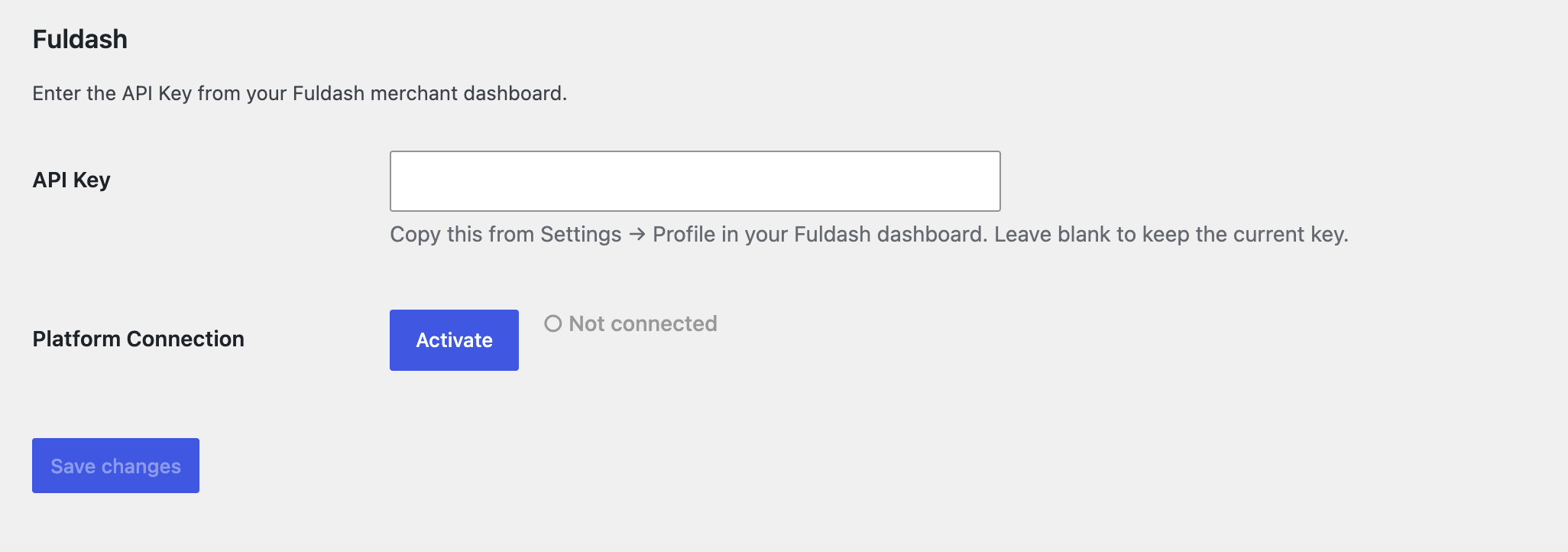
- Go to WooCommerce Settings Fuldash.
- Paste your API Key from your Fuldash merchant dashboard (Settings Profile).
- Click Save changes, then click Activate to connect your store to the platform.
Channel control:
Use the Activate / Deactivate button on the settings page to connect or disconnect your
store from Fuldash at any time. Deactivating stops order forwarding without removing
your credentials — you can reactivate instantly when ready.
External Services
This plugin sends data to the Fuldash platform (https://fuldash.com), an external
third-party service.
What is sent and when:
- Channel activation / deactivation — when you click Activate or Deactivate, a
request is sent to the Fuldash platform to record your store’s connection status. - Order data — when an order is created and the channel is active, the full
WooCommerce order (line items, addresses, payment method, totals) is sent to the
Fuldash platform for fulfillment processing.
What Fuldash can request from your store:
Fuldash’s fulfillment platform also makes authenticated requests back to your store,
used to help you configure product, payment, and expense mappings in your Fuldash
dashboard, and to keep your order statuses in sync:
- Product catalog — product names and SKUs, so you can map them to your accounting
items in the Fuldash dashboard. - Payment gateways — the ID, title, and enabled status of your configured WooCommerce
payment gateways, so you can map them to accounting payment methods. - Recent order fee data — numeric and JSON order meta fields on your 25 most recent
orders, used to detect payment-processor fee fields (e.g. Stripe or PayPal fees) for
expense tracking. No customer personal data is included in this scan. - Order completion — once fulfillment finishes, Fuldash marks the corresponding
order Completed in your store.
Every request in both directions is authenticated with your per-store API Key.
Service information:
- Service URL: https://fuldash.com
- Terms of Service: https://fuldash.com/terms
- Privacy Policy: https://fuldash.com/privacy
Details
Related plugins
Plugins that also contain the tag automation
OttoKit: All-in-One Automation Platform

Zapier for WordPress

Uncanny Automator – Easy Automation, Integration, Webhooks & Workflow Builder Plugin

MailerLite – WooCommerce integration

WP Webhooks – Automate repetitive tasks by creating powerful automation workflows directly within WordPress

Thrive Automator


About
Plugin for that tries to help you find the WordPress plugin you are looking for.
| Please enjoy an image of Crush (this awesome turtle) and have a lovely day! |  |
We do not own any plugin listed on this site and do not work for or work with WordPress.com or it's associated companies. We simply provide a searchable list of the available WordPress plugins.