



Fyrins Content Manager for AI Agents
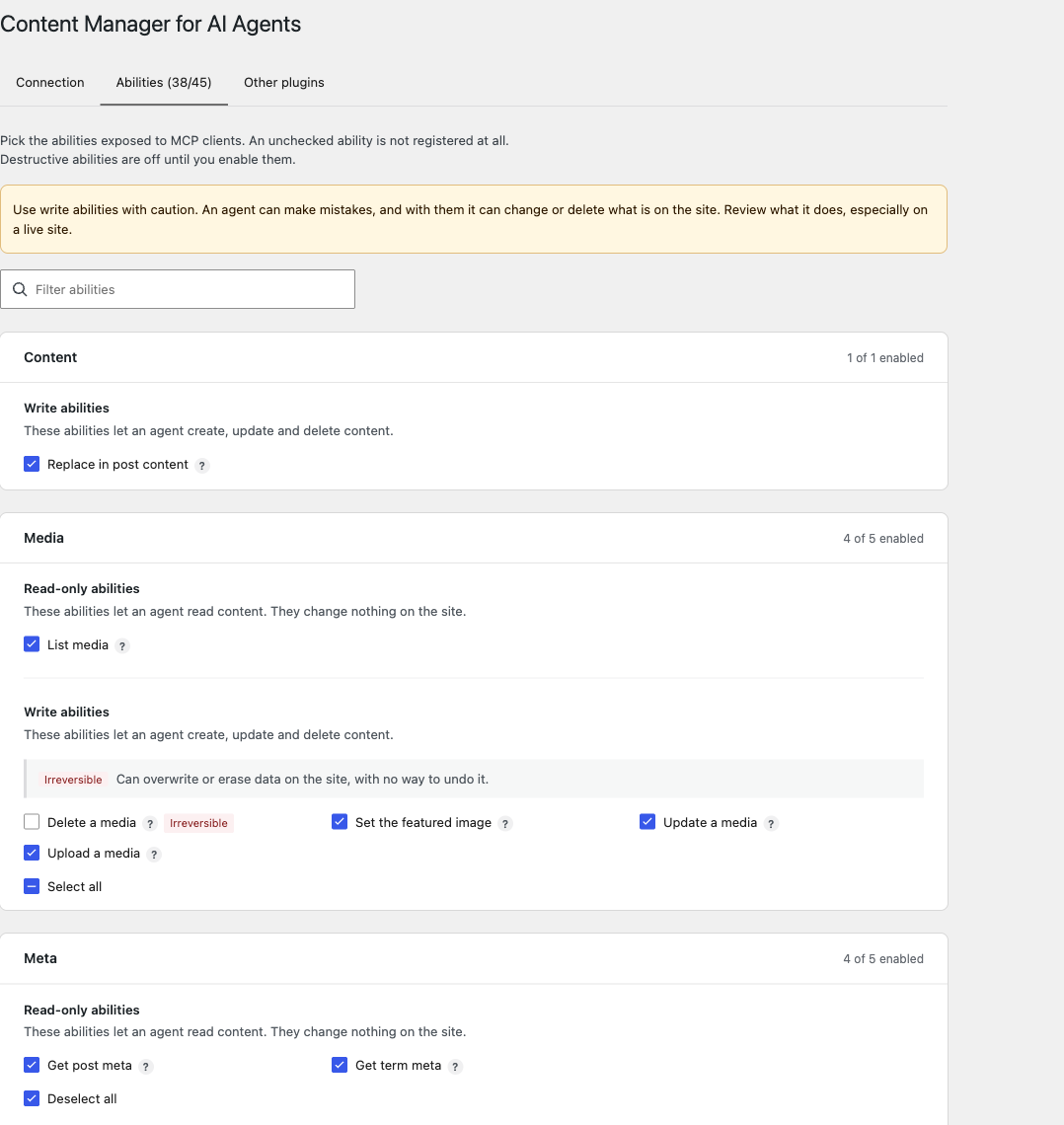
Fyrins Content Manager for AI Agents registers content management abilities with the WordPress Abilities API. With the MCP Adapter active, an MCP client (Claude, ChatGPT, Cursor…) can discover and run them: an AI agent can draft and publish posts, fix a typo across a page, upload images, classify content, fill in SEO fields or build a variable product, always within the permissions of the WordPress user it authenticates as.
Ability families, with a few names:
- Content: five abilities for each public post type, such as
list-posts,get-page,create-post,update-page,delete-post, with dates, sticky posts and terms in every taxonomy. Plusreplace-in-post-content, which swaps a literal string without resending the whole content, with a dry run and an expected count. - Taxonomies:
list-taxonomies,list-terms,get-term,create-term,update-term,delete-term. - Media:
list-media,upload-media(from a URL),update-media,set-featured-image,delete-media. - Meta:
get-post-meta,update-post-meta,get-term-meta,update-term-meta,delete-term-meta. - Templates:
list-templates,get-template,create-template,update-template,delete-template, for block templates and template parts. - WooCommerce, when active:
create-product,update-product, product variations and global attributes. - SEOPress, when active:
get-post-seopress,update-post-seopress,get-term-seopress,update-term-seopress, andupdate-post-schemas-seopresswith SEOPress Pro. - WP Grid Builder, when active:
list-wpgb-facets,index-wpgb-facets(queues facets for indexing, off by default) andclear-wpgb-cache, for users who can manage options.
Every name carries the cm4ai/ prefix.
Each ability can be switched on or off from Settings Fyrins Content Manager for AI Agents. Abilities that delete something are off until you enable them.
Requirements
- WordPress 6.9 or later: the Abilities API ships with core from 6.9.
- The MCP Adapter plugin, to reach the abilities from an MCP client. Without it, the abilities are still registered and usable through the Abilities API, and a notice on the Plugins screen and the settings screen says the adapter is missing.
Security
- Every call runs as a logged-in WordPress user and is checked against that user’s capabilities, on the object it targets:
edit_postordelete_poston that very post,edit_termon that term. Publishing, changing the author, pinning a post and assigning terms need the same capabilities as in the admin. - Protected meta keys (starting with
_) stay out of reach unless a developer allow-lists them. - Templates can only be changed by users who can edit the theme (
edit_theme_options). - WP Grid Builder facets, index and cache are reserved to users who can manage options (
manage_options), as in its own screens. - Markup goes through the usual WordPress filtering for users without the
unfiltered_htmlcapability, and the response says when something was stripped. - Destructive abilities are disabled by default, and any ability can be disabled individually. The settings screen requires
manage_options.
Third-party abilities
The settings screen also lists the abilities other plugins register, grouped by plugin.
- An ability its plugin opened to MCP can be switched off for MCP requests. The plugin that provides it keeps using it everywhere else.
- An ability its plugin kept closed to MCP (SEOPress’s own abilities, for instance) can be exposed to the MCP server as a tool. These are off by default, and exposing one grants no extra right: the ability’s own permission check still decides.
Core and MCP Adapter abilities are never listed.
Privacy
- The plugin sends no data to its author or any third party, collects nothing, and has no tracking or telemetry.
- The only outgoing request it can make is the download performed by
upload-media, to the URL the MCP client supplies. - The MCP client acts with the rights of the WordPress user it authenticates as, and sees what that user can see. Choose that account, and its role, deliberately.
- What the AI service connected to your MCP client does with the content it reads is governed by that service, not by this plugin.
For developers
Every query, result and permission decision can be adjusted through cm4ai_* filters, and new abilities can be added. Custom abilities are added on the cm4ai_register_abilities action, and every call can be observed or adjusted with cm4ai_before_execute, cm4ai_execute_result and cm4ai_after_execute. Full reference on GitHub: https://github.com/Fyrins/content-manager-for-ai
Source code
The settings screen ships compiled in build/. Its sources live in src/ in the public repository, https://github.com/Fyrins/content-manager-for-ai, and are built with @wordpress/scripts: npm install, then npm run build.
Details


Related plugins
Plugins that also contain the tag abilities
AI Experiments

Abilities Bridge

Agent Toolbelt – Safe Site Operations for AI Agents

Soflyy Primitives for AI

AcrossAI Abilities Manager

RuleFence – AI Agent Control


About
Plugin for that tries to help you find the WordPress plugin you are looking for.
| Please enjoy an image of Crush (this awesome turtle) and have a lovely day! |  |
We do not own any plugin listed on this site and do not work for or work with WordPress.com or it's associated companies. We simply provide a searchable list of the available WordPress plugins.