

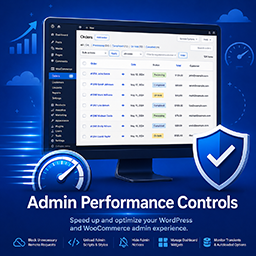
GoodTeam Admin Performance Controls
GoodTeam Admin Performance Controls helps diagnose and reduce WordPress admin slowdown caused by remote HTTP requests, dashboard widgets, admin notices, admin scripts, transient churn, and large autoloaded options.
The plugin is designed for complex WordPress and WooCommerce admin environments where many plugins load remote checks, API calls, scripts, styles, and notices across unrelated admin pages.
Features include:
- Per admin page remote request detection and blocking.
- Admin bar quick controls for the current admin page.
- Protected plugin, theme, and WordPress update screens.
- Dashboard widget offloading.
- Per admin page admin notice hiding with manual reveal support.
- Per admin page script and style unloading.
- Transient churn monitoring.
- Autoloaded options scanner.
- Recently visited admin page history.
- WooCommerce admin optimization workflows.
How To Use
- Visit a slow WordPress admin page.
- Open the “Admin Performance” menu in the WordPress admin bar.
- Review detected remote requests, scripts, styles, widgets, and notices loaded on the current admin page.
- Disable unnecessary items for the current admin page only.
- Refresh the page and measure admin performance improvements.
- Continue refining rules until the admin page becomes more responsive.
The plugin is intentionally page specific so optimizations can be safely targeted without globally breaking WordPress admin functionality.
Always test carefully after disabling requests or unloading assets.
Admin Menus and Tools
Admin Performance Admin Bar Menu
The Admin Performance admin bar menu is the primary workflow tool for the plugin.
While viewing any WordPress admin page, open the Admin Performance menu in the top admin bar to inspect and control performance related activity specific to the current admin page.
Available tools may include:
-
Remote Request Controls
View and block unnecessary remote HTTP requests triggered by plugins or admin pages. -
Admin Scripts and Styles
Unload unnecessary JavaScript and CSS assets on selected admin pages. -
Admin Notices
Hide excessive admin notices on selected admin pages while preserving a manual reveal option. -
Dashboard Widget Controls
Disable unnecessary dashboard widgets that slow down the WordPress Dashboard. -
Recently Visited Admin Pages
Quickly revisit previously viewed admin pages while troubleshooting admin performance issues. -
WooCommerce Optimization Workflows
Includes workflows designed to help optimize slow WooCommerce admin pages such as Orders, Products, and Analytics.
Transient Churn Monitor
The transient monitor helps identify plugins generating excessive transient activity that may increase database load or admin slowdown.
Autoloaded Options Scanner
The autoloaded options scanner helps identify oversized autoloaded options that may impact WordPress performance and memory usage.
Protected Admin Screens
Plugin updates, theme updates, and core WordPress update screens are protected automatically to reduce the risk of blocking important update functionality.
Details


Related plugins
Plugins that also contain the tag admin
Redux Framework

Loginizer

LightStart – Maintenance Mode, Coming Soon and Landing Page Builder

Admin Menu Editor

White Label CMS

InfiniteWP Client


About
Plugin for that tries to help you find the WordPress plugin you are looking for.
| Please enjoy an image of Crush (this awesome turtle) and have a lovely day! |  |
We do not own any plugin listed on this site and do not work for or work with WordPress.com or it's associated companies. We simply provide a searchable list of the available WordPress plugins.