



GreenScript PressBot – AI Chatbot & Site Agent
PressBot by GreenScript adds an AI chatbot to your WordPress site that answers visitor questions from your own content: your pages, posts, products and the notes you give it. You connect your own AI provider key, so you pay the provider directly for what you use, with no PressBot subscription and no markup.
How it works:
- Paste an API key from Anthropic (Claude), Google (Gemini), OpenAI, DeepSeek or Ollama Cloud.
- Pick your colors, greeting and position.
- PressBot finds the answer on your published pages and products, and links to the page it came from.
- Add knowledge base notes for anything that isn’t on the site yet: opening hours, policies, pricing details.
Answers from your site
- Site Answers – The chatbot searches your published pages, posts and WooCommerce products, reads the best match, and links its source. You choose which content types it can use, in priority order.
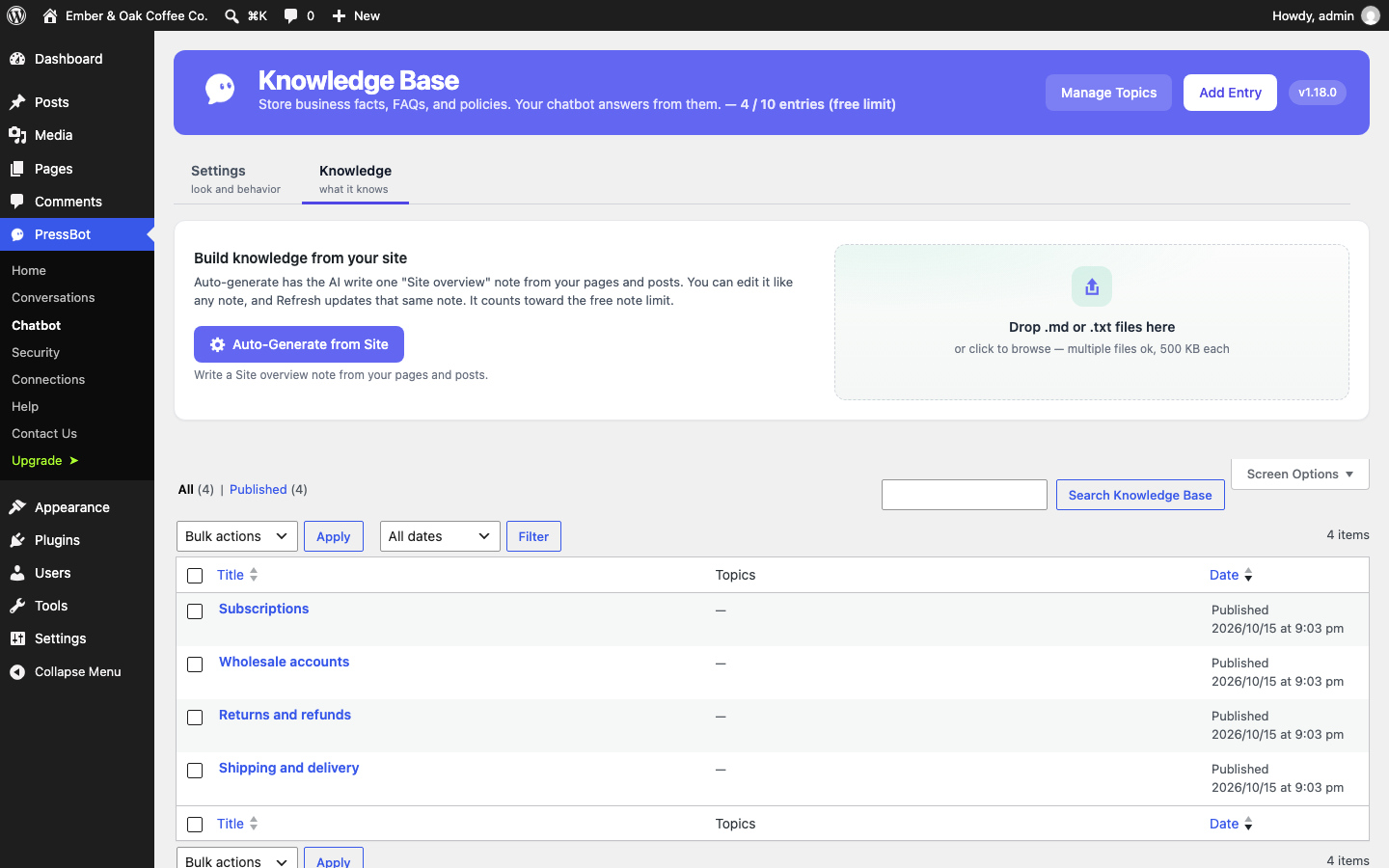
- Knowledge Base – Write notes for anything not on your site (up to 10 in the free version). They’re plain WordPress posts you can edit any time.
- Focus Mode – On by default. The chatbot stays on your site’s topics and politely declines unrelated requests, like writing an email or doing homework, so nobody uses your API key as a free AI assistant.
- External Knowledge – Optionally connect your own search endpoint for documents that live outside WordPress.
Made for your visitors
- Streaming replies – Visitors see the answer as it’s written.
- Customizable widget – Brand colors, position, greeting, suggested questions and an optional featured video.
- Explain buttons – Add “Ask PressBot” buttons next to any section with a shortcode, a data attribute or the JavaScript API, so visitors can ask about exactly what they’re reading.
- Works with page caching – The widget loads asynchronously and talks to the WordPress REST API.
In control of cost and privacy
- Bring your own key – Your key is encrypted in your database. Conversations go only to the AI provider you chose.
- Rate limiting and a monthly budget – Limit how many requests the chatbot takes and set a monthly spending cap.
- Conversation history – Read past conversations and visitor feedback in the dashboard, with AI summaries of what visitors ask about.
Connect AI coding tools (MCP)
PressBot includes an MCP server, so tools like Claude Code, Cursor and Codex can read your site’s posts, plugins, comments and conversations. Off by default; administrators only.
Supported AI providers
- Anthropic Claude – Claude Haiku 5.5 is the recommended default: fast, low-cost, and the most reliable model in PressBot’s own tests.
- Google Gemini – Gemini 3.8 Flash and lower-cost Flash Lite options.
- OpenAI – GPT-6 models.
- DeepSeek – A very low-cost option for simple sites.
- Ollama Cloud – Open models such as GLM, with a free starter plan.
PressBot Pro
PressBot Pro adds an AI admin agent that runs your site from a chat box: edit and publish posts, fix SEO titles and descriptions in bulk, manage menus, comments, plugins and WooCommerce products, read Google Analytics and Search Console, and more, with 117 tools in all. Changes show a review card before they run, and most can be undone. Pro also adds lead capture, proactive messages, Telegram alerts, PressBot Shield login protection, and the full MCP tool set. See Pro.
External services
PressBot contacts outside services only as described here. Nothing is sent until the site owner configures the feature.
AI providers (the chatbot’s answers). The chatbot sends each visitor message to the one AI provider the site owner selects and adds an API key for. Each request includes the visitor’s message, the recent messages in that conversation, and the site context PressBot adds to answer it: the site name, instructions, knowledge base notes, and passages from the site’s published pages or products that match the question. Requests go directly from your server to the provider. The provider’s terms and privacy policy apply:
- Anthropic (Claude), api.anthropic.com. Terms, Privacy Policy
- Google (Gemini API), generativelanguage.googleapis.com. Terms, Privacy Policy
- OpenAI, api.openai.com. Terms, Privacy Policy
- DeepSeek, api.deepseek.com. Terms, Privacy Policy
- Ollama Cloud, ollama.com. Terms, Privacy Policy
When you click Test Connection in Settings, PressBot sends a short test message to the selected provider to check the key.
Your own knowledge endpoint (optional). If you connect an External Knowledge endpoint in Settings, PressBot sends the visitor’s question to the URL you enter. That service is yours or your vendor’s; its terms apply.
YouTube (optional). If you add a featured video to the chat widget, the YouTube player loads from youtube-nocookie.com only after the visitor clicks Play. Terms, Google Privacy Policy
Error reports to pressbot.io (off by default). If you turn on error reporting in Settings, PressBot sends plugin errors to pressbot.io so we can fix them: the error type, code, and message (with file paths, API keys, and long tokens removed, cut to 500 characters), where it happened, the AI provider, a one-way hash of your site URL, the plugin, WordPress, and PHP versions, and the list of active plugins. Nothing is sent while the setting is off. Terms, Privacy Policy
Freemius (optional). PressBot uses the Freemius SDK for the optional Pro upgrade. On activation you can opt in to share basic site and usage information with Freemius, or skip it; skipping sends nothing. If you fill in the optional feedback form when deactivating the plugin, your answer is sent to Freemius. Terms, Privacy Policy
Source code
The JavaScript in assets/js is compiled from the TypeScript in src/ with Vite. To rebuild it, run npm install and then npm run build:prod in the plugin folder. package.json, vite.config.ts, and tsconfig.json are included. PHP dependencies in vendor/ are managed with Composer; composer.json and composer.lock are included.
Details




Related plugins
Plugins that also contain the tag ai
SEOPress – On-site SEO & Analytics

AI Engine – The Chatbot, AI Framework & MCP for WordPress

GetGenie – AI Content Writer with Keyword Research & SEO Tracking Tools

SEO Plugin by Squirrly SEO

Website LLMs.txt

Smartsupp – live chat, AI shopping assistant and chatbots


About
Plugin for that tries to help you find the WordPress plugin you are looking for.
| Please enjoy an image of Crush (this awesome turtle) and have a lovely day! |  |
We do not own any plugin listed on this site and do not work for or work with WordPress.com or it's associated companies. We simply provide a searchable list of the available WordPress plugins.