

Back

Hide Address Fields for WooCommerce
Details
View on WordPress
Back
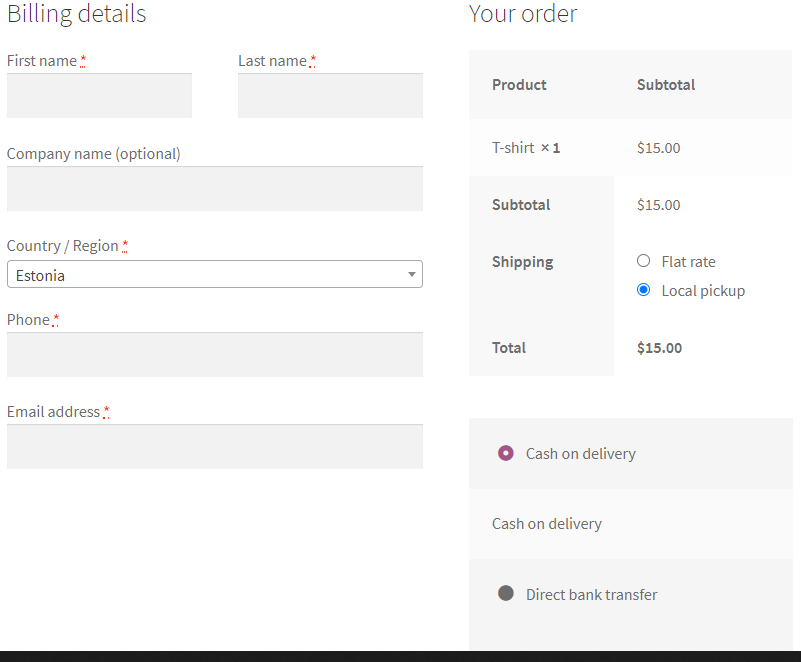
WooCommerce plugin for hiding the billing address fields on checkout based on the selected shipping/payment methods.
How To Use
- Plugin Settings: Choose for which payment/shipping methods the billing address fields will be hidden.
How It Works
- Each time the customer will modify his shipping/payment methods on checkout, the plugin will show/hide the billing address fields accordingly.
Features
- Conditions: Choose which shipping methods and payment methods will cause the billing address fields to be hidden (for example local pickup and cash).
- Billing Address Fields: Choose which billing address fields to hide when conditions are met.
- Top Options: The shipping/payment options can be moved to the billing details section on checkout.
- Customer Address: The address of the customer from previous orders will be kept in his user details after creating an order with no billing address fields.
- Shipping Options Shortcode: Display the shipping options anywhere using the [haf_shipping_options] shortcode.
Details
Plugin code:
hide-address-fields-for-woocommerce
Plugin version:
1.2.3
Author:
Outdated:
No
WP version:
5.2 or higher
PHP version:
7.0 or higher
Test up to WP version:
6.9
Total installations:
400
Last updated:
2025-12-23
Rating:
Times rated:
3
billing-fields
local-pikcup



About
Plugin for that tries to help you find the WordPress plugin you are looking for.
| Please enjoy an image of Crush (this awesome turtle) and have a lovely day! |  |
We do not own any plugin listed on this site and do not work for or work with WordPress.com or it's associated companies. We simply provide a searchable list of the available WordPress plugins.