



Ichipen Page Fix Request
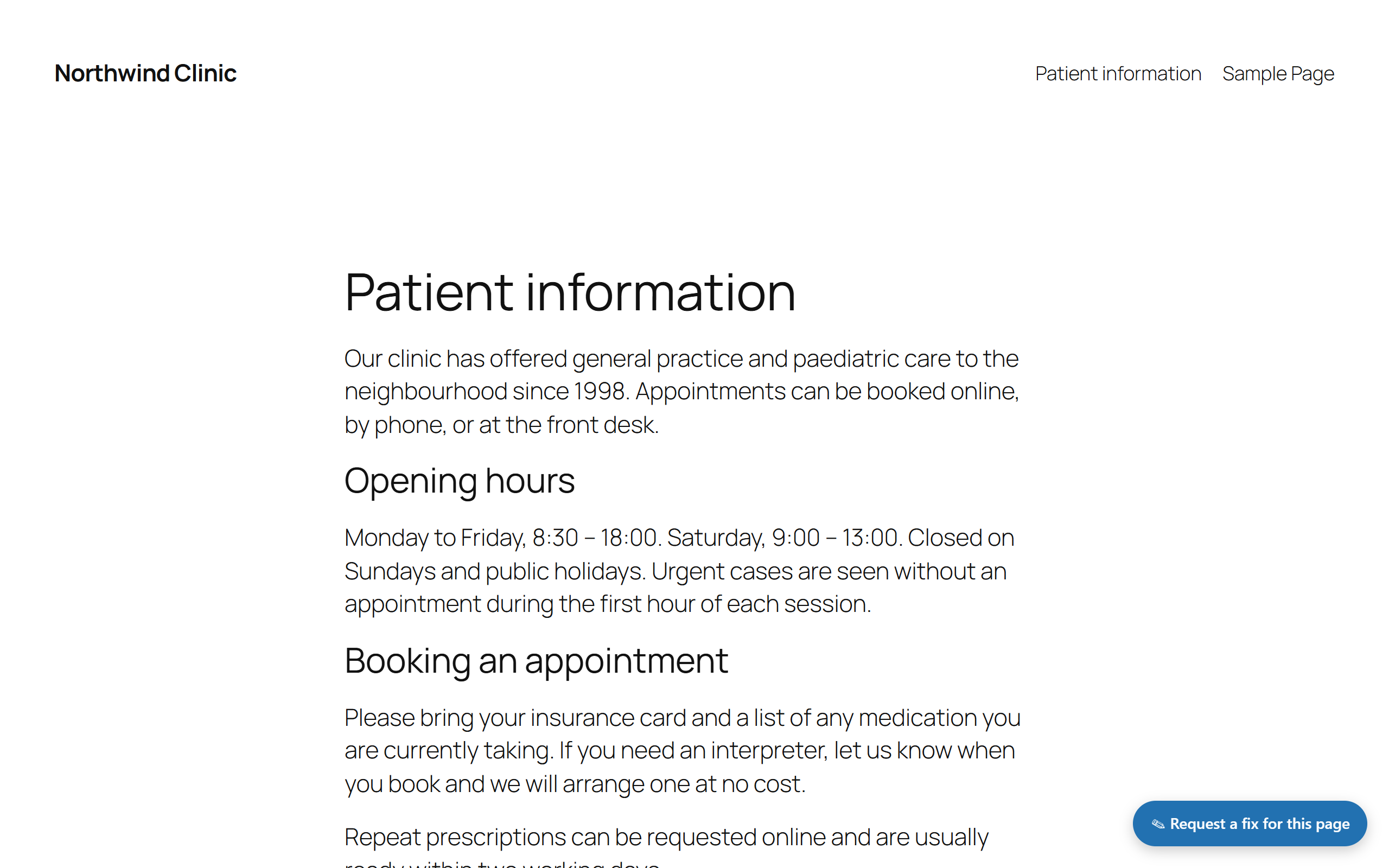
Ichipen Page Fix Request adds a small floating button to the front end for logged-in
staff. With one click they can open a panel and report a problem with the page
they are currently viewing. By default the request is emailed to a configured
address and no third-party service is contacted. Submissions are never stored
(only a single settings option is kept).
It is designed to consolidate scattered request channels (LINE, phone, chat)
into a single, low-cost flow.
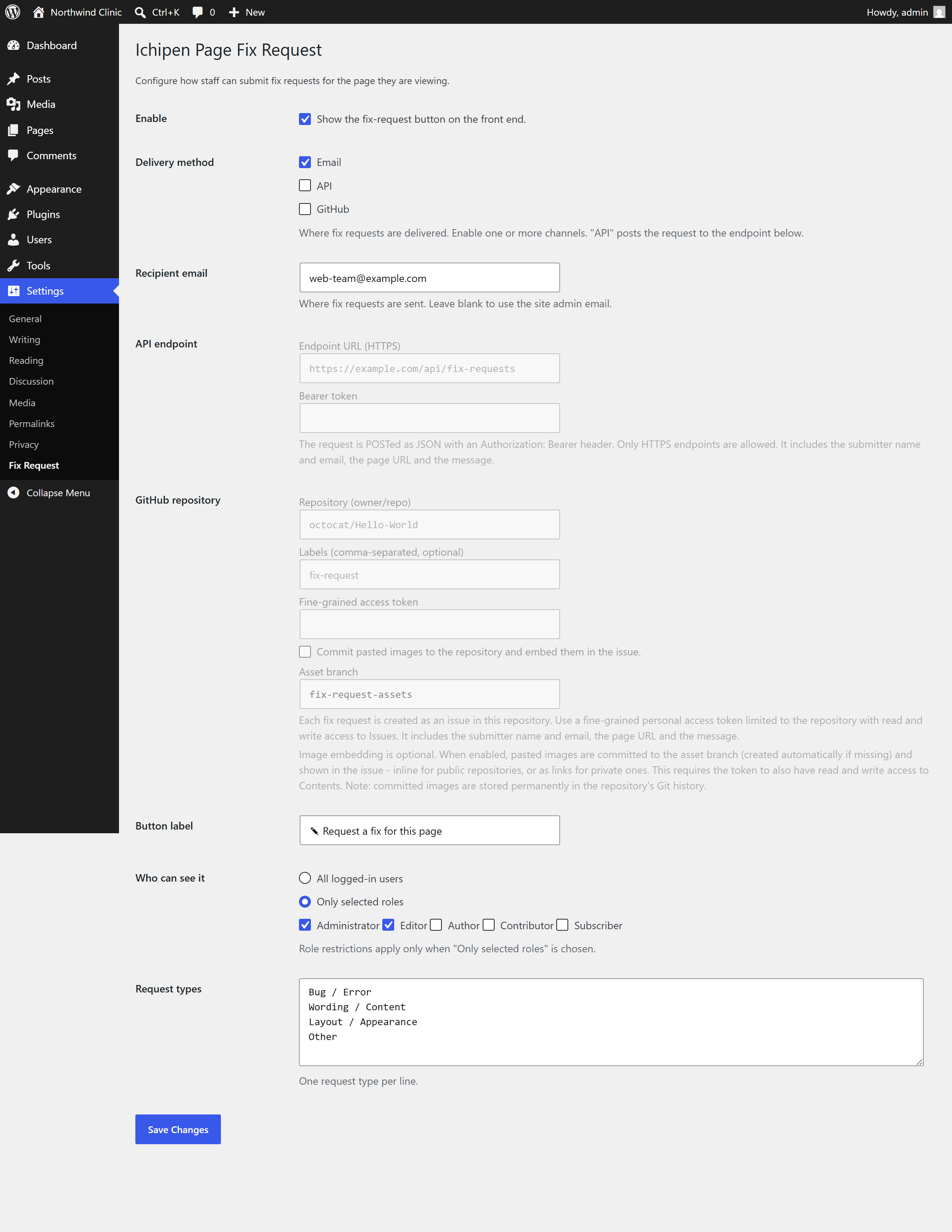
Sending to your own system (API delivery)
Instead of (or in addition to) email, you can have each submission POSTed as JSON
to an HTTPS endpoint that you configure under Settings > Fix Request. This is
optional and off by default – no data leaves the site unless you set it up. When
enabled, the request is sent with an Authorization: Bearer token you provide,
and the JSON includes the request type and message, the page title and URL, the
submitter’s WordPress user ID, display name and email, the site name and URL, and a timestamp. The
data goes only to the endpoint you configure and to no other third party.
Opening a GitHub issue (GitHub delivery)
You can also have each submission opened as an issue in a GitHub repository you
configure under Settings > Fix Request. This is optional and off by default. The
issue title is built from the request type and page title; the Markdown body
holds the same details as the email (type, page, URL, submitter and date) plus
the message, and pasted screenshots are shown as [Image N] placeholders.
Authenticate with a fine-grained personal access token limited to the target
repository with read and write access to Issues; the token is stored in its
own non-autoloaded option, separate from the other settings. Requests go only
to api.github.com over HTTPS.
Optionally, you can also embed the pasted images in the issue. When enabled, each
image is committed to a dedicated asset branch (default fix-request-assets,
created automatically if missing) via the GitHub Contents API and shown in the
body – inline for public repositories, or as a link for private ones (whose raw
URLs do not render for other members). Those raw.githubusercontent.com / github.com
addresses are only written into the issue text as Markdown links; your WordPress
site never loads anything from them. This requires the token to additionally have
read and write access to Contents. If an upload fails the issue is still
created, with the affected image degraded to a text note.
Privacy note: with image embedding enabled, screenshots are committed to your
repository and therefore stored permanently in its Git history. Leave embedding
off (the default) if you do not want that.
Design principles
- Zero third-party dependencies (no CMB2, ACF, jQuery or external APIs).
- No submission data is stored (only a single settings option is saved).
- Privacy friendly by default: nothing leaves the site unless you enable API delivery to your own endpoint.
- Drop-in: works immediately. If no recipient is set, it falls back to the site admin email.
- Everything is overridable with filters, so a host platform can integrate it with its own settings layer.
Features
- Floating “Request a fix” button shown only to permitted, logged-in users on the front end. Nothing (HTML or assets) is output for everyone else.
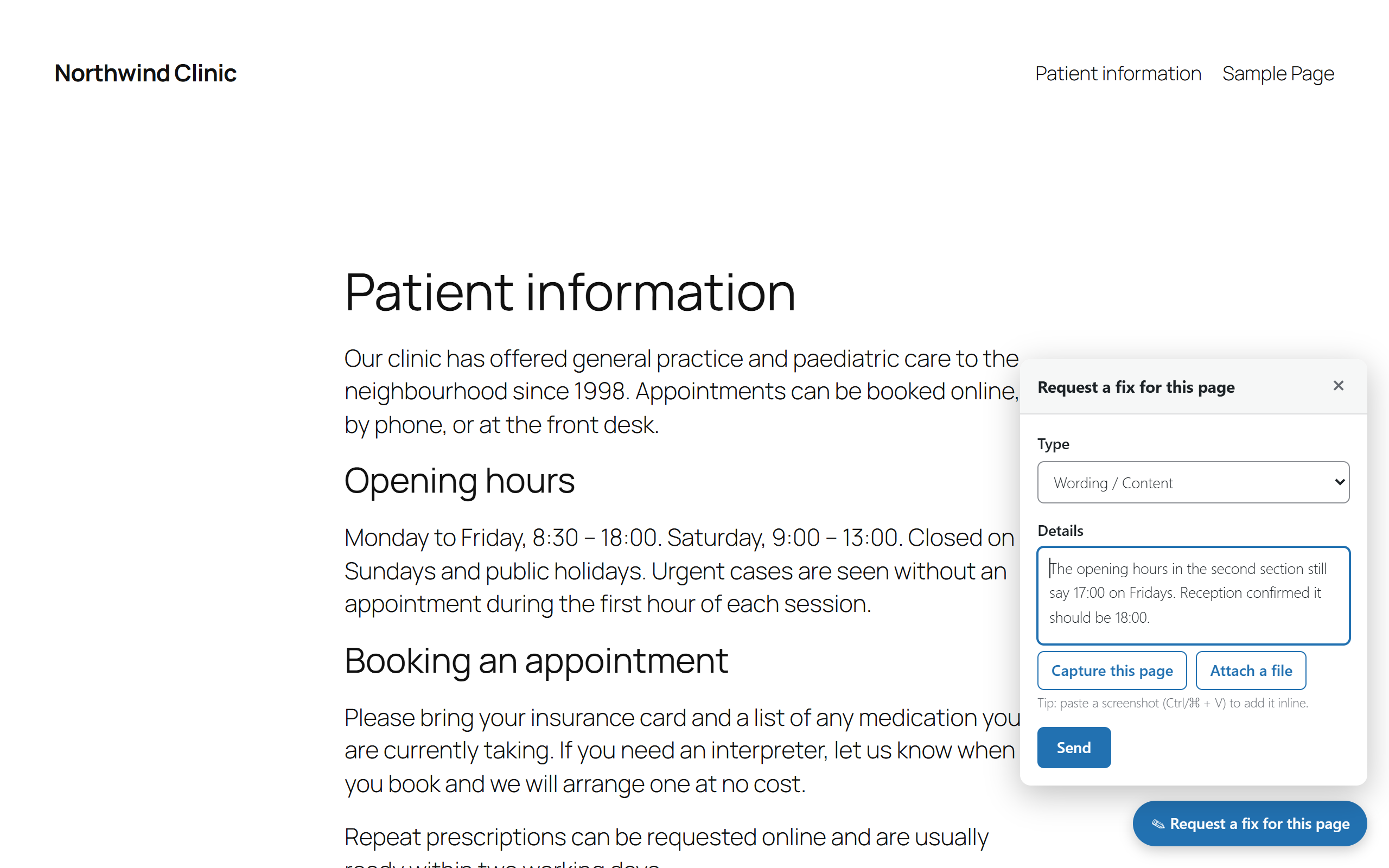
- Panel with a request type selector, a details field, a send button and a status indicator. Opens/closes on click and closes on Esc.
- Paste screenshots from the clipboard (Ctrl/Cmd + V) straight into the details field; they appear inline where you paste them. Images are embedded inline in the email (and included in the API payload) and never stored on the server or in the media library.
- The current page URL and title are attached automatically.
- The email contains: type, page (title), URL, requester name and email, timestamp and the request details. Reply-To is set to the requester. When screenshots are pasted, the email is sent as HTML with the images embedded inline (with a plain-text alternative).
- Optional API delivery: POST each submission as JSON (with a bearer token) to your own HTTPS endpoint – email only, API only, or both. The payload includes the plain-text message, an HTML version (message_html) and any pasted images base64-encoded under images[] (each images[].cid matches the cid: reference in message_html).
- Optional GitHub delivery: open each submission as an issue in a repository you configure (title, Markdown body and optional labels), using a fine-grained access token with Issues write access. Independent of email and API – enable any combination. Pasted images can optionally be committed to an asset branch (Contents API) and embedded in the issue – inline for public repos, linked for private ones.
- Optional file attachments: attach non-image files (PDF, log, CSV, JSON, ZIP, … by default) alongside the message. Files are validated by extension AND real MIME type (a renamed .php/.svg/.exe is rejected), held in memory only, and delivered as email attachments, base64 in the API payload (files[]), and – when image embedding is on – committed to the GitHub asset branch and linked from the issue. Default limit 5 files, 5 MB each (configurable via ichipafi_file_limits).
- Delivery test on the settings screen: send one sample request – with a small image and text file attached – through a single channel and see what happened. For GitHub the result is reported stage by stage, so a missing token permission points at the setting that causes it.
- Per-user rate limiting to prevent rapid repeat submissions (15 seconds by default).
- “Settings” link on the Plugins screen for quick access to the configuration page.
Filters for host integration
ichipafi_recipient– override the notification recipient.ichipafi_can_display– override whether the widget is shown/submission is allowed (bool).ichipafi_categories– override the request type list (key => label array).ichipafi_mail_subject– override the email subject.ichipafi_mail_body– override the plain-text email body (also used as the HTML email’s plain-text alternative).ichipafi_mail_html_body– override the HTML email body (used when screenshots are attached).ichipafi_mail_headers– override the email headers.ichipafi_image_limits– override the inline-image limits (max count, max bytes, allowed MIME types); set max_count to 0 to disable image pasting.ichipafi_file_limits– override the file-attachment limits (max count, max bytes, and the extension => accepted MIME types whitelist); set max_count to 0 to disable attachments.ichipafi_delivery– override the delivery method (’email’, ‘api’ or ‘both’).ichipafi_api_url– override the API endpoint URL.ichipafi_api_token– override the API bearer token.ichipafi_api_headers– override the API request headers.ichipafi_api_payload– override the JSON payload sent to the API.ichipafi_api_args– override the wp_remote_post() arguments.ichipafi_api_success– override whether an API response counts as success.ichipafi_github_owner/ichipafi_github_repo– override the GitHub repository owner/name.ichipafi_github_token– override the GitHub access token.ichipafi_github_labels– override the labels applied to created issues.ichipafi_github_attach_enabled– override whether images are committed and embedded (bool).ichipafi_github_branch– override the branch that committed assets are pushed to.ichipafi_github_body– override the Markdown issue body.ichipafi_github_payload– override the issue payload (title/body/labels) sent to GitHub.ichipafi_github_headers– override the GitHub request headers.ichipafi_github_args– override the wp_remote_post() arguments.ichipafi_github_success– override whether a GitHub response counts as success.ichipafi_rate_limit– override the rate-limit window in seconds.
Example: supply the recipient from your own settings system.
add_filter( 'ichipafi_recipient', function () { return 'team@example.com'; } );
External services
With its default configuration this plugin contacts no external service at all:
requests are delivered with WordPress’ own wp_mail(). All CSS, JavaScript and
images used by the plugin ship inside the plugin folder; nothing is loaded from a
remote server. The two optional delivery channels below are off until a site
administrator turns them on, and each one is described here so you know exactly
what is sent, when, and to whom.
1. GitHub (optional – only when “GitHub” delivery is enabled)
What it is: GitHub is a source-code hosting service operated by GitHub, Inc. This
plugin uses its REST API so that each fix request can be filed as an issue in a
repository that you own and configure under Settings > Fix Request. An account
with GitHub is required to use this channel: you must own or have write access to
the target repository and create a fine-grained personal access token for it.
Nothing is sent to GitHub unless you enable the GitHub channel and supply both a
repository and that token.
Where it connects: https://api.github.com (the REST API). No other GitHub host
is contacted by your site. When image embedding is enabled, the created issue
contains links to https://raw.githubusercontent.com or https://github.com;
those are addresses inside the issue text that GitHub itself resolves when a
person views the issue – your WordPress site never requests them.
What is sent, and when: each time a permitted logged-in user submits a fix
request while the GitHub channel is enabled, your site sends to api.github.com
the request type, the title and URL of the page being reported, the submitter’s
WordPress display name and email address, the submission date and time, and the
message text. Before creating the issue the plugin also reads the repository’s
visibility and default branch, and reads or creates the asset branch. If – and
only if – you additionally tick “Commit pasted images to the repository and embed
them in the issue”, any pasted screenshots and attached files are also uploaded
to that repository through the GitHub Contents API, which stores them permanently
in the repository’s Git history.
Service terms: GitHub Terms of Service –
https://docs.github.com/en/site-policy/github-terms/github-terms-of-service –
and GitHub Privacy Statement –
https://docs.github.com/en/site-policy/privacy-policies/github-privacy-statement
2. Your own HTTPS endpoint (optional – only when “API” delivery is enabled)
What it is: not a third-party service chosen by this plugin, but any HTTPS
endpoint that you enter yourself under Settings > Fix Request – typically your own
helpdesk, ticket system or internal API. Nothing is sent unless you enable the API
channel and enter an endpoint URL.
What is sent, and when: each time a permitted logged-in user submits a fix
request while the API channel is enabled, the submission is POSTed as JSON to
exactly the URL you configured (and to no other host), with the bearer token you
supply in an Authorization header. The payload contains the request type, the
message in plain text and HTML, the page title and URL, the submitter’s WordPress
user ID, display name and email address, the site name and URL, a timestamp, and
any pasted screenshots and attached files base64-encoded.
Service terms: because you choose the destination, the applicable terms and
privacy policy are those of the operator of that endpoint.
Details
Related plugins
Plugins that also contain the tag email
MC4WP: Mailchimp for WordPress

Post SMTP – Complete Email Deliverability and SMTP Solution with Email Logs, Alerts, Backup SMTP & Mobile App

WP Mail Logging

Creative Mail – Easier WordPress & WooCommerce Email Marketing

Mailchimp for WooCommerce

SureMail – SMTP and Email Logs Plugin with Amazon SES, Postmark, and Other Providers


About
Plugin for that tries to help you find the WordPress plugin you are looking for.
| Please enjoy an image of Crush (this awesome turtle) and have a lovely day! |  |
We do not own any plugin listed on this site and do not work for or work with WordPress.com or it's associated companies. We simply provide a searchable list of the available WordPress plugins.