


Idunara Product Search Details for WooCommerce
When you add products to an order in the WooCommerce admin, the product search only shows the product name and SKU. If several products have similar names, or a product was duplicated, it is hard to tell which one is the right one.
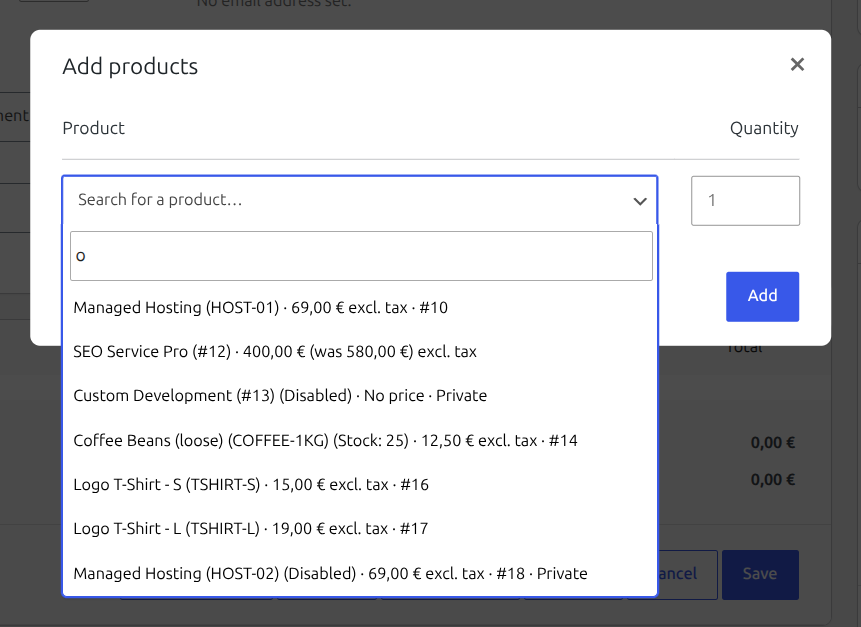
Idunara Product Search Details adds the information you need to every search result:
- Price in the store currency, including sale prices (“49,00 € (was 69,00 €)”) and price ranges of variable products (“from 15,00 €”)
- Billing period and sign-up fee for WooCommerce Subscriptions products (“69,00 € / month”)
- Tax hint (excl. tax / incl. tax), if taxes are enabled
- Product ID, so even products with identical names and prices can be told apart
- Status for products that are not public, e.g. “Private”
Example:
Managed Hosting (HOST-01) · 69,00 € / month excl. tax · #4133
The details appear wherever WooCommerce uses its admin product search: adding products to orders, coupon product restrictions, upsells and cross-sells.
There are no settings. The plugin works right after activation, stores no data and adds nothing to your shop front end.
Developer hooks
psdfw_label_parts– filter the appended details. Receives an array of plain-text parts keyed byprice,idandstatus, plus theWC_Product. Remove a key to hide that detail or add your own.psdfw_label_separator– change the separator (default:·).
Example: hide the product ID.
add_filter( 'psdfw_label_parts', function ( $parts ) { unset( $parts['id'] ); return $parts; } );
Compatibility
- WooCommerce High-Performance Order Storage (HPOS)
- WooCommerce Subscriptions (optional)
- Decimal Product Quantity for WooCommerce: that plugin ends the product search request early, which would hide the details. Idunara Product Search Details takes over its decimal stock display in the product search, so both keep working.
Details
Related plugins
Plugins that also contain the tag admin
Redux Framework

Loginizer

LightStart – Maintenance Mode, Coming Soon and Landing Page Builder

Admin Menu Editor

White Label CMS

InfiniteWP Client


About
Plugin for that tries to help you find the WordPress plugin you are looking for.
| Please enjoy an image of Crush (this awesome turtle) and have a lovely day! |  |
We do not own any plugin listed on this site and do not work for or work with WordPress.com or it's associated companies. We simply provide a searchable list of the available WordPress plugins.