


WebLift Booster by Jayanta
WebLift Booster by Jayanta helps WordPress sites improve PageSpeed Insights results with practical, configurable performance controls. It focuses on common mobile and desktop issues such as render-blocking CSS and JavaScript, unused assets, font loading, image loading, document latency, cache headers, and unnecessary WordPress output.
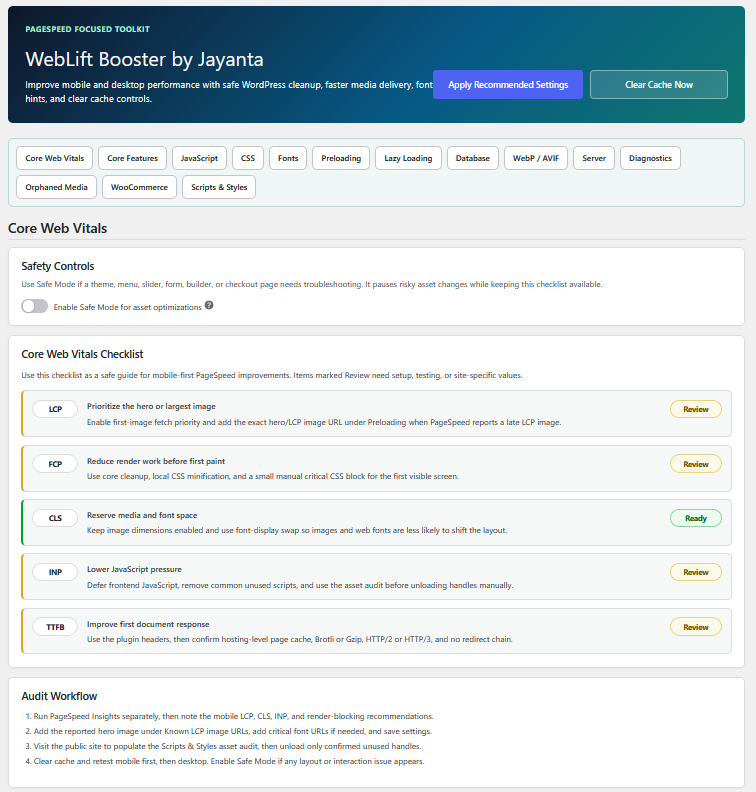
The plugin includes a one-page admin screen with quick section links, know-more help icons for every setting, a one-click “Apply Recommended Settings” button, and a top admin-bar cache clear shortcut.
Main Features
- Recommended mobile-first settings preset.
- One-page settings screen with section jump links.
- Core Web Vitals checklist for LCP, FCP, CLS, INP, and TTFB.
- Safe Mode switch for troubleshooting risky asset optimizations.
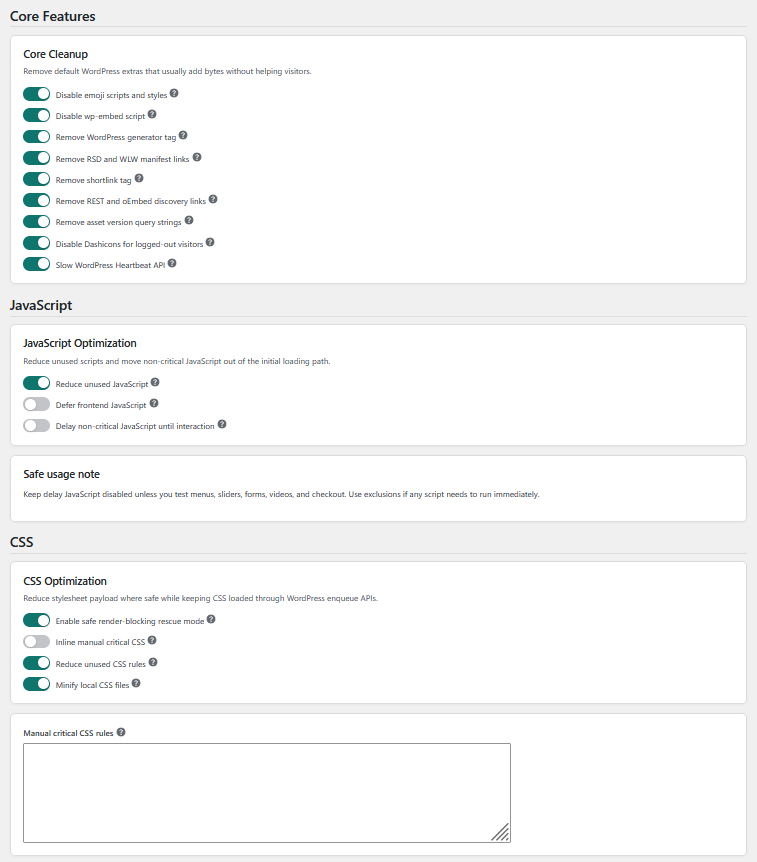
- Core cleanup for emojis, embeds, generator tags, RSD/WLW links, shortlinks, REST/oEmbed links, Dashicons, query strings, and Heartbeat.
- Render-blocking rescue mode for safer CSS and JavaScript delivery improvements.
- Manual critical CSS inlining for above-the-fold styles.
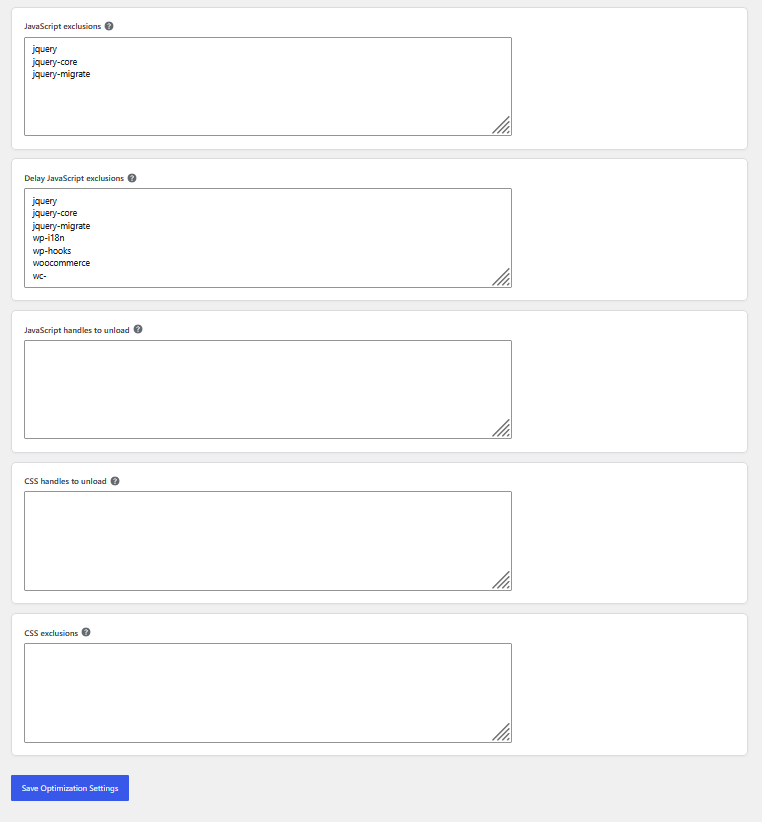
- JavaScript defer support with exclusions.
- Optional delayed JavaScript loading after interaction.
- Unused JavaScript cleanup for common scripts and manual script handle unloading.
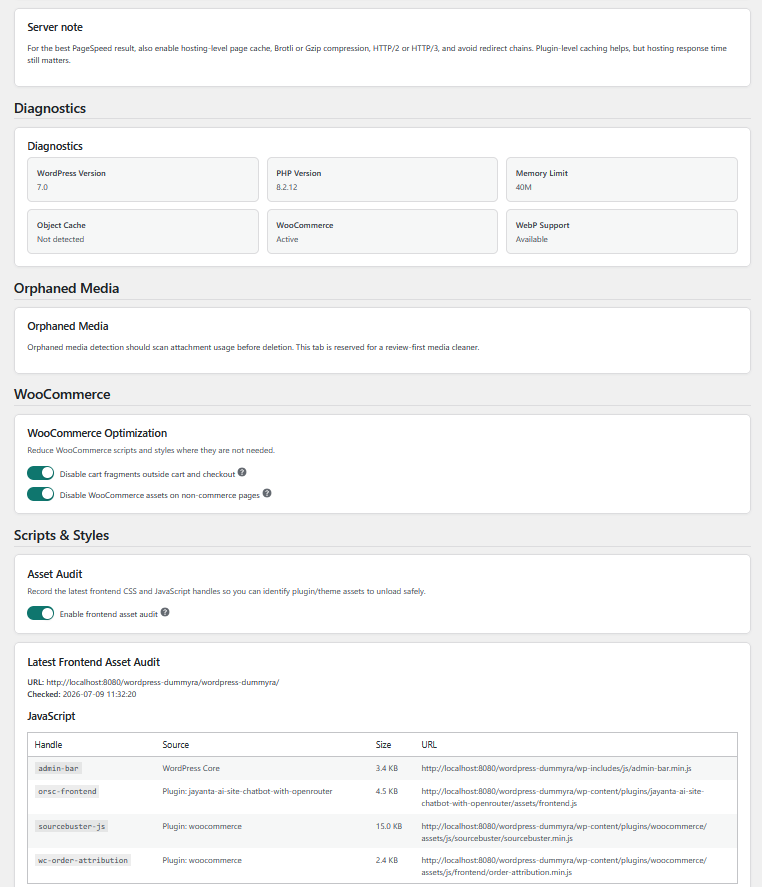
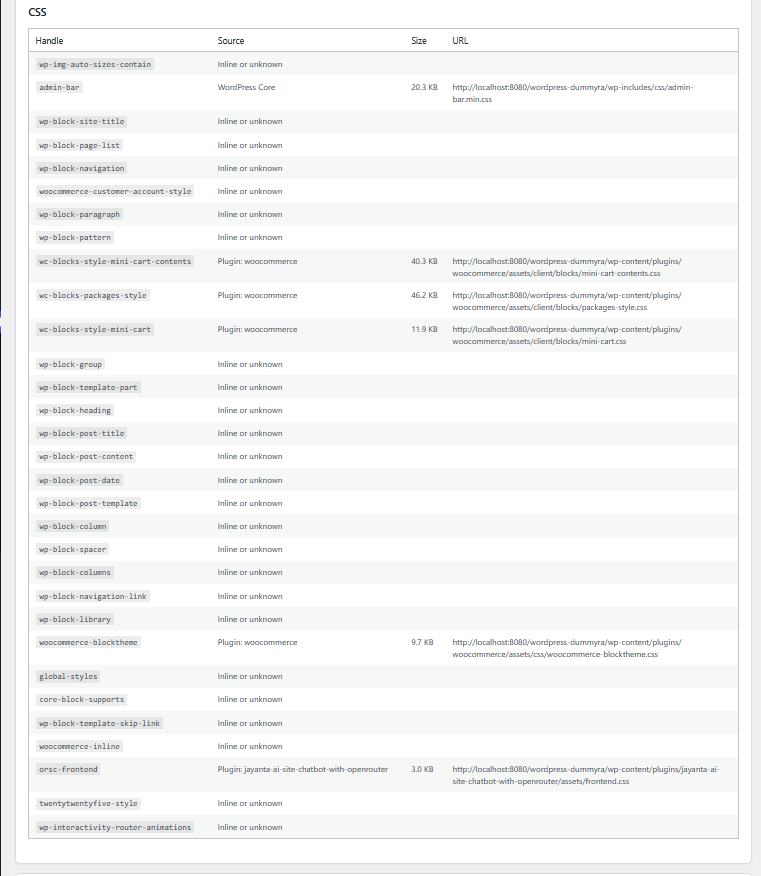
- Frontend asset audit for latest CSS and JavaScript handles, source, URL, and local file size.
- Conservative unused CSS cleanup for WordPress and WooCommerce block styles.
- Local CSS minification with cached minified files.
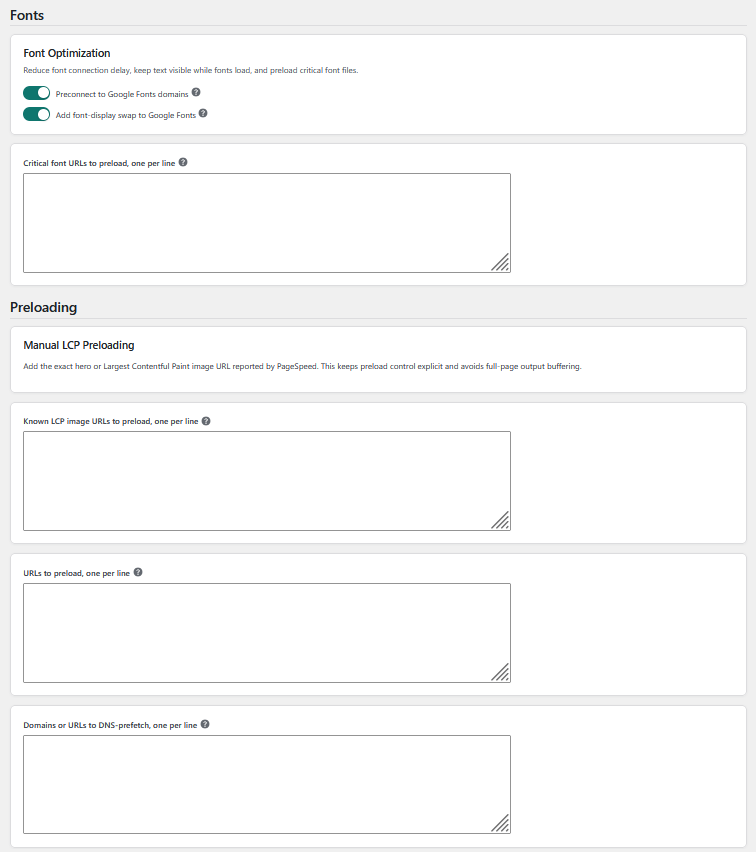
- Google Fonts preconnect.
- Google Fonts font-display swap support.
- Manual critical font preload URLs.
- Preload and DNS-prefetch controls.
- Manual known LCP image preload URLs with high fetch priority.
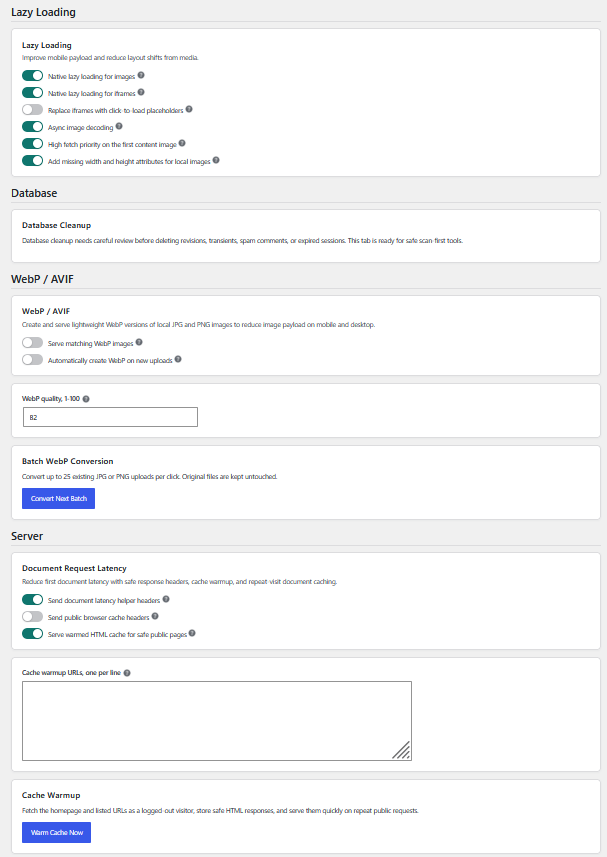
- Native lazy loading for images and iframes.
- Async image decoding to reduce image decode blocking on mobile devices.
- Optional click-to-load iframe placeholders for videos, maps, and embeds.
- High fetch priority for the first content image.
- Missing width and height attributes for local content images.
- WebP generation for JPG/PNG uploads with batch conversion for existing media.
- WebP serving for image
srcandsrcsetwhen matching.webpfiles are available. - Document latency helpers with DNS prefetch headers, browser cache headers, and warmed public HTML cache serving.
- Cache warmup for the homepage and selected public URLs.
- WooCommerce cart fragments and asset cleanup, active only when WooCommerce is available.
- Diagnostics section for quick environment checks.
- Admin bar and settings page cache clear button.
- Placeholder sections for future scan-first Database and Orphaned Media tools.
Admin Sections
- Core Web Vitals
- Core Features
- JavaScript
- CSS
- Fonts
- Preloading
- Lazy Loading
- Database
- WebP / AVIF
- Server
- Diagnostics
- Orphaned Media
- WooCommerce
- Scripts & Styles
Safe Performance Approach
Some performance settings can affect menus, sliders, forms, videos, checkout, page builders, or custom theme behavior. For this reason, the plugin includes exclusions for CSS and JavaScript handles. The strongest JavaScript delay option is not forced on by default.
After changing settings, clear cache and test the site on mobile and desktop.
External services
This plugin can add browser resource hints for Google Fonts when the Google Fonts optimization settings are enabled. These hints help browsers connect earlier to Google Fonts domains when the active theme or another plugin already uses Google Fonts.
When enabled, visitors’ browsers may connect to fonts.googleapis.com and fonts.gstatic.com. The plugin itself does not send server-side requests to Google Fonts.
This service is provided by Google. Terms of Service: https://policies.google.com/terms. Privacy Policy: https://policies.google.com/privacy.
How can I improve First Contentful Paint and Largest Contentful Paint?
Enable render-blocking rescue, critical CSS, font-display swap, first-image priority, and manual LCP image preload. If your hero image is loaded by a slider or CSS background, add its exact URL in the known LCP image preload field.
Will CSS or JavaScript optimization break my site?
Most options are conservative, but any CSS/JS optimization can affect complex themes or builders. Use the JavaScript and CSS exclusion fields if a menu, slider, form, video, checkout page, or builder feature needs a script or stylesheet to load normally.
How do I find JavaScript handles to unload or exclude?
Use Chrome DevTools Coverage or inspect the script URL. Many plugins include their plugin slug in the URL. Add the script handle or a handle keyword one per line in the relevant Scripts & Styles field.
Does the plugin optimize WooCommerce?
Yes. WooCommerce controls work only when WooCommerce is active. If WooCommerce is not active, the section becomes read-only and shows a message. The plugin avoids WooCommerce-sensitive pages such as cart, checkout, account, and shop pages where needed.
Does the plugin convert images to WebP or AVIF?
It can create WebP copies of JPG and PNG uploads when the server supports WebP through GD or Imagick. Existing media can be converted in small batches from the WebP / AVIF section. Original images remain untouched. AVIF conversion is not included in this version.
How does cache warmup work?
The Server section can warm the homepage and selected same-site URLs by fetching them as a public visitor and storing safe HTML responses in WordPress transients. Matching public GET requests can then be served from that warmed cache. Logged-in users, query strings, search, previews, REST/AJAX, and WooCommerce-sensitive pages are skipped.
Does the plugin clean the database or orphaned media?
Not yet. Those sections are reserved for future scan-first cleanup workflows. The plugin does not delete database rows or media files automatically.
Where are minified CSS files stored?
Minified CSS cache files are stored under wp-content/uploads/jayso-cache/css/. The plugin cache clear button removes these generated files.
Details
Related plugins
Plugins that also contain the tag cache
WP Super Cache

WP-Optimize – Cache, Compress images, Minify & Clean database to boost page speed & performance
SpeedyCache – Cache, Optimization, Performance

Breeze Cache

OMGF | GDPR/DSGVO Compliant, Faster Google Fonts. Easy.

Jetpack Boost – Website Speed, Performance and Critical CSS


About
Plugin for that tries to help you find the WordPress plugin you are looking for.
| Please enjoy an image of Crush (this awesome turtle) and have a lovely day! |  |
We do not own any plugin listed on this site and do not work for or work with WordPress.com or it's associated companies. We simply provide a searchable list of the available WordPress plugins.