



Kitgenix PDF Invoicing for WooCommerce
Most WooCommerce stores eventually need proper order documents.
You might need a PDF invoice for accounting, a receipt for the customer, a packing slip for fulfilment, or a credit note when a refund is issued. You also want documents that look professional, match your branding, and work reliably across WooCommerce email flows.
Kitgenix PDF Invoicing for WooCommerce is a lightweight, security-first PDF invoicing plugin that generates WooCommerce order PDFs on demand — without heavy background queues, and without filling your uploads folder with permanently stored PDFs.
It’s built around practical store requirements:
– Stable document identifiers/numbering history (so regenerated PDFs stay consistent)
– Secure Dompdf rendering defaults (chrooted paths, remote disabled by default, PHP in templates disabled by default)
– Theme template overrides and developer hooks
– Clean admin preview/download workflow on the order screen
– Customer “My Account” download buttons and order table actions (optional)
– Configurable WooCommerce email attachments that clean up temp files automatically
Important: Dompdf dependency
This plugin uses Dompdf (installed as a Composer dependency). If you are building from source, you must run Composer so the vendor/ directory (Dompdf) is present. The WordPress.org release includes the required library.
Documents generated (built-in types)
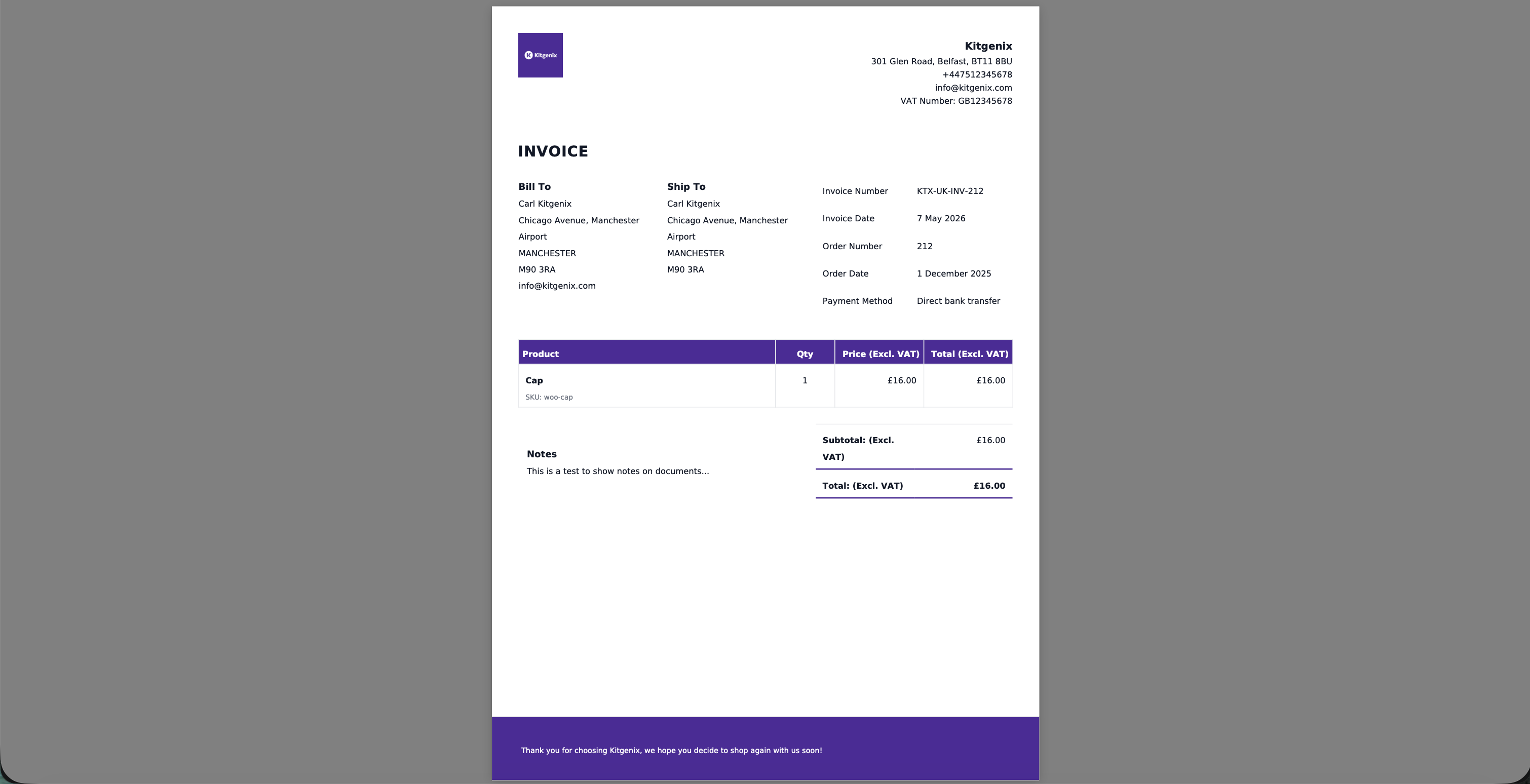
- Invoice (PDF)
- Receipt (PDF)
- Packing Slip (PDF)
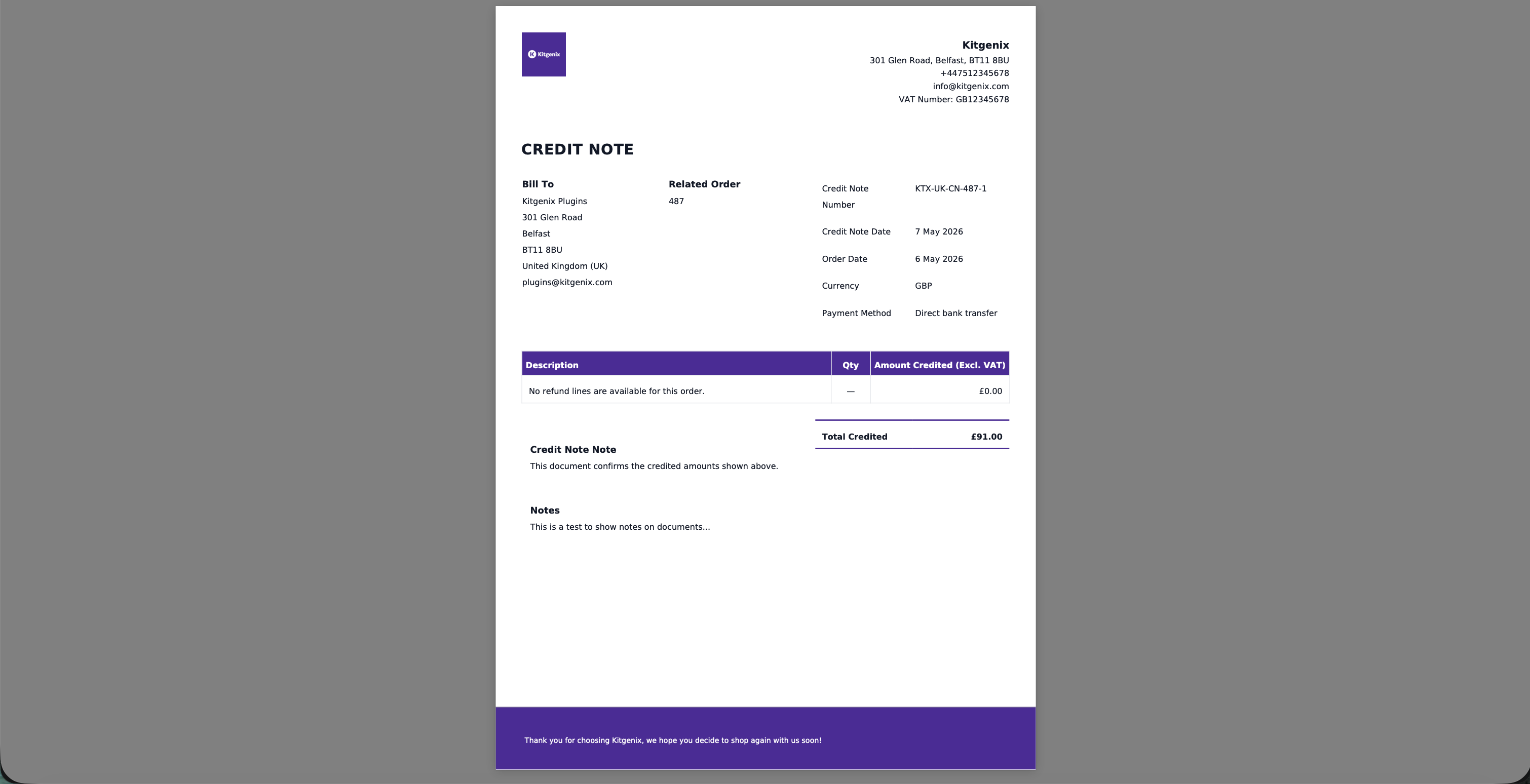
- Credit Note (PDF) (only available when refunds exist)
Document types are registered in a document registry and can be extended via filters.
Why store owners choose Kitgenix PDF Invoicing
Secure by default
– Dompdf configured with strict defaults:
– chroot limited to allowed paths
– remote resource fetching disabled by default
– PHP execution inside templates disabled by default (opt-in only)
– All admin/customer download actions are protected with nonces and permission checks.
No bloat
– PDFs are generated only when needed.
– Email attachments are created as temporary files and automatically cleaned up at shutdown.
– No custom database tables.
Built for WooCommerce documents
– Refund-aware credit notes
– Email attachment mapping
– Customer download links in the right places
– Store-friendly templates and template override system
Modular + extensible
Modules (Admin / Settings / Invoicing / Email / Frontend) are registered through a module manager and can be filtered for extension.
Features
Admin settings (branding, numbering, styles)
Settings page under the shared Kitgenix menu includes:
– Company name, address, email/phone, tax ID
– Logo upload (WordPress media)
– Footer text and customer notes/footer notes
– Document prefixes:
– Invoice prefix
– Receipt prefix
– Credit note prefix
– Template style selector (Standard / Simple / Modern / Business)
– Colour settings:
– Primary colour
– Accent colour
– Text colour
– Muted text colour
– Border colour
– Table header background
– Document background
– Footer background
– Footer text colour
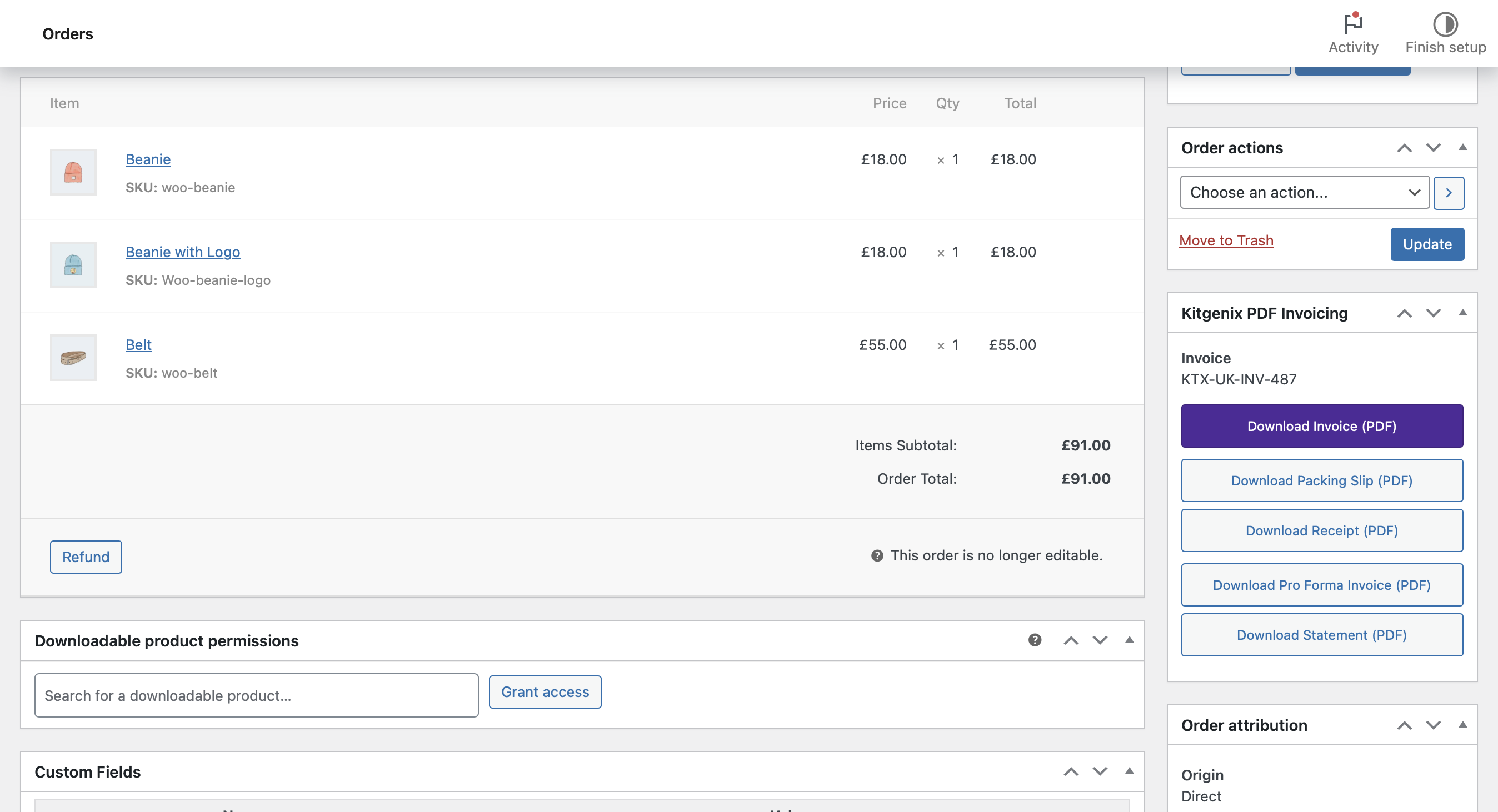
Admin order meta box (preview + PDF downloads)
On WooCommerce order edit screens the plugin adds document actions:
– Download Invoice (PDF)
– Download Packing Slip (PDF)
– Download Receipt (PDF)
– Download Credit Note (PDF) (only shown when refunds exist)
Endpoints are secured using nonce + capability checks.
Stable document identifiers & history
For documents that require stable numbering (invoices/credit notes), the plugin persists document identifiers and relevant timestamps on first generation so the document remains consistent over time.
Secure Dompdf PDF rendering
- Renders HTML templates into PDF (A4 portrait by default)
- Remote fetching disabled by default
- Dompdf “chroot” restricts filesystem access to allowed paths
- PHP in templates disabled by default (advanced opt-in only)
Template overrides (theme and agency friendly)
Templates can be overridden without editing plugin files.
Template resolution order:
1) Full override via filter
2) Theme override path:
kitgenix-pdf-invoicing-for-woocommerce/{style}/
3) Plugin templates fallback:
templates/{style}/
Where {style} is the active template pack selected in settings: standard, simple, modern, or business.
For compatibility, the resolver also checks .../standard/ and legacy root locations if a file is not found.
Customer downloads (My Account)
Optional customer-facing downloads for the order owner:
– Order details page buttons:
– Download Invoice (PDF)
– Download Credit Note (PDF) (only when refunds exist)
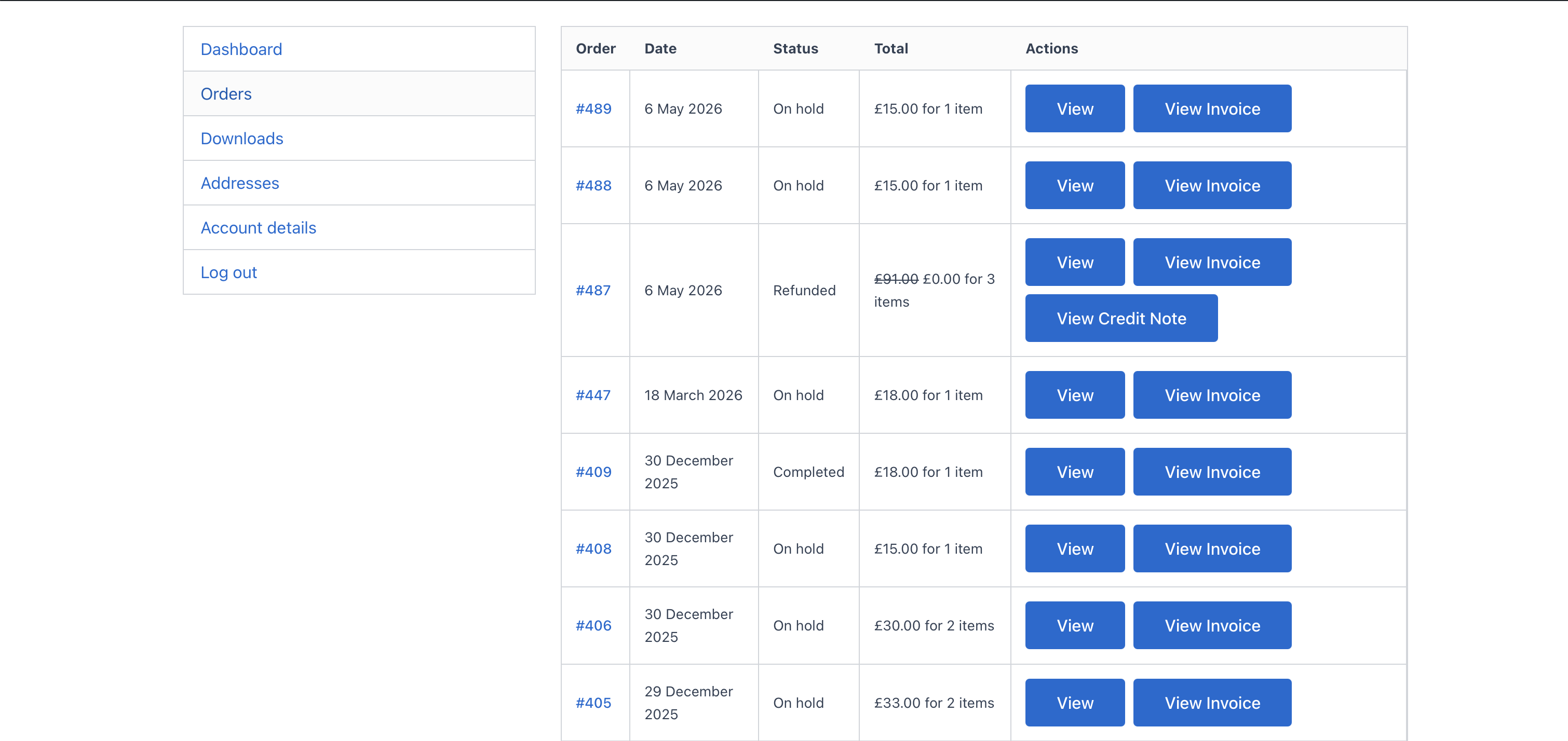
– My Account Orders table actions:
– View Invoice
– View Credit Note (when refunds exist)
Customer downloads are nonce-protected and/or can be validated by order key for guest access (see “Download permissions”).
Download permissions & security
PDF rendering supports secure query-arg requests:
– kitgenix_pdf=1
– kitgenix_doc={type}
– order_id={id}
– _wpnonce=…
Guest access (without a nonce) is permitted only when a valid WooCommerce order key is provided:
– key= or order_key= must match the order’s key
Default per-document rules:
– Invoice + Receipt:
– order owner OR shop staff OR valid order key
– Packing Slip:
– shop staff only (by default)
– Credit Note:
– staff OR order owner (only if refunds exist) OR valid order key (only if refunds exist)
Final permission gate is filterable.
Email attachments (configurable)
Attach PDFs to WooCommerce emails using settings and filters.
The plugin hooks WooCommerce’s email attachment pipeline, generates PDFs as temporary files for each email, attaches them, and cleans up automatically.
Sensible defaults (customisable):
– Invoice: Processing + Completed
– Receipt: Completed
– Credit Note: Refunded
– Packing Slip: New Order (admin email)
Filenames, streaming vs download
- Default filename: {type}-{order_number}.pdf (filterable)
- Streams inline by default (Attachment=false), unless filtered to force download
- Generates temporary files for email attachments, cleaned up automatically
- Tracks simple generation metrics in an option (counts successful generations)
Customisation hooks (HTML/CSS/output)
- Full HTML filter
- Wrapper hooks before/after document
- Custom CSS injection hook
- Language attribute filter
- Document title/body class filters
- “Show shipping address” toggle filter
Quick Start
- Install and activate the plugin (WooCommerce required).
- Open any WooCommerce order in wp-admin.
- In the Kitgenix PDF Invoicing meta box, click “Download Invoice (PDF)” to confirm output.
- Configure settings:
- branding + company details
- prefixes
- email attachments mapping
- Optional: enable customer downloads and order table actions.
To customise layout, copy templates into your theme override folder and edit them.
Template Overrides
-
Copy templates from:
templates/{style}/ -
Paste into your theme at:
kitgenix-pdf-invoicing-for-woocommerce/{style}/ -
Edit the theme copies.
The plugin will automatically use your theme templates instead of bundled templates.
Developers
Text domain:
kitgenix-pdf-invoicing-for-woocommerce
Architecture:
– Modular plugin with Admin/Settings/Invoicing/Email/Frontend modules
– Document types registry (extendable)
– Template system with theme overrides + HTML/CSS filters
– Secure download endpoints with nonce/capability checks and optional order key validation
Key filters:
– kitgenix_pdf_invoicing_modules
– kitgenix_pdf_document_types
– kitgenix_pdf_document_enabled
– kitgenix_pdf_document_user_can_download
– kitgenix_pdf_document_filename
– kitgenix_pdf_invoice_filename (back-compat)
– kitgenix_pdf_document_attachment (inline vs download)
– kitgenix_pdf_document_template_path
– kitgenix_pdf_document_html
– kitgenix_pdf_invoice_html (back-compat)
– kitgenix_pdf_document_custom_css
– kitgenix_pdf_document_lang
– kitgenix_pdf_document_title
– kitgenix_pdf_document_body_class
– kitgenix_pdf_show_shipping_address
– kitgenix_pdf_email_document_map
– kitgenix_pdf_email_attach_document
– kitgenix_dompdf_enable_php (advanced; default false)
Key actions:
– kitgenix_before_stream_pdf_document
– kitgenix_after_stream_pdf_document
– kitgenix_before_stream_pdf_invoice (back-compat)
– kitgenix_after_stream_pdf_invoice (back-compat)
– Template hooks:
– kitgenix_pdf_before_document / kitgenix_pdf_after_document
– kitgenix_pdf_before_document_wrapper / kitgenix_pdf_after_document_wrapper
– kitgenix_pdf_after_notes
– kitgenix_pdf_after_order_data_rows
Data Handling
- Plugin settings stored in a single option:
kitgenix_pdf_invoicing_settings. - Anonymous generation metrics stored in:
kitgenix_pdf_invoicing_for_woocommerce_metrics. - Document identifiers/history stored on the order to keep documents stable:
_kitgenix_pdf_invoicing_for_woocommerce_invoice_number_kitgenix_pdf_invoicing_for_woocommerce_invoice_date_kitgenix_pdf_invoicing_for_woocommerce_receipt_number_kitgenix_pdf_invoicing_for_woocommerce_receipt_date_kitgenix_pdf_invoicing_for_woocommerce_credit_note_count_kitgenix_pdf_invoicing_for_woocommerce_credit_note_history
- PDFs generated on demand (temporary files).
- Email attachments generated as temp files and cleaned up automatically.
- No custom database tables created.
Security & Privacy
- All admin actions protected with nonces and capability checks.
- Inputs sanitised; outputs escaped appropriately.
- Dompdf PHP execution disabled by default. Enable only if you understand the risk:
add_filter( ‘kitgenix_dompdf_enable_php’, ‘__return_true’ );
Security identifiers (exact):
– Admin meta box downloads use admin-post.php actions kitgenix_admin_stream_invoice, kitgenix_admin_stream_receipt, kitgenix_admin_stream_packing_slip, kitgenix_admin_stream_credit_note, protected by query arg nonce created/verified with nonce action kitgenix_admin_pdf.
– WordPress action hooks for those admin-post actions: admin_post_kitgenix_admin_stream_invoice, admin_post_kitgenix_admin_stream_receipt, admin_post_kitgenix_admin_stream_packing_slip, admin_post_kitgenix_admin_stream_credit_note.
– Frontend document downloads use the optional _wpnonce value created/verified with nonce action kitgenix_download_{doc_type}_{order_id}.
– WooCommerce order action key: kitgenix_download_pdf_invoice (hook: woocommerce_order_action_kitgenix_download_pdf_invoice).
Admin page hook suffix:
– kitgenix_page_kitgenix-pdf-invoicing-settings
PDF generation is performed locally on your server using Dompdf. This plugin does not send customer data to a third-party PDF generation API.
External Services
This plugin includes a shared “Kitgenix hub” component in wp-admin which may fetch publicly available plugin metadata from WordPress.org using WordPress core’s plugins_api() function.
Caching:
– Transient: kitgenix_hub_wporg_active_installs_v1
– Transient: kitgenix_hub_wporg_ratings_v1
Uninstall
Uninstall removes the plugin settings option (kitgenix_pdf_invoicing_settings) and metrics option (kitgenix_pdf_invoicing_for_woocommerce_metrics) when uninstalled via WordPress.
It also deletes the activation redirect transient: kitgenix_pdf_invoicing_for_woocommerce_do_activation_redirect.
Order meta and document history are intentionally preserved to avoid accidental loss of invoice/credit note history.
Support Development
If this plugin helps you generate clean WooCommerce PDFs and reduces admin work, you can support ongoing development here:
https://buymeacoffee.com/kitgenix
Credits
Built with ❤︎ by @kitgenix – https://kitgenix.com
Bundled library: Dompdf (see vendor/ for licenses)
Details

Related plugins
Plugins that also contain the tag invoices
PDF Invoices & Packing Slips for WooCommerce

PDF Builder for WooCommerce. Create invoices,packing slips and more
Morning for WooCommerce

PDF Generator for WordPress
PDF Invoices and Packing Slips For WooCommerce

Printus – Automatic Cloud Printing for WooCommerce


About
Plugin for that tries to help you find the WordPress plugin you are looking for.
| Please enjoy an image of Crush (this awesome turtle) and have a lovely day! |  |
We do not own any plugin listed on this site and do not work for or work with WordPress.com or it's associated companies. We simply provide a searchable list of the available WordPress plugins.