



Let's Code Cookie Banner
Let’s Code Cookie Banner is a lightweight, fully compliant cookie consent solution designed for WordPress sites that must comply with GDPR and the Italian Data Protection Authority (Garante della Privacy) guidelines.
Key features
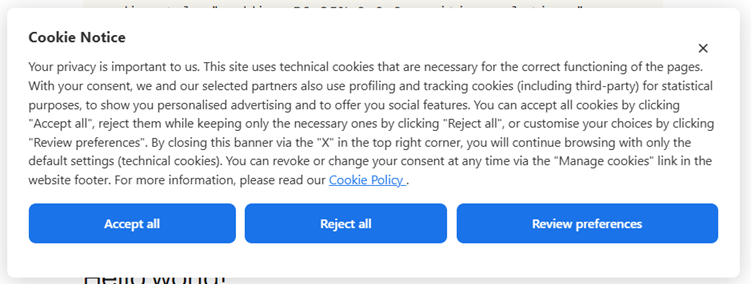
- Banner with three equal buttons — Accept all / Reject all / Review preferences. All three buttons share the same visual style to comply with the Garante’s visual neutrality principle.
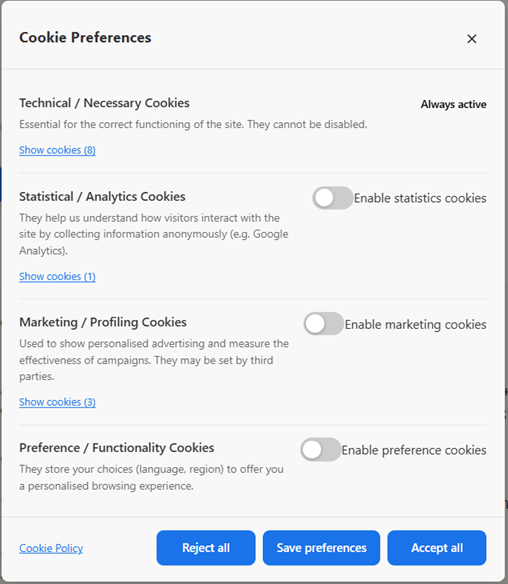
- Four cookie categories — Necessary, Statistics, Marketing, Preferences. Necessary cookies are always active.
- Consent log — Anonymous GDPR consent log stored in the WordPress database (no IP addresses or personal data stored). Exportable as CSV.
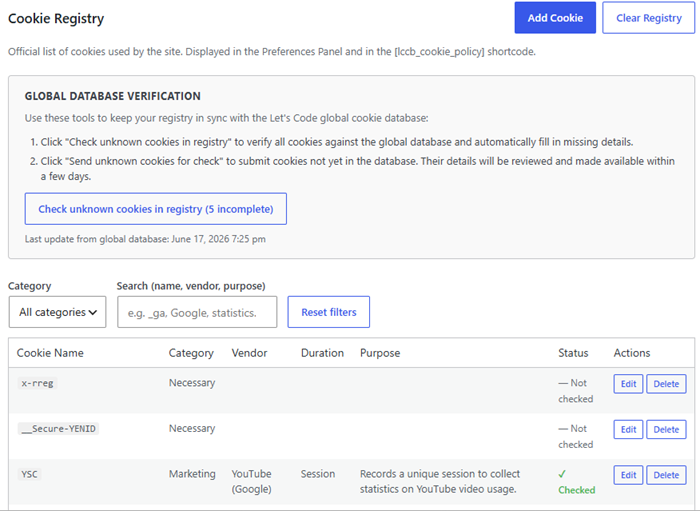
- Cookie registry — Manage the official list of cookies used by your site. Displayed in the preferences panel and via the
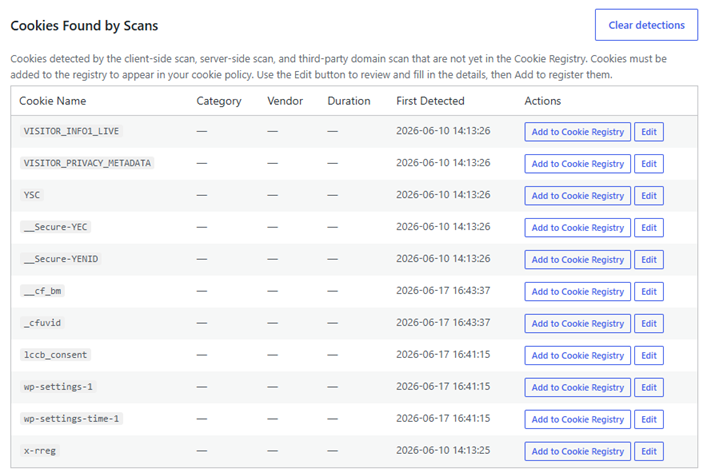
[lccb_cookie_policy]shortcode. - Client-side cookie scanner — Automatically detects cookies set by JavaScript on any page of your site.
- Server-side cookie scanner (HttpOnly) — The server makes an HTTP request to the target page and reads the
Set-Cookieresponse headers, detecting HttpOnly cookies invisible to JavaScript. - Third-party domain scanner — Detects third-party domains loaded by your site and scans them for cookies.
- Global cookie database — Automatically enrich unrecognised cookies detected on your site by looking them up in the Let’s Code global cookie catalogue. The lookup is triggered manually by the administrator.
- Fully customisable design — Colours (banner, buttons, cookie policy table rows and headers), border radii, padding, font size and banner position are configurable with a live preview (requires the free Let’s Code Cookie Banner Pro add-on).
- Shortcodes —
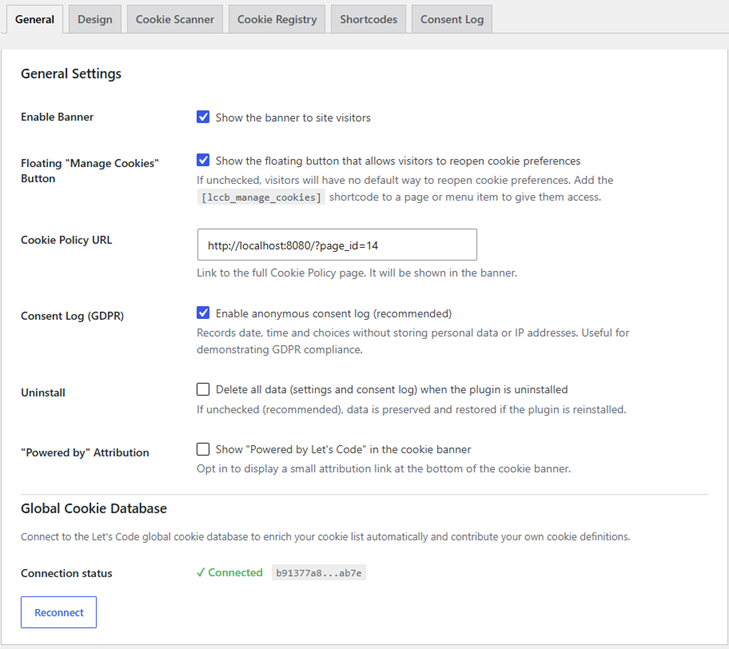
[lccb_manage_cookies]adds a “Manage cookies” button that can be placed anywhere on your site (footer, widget, block);[lccb_cookie_policy]renders a full cookie policy table. - Floating “Manage Cookies” button — Optional floating action button (FAB) always visible on the frontend, allowing visitors to reopen the preferences panel at any time. Can be enabled or disabled from the General tab.
- YouTube embed blocking — Automatically blocks YouTube iframes until the user grants marketing consent. Displays a CSS-only placeholder with a Play button; no request is sent to YouTube before consent.
- Vimeo embed blocking — Automatically blocks Vimeo iframes until the user grants marketing consent. Displays a CSS-only placeholder with a Play button; no request is sent to Vimeo before consent. Vimeo iframes that already carry
dnt=1in their URL are not blocked, as they do not install tracking cookies. - Bilingual — English and Italian frontend strings built in; fully translatable via
.po/.mofiles.
External services
This plugin communicates with the Let’s Code backoffice API (https://backoffice.let-scode.it) for four purposes:
- Plugin registration — On first activation, the plugin sends the site URL and the plugin slug to the API to obtain an anonymous API key. No personal data is transmitted.
- Cookie lookup — When an administrator clicks “Update from global database”, the names of unrecognised cookies are sent to the API, which returns metadata (category, vendor, description) from the Let’s Code global cookie catalogue. No personal data is transmitted.
- Cookie contribution — When an administrator clicks “Contribute” on a cookie, the site URL and the cookie’s metadata are submitted to the global catalogue for manual review by the Let’s Code team. This action is entirely opt-in and admin-initiated.
- Script contribution — When an administrator clicks “Suggest to Community” in the Cookie Scanner tab, the normalized URLs of third-party scripts detected during the last client-side scan are submitted to the global catalogue via
/cookies/scripts/contribute. Only the scheme, domain, and path are transmitted — query parameters, fragments, and all personal data are stripped before sending. This action is entirely opt-in and admin-initiated.
All four calls use wp_remote_post(), require administrator capability, and are triggered only by explicit admin actions — never automatically on page load.
On sites with the Pro licence active, this plugin also loads a client-side autoblocking script from the same backoffice service. This script is served from https://backoffice.let-scode.it/autoblocking/{installation_id} and is injected into every frontend page via wp_enqueue_script(). It intercepts third-party scripts and cookies before the visitor has given consent, and re-activates them once consent is granted. When a visitor loads a page, their browser fetches this script from the Let’s Code backoffice server; this request transmits the visitor’s IP address and browser user-agent to the backoffice server as part of the standard HTTP request. The installation ID embedded in the URL is an anonymous, randomly generated identifier (stored in wp_options during plugin registration) and contains no personal data. The script itself does not send any further data from the visitor’s browser to the backoffice server.
- Service URL:
https://backoffice.let-scode.it - Privacy policy:
https://let-scode.it/privacy
This plugin integrates the Freemius SDK to manage Pro licences, deliver plugin updates, and collect anonymous usage analytics (opt-in). Freemius communicates with its own servers when the plugin is activated and when licence-related actions are performed. Users who opt out during the activation screen transmit no data.
- Service URL:
https://api.freemius.com - Privacy policy:
https://freemius.com/privacy/ - Terms of service:
https://freemius.com/terms/
This plugin also includes a server-side cookie scanner that uses wp_remote_get() to fetch a URL entered by the administrator and reads the Set-Cookie response headers. This request targets a URL chosen by the admin (typically the site’s own frontend) and is protected against SSRF: private IP ranges, loopback addresses and reserved IP blocks are blocked before the request is sent.
When a YouTube iframe is blocked by the plugin (because the visitor has not yet granted marketing consent), the plugin displays a placeholder image loaded from YouTube’s thumbnail service (img.youtube.com). This request is made by the visitor’s browser, is triggered only when a YouTube embed is present on the page, and transmits no personal data beyond the standard HTTP request (IP address, user-agent) handled by YouTube/Google.
- Service URL:
https://img.youtube.com - Privacy policy:
https://policies.google.com/privacy - Terms of service:
https://www.youtube.com/t/terms
When a Vimeo iframe is blocked by the plugin (because the visitor has not yet granted marketing consent), the plugin displays a CSS-only placeholder — no request is sent to Vimeo before consent. When the visitor clicks Play (granting consent), the iframe is restored and the browser loads the video from Vimeo (player.vimeo.com). This request is handled by Vimeo and transmits the visitor’s IP address and browser user-agent as part of the standard HTTP request. Vimeo iframes that already carry dnt=1 in their URL are never blocked, as they do not install tracking cookies.
- Service URL:
https://player.vimeo.com - Privacy policy:
https://vimeo.com/privacy - Terms of service:
https://vimeo.com/terms
Details
Related plugins
Plugins that also contain the tag consent
Complianz – GDPR/CCPA Cookie Consent

Cookie Notice & Compliance for GDPR / CCPA

CookieAdmin – Cookie Consent Banner

WP Consent API
WPConsent – Cookie Consent Banner for Privacy Compliance (GDPR / CCPA)

TermsFeed AutoTerms: Privacy Policy Generator, Cookie Consent, GDPR, CCPA, Terms & Conditions, Disclaimers, Cookies Policy, EULA


About
Plugin for that tries to help you find the WordPress plugin you are looking for.
| Please enjoy an image of Crush (this awesome turtle) and have a lovely day! |  |
We do not own any plugin listed on this site and do not work for or work with WordPress.com or it's associated companies. We simply provide a searchable list of the available WordPress plugins.