


Back
LevelNetwork WRT Reading Tools
Details
View on WordPress
Back
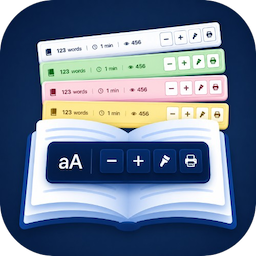
LevelNetwork WRT Reading Tools enhances your content by adding a professional and informative bar, providing valuable metadata and accessibility tools directly within your posts and pages.
Core Features:
- Word Count: Automatically calculates and displays the total word count based on the main filtered content block (
the_content). Provides the most relevant count for the displayed text. - Estimated Reading Time: Shows reading time in minutes, calculated using a configurable WPM setting (Default: 200 WPM) based on the filtered content word count.
- Post View Counter:
- Reliably tracks and displays post/page views via AJAX with secure nonces and cookie tracking.
- Configurable Cookie Expiry (Default: 6 hours).
- Global & Per-Post Start Value options to set an initial count.
- View Reset button in the post editor metabox.
- (Note: Disabled by default, must be enabled in settings).
- Text Font Resizer: Includes +/- buttons and an optional Reset button. Remembers user preference via LocalStorage.
- Accessibility & Utility Buttons:
- Optional Contrast/Night Mode toggle with multiple icon choices. Remembers user preference.
- Optional Clean Print button using a configurable selector to print only the main content area.
Extensive Customization & Compatibility:
- Display Control:
- Show bar on: Only Posts (Default), Only Pages, Both, or Manual Placement Only (disables automatic insertion).
- Automatically excluded from the homepage.
- Position: Above (Default) or Below content.
- Mobile Visibility: Option to show (Default) or hide on mobile.
- Component Toggle: Individually enable/disable Word Count, Reading Time, View Counter, Font Resizer (+/-), Font Reset Button, Contrast Button, and Print Button.
- Theme Compatibility & Exclusions: Settings for CSS selectors allow you to target specific content areas and exclude unwanted elements (like injected ads, related posts, or author boxes) from being counted, resized, or printed.
- Visual Styling:
- Choose from 50 built-in Color Palettes with live admin preview!
- Select your preferred icon for the Contrast Mode button (with preview).
- Shortcode:
[lnwrt_only_tools]available to manually display only the action buttons group. - Professional & Lightweight: Clean design, uses WordPress Dashicons, CSS Variables.
- Localization Ready: Fully translatable.
Provide richer insights, better accessibility, and more control using LevelNetwork WRT Reading Tools!
Details
Plugin code:
levelnetwork-wrt-reading-tools
Plugin version:
1.1.3
Author:
Outdated:
No
WP version:
5.4 or higher
PHP version:
7.4 or higher
Test up to WP version:
7.0
Total installations:
0
Last updated:
2026-06-09
Rating:
Times rated:
0
accessibility
font-resizer
post-views
reading-time
word-count


Related plugins
Plugins that also contain the tag accessibility
Ally – Web Accessibility & Usability

Auto Image Attributes From Filename With Bulk Updater (Add Alt Text, Image Title For Image SEO)

Accessibility by UserWay

WP Dark Mode – Improve Accessibility with AI Powered Dark Theme

AccessibleWP – Accessibility Toolbar
Alt Text AI – Automatically generate image alt text for SEO and accessibility


About
Plugin for that tries to help you find the WordPress plugin you are looking for.
| Please enjoy an image of Crush (this awesome turtle) and have a lovely day! |  |
We do not own any plugin listed on this site and do not work for or work with WordPress.com or it's associated companies. We simply provide a searchable list of the available WordPress plugins.