


LinkRevive AI – Broken Link Checker & Fixer
LinkRevive AI checks every link on your site in the background and tells you, in plain words, which ones are really broken and how to fix them. It is free, with no account, no limits and no upsell inside the plugin’s features.
No false alarms
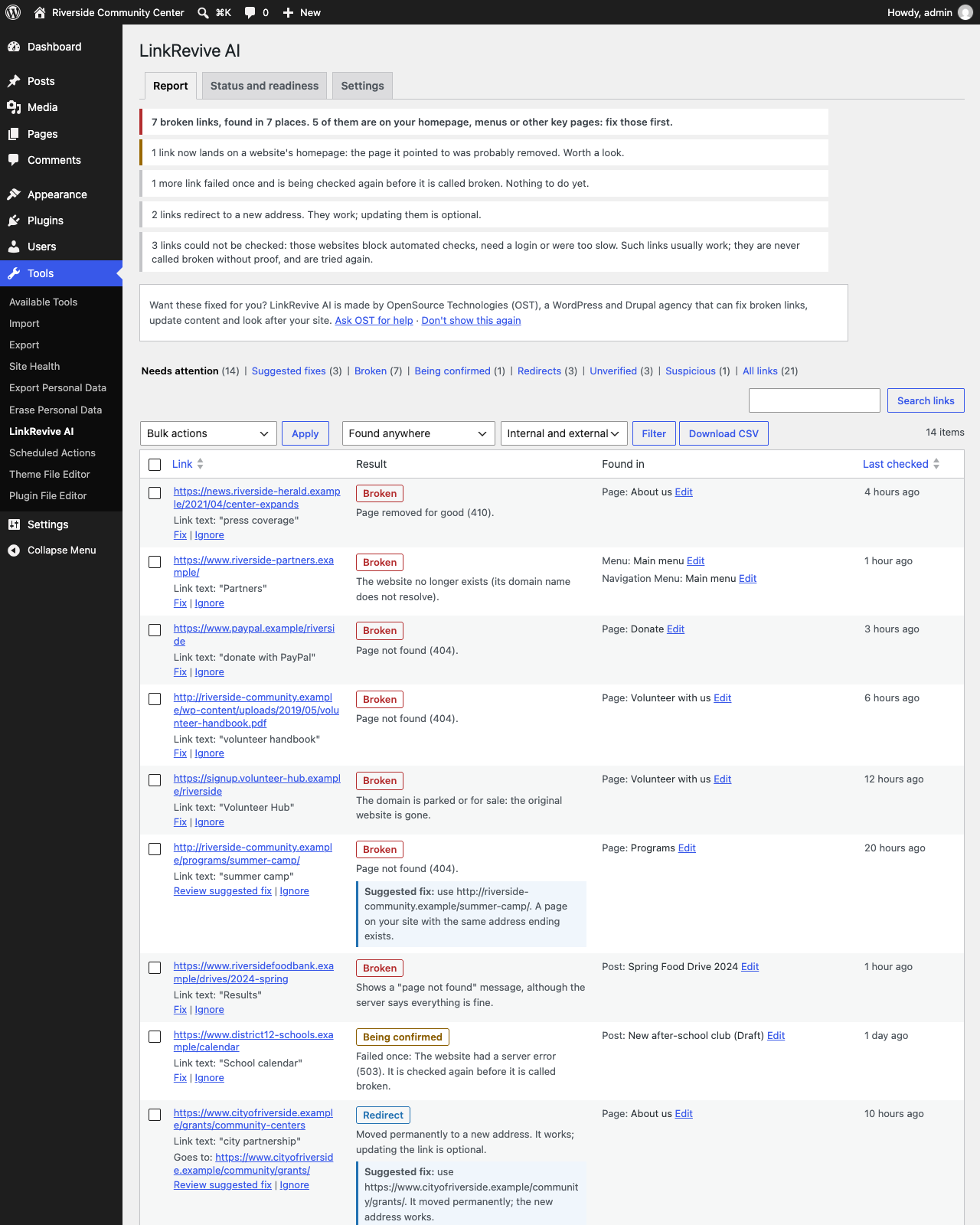
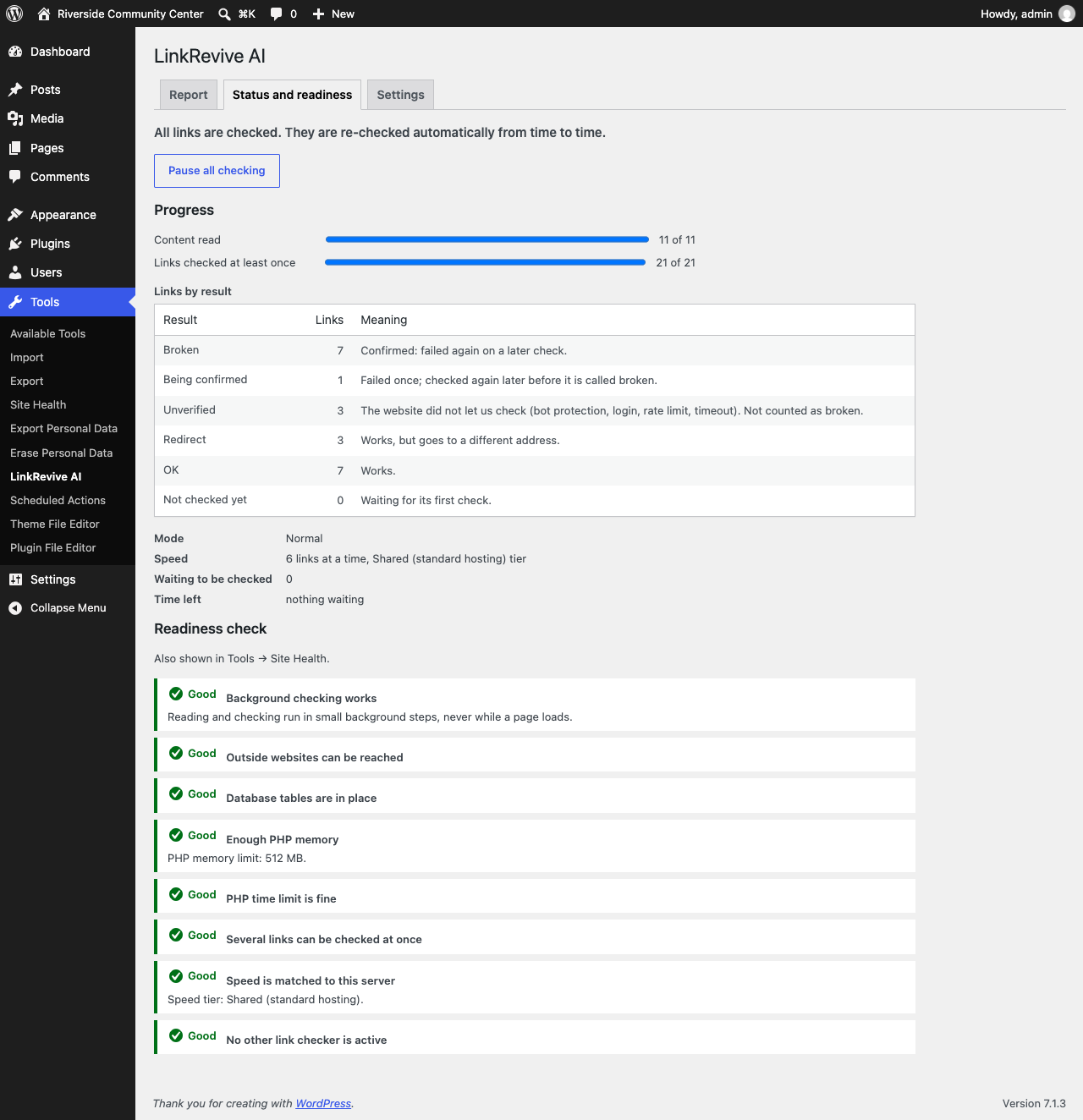
Many link checkers call a link “broken” because one website blocked an automated visit or was slow for a minute. LinkRevive AI only calls a link Broken after it fails again on a later check. Websites that block automated checks (bot protection, logins, rate limits) are shown as Unverified — never as broken without proof. It also catches “page not found” pages that pretend to work (soft 404s).
Finds links everywhere
- Posts, pages and custom post types in every status: published, scheduled, private, drafts and pending
- Classic editor and blocks, including links kept in block settings (navigation, embeds, social links)
- Menus, widgets, block-theme templates, template parts and navigation menus
- Advanced Custom Fields (URL, link, rich text, repeaters and groups) and Elementor pages
- Links, images, embeds and files
Fix in one click, safely
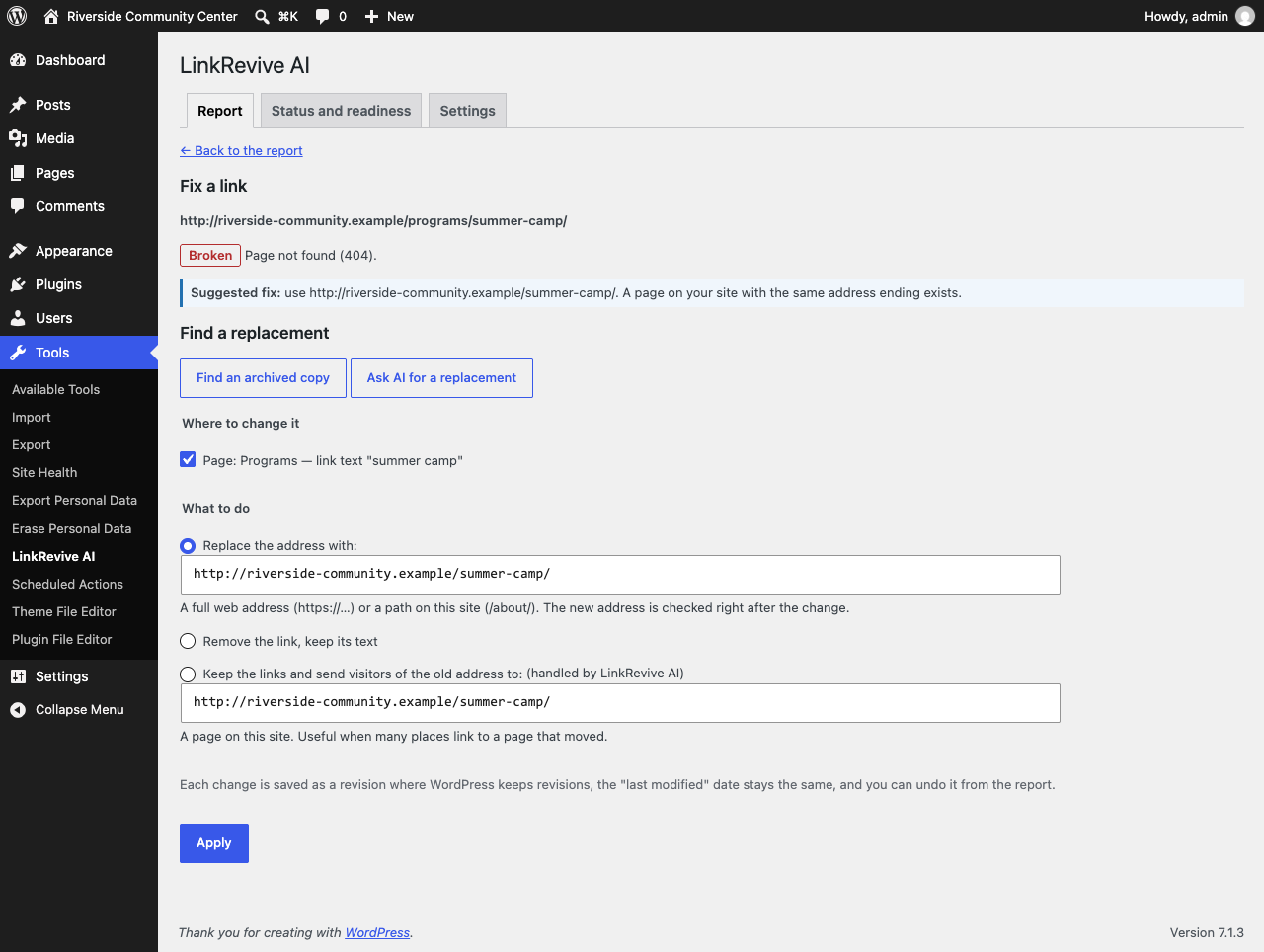
- Replace an address, or remove a link and keep its text — in one place or everywhere it appears
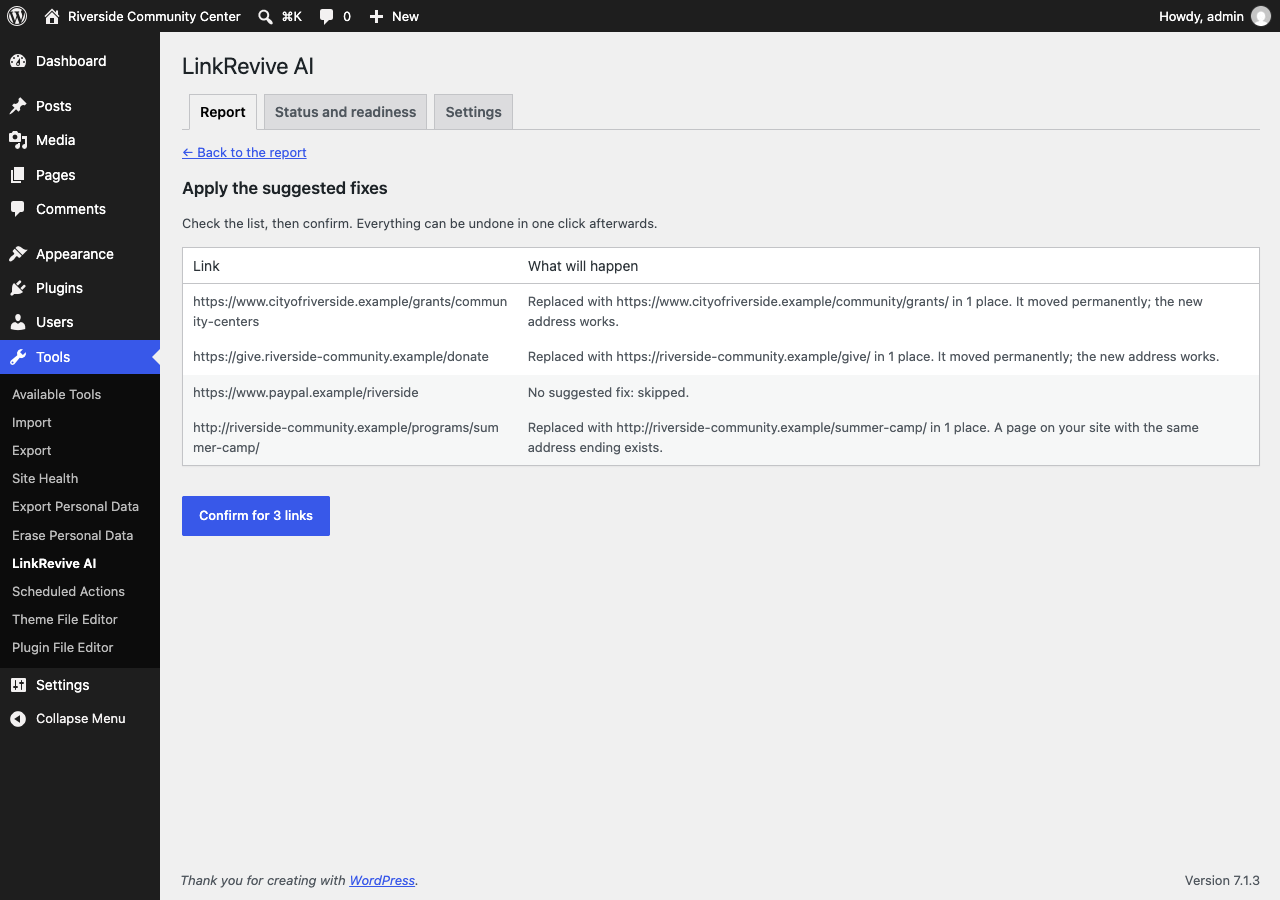
- Suggested fixes: links that moved permanently are updated to their confirmed new address; broken links to your own pages are matched to where the page moved
- Redirect a removed page of your site to a new one instead of editing every link (works with the Redirection plugin)
- Bulk fixing with a preview, and one-click undo for every change
- Every change is checked before it is kept: if anything but that one link would change, nothing is changed
- Saved as a revision, the “last modified” date stays the same, caches are cleared (WP Rocket, LiteSpeed, W3 Total Cache, WP Super Cache, Cloudflare and more)
Optional helpers (off until you switch them on)
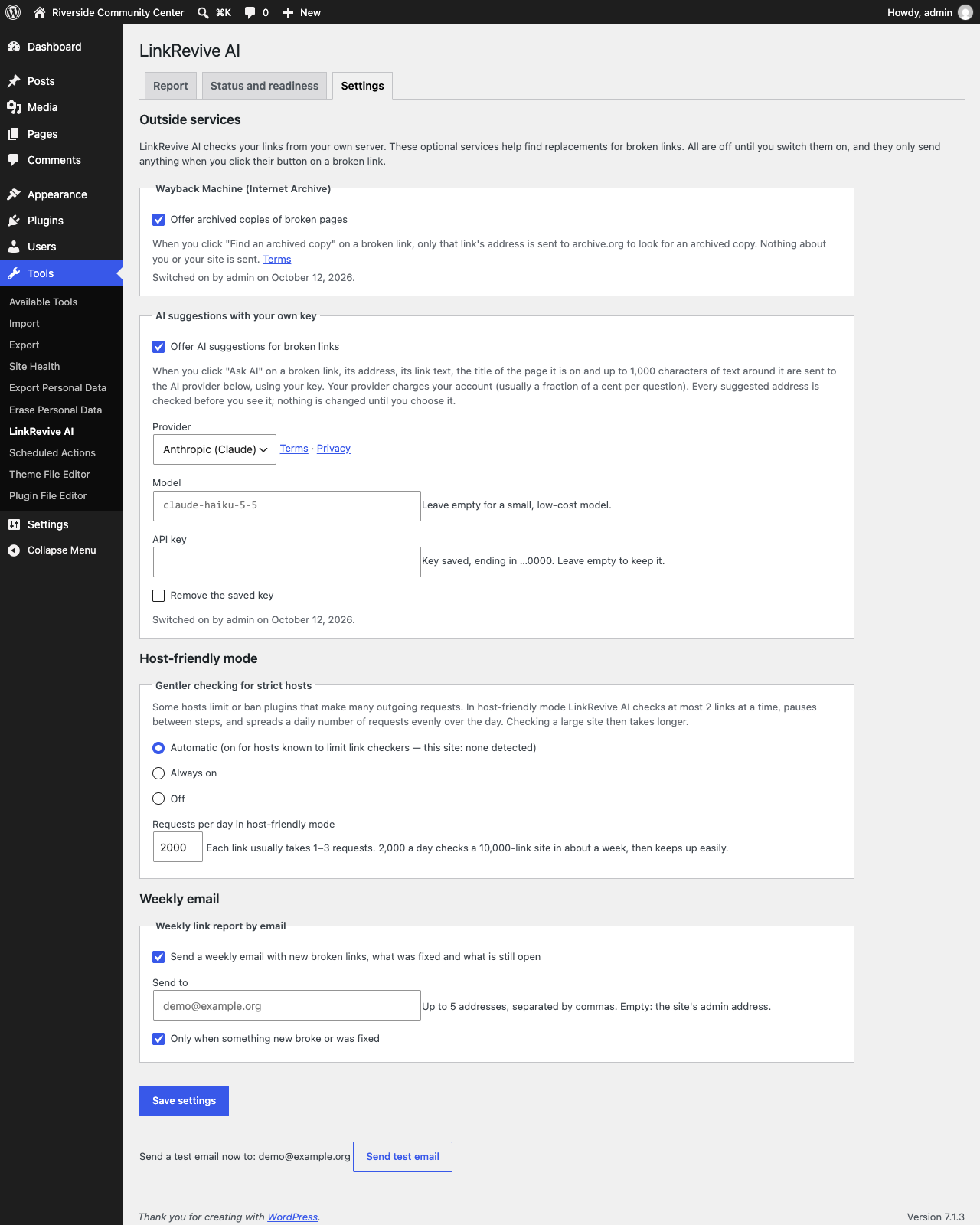
- Wayback Machine: find an archived copy of a page that is gone
- AI suggestions through WordPress’s built-in AI connection (WordPress 7.0+, with the AI provider you set up under Settings Connectors): suggests a replacement; every suggested address is checked before you see it
Never slows your site
Checking runs in small background steps, never while a page loads. The plugin measures your server and adjusts its speed, slows down at once when your site gets busy, recovers by itself if something goes wrong, and can be paused at any time. On hosts that limit link checkers it switches to a gentler host-friendly mode with a daily limit.
Reports
- A plain-English summary: what to fix first, what can wait and why
- Filters, search and CSV export
- An optional weekly email
- A readiness check in Tools Site Health
LinkRevive AI is made by OpenSource Technologies (OST), a WordPress and Drupal agency.
External services
LinkRevive AI talks to outside services only as described here. Optional services are off until an administrator switches them on (Tools LinkRevive AI Settings), and then only send anything when an administrator clicks their button on a broken link. No visitor data is ever sent.
The websites your links point to
To check a link, the plugin requests that link’s address from your own server, as any visitor’s browser would (with an honest User-Agent: “LinkRevive-AI/1.0; +https://wordpress.org/plugins/linkrevive-ai/”). Only the address itself is requested; nothing about your site or visitors is sent. This is the plugin’s core purpose. It starts only after an administrator clicks “Start checking links” (Tools LinkRevive AI), or runs wp linkrevive start; until then the plugin only reads your own content and contacts no other website. After that it runs in the background and can be paused at any time.
Internet Archive — Wayback Machine (optional, off by default)
Used to find an archived copy of a broken page. When an administrator clicks “Find an archived copy”, only that broken link’s address is sent to https://archive.org/wayback/available, without the part after “?” (only plain page numbers such as ?p=12 or ?lang=en are kept).
Terms of use: https://archive.org/about/terms.php — Privacy: https://archive.org/about/terms.php
AI suggestions through WordPress’s AI Client (optional, off by default)
Used to suggest a replacement for a broken link. The plugin does not contact any AI service itself and stores no AI keys: it uses WordPress’s built-in AI Client (WordPress 7.0 or later), which sends the question to the AI provider the site owner has set up under Settings Connectors. When an administrator clicks “Ask AI”, the broken link’s address (without the part after “?”, except plain page numbers such as ?p=12), its link text, the title of the page it is on and up to 1,000 characters of the surrounding text are sent to that provider. The terms, privacy policy and charges of the provider the site owner chose apply. Every suggested address is checked by the plugin before it is shown; nothing on the site changes until the administrator chooses a suggestion and applies it.
Details
Related plugins
Plugins that also contain the tag 404
Redirection

404 to 301 – Redirect, Log and Notify 404 Errors

Smart Custom 404 Error Page

Redirection

WP 404 Auto Redirect to Similar Post

Link Juice Keeper


About
Plugin for that tries to help you find the WordPress plugin you are looking for.
| Please enjoy an image of Crush (this awesome turtle) and have a lovely day! |  |
We do not own any plugin listed on this site and do not work for or work with WordPress.com or it's associated companies. We simply provide a searchable list of the available WordPress plugins.