



Llamly MCP – AI Agent with ChatGPT & Claude
Llamly MCP connects your WordPress site to the AI you already use: ChatGPT, Claude, Codex, Cursor and other AI agents. Ask in plain language and your agent writes, edits and organizes the site for you, with your WordPress content permissions, a full change history and undo. It is a free WordPress MCP server (Model Context Protocol) that runs inside your own site: no relay, no Llamly server in between, no Llamly account and no API key from an AI provider.
Use the AI subscription you already have. Keep every change reversible.
- Manage your site by chat: create, edit and publish posts and pages, edit Gutenberg blocks, upload media, organize categories, tags and menus, moderate comments and look up users.
- Undo and redo: every change made by an agent is written to a journal first, so almost everything can be undone from the Activity screen or by asking your agent.
- You stay in charge: safe mode makes the agent confirm before it deletes or undoes something. Turn on the approval queue and publishing waits for you in wp-admin, with a before and after of each change.
- Content, never administration: the agent works with your content permissions only. Whatever your role, it never changes site settings, users, plugins, themes or code, and never writes unfiltered HTML.
- Bring your own AI: works with ChatGPT, claude.ai, Claude Desktop, Claude Code, Codex, Cursor, OpenCode and Antigravity CLI. Llamly has no AI of its own and no usage meter: the agent you already pay for does the work.
- Your data stays on your site: self-hosted, no account, no relay, no telemetry. Your AI app connects to your site, and Llamly never calls out.
- Ready in a few minutes: a step-by-step recipe for each app with your site address already filled in, an “Add to Claude” button, and a Doctor that checks your server and tells you what to ask your host.
Ask things like “publish the three drafts about our new service”, “find every image without alt text and fill it in”, “add a FAQ section to the pricing page”, “move Contact to the end of the main menu” or “undo the last change you made”, and your agent does it on your site.
What is a WordPress MCP server?
MCP (Model Context Protocol) is the open standard AI apps use to work with other software. A WordPress MCP server gives ChatGPT, Claude or any MCP-capable agent a set of typed, permission-checked actions on your site, such as publishing a post or updating a menu, instead of you copying and pasting between a chat window and wp-admin. Llamly MCP is that server, installed like any other plugin.
What your agent can do
- Content: posts, pages and public custom post types: list, read, create, update, trash, revisions and restore of a revision.
- Gutenberg: read any page as a block tree and edit blocks in one atomic batch; patterns, templates and template parts, and global styles on block themes (custom CSS stays in the Site Editor and is never changed by Llamly).
- Media: upload files, edit titles, captions and alt text, delete media.
- Site structure: categories, tags and other taxonomies, menus and navigation, comments, and users (read only, within your role).
- Site information: name, addresses, WordPress and PHP versions, theme, locale and limits.
- Elementor: when Elementor is installed, read pages, templates, widgets and global styles (read only).
- WordPress Abilities API: on WordPress versions with the Abilities API, Llamly tools can also be exposed as abilities (off by default), with the same permissions and approval rules.
Connect ChatGPT to WordPress
ChatGPT signs in with OAuth, so no key is needed. On chatgpt.com, turn on Developer mode in Settings > Security and login, add a custom MCP server with your Llamly endpoint as the server URL and OAuth authentication, then approve access on your site. Needs a ChatGPT plan with developer mode (Plus, Pro, Business, Enterprise or Edu) and your site on a public HTTPS address.
Connect Claude to WordPress (claude.ai and Claude Desktop)
Click “Add to Claude” in the Llamly recipe, review the request on your site, choose read only or read and write, and click Approve access. The same connector shows up in Claude Desktop on the same account. Needs a public HTTPS address; for a site on your computer, Claude Desktop uses the local bridge shown in the recipe.
Connect Claude Code, Codex, Cursor, OpenCode and Antigravity CLI
Create an access key in the Llamly recipe and paste the ready-made command. For Claude Code:
claude mcp add --transport http my-site https://your-site.example/wp-json/llamly/v1/endpoint --header "Authorization: Bearer YOUR_KEY"
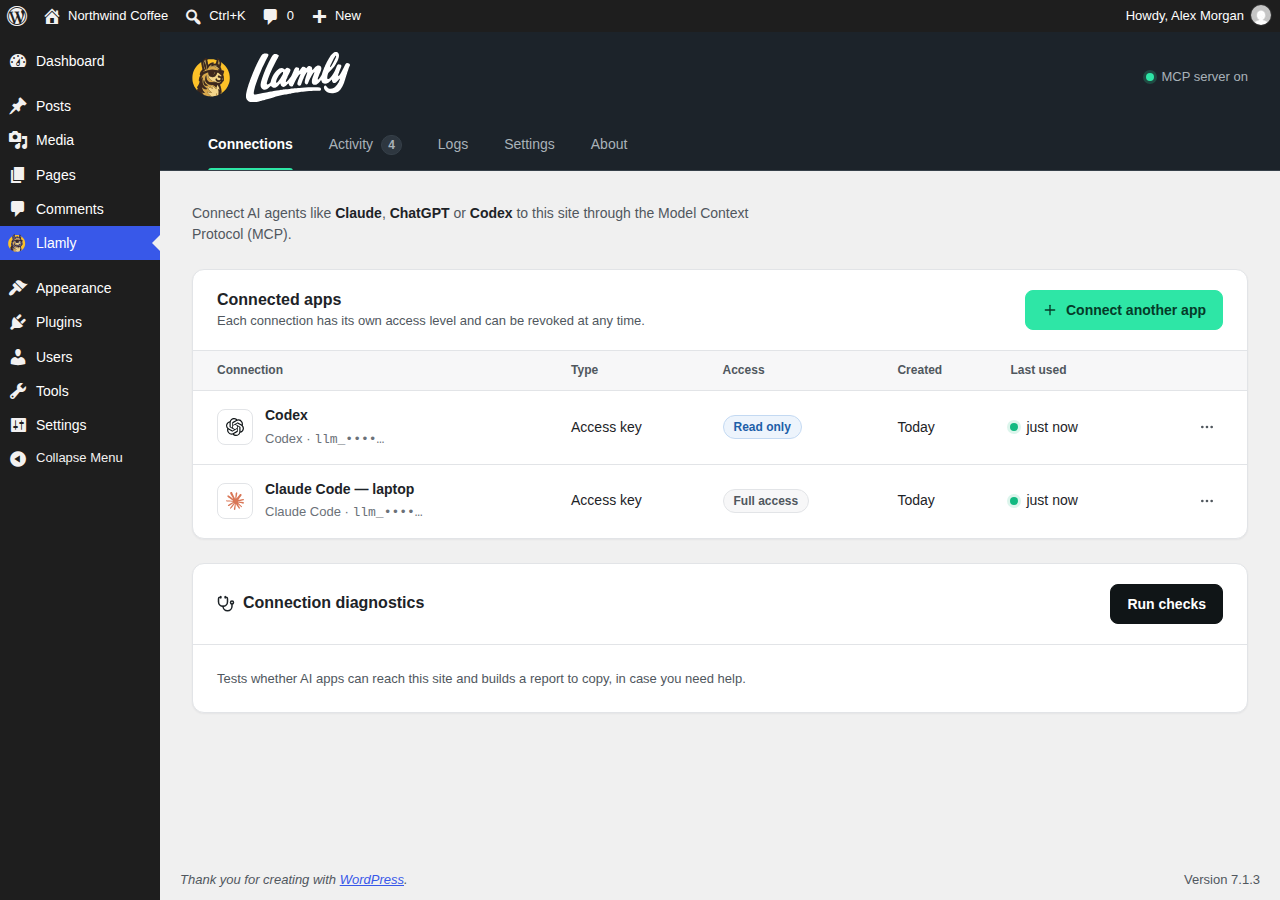
The Connections tab shows the exact command or config for each app, with your endpoint filled in. These apps also work with a local WordPress site, with no public address needed.
Safe by design
You are handing an AI real access to your site, so Llamly is built to keep you in charge:
- Change journal with undo and redo: before-state snapshots of every change, undo from Activity or by the agent (
wp_undo_change/wp_redo_change), newest first in batches, and conflicts with later human edits are reported instead of overwritten. - Safe mode (on by default): the agent must show you what it will do and repeat the call with
confirm: truebefore it deletes or trashes something, undoes a change, makes a destructive redo or takes an irreversible action. The agent controls that flag, so it is a brake and not a security boundary. - Content permissions only: every agent request runs under a capability ceiling. The key or OAuth grant acts as its WordPress user for content, but never with administrator capabilities (site settings, users, plugins, themes, code files, import and export, unfiltered HTML), whatever that user’s role. All markup the agent writes goes through the WordPress content filter: scripts, styles, iframes, inline event handlers,
javascript:links and Custom HTML blocks are refused or removed. - Approval queue (optional): holds publishing or changing anything visitors see until a human approves it in wp-admin. Requests expire after 7 days, and the agent cannot approve its own request.
- Access control: each key can have full access, read only access or chosen tool categories; OAuth connections are read only or read and write. Keys and tokens are stored hashed and can be revoked at any time.
- Audit log and limits: every MCP request is logged, with rate limiting per connection (120 requests per minute by default) and an origin allowlist.
- One gate for every write: input schema, your WordPress capabilities, the scope of the connection, the policy above, a durable snapshot and a revision check before anything changes.
Undo brings content back, but it cannot take back effects outside your database such as caches and CDNs. See Limitations below.
What Llamly does not do
No arbitrary SQL, shell, WP-CLI or file editing; no site settings, user changes or server logs; no installing, updating or switching plugins and themes; no fetching of remote URLs; no writing to Elementor. Llamly has no internal AI chat and does not send your content to any AI provider: the AI app you connect calls your site, not the other way around.
Requirements
- WordPress 6.2 or newer and PHP 8.0 or newer (tested up to WordPress 7.1).
- MySQL 5.7.8 or newer, or MariaDB 10.3 or newer, with InnoDB tables. Not supported for writes: Galera clusters (
wsrep_on=ON) and a customwp-content/db.phpdrop-in. - The database user must be allowed to use
GET_LOCK()and to runSET SESSION TRANSACTION ISOLATION LEVEL. Llamly sets REPEATABLE READ for each write and restores the previous level, so the host default does not need to change. innodb_flush_log_at_trx_commitmust be 1 or 2. Value 1 is fully durable; with 2 an operating system crash or power loss can lose about one second of committed changes, including journal entries. Value 0 is refused.max_allowed_packetof 16 MB or more is recommended; large changes can be refused below that.- A persistent object cache such as Redis is supported.
- OAuth apps (claude.ai, ChatGPT, Claude Desktop remote) need your site on a public HTTPS address.
The Doctor in the Connections tab (Run checks) tests these requirements on your server and tells you what to ask your host for.
Tested apps
Tested end to end with Claude Code, Codex, OpenCode, claude.ai, ChatGPT, Claude Desktop (cloud connector), Cursor (access key) and Antigravity CLI. Recipes are included, and testing is under way, for Cursor sign-in and the Claude Desktop local bridge. If a recipe does not work for you, please tell us in the support forum.
Admin screens
One Llamly menu with five tabs: Connections (connected apps, recipes and the Doctor), Activity (change history with undo and redo and approval requests), Logs (filterable audit log with CSV export), Settings and About (getting started and example requests). The interface is in English and can be translated on translate.wordpress.org; wp-admin and the OAuth sign-in page follow each user’s language.
Credits and licenses
Llamly is GPLv2 or later. Its connection recipes, OAuth flow and transport were modelled on Cowboy MCP (GPL-2.0-or-later); interface icons come from Lucide (ISC) and client marks from Simple Icons (CC0) and OpenCode (MIT). Details are in THIRD-PARTY-NOTICES.txt inside the plugin.
Privacy
Llamly stores, in your WordPress database:
- Connections: name, scope, owner user, creation and last-use time of each key and OAuth client. Keys and tokens are stored only as hashes.
- Audit log: one row per MCP request with time, connection, user, tool, result and the request IP address. Kept for 30 days by default (configurable from 1 to 365 days); you can clear or export it from Logs.
- Change journal: before and after snapshots of each object an agent changed, used for undo and redo. Snapshots contain the fields of the changed object, which can include personal data such as a comment author’s name, email, IP address and user agent; passwords, sessions and application passwords are never stored. Kept for 7 days by default (configurable from 1 to 90 days). Snapshots of deleted media files are kept in
wp-content/uploads/llamly-mcp/for the same period.
There is no Llamly server: the AI app you connect sends its requests straight to your site, and each request acts with the content permissions of the user who created the key or approved the OAuth sign-in, never administrator ones.
Expired rows are removed by a daily WordPress cron event. Llamly sets no cookies on the public site, adds no tracking, and makes no external requests at runtime. Links in the admin that open claude.ai or chatgpt.com only open those sites in your browser when you click them.
Source code
Every JavaScript and CSS file in this plugin is its own human-readable source, not minified and not generated: there is no build step. assets/free/js/admin.js (the admin screens), assets/free/js/editor-guard.js (block editor guard) and assets/free/js/icons.js (the SVG markup of the icons, from Lucide and Simple Icons, see THIRD-PARTY-NOTICES.txt) are loaded as they are, and the CSS in assets/free/css/ likewise. The PHP code is in src/Free/.
Limitations
- One undo and redo cycle. A change can be undone once and redone once. A repeated undo returns
already_undone. - Undo works while the snapshot of a change is retained (7 days by default). After that the Activity screen shows why a change can no longer be undone.
- Private meta fields of other plugins and meta derived from other data (for example values a plugin recalculates on save) are left as they are; undo does not rewrite them.
- Editors and other REST clients. After the agent has edited a post, page, custom post type, navigation menu, template or template part, a save over the REST API is refused with 409 until the client reads the item with
context=editand sends itsllamly_edit_tokenin theX-Llamly-Edit-Tokenheader. The block editor does this for you. The mobile app and other REST clients that send no token get the error until they reload the item. Items the agent never changed need no token. Not guarded: XML-RPC, the quick edit and bulk edit of the posts list, and plugin-specific REST APIs that write the same post (for example WooCommerce products). You can disable XML-RPC. - Upload size. One
wp_upload_mediacall carries a file of up to about 693 KB, because the whole request is limited to 1 MiB. Over the limit the agent gets a clear error and a request larger than 1 MiB is refused with HTTP 413. - Elementor support is read only.
- Llamly coordinates with the block editor, but a person saving the same post at the same moment as an agent may get a conflict that must be resolved by reloading.
- The agent can delete to the trash only; permanent deletion of posts is not offered.
Details


Related plugins
Plugins that also contain the tag ai-agent
ActiveCampaign – The autonomous marketing platform

S2B AI Assistant – ChatBot, AI Agents, ChatGPT API, Image Generator
Instant AI Chatbot

White Label voice assistant for ElevenLabs AI Agents
AI Chat Bot Agent D33PS33K

ChatSpark


About
Plugin for that tries to help you find the WordPress plugin you are looking for.
| Please enjoy an image of Crush (this awesome turtle) and have a lovely day! |  |
We do not own any plugin listed on this site and do not work for or work with WordPress.com or it's associated companies. We simply provide a searchable list of the available WordPress plugins.