



Merchant Feed Booster Lite for WooCommerce
Merchant Feed Booster Lite does two things most feed plugins skip entirely: it generates a solid Google Merchant XML feed and tells you exactly why your products might be rejected or underperforming — before they reach Google.
The core problem it solves
You create a WooCommerce product, include it in your feed, and submit it to Google Merchant Center. Days later, some products are disapproved or showing low impressions. The rejection messages are vague. You have no idea which product has what issue, or what to change.
This plugin scans every product in your catalog against 25 named policy rules that mirror Google’s content requirements. Each issue comes with a rule ID, a plain-English explanation, and a specific fix hint — all visible in your WordPress admin before your feed ever reaches Google.
Google Merchant XML Feed
The plugin writes a properly formatted RSS 2.0 feed with the g: Google namespace to:
wp-content/uploads/codesolz-feeds/google-products.xml
The feed URL is displayed on the Dashboard and can be copied with one click for pasting into Google Merchant Center as a scheduled fetch (Settings Data sources Add file).
What goes into the feed:
g:id— WooCommerce product ID or SKUg:title— Product name (with optional store-wide prefix)g:description— Product descriptiong:link— Product permalinkg:image_link— Featured image URLg:priceandg:sale_price— Regular and sale prices with currency codeg:availability—in_stockorout_of_stockg:brand— Per-product field or store-wide defaultg:gtin— Barcode / EAN / UPC (validated)g:mpn— Manufacturer Part Numberg:google_product_category— Full Google taxonomy pathg:condition— new, refurbished, or usedg:identifier_exists— Auto-set based on brand + GTIN/MPN
Feed reliability:
- Atomic file write — the plugin writes to a
.tmpfile first, then renames it, so the live feed is never half-written during regeneration - WP-Cron auto-refresh: twice daily, daily, weekly, or a custom interval in hours
- Manual regeneration from the Dashboard at any time with live product count feedback
- Out-of-stock toggle — include OOS products with
availability: out_of_stockor exclude them entirely
Per-product Google Fields
New fields appear on every WooCommerce product edit screen (General tab):
- Brand — Manufacturer or brand name, exported as
g:brand - GTIN — Barcode / EAN / UPC. Non-numeric characters are stripped on save. Validated against the GS1 check digit algorithm; shows a warning if structurally invalid without blocking the save
- MPN — Manufacturer Part Number, used when GTIN is not available
- Google Product Category — Full Google taxonomy path, e.g.
Apparel & Accessories > Clothing - Condition — new, refurbished, or used
Store-wide defaults for brand and Google product category can be set in Settings and are used as fallbacks when a product has no value filled in.
Feed Health — 25 Policy Rules
Every product in your catalog is checked against 25 named rules and assigned a health score from 0 to 100.
Title rules (T01–T08)
- T01 — Title under 25 characters — too short for meaningful ad targeting
- T02 — Title over 150 characters — Google truncates these in ads
- T03 — Promotional words in title (FREE, SALE, % OFF, etc.) — policy violation
- T04 — ALL CAPS words — policy violation
- T05 — HTML tags in title — breaks feed parsing
- T06 — Price mentioned in the title — not allowed by Google
- T07 — Special characters at the start or end of the title
- T08 — Repeated words in the title
Image rules (I01–I05)
- I01 — No product image set
- I02 — Image smaller than 100×100 px — Google rejects these outright
- I03 — Image smaller than 250×250 px — Google warns; lower ad quality
- I04 — Non-standard image format (not JPEG, PNG, GIF, or WebP)
- I05 — Tracking parameters in the image URL (e.g.
?utm_source=)
Price rules (P01–P04)
- P01 — Missing or zero price
- P02 — Sale price set but no regular price — Google requires both
- P03 — Sale price is equal to or greater than the regular price
- P04 — Non-numeric price value
Identifier rules (ID01–ID04)
- ID01 — GTIN has wrong digit count (valid: 8, 12, 13, or 14 digits)
- ID02 — GTIN fails the GS1 check digit algorithm — structurally invalid
- ID03 — Brand is set but neither GTIN nor MPN is provided
- ID04 — No brand set — required for most product categories
Description rules (D01–D04)
- D01 — No product description
- D02 — Description under 50 characters — too thin for Google
- D03 — HTML tags in the description
- D04 — Promotional language in the description (FREE, SALE, etc.)
Health score tiers:
- Excellent (85–100) — green — product meets all or nearly all requirements
- Good (70–84) — blue — minor issues; product will likely be approved
- Needs Work (50–69) — amber — several issues; moderate approval risk
- Poor (30–49) — orange — major issues; product is likely to underperform
- Critical (0–29) — red — severe violations; product will probably be disapproved
Scores are cached per-product using an MD5 hash of key fields (title, price, image, brand, GTIN, modified date). The score reloads instantly from cache when nothing changed and is automatically recalculated the moment a relevant field is updated on save.
Admin Pages
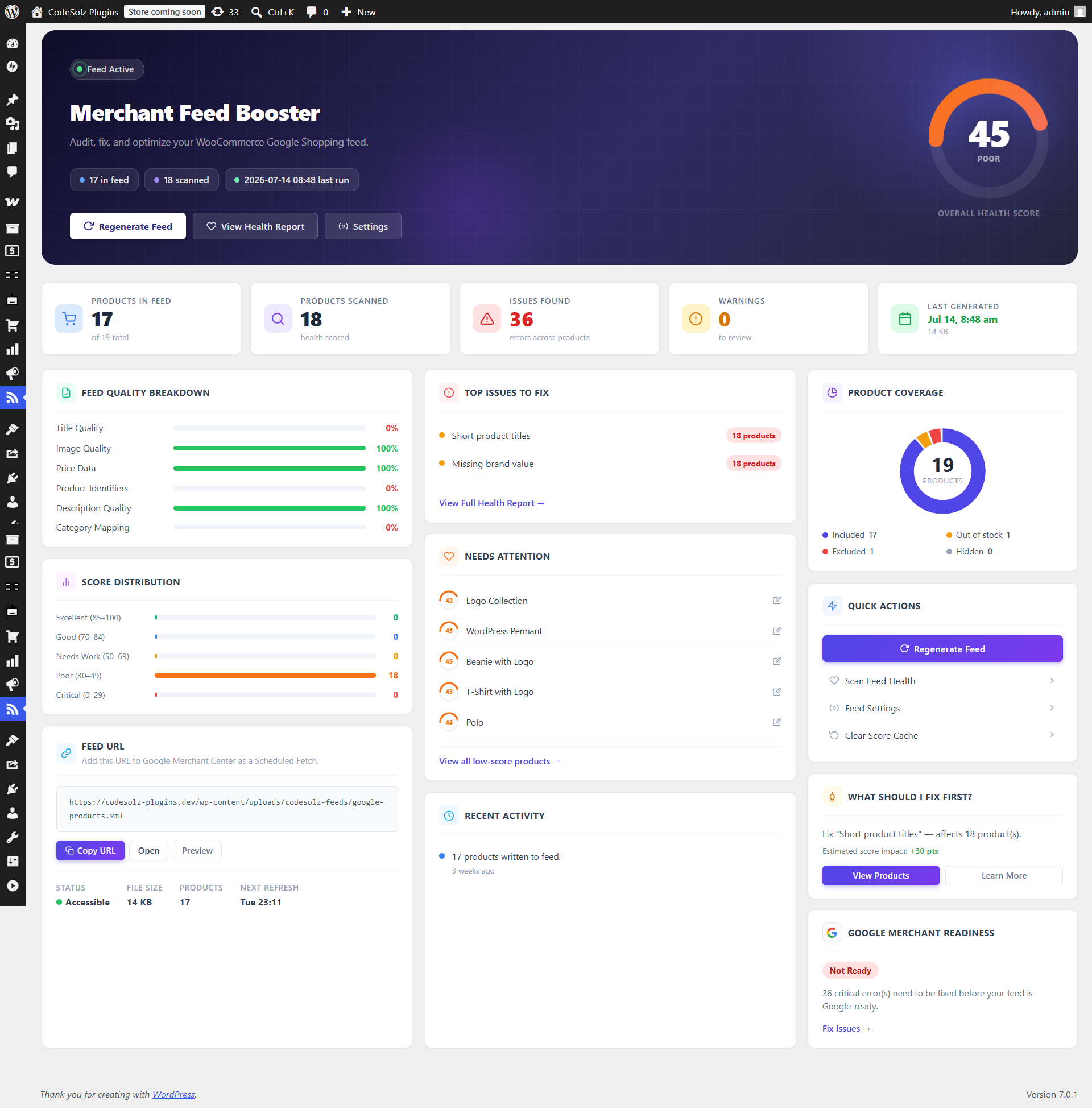
Dashboard
The main overview page shows the store-wide picture at a glance:
- Animated circular health score gauge showing your store’s average score
- Feed status (active / inactive) with last generation time
- Feed URL with one-click copy button
- Stats: products in feed, products scanned, errors, warnings
- Feed quality breakdown bars per category (Title, Image, Price, Identifiers, Description)
- Score distribution chart showing how many products fall in each tier
- 5 lowest-scored products that need immediate attention
- Top issues to fix, ranked by how many products they affect
- Recent activity log
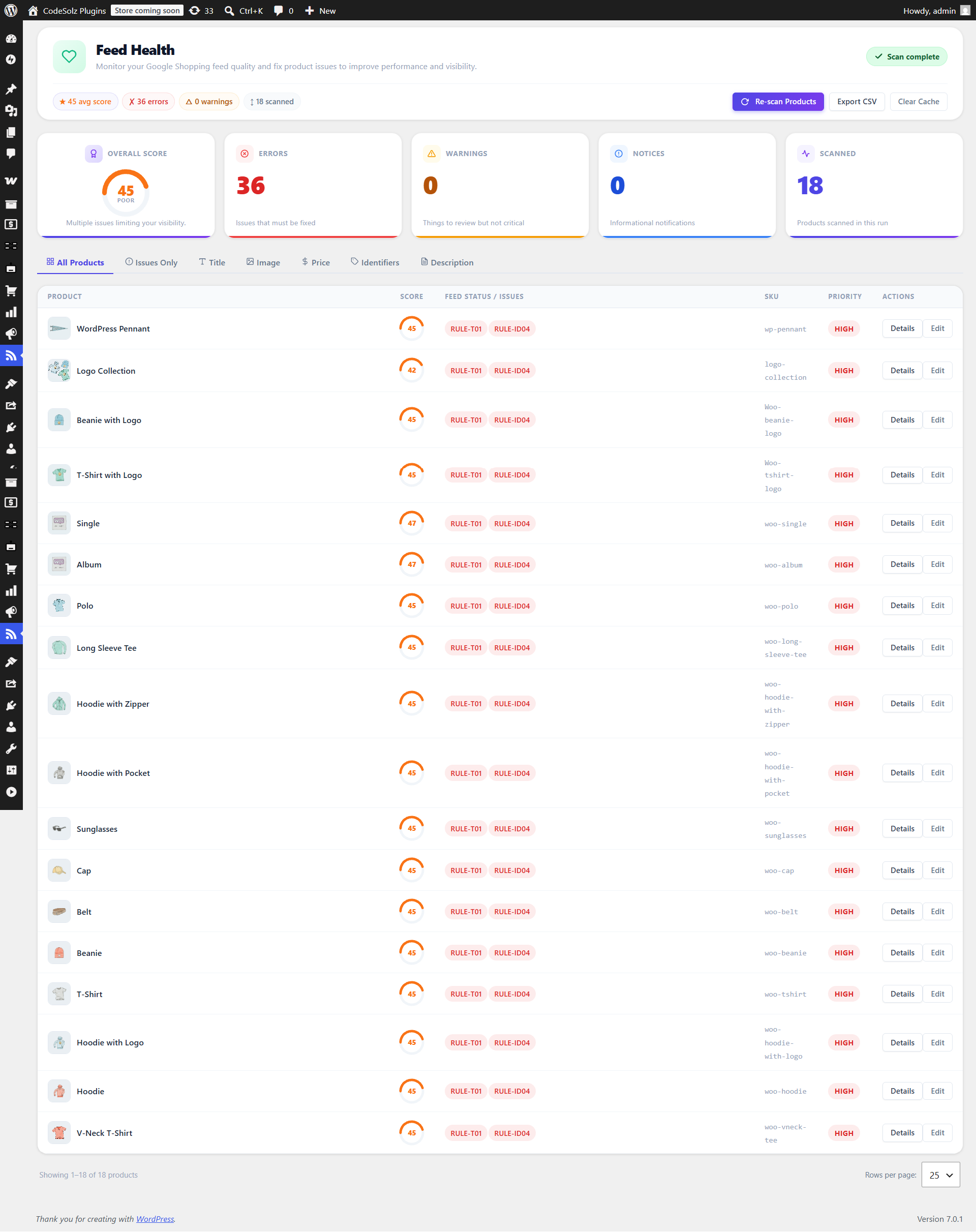
Feed Health
Full product-by-product breakdown:
- Score badge (color-coded by tier) next to every product name
- Filter tabs: All Products, Issues Only, Title, Image, Price, Identifiers, Description
- Expandable detail row per product showing every failing rule — severity (Error / Warning / Notice), rule ID, message, and a specific fix hint
- Background scan with real-time progress bar — scans 50 products per batch, never times out on large catalogs
- Export to CSV — one row per product, one column per rule ID
- Clear Cache button to force a full rescan from scratch
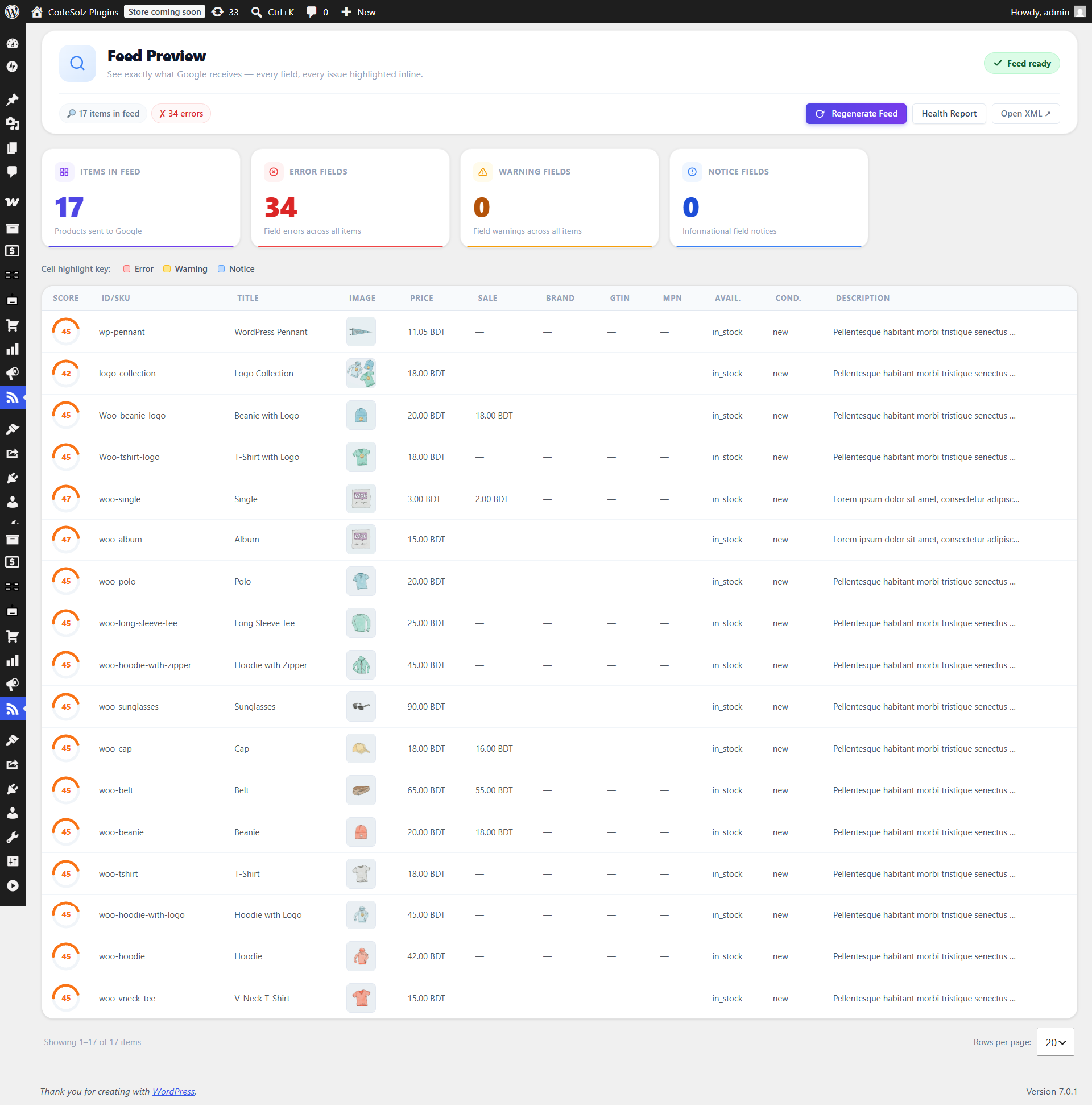
Feed Preview
Live view of your feed items as they will appear in the XML file:
- One row per product, one column per field (Title, Image, Price, Sale Price, Brand, GTIN, MPN, Availability, Condition, Description)
- Cells highlighted red, amber, or blue when a policy rule affects that specific field
- Score gauge in the first column
- Pagination with configurable rows per page
Per-product Meta Box
Appears in the sidebar of every WooCommerce product edit screen:
- Color-coded score badge for this product
- Up to 5 failing rules with severity and rule ID
- Link to the full Feed Health report filtered to this product
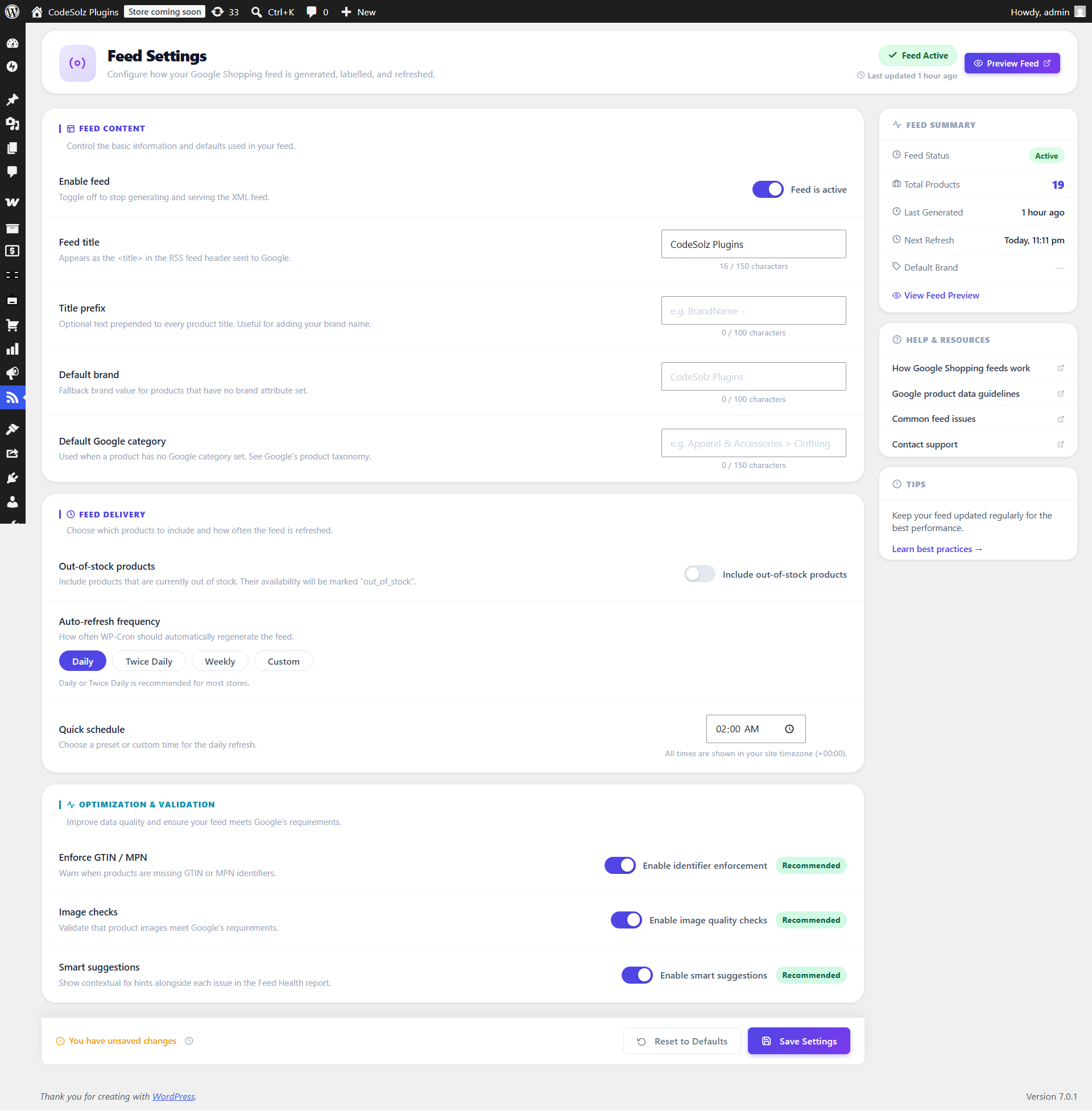
Settings
All settings are AJAX-driven — no page reload needed:
- Enable / disable the feed (master switch)
- Feed title
- Product title prefix (prepended to every product title in the feed)
- Default brand (fallback for products with no brand set)
- Default Google product category (fallback for uncategorized products)
- Include out-of-stock products toggle
- Auto-refresh frequency: twice daily / daily / weekly / custom hours
- Preferred schedule time for daily refresh
- Enforce GTIN / MPN warnings
- Validate image dimensions
WP-CLI Commands
wp cs-mfb generate — Regenerate the feed from the command line

wp cs-mfb health — List all products with their scores and issue counts

wp cs-mfb health --limit=100 --format=csv — Export health report as CSV

wp cs-mfb score 42 — Show score and all issues for product ID 42

wp cs-mfb clear-cache — Clear all cached scores (next scan rescores everything)
Developer Hooks
Filters
cs_mfb_required_capability— Change the required admin capability (default:manage_woocommerce)cs_mfb_should_include_product— Returnfalseto exclude a product from the feedcs_mfb_item_data— Modify any feed field before it is written to XMLcs_mfb_extra_item_fields— Add extrag:*fields to a feed itemcs_mfb_policy_rules— Add, remove, or modify the 25 policy rulescs_mfb_score_weights— Adjust the weight each rule contributes to the 0–100 scorecs_mfb_health_table_columns— Add extra columns to the Feed Health tablecs_mfb_include_hidden— Include catalog-hidden products in the feed (default: false)
Actions
cs_mfb_ready— Fires after all plugin subsystems are initializedcs_mfb_register_admin_pages— Fires insideadmin_menu— use to add sub-pages under Feed Boostercs_mfb_feed_generated— Fires after the XML feed file is writtencs_mfb_before_item_written— Fires before each product item is serialized to XMLcs_mfb_after_product_scored— Fires after a product is scoredcs_mfb_after_health_table— Fires after the Feed Health table is rendered
Privacy
This plugin does not collect, transmit, or store any personal data. All feed generation, health scoring, GTIN validation, and image dimension checking runs entirely on your server. No external API calls are made.
Details

About
Plugin for that tries to help you find the WordPress plugin you are looking for.
| Please enjoy an image of Crush (this awesome turtle) and have a lovely day! |  |
We do not own any plugin listed on this site and do not work for or work with WordPress.com or it's associated companies. We simply provide a searchable list of the available WordPress plugins.