



Mixer Dynamic Cursor
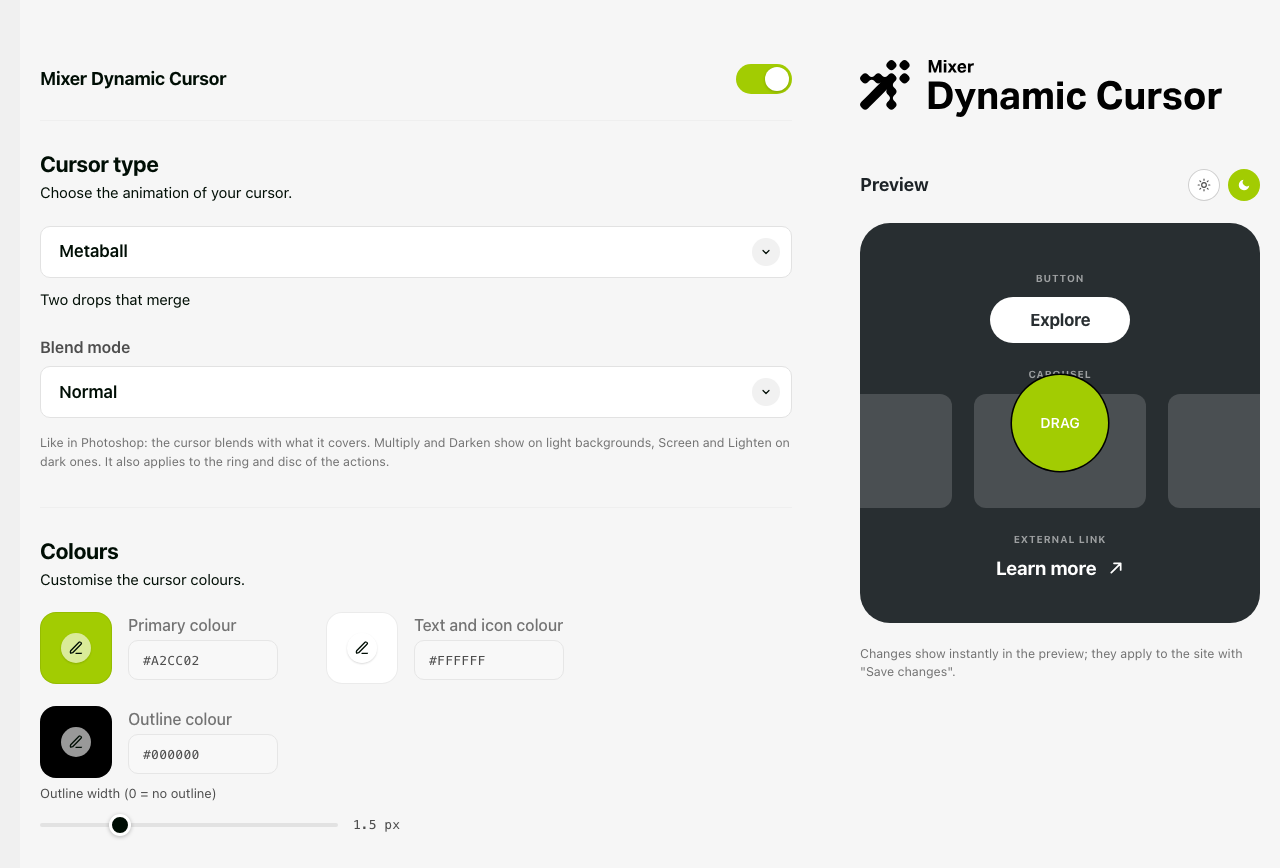
Mixer Dynamic Cursor replaces the system pointer with an animated cursor that follows the mouse and reacts to what it hovers. Everything is set from one page in the dashboard, with a live preview.
24 cursor styles, each with one to three colours: Metaball, Dot, Invert, Glow, Comet, Trail, Crosshair, Magnet, Jelly, Lens, Pixel, Neon, Sparkles, Beam, Amoeba, Radar, Caret, Eclipse, Orbit, Brush, Autofocus, Glitch, Heart, Confetti.
Blend modes, named and grouped like in Photoshop: Normal, Darken, Multiply, Color Burn, Lighten, Screen, Color Dodge, Overlay, Soft Light, Hard Light, Difference, Exclusion, Hue, Saturation, Color, Luminosity. Invert always uses Difference.
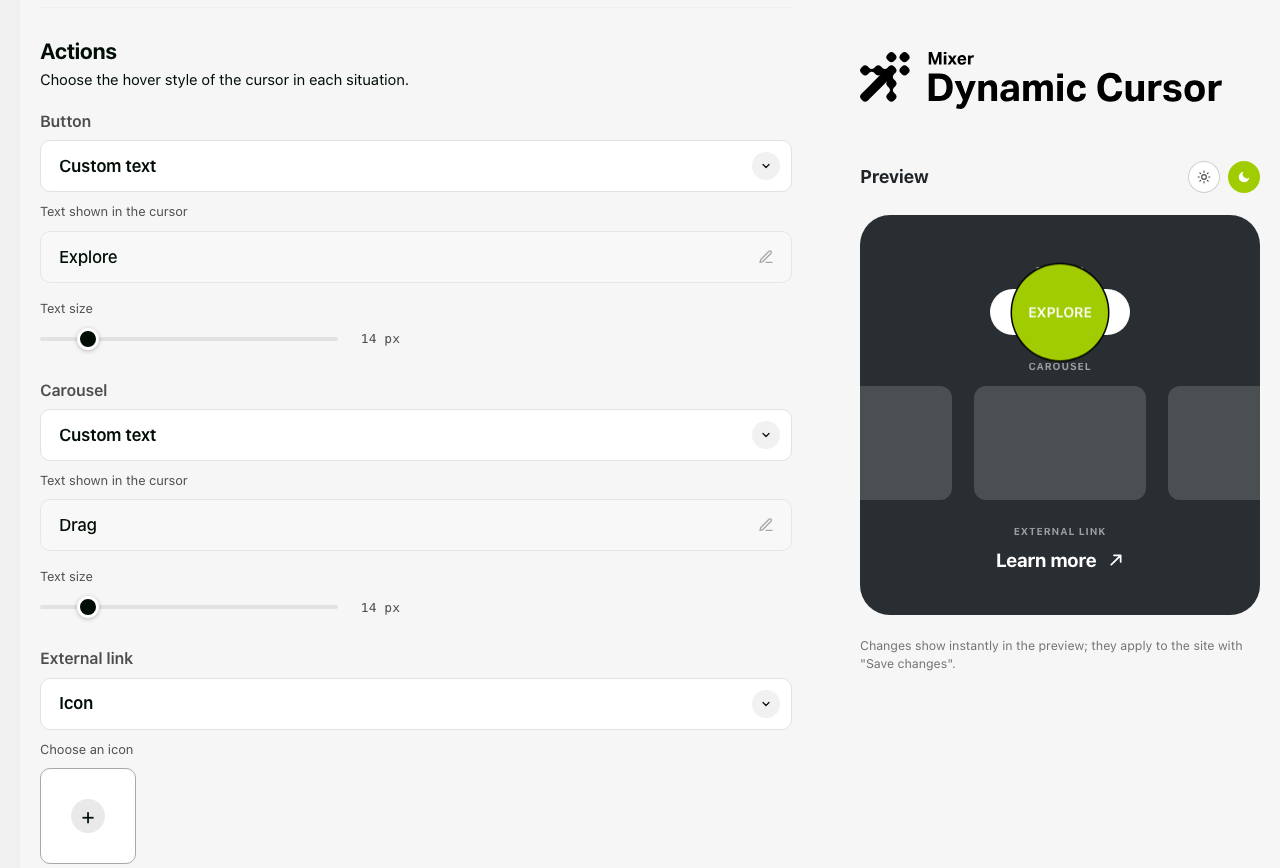
Three hover actions, each in three modes (Ring, Icon, Text):
- Button: buttons and links, tabs, ARIA interactive roles, form submit controls.
- Carousel: Elementor (free and Pro), Swiper, Flickity, Slick, Owl, Splide, Glide, Tiny Slider, Keen, Embla, Smart Slider, MetaSlider, Soliloquy, Slider Revolution, and in general any container that scrolls horizontally. Carousels that cannot be dragged keep the normal cursor.
- External link: links with
target="_blank"orrel="external".
Other features
- Icons from the media library (SVG or PNG with transparency). Without an icon, the bundled 45° arrow is used.
- Font: the site font, a Google Font, or Adobe Fonts (Typekit project ID, validated from the dashboard).
- Outline colour and width, text size, case and weight for the actions.
- Extra CSS selectors for buttons, carousels and “system cursor” areas.
- Per-element overrides:
data-cursor="button|carousel|external|native"anddata-cursor-text="Drag". - Mouse and trackpad only: on touch devices nothing is loaded. With “reduce motion” enabled, ambient animations and trails are turned off.
- Not loaded in the Elementor editor and preview, in feeds, REST and AJAX requests.
- A
dynamic_cursor_should_loadfilter to switch the cursor off on specific pages.
External services
Mixer Dynamic Cursor works without contacting any external service. Two optional font sources, chosen by the administrator in the dashboard, load files from third-party servers:
Google Fonts — when “Google Fonts” is selected as the font source, every page of the site loads a stylesheet from fonts.googleapis.com and the font files from fonts.gstatic.com. Visitors’ browsers connect to Google servers, which receive their IP address. Service: Google Fonts — Google Privacy Policy — Google Fonts FAQ on privacy.
Adobe Fonts (Typekit) — when “Adobe Fonts” is selected, every page of the site loads a stylesheet from use.typekit.net with the project ID you entered, and visitors’ browsers connect to Adobe servers. In addition, when the administrator clicks “Validate ID” in the dashboard, the site’s server fetches https://use.typekit.net/<project-id>.css once to read the available font families. No other data is sent. Service: Adobe Fonts — Adobe Terms of Use — Adobe Privacy Policy.
With the default “Site font” option, no external request is made.
Details
Related plugins
Plugins that also contain the tag animation
Blocks Animation: CSS Animations for Gutenberg Blocks

UiCore Animate – Free Animations, Transitions, and Interactions Addon for Elementor & Gutenberg blocks

Loading Page with Loading Screen
Animations for Blocks

Ghost Kit – Page Builder Blocks, Motion Effects & Extensions

Animate on Scroll


About
Plugin for that tries to help you find the WordPress plugin you are looking for.
| Please enjoy an image of Crush (this awesome turtle) and have a lovely day! |  |
We do not own any plugin listed on this site and do not work for or work with WordPress.com or it's associated companies. We simply provide a searchable list of the available WordPress plugins.