



Mustkit Intent & CRO for WooCommerce
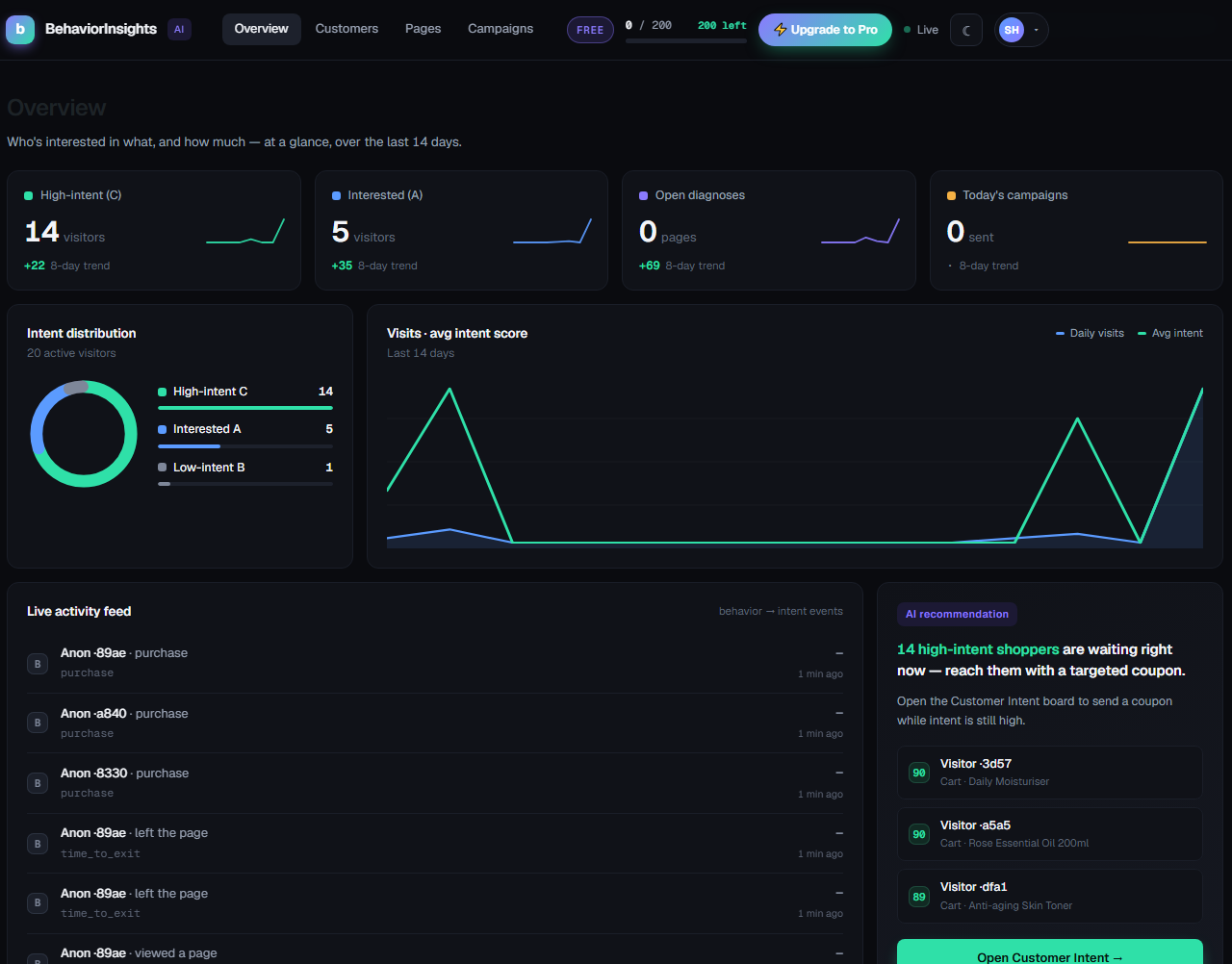
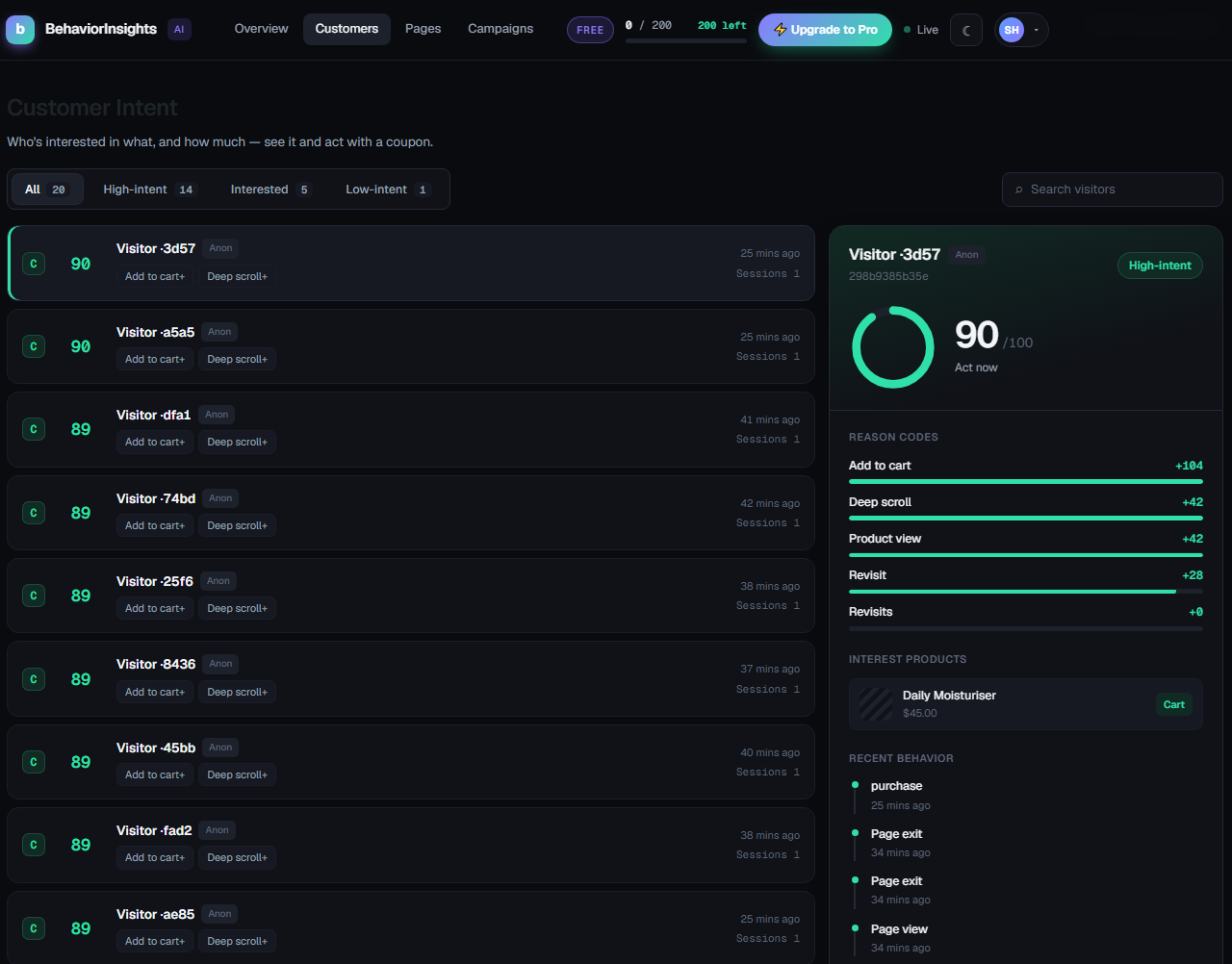
Mustkit Intent & CRO for WooCommerce analyzes detailed visitor behavior to (1) score each customer’s purchase intent into A/B/C labels for automated campaigns, and (2) diagnose weak page sections and prescribe concrete CRO fixes. All visitor data and PII stay on your own store server.
Intent scoring that learns from your store, not from a hardcoded table
- The weight of each behavior is not written into the plugin. It is learned from your own conversions: for every behavior type, Mustkit Intent & CRO measures the log-odds lift of that behavior among buyers versus non-buyers, and re-weights accordingly.
- A “scroll to the bottom” means something different in a jewelry store and a supplement store. The data works that out for you.
- Before there is enough data, scoring falls back to a neutral prior and converges as orders accumulate.
Signals beyond scroll depth
- Collected on the page: pageview, scroll depth, section dwell, time to exit, rage clicks, dead clicks, add-to-cart, product views, and viewport visibility.
- Section dwell can follow your own
data-bi-sectionmarkers, or fall back to scroll-percentile bands.
Why they don’t buy — per product
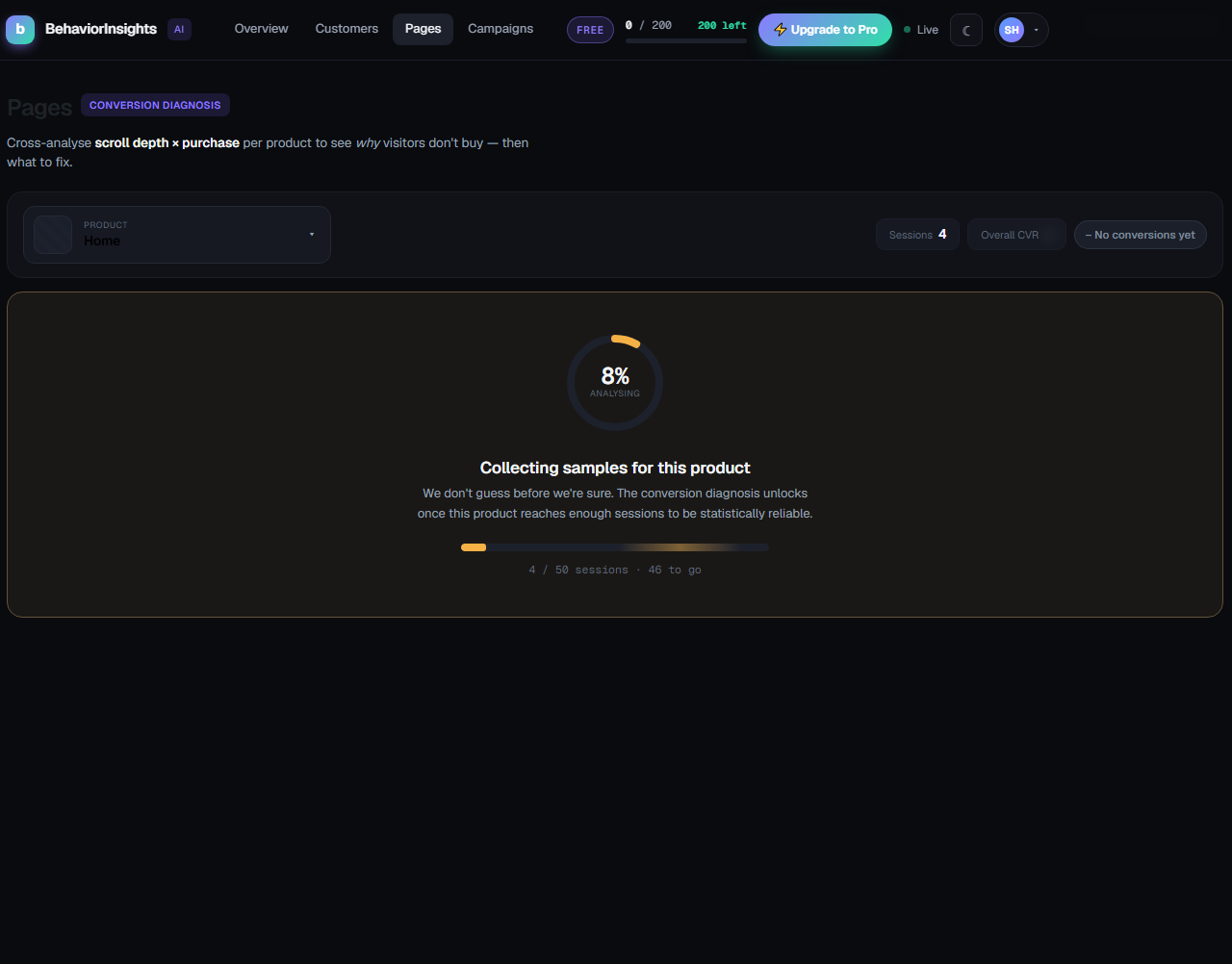
- Cross-analyses scroll depth against purchases for each product page, then names the section losing the sale — weak hero, dull mid-page, unconvincing price — with a concrete fix.
- Waits until a product has enough sessions to be statistically reliable before showing a verdict.
Campaigns that reach anonymous visitors too
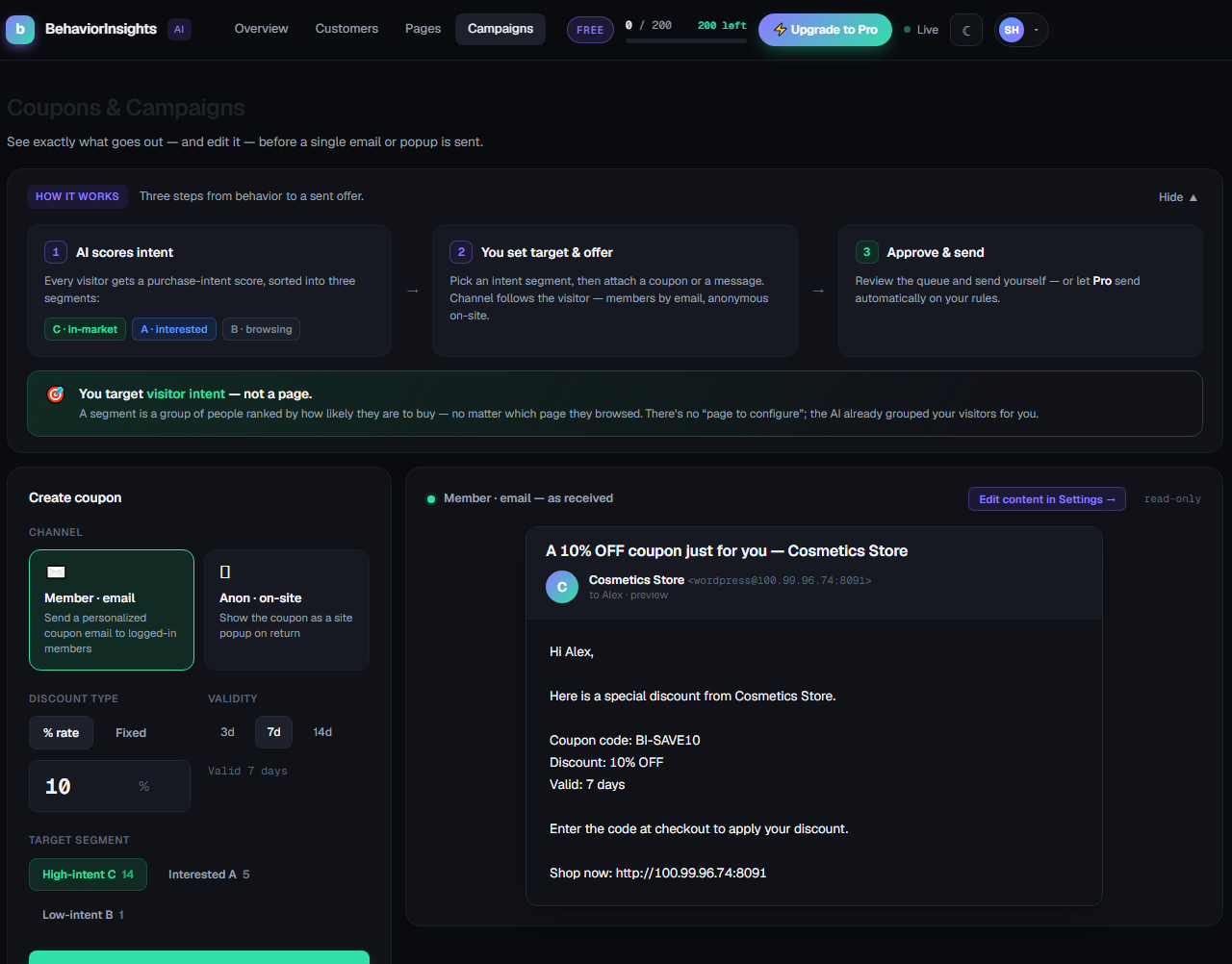
- Email campaigns for known customers, plus on-site coupon popups keyed to the visitor’s anonymous cookie ID — so a first-time, never-logged-in browser can still be won back on their next visit.
- Popups only fire for visitors who have given consent.
Privacy handled, not promised
- Registered with WordPress’s own privacy tools: data-subject export and erase requests are handled for you.
- Consent withdrawal anonymizes that visitor’s history.
- A retention window (default 180 days) purges expired behavior data on a schedule.
What leaves your server
- Every feature — visitor tracking, intent scoring, conversion diagnosis, prescriptions and campaigns — runs entirely on your own server. By default, nothing is sent anywhere.
- All features are free and fully functional. Nothing is locked, time-limited, or usage-capped.
- Two optional data connections to our cloud exist and are off by default — they only run if you turn them on in Settings External data sharing. The only other outbound calls are ones you trigger yourself: Pro license/billing checks and the support form. All are documented under “External services” below.
External services
The plugin requires no account and no API key to use. All processing runs locally on your store. The services below are contacted only if you explicitly opt in (1, 2) or explicitly use the feature in question (3, 4). All four services are operated by JK Networks (the plugin author). The same terms and privacy policy apply to all of them:
Terms of service: https://mustkit.com/legal/service — Privacy policy: https://mustkit.com/legal/privacy
-
Installation reporting — Mustkit cloud at
bi.mustkit.com— opt-in, off by default. If you enable “Share install status” in Settings, then once every 24 hours from the WordPress admin the plugin sends your site domain, a hash of it, the active plan (free/pro), whether a license is active, and the plugin version, so we can see where the plugin is installed. No visitor data, no PII, and no store content is sent. -
Behavior cloud sync — Mustkit cloud at
bi.mustkit.com— opt-in, off by default. If you enable “Sync behavior to cloud” in Settings, anonymized visitor-behavior events are mirrored to our cloud so it can provide cross-site benchmarking that a single store cannot compute locally. Visitor IDs are one-way hashed and no PII (name, email, order details) is sent. When you first enable this option, the plugin also registers your site once with the same service (sending your site domain, a site identifier, and a one-time challenge string) to receive the signing secret used to authenticate the sync. With this off, no visitor data ever leaves your server. -
License verification & subscription management — Mustkit license/billing server at
bi.mustkit.com— only if you buy the optional Pro add-on on mustkit.com and use the Plan & Billing screen. No call is made unless a license key has been entered. Specifically:- License verification: after you paste your license key, the plugin periodically re-verifies it (result cached up to 10 minutes), sending the license key and your site URL.
- Subscription cancellation: only when you click “Cancel auto-renewal” in Plan & Billing, the plugin sends your license key, site URL, and subscription ID so our billing server can stop the renewal. Your plan stays active until the paid period ends.
- Billing history: only when you open the billing-history panel in Plan & Billing, the plugin sends your license key, site URL, and subscription ID and receives your invoice list (date, amount, status, payment method) for display.
-
Support requests — Mustkit operations console at
console.mustkit.com— only when you submit the form on the Support screen. The plugin sends the product ID, your site URL, your admin account email address, and your subject/message. If (and only if) you tick “Attach diagnostics”, it also sends the plugin, WordPress, WooCommerce and PHP versions and your list of active plugins to help us debug. Nothing is sent unless you press Submit.
Upgrading to Pro happens on our website (https://mustkit.com); there is no checkout inside the plugin. No external service is contacted for visitor tracking, intent scoring, page diagnosis, prescriptions, or campaigns — those run locally on your store.
Source Code
All JavaScript and CSS in this plugin is hand-written, human-readable source, shipped exactly as authored — there is no build, transpilation, or minification step for JS/CSS, so the files in assets/ are the complete source themselves.
The bundled vendor/jk-wp-sdk PHP library is also hand-written source. During packaging its PHP namespace is prefixed per product with PHP-Scoper (to prevent class collisions when two of our plugins are active on the same site); this only renames namespaces and the code remains fully human-readable.
Details
Related plugins
Plugins that also contain the tag analytics
Site Kit by Google – Analytics, Search Console, AdSense, Speed

MonsterInsights – Google Analytics Dashboard for WordPress (Website Stats Made Easy)

WP Statistics – Simple, privacy-friendly Google Analytics alternative

GA Google Analytics – Connect Google Analytics to WordPress

Head, Footer and Post Injections

ExactMetrics – Google Analytics Dashboard for WordPress (Website Stats Plugin)


About
Plugin for that tries to help you find the WordPress plugin you are looking for.
| Please enjoy an image of Crush (this awesome turtle) and have a lovely day! |  |
We do not own any plugin listed on this site and do not work for or work with WordPress.com or it's associated companies. We simply provide a searchable list of the available WordPress plugins.