


Nubocoder Agency Manager Client
Install this plugin when your agency uses Nubocoder Agency Manager, the free hub plugin it installs on its own WordPress site. On its own this plugin does nothing. It lets the agency create, change, suspend and remove the accounts of its own team members on your site, so people who join or leave the agency get or lose access right away.
Full documentation: cesarsiancas.com/plugins/nubocoder-agency-manager-client.
Important: this plugin delegates part of the administration of your site
After you connect, the agency hub can create user accounts on this site, change their roles, suspend them and delete them, without logging in here. If you allow administrator-level roles, those accounts can manage the whole site, including its plugins, themes, settings and other users.
The agency hub is the WordPress site where your agency runs Nubocoder Agency Manager. It is run by your agency, not by the authors of this plugin, and the security of your site will also depend on its security: anyone who takes control of that site or of its keys could act on your site within the permissions you grant. Connect only to an agency you trust, allow administrator-level roles only if the agency needs them, and disconnect the agency as soon as it no longer works on your site.
The connection screen explains this, and you must confirm it before connecting.
You stay in control
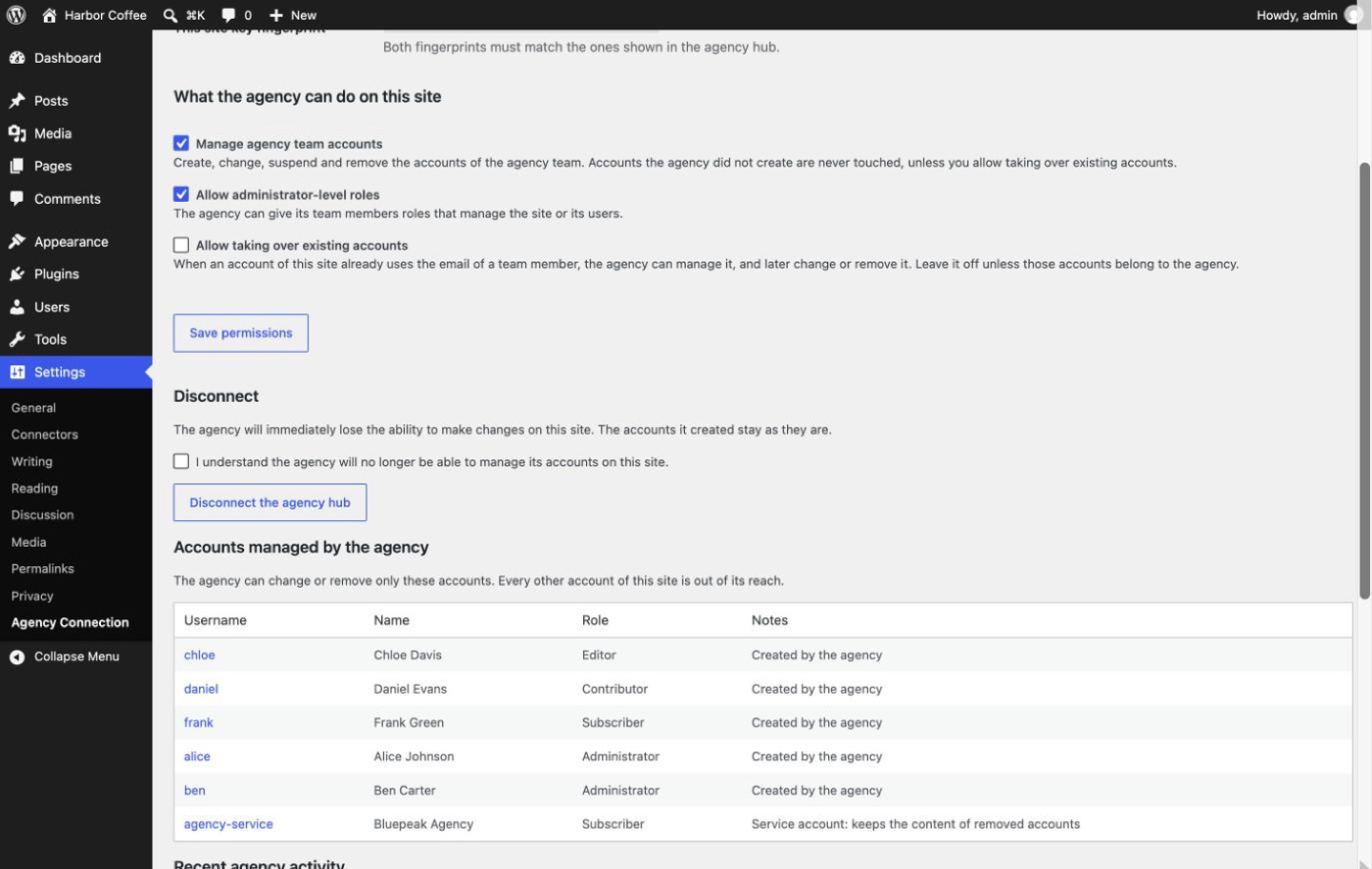
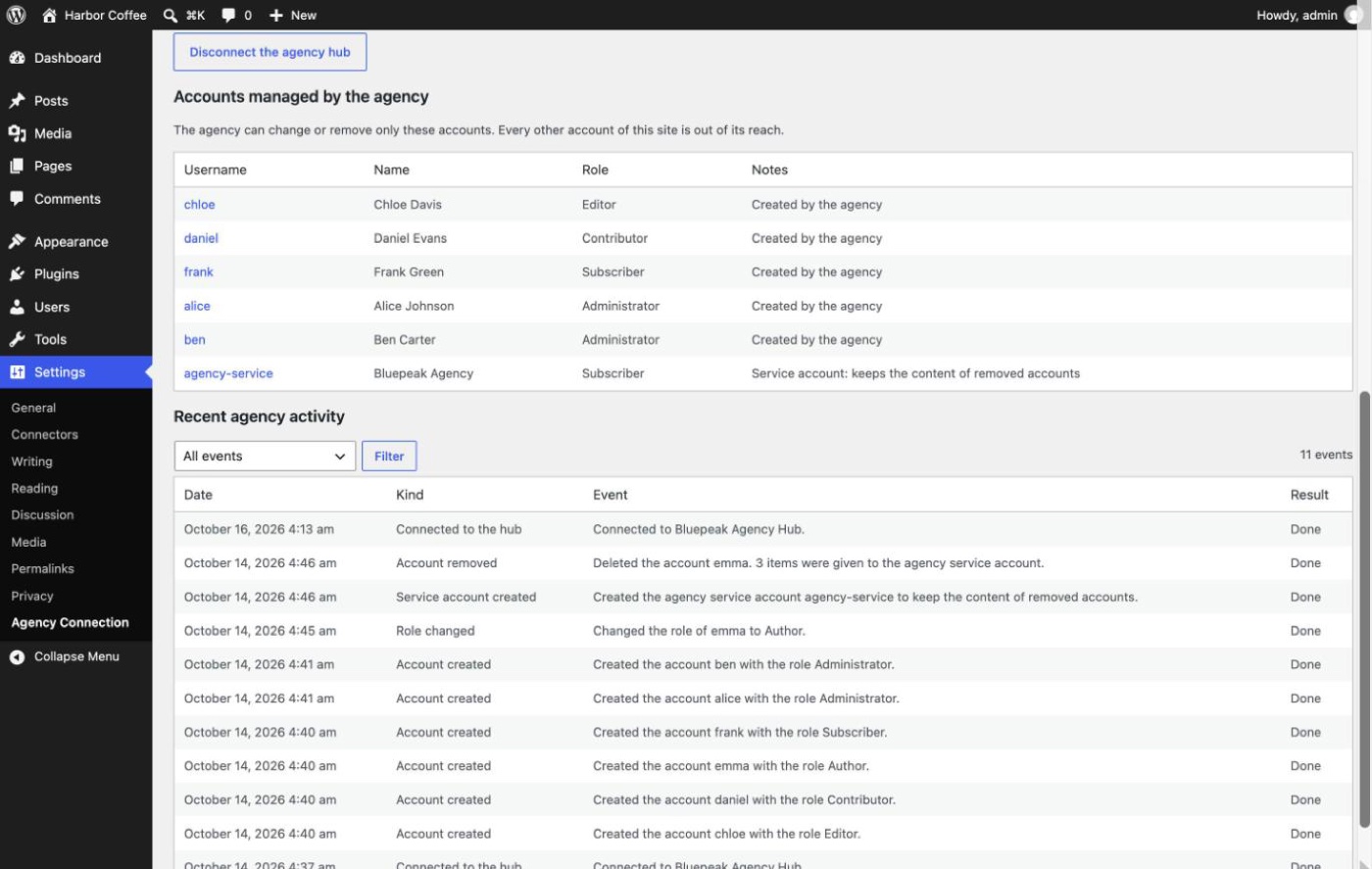
- The agency can only change the accounts it created. Your own accounts are never touched unless you allow taking over existing accounts, and the last administrator of the site is never removed.
- Choose what the agency may do before connecting: manage team accounts, give administrator-level roles, or take over existing accounts (off by default).
- See every action of the agency, and the list of accounts it manages, in Settings Agency Connection. You get an email when an agency account receives an administrator-level role or when someone changes the permissions.
- Disconnect the agency at any time. In an emergency, add define( ‘NBAMC_DISABLE’, true ); to wp-config.php.
- A copy of the site, such as a staging copy, does not act on agency requests and cannot disconnect the real site.
Every request is signed with a key dedicated to your site, valid for five minutes and usable once. Requests that fail verification are rejected, and repeated failures block the sender for 15 minutes. The plugin sends no data to anyone other than the connected agency hub.
External services
This plugin does not use any third-party service. It only talks to the Agency Manager hub of your agency, the site where your agency runs Nubocoder Agency Manager, and only after you paste its connection key in Settings Agency Connection.
- When you connect, the plugin sends the hub the address of this site, its REST endpoint, a public key and the plugin version.
- When the hub asks, the plugin answers with the WordPress and PHP versions, the name and address of this site, its roles and number of users, the login, email, role and post count of the accounts the agency manages here, and the login, email and role of the administrators of this site.
- When you disconnect, the plugin tells the hub that the connection was closed, with the address of this site.
The address of the hub is the one in the connection key your agency gave you. Ask your agency for its privacy policy. Nothing is sent to any other server.
Details
Related plugins
Plugins that also contain the tag access-management
Meveto

Nubocoder Agency Manager

WP – Custom Access Lite


About
Plugin for that tries to help you find the WordPress plugin you are looking for.
| Please enjoy an image of Crush (this awesome turtle) and have a lovely day! |  |
We do not own any plugin listed on this site and do not work for or work with WordPress.com or it's associated companies. We simply provide a searchable list of the available WordPress plugins.