

Onscreen Keyboard
This plugin adds an onscreen keyboard powered by Javascript/JQuery, ported from Samuel Deering’s work on github with his permission under the above licence by Iain Redmill, now working within WordPress, allowing mouse based input or input when working from a touch screen device. Keyboard settings etc can be modified by editing the file. To add a keyboard, enter [oskb] within your page where you wish it to appear.
Apart from improving the working of the older version, the on-screen keyboard for password protected posts and pages in different flavors has been added recently.
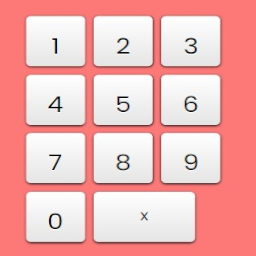
Onscreen keyboard for password protected posts and pages. Standard keyboard can still be used.
Onscreen numerical keyboard for password protected posts and pages where password is numerical i.e. a pincode. Furthermore: 12 digit password is submitted automatically. (Passwords longer than 12 characters, of which the first 12 characters are numbers, are therefore impossible.) Standard keyboard can still be used (but in that case the auto-submit won’t work properly – you have to hit the submit button). General passwords can still be used by using standard keyboard.
Details


Related plugins
Plugins that also contain the tag keyboard
Save with keyboard
Cool Virtual Keyboard

Quick Navigation Interface

WP Keyboard Navigation

WP Arabic Virtual Keyboard

Keyboard Save


About
Plugin for that tries to help you find the WordPress plugin you are looking for.
| Please enjoy an image of Crush (this awesome turtle) and have a lovely day! |  |
We do not own any plugin listed on this site and do not work for or work with WordPress.com or it's associated companies. We simply provide a searchable list of the available WordPress plugins.