



Opti-Behavior – Analytics That Grows Your Business
Opti-Behavior is the only WordPress analytics plugin that gives you Hotjar-level behavior analytics with complete data privacy and zero performance impact — all from your own server.
Powered by a revolutionary Hybrid Storage engine, Opti-Behavior writes analytics events to optimized files on disk instead of hammering your database with every pageview. Combined with batch processing, pre-aggregated daily statistics, and a ~15KB async tracking script, your website stays blazing fast — even with millions of pageviews.
See exactly how visitors interact with your website through powerful visual heatmaps, detailed click tracking, conversion funnels, and comprehensive real-time analytics. Unlike Hotjar, Microsoft Clarity, or Google Analytics, all your data stays on YOUR WordPress server. No cloud. No third-party access. No data sharing. No slowdown. Period.
Your Data, Your Server
Every other analytics tool sends your visitors’ data to external servers:
- Microsoft Clarity is free, but Microsoft acts as an independent data controller and uses your visitors’ behavioral data for advertising purposes.
- Hotjar sends all data to AWS Ireland — you have zero control over what happens with it.
- Google Analytics uses your data for ad targeting across the web.
- Lucky Orange, Crazy Egg, Mouseflow — your data lives on THEIR servers.
Opti-Behavior is different. Every click, scroll, and interaction is stored in YOUR WordPress database or file system. Your data never leaves your hosting. No DPA required. No cross-border transfer concerns. No cookie consent headaches.
Why Choose Opti-Behavior?
- 100% Self-Hosted – All analytics data stored locally on your WordPress server
- GDPR Compliant by Design – No cross-border data transfers, no third-party sharing
- No Cookie Consent Needed – Session-based tracking without cookies
- No Session Limits – Track every visitor, not just a sample (Hotjar free: 35/day, Mouseflow free: 500/month)
- No Monthly Bills – One-time plugin, no per-session SaaS billing
- Beautiful Visualizations – Modern UI with heatmaps, charts, and interactive maps
- Blazing Fast with Hybrid Storage – Our Hybrid Storage engine writes events to optimized files on disk, not your database. Batch processing and pre-aggregated stats keep your site lightning-fast
- Lightweight – ~15KB minified JavaScript, loads asynchronously (lighter than Hotjar). Zero impact on Core Web Vitals
- WordPress-Native – Built for WordPress from the ground up, not a script injection wrapper
Core Features (Free)
Visual Heatmaps
- Click heatmaps with color-coded intensity visualization
- Separate Mobile & Desktop heatmap tracking
- Configurable tracking accuracy (High, Medium, Low)
- Page-specific heatmap data with database or file-based storage
Real-Time Analytics Dashboard
- Live visitor monitoring with real-time updates
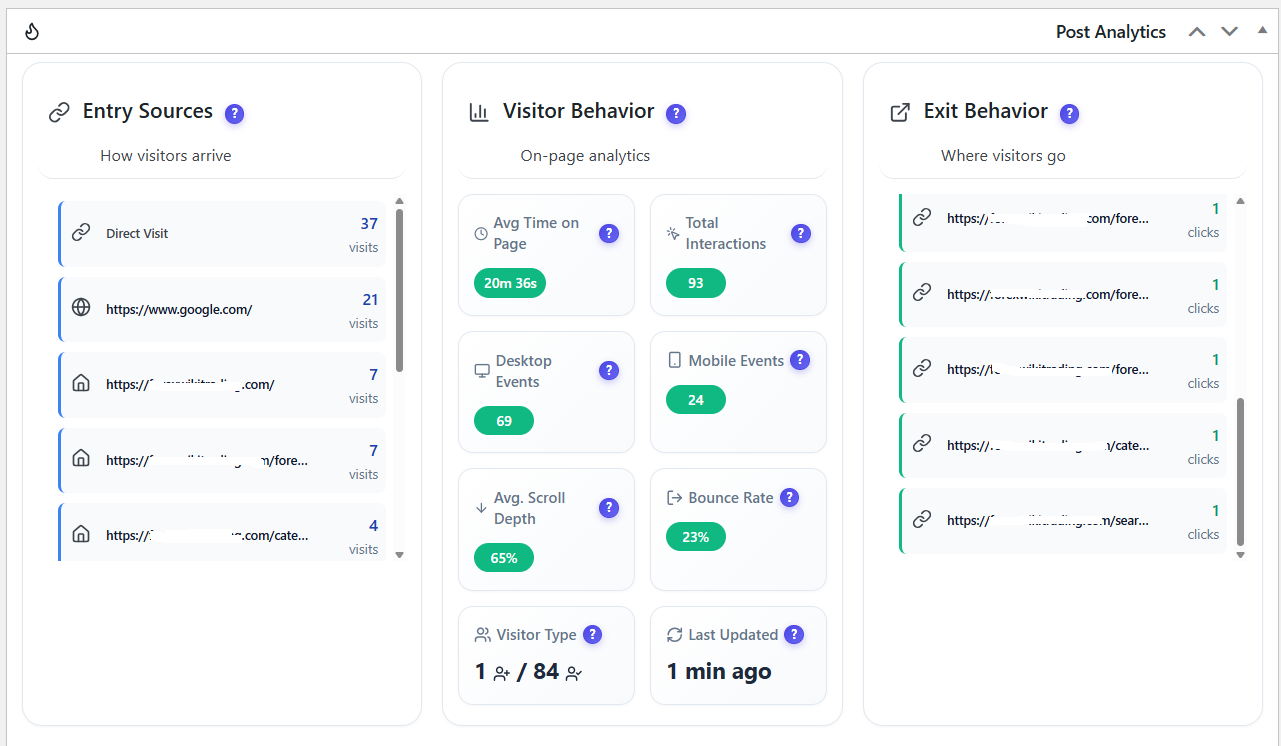
- 6 key metrics: Visitors, Sessions, Page Views, Avg Session Time, Avg Scroll Depth, Bounce Rate
- Interactive world map with visitor locations (Leaflet + OpenStreetMap)
- Top Pages, Top Engaged Users, Traffic Sources
- New vs Returning Visitors breakdown
- Device, Browser, OS, and Country analytics
- Visited Directories with depth tracking
- Flexible time periods: Today, Yesterday, 7 Days, 30 Days, Custom Range
Conversion Funnels
- Custom funnel builder with multi-step tracking
- Step-by-step conversion analysis with dropout rates
- Device-specific and country-specific funnel filtering
- Funnel status management (active/inactive)
- Visual dropout visualization
Session & Visitor Tracking
- Complete session tracking (duration, pages visited, entry/exit pages)
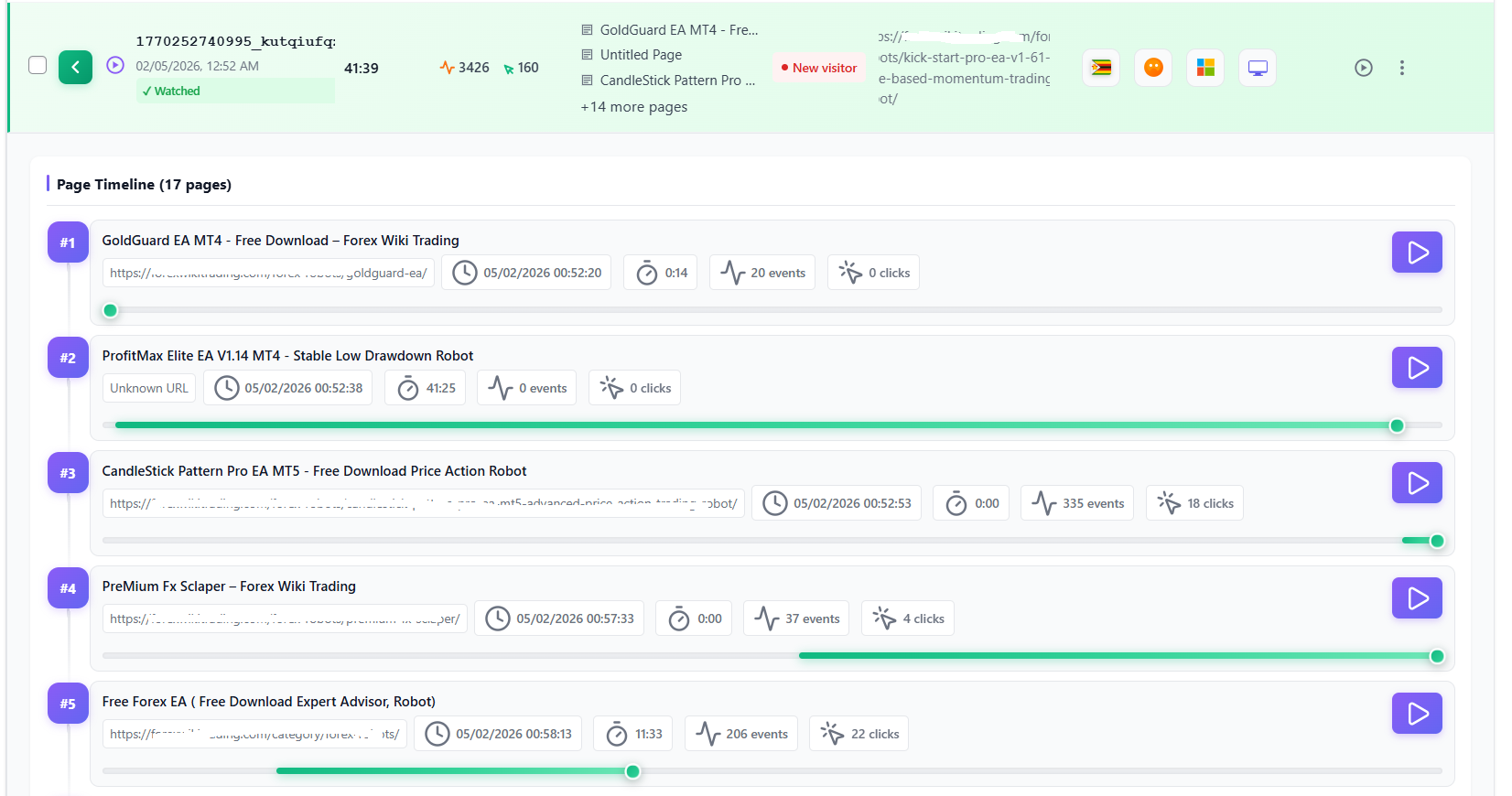
- Visitor journey mapping across your site
- Referrer and traffic source tracking
- Outbound link click monitoring
- Logged-in user identification
Bot Detection & Filtering
- Automatic server-side bot identification
- Search engine crawler detection (Google, Bing, Yahoo, etc.)
- Separate bot visit tracking for transparency
- Configurable filtering options
Scheduled Email Reports
- Automated report delivery (Daily, Weekly, Monthly)
- Configurable recipient lists
- Report template selection
- Test email functionality
AI-Powered Insights (Comming Soon)
- AI analytics suggestions for optimization
- Automated behavior pattern detection
User Intent Rules
- Advanced behavior pattern analysis
- Intent categorization system
- Custom traffic classification rules
Data Export & Management
- CSV export of all analytics data
- Data retention controls with auto-cleanup
- Smart cleanup tools for database optimization
- Complete data deletion on uninstall (optional)
Privacy & Security
- IP anonymization (optional)
- No cookies required (session-based tracking)
- No third-party data sharing
- Consent management integration support
- WordPress nonce verification on all forms
- Prepared SQL statements throughout
- WP_Filesystem API for file operations
Multilingual Admin
- English (default)
- French (fr_FR)
- German (de_DE)
- Spanish (es_ES)
- Portuguese (pt_BR)
- Italian (it_IT)
Pro Features (Upgrade)
Take your analytics further with Opti-Behavior Pro:
- Session Recordings – Watch real user sessions with full playback, encryption, and privacy controls
- Error Tracking – Capture JavaScript errors, network errors, and Core Web Vitals (LCP, FID, CLS, INP, FCP)
- Friction Detection – Automatic rage click and dead click identification
- Broken Link Detection – Find and fix broken links across your site
- User Journey Analytics – Beautiful Sankey diagram visualization of visitor paths
- Form Analytics – Field-level interaction tracking (time spent, errors, refills, abandonment)
- Advanced Heatmap Filtering – Filter by country, browser, device, and date range
- Priority Support – Get help when you need it
All Pro features are also 100% self-hosted with local data storage.
Try Pro FREE for 6 months — no credit card required! Install this free plugin, then click “Try Pro Free” in your WordPress admin to get a 6-month Pro trial license automatically.
Learn more about Opti-Behavior Pro
Download Opti-Behavior Pro
How Opti-Behavior Compares
Click Heatmaps
Opti-Behavior: Yes | Hotjar: Yes | MS Clarity: Yes | Matomo: EUR 199/yr plugin
Conversion Funnels
Opti-Behavior: Yes | Hotjar: No (Scale only) | MS Clarity: No | Matomo: EUR 99/yr plugin
Real-time Dashboard
Opti-Behavior: Yes | Hotjar: No | MS Clarity: Yes | Matomo: Yes
Bot Detection
Opti-Behavior: Yes | Hotjar: No | MS Clarity: No | Matomo: Partial
Scheduled Reports
Opti-Behavior: Yes | Hotjar: No | MS Clarity: No | Matomo: Yes
AI Insights
Opti-Behavior: Yes | Hotjar: $213+/mo | MS Clarity: Yes | Matomo: No
Self-Hosted Data
Opti-Behavior: Yes | Hotjar: No | MS Clarity: No | Matomo: Yes
No Data Sharing
Opti-Behavior: Yes | Hotjar: Yes | MS Clarity: No (Microsoft) | Matomo: Yes
Session Limits
Opti-Behavior: None | Hotjar: 35/day | MS Clarity: Unlimited* | Matomo: None
Monthly Cost
Opti-Behavior: $0 | Hotjar: $0-$213+ | MS Clarity: $0* | Matomo: $0 + paid plugins
*Microsoft Clarity is free but Microsoft uses your visitors’ data as an independent data controller, including for advertising purposes.
Perfect For
- Privacy-Conscious Website Owners – Keep all visitor data on your own server
- EU-Based Businesses – Self-hosted means no cross-border data transfer concerns
- E-commerce Stores – Optimize checkout flows and product pages without sharing customer data
- Agencies – Provide clients with analytics without per-site SaaS subscriptions
- Healthcare, Finance & Legal Sites – Meet strict data handling requirements with self-hosted analytics
- Content Publishers – Understand reader engagement without third-party tracking
- WooCommerce Stores – Track cart behavior, analyze product pages, optimize conversions
- Small Businesses – Enterprise-grade analytics without enterprise pricing
How It Works
- Install & Activate – One-click installation, starts tracking immediately
- View Your Dashboard – Real-time visitor activity with key metrics
- Analyze Heatmaps – See where visitors click on every page
- Build Funnels – Track conversion paths and find drop-off points
- Export & Optimize – Download reports and make data-driven improvements
Technical Highlights
- WordPress Coding Standards compliant
- Secure by design: prepared SQL statements, nonce verification, capability checks
- Hybrid Storage engine – analytics events stored in optimized JSON files on disk, not in your database
- ~15KB minified JavaScript with async loading — zero Core Web Vitals impact
- Batch processing for efficient event handling — events collected in memory and written in batches
- Pre-aggregated daily statistics for instant dashboard loading
- Smart database indexing for millisecond query responses
- Multisite compatible
- REST API ready with hooks and filters
- Compatible with all major caching plugins (WP Super Cache, W3 Total Cache, WP Rocket)
- Works with all page builders (Elementor, Divi, Beaver Builder, WPBakery, Gutenberg)
External Services
This plugin may connect to external services in limited circumstances:
IP Geolocation (ip-api.com)
Purpose: Provides geographic location data (country, city, timezone) for visitor analytics and map visualization.
When Used: Only when a visitor’s location cannot be determined from CloudFlare headers. If CloudFlare is active, no external calls are made.
Data Sent: Only the visitor’s IP address. No personally identifiable information is transmitted.
Caching: Results are cached for 1 hour to minimize API requests.
Privacy:
* Service: https://ip-api.com/
* Terms & Privacy: https://ip-api.com/docs/legal
* Note: ip-api.com may log IP addresses. Review their privacy policy for details.
IP Geolocation Fallback (ipwho.is)
Purpose: Secondary geolocation fallback when ip-api.com is rate-limited or unavailable. Provides geographic location data (country, city, region, timezone) for visitor analytics.
When Used: Only when both CloudFlare headers and ip-api.com fail to resolve a visitor’s location. ip-api.com’s free tier has a 45 requests/minute rate limit, so on high-traffic sites ipwho.is ensures visitors are still geolocated accurately.
Data Sent: Only the visitor’s IP address. No personally identifiable information is transmitted.
Caching: Results are cached for 1 hour to minimize API requests.
Privacy:
* Service: https://ipwho.is/
* Terms & Privacy: https://ipwho.is/
* Note: ipwho.is may log IP addresses. Review their privacy policy for details.
OpenStreetMap Tiles
Purpose: Displays the interactive visitor location map in your WordPress admin dashboard.
When Used: Only when YOU (the admin) view the real-time visitor map. Not used on the frontend.
Data Sent: Your browser makes direct requests to OpenStreetMap tile servers (standard HTTP headers only).
Privacy:
* Service: https://www.openstreetmap.org/
* Tile Policy: https://operations.osmfoundation.org/policies/tiles/
* Privacy Policy: https://wiki.osmfoundation.org/wiki/Privacy_Policy
OptiUser API (api.optiuser.com)
Purpose: Handles anonymous install tracking, plugin deactivation notifications, Pro trial license generation, license validation, update checks, and download access code generation for the Pro plugin.
When Used:
* Install tracker: Sends an anonymous heartbeat once every 24 hours after activation, containing only: site URL, WordPress version, PHP version, plugin version, and plugin type (free/pro). No visitor data or personal information is sent.
* Deactivation: Notifies the API when the plugin is deactivated so installation records stay up to date.
* Pro upgrade pages: When an admin views a Pro feature upgrade page (Session Recordings, Error Tracking, User Journeys, Form Analytics), the plugin requests a one-time download access code from the API. This code is used to securely access the Pro download page on optiuser.com.
Data Sent: Site URL, WordPress admin username, admin email address (only when requesting a Pro download access code). No visitor analytics data is ever sent to the API.
Privacy:
* Service: https://api.optiuser.com/
* Website: https://optiuser.com/
* Privacy Policy: https://optiuser.com/privacy-policy/
* The API stores installation metadata (site URL, plugin version) for license management. No visitor data is collected or stored by the API.
OptiUser Website (optiuser.com)
Purpose: Hosts the Opti-Behavior Pro download page and sales/feature pages. When an admin clicks “Download Pro — Free for 6 Months” on a Pro upgrade page, they are redirected to optiuser.com to register and download the Pro plugin.
When Used: Only when an admin chooses to download Opti-Behavior Pro from a Pro upgrade page within the WordPress admin. This is an optional, user-initiated action.
Data Sent: Site URL, username, and email address are passed as URL parameters to pre-fill the registration form. No visitor analytics data is sent.
Privacy:
* Service: https://optiuser.com/
* Privacy Policy: https://optiuser.com/privacy-policy/
Important Note: All analytics data is stored locally on your WordPress server. The external services listed above are used only for optional geographic features (ip-api.com, ipwho.is, OpenStreetMap), anonymous install tracking, and Pro license management (api.optiuser.com). No visitor analytics data ever leaves your server.
Privacy Policy
Opti-Behavior collects user interaction data to provide analytics insights. This data includes:
- Page URLs and titles
- Click coordinates and target elements
- Mouse movement patterns
- Scroll depth
- Session timestamps
- Referrer URLs
- Browser and device information
- IP addresses (can be anonymized)
- Approximate location based on browser timezone (client-side only, no external services)
Data Storage: All analytics data is stored locally in your WordPress database or file system. No data is sent to external analytics servers.
External Services: This plugin may make API calls to ip-api.com and ipwho.is for IP geolocation when CloudFlare headers are not available. ipwho.is is used as a secondary fallback when ip-api.com is rate-limited or unavailable. Only the visitor’s IP address is sent to these services. See the “External Services” section above for complete details.
No Third-Party Data Sharing: Unlike cloud-based analytics tools, Opti-Behavior does not share, sell, or transfer your visitors’ data to any third party. You are the sole data controller.
User Rights: You have full control over data retention and deletion. Users can request data deletion at any time.
When using this plugin, ensure your site’s privacy policy discloses:
* What data is being collected
* How long it is retained
* Who has access to it
* How users can request deletion
* That data is stored locally and not shared with third parties
Third-Party Libraries
This plugin bundles the following open-source libraries:
Chart.js
- Version: 4.4.0
- License: MIT License
- Homepage: https://www.chartjs.org/
- Used for: Rendering analytics charts and graphs
Leaflet
- Version: 1.9.4
- License: BSD 2-Clause License
- Homepage: https://leafletjs.com/
- Used for: Real-time visitor map visualization
heatmap.js
- Version: 2.0.5
- License: MIT License
- Homepage: https://www.patrick-wied.at/static/heatmapjs/
- Used for: Generating visual heatmaps of user interactions
Lucide
- Version: 0.554.0
- License: ISC License
- Homepage: https://lucide.dev/
- Used for: Icon library for the admin interface
All bundled libraries use GPL-compatible licenses (MIT, BSD 2-Clause, and ISC) and are included locally within the plugin. See THIRD-PARTY-LICENSES.txt in the plugin directory for full license texts.
Credits
Developed by OptiUser
Details






Related plugins
Plugins that also contain the tag cookieless-analytics
ezStats Analytics

Habibur Analytics


About
Plugin for that tries to help you find the WordPress plugin you are looking for.
| Please enjoy an image of Crush (this awesome turtle) and have a lovely day! |  |
We do not own any plugin listed on this site and do not work for or work with WordPress.com or it's associated companies. We simply provide a searchable list of the available WordPress plugins.