



Optimi AI Product Reviews – Customer Photo Reviews for WooCommerce
Your product pages already sell. Optimi AI Product Reviews adds the photos your customers take of what actually arrived, checked and captioned automatically, right beside your own.
- AI that checks every photo and every word. The right product, sharp enough, nothing you would not want on your page.
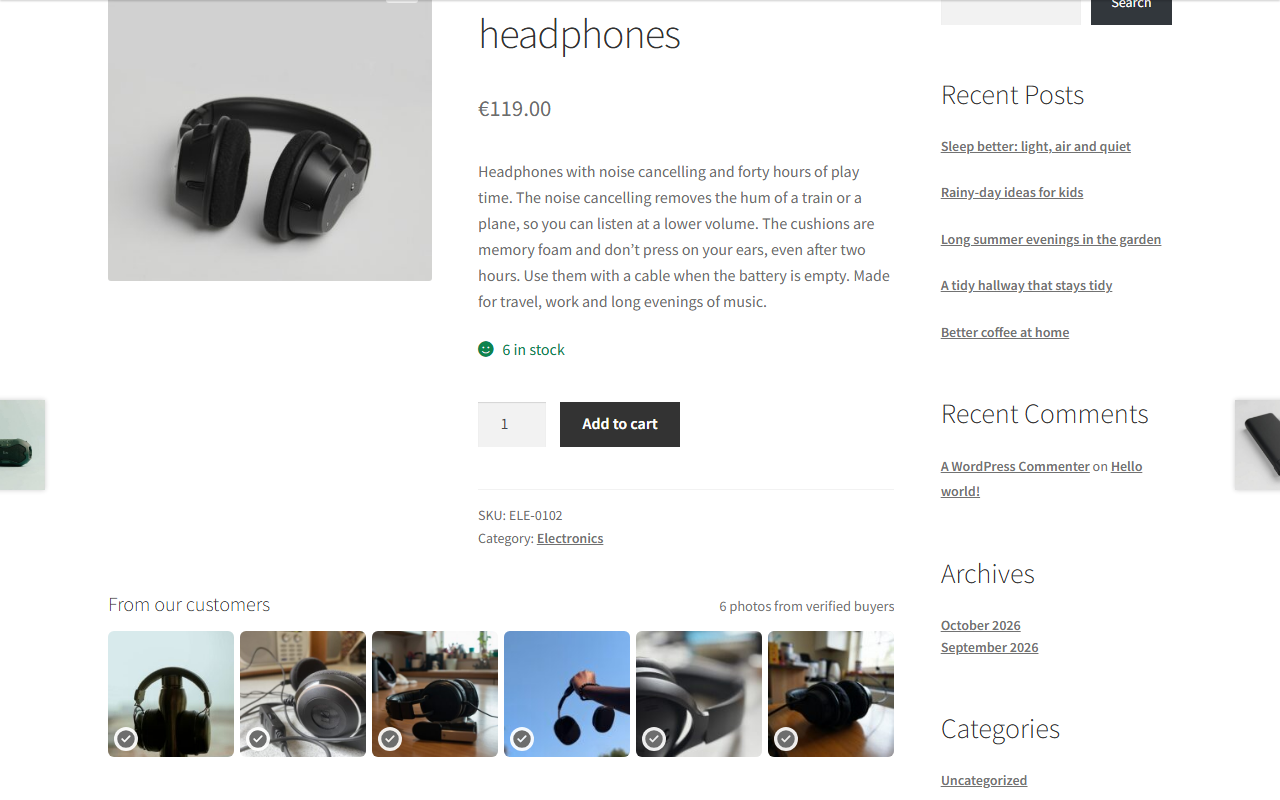
- Real photos that build trust. Visitors see what arrives at home, marked “Verified buyer”, beside your studio shots.
- Alt text, caption, and file name written for search engines. Every photo arrives with its texts; you can change any of them.
- Nothing to moderate. You set how strict. What passes publishes on its own; what needs you waits on one list, with the reason.
- A reward that gets customers to photograph and write. A coupon, a prize draw, or your own thank-you, given only when their photo goes live.
Free, for good. The Free plan has no end date; you sign up with your email address only. Every plan has every function; a bigger plan adds submissions. You see every plan in the plugin before you sign up.
A customer unpacks your rain jacket, puts it on, and sends one photo from the sofa. Optimi AI Product Reviews checks that it is your jacket and sharp enough. It writes the alt text and caption, and places the photo under your studio shots, marked “Verified buyer”. You did nothing.
Safe to try. Your reviews, your theme, and your gallery stay as they are. A product without customer photos shows nothing.
Your customers’ photos, your choice. Only the photo, the words, and the product’s details go to Optimi, never a name, email address, or order number. The photo is kept only during the check. EU or Global is your choice.
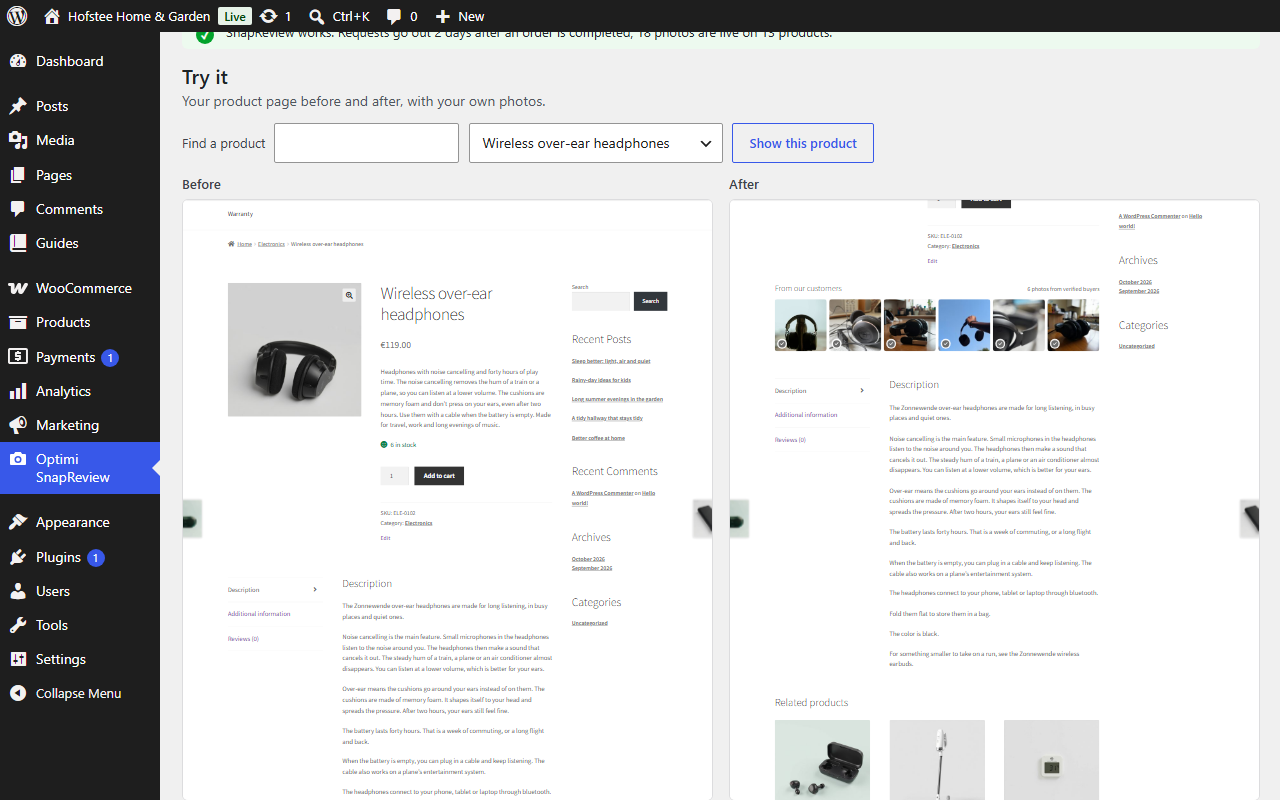
See it on your own store: the setup guide shows your product page before and after.
Needs WooCommerce. Several stores? One license key each, all in the Optimi Portal.
Why it is not another review plugin
- No stars, no form, no review block at the bottom of the page. The photos sit beside your own.
- Checked by machine before anyone sees them. Another product, a box, a screenshot, or a blurred photo never goes live on its own.
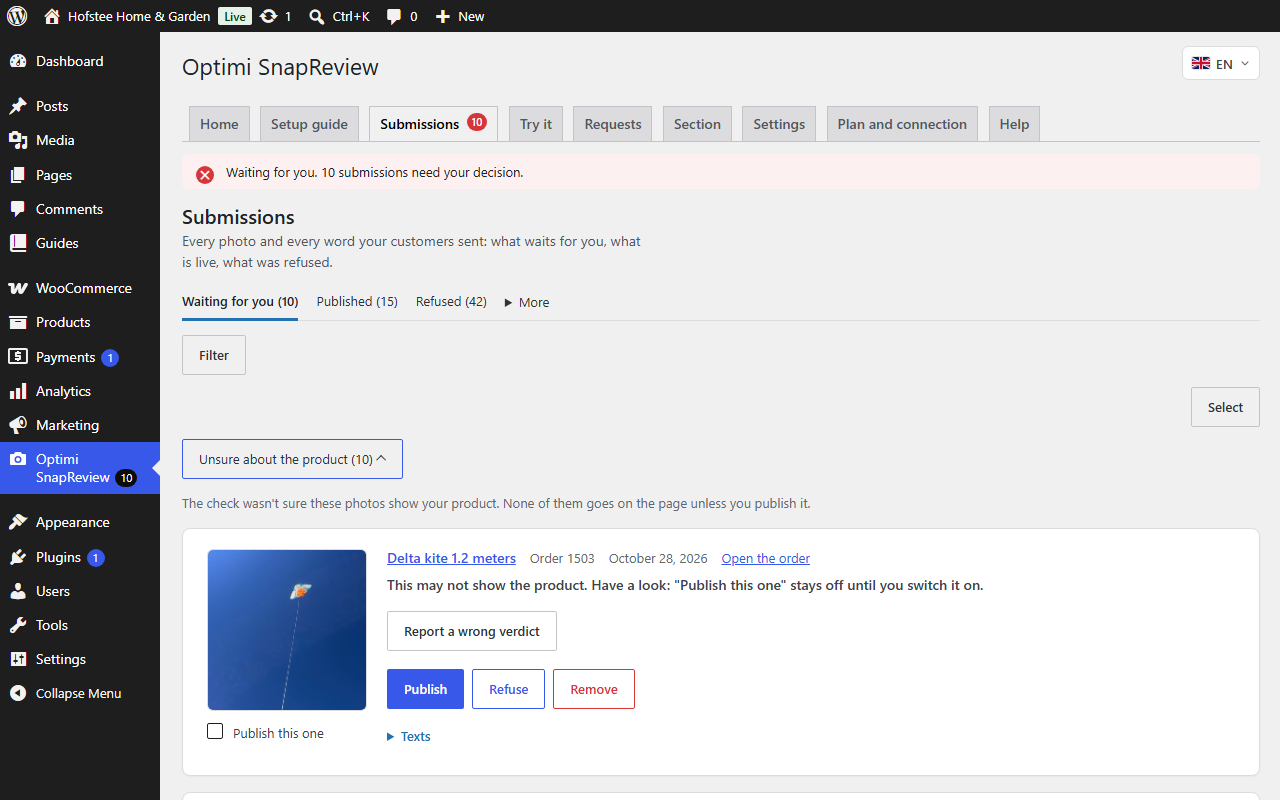
- The few that need you wait on one list. Each says why in one sentence, and you publish or refuse with one click.
- Four texts per photo. Alt text, caption, file name, and description, in your store’s language.
What your customers get
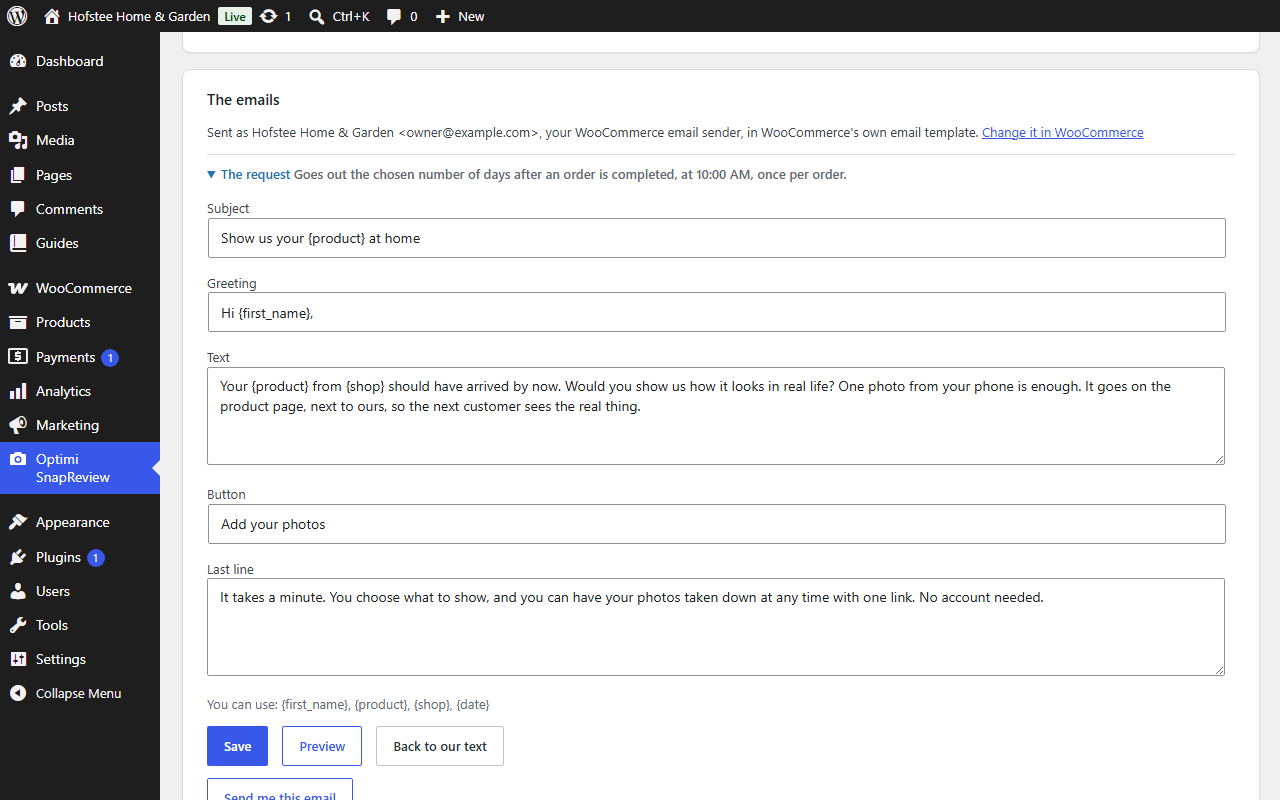
- An email from your store. In your store’s name and the language of their order, a few days after it is completed.
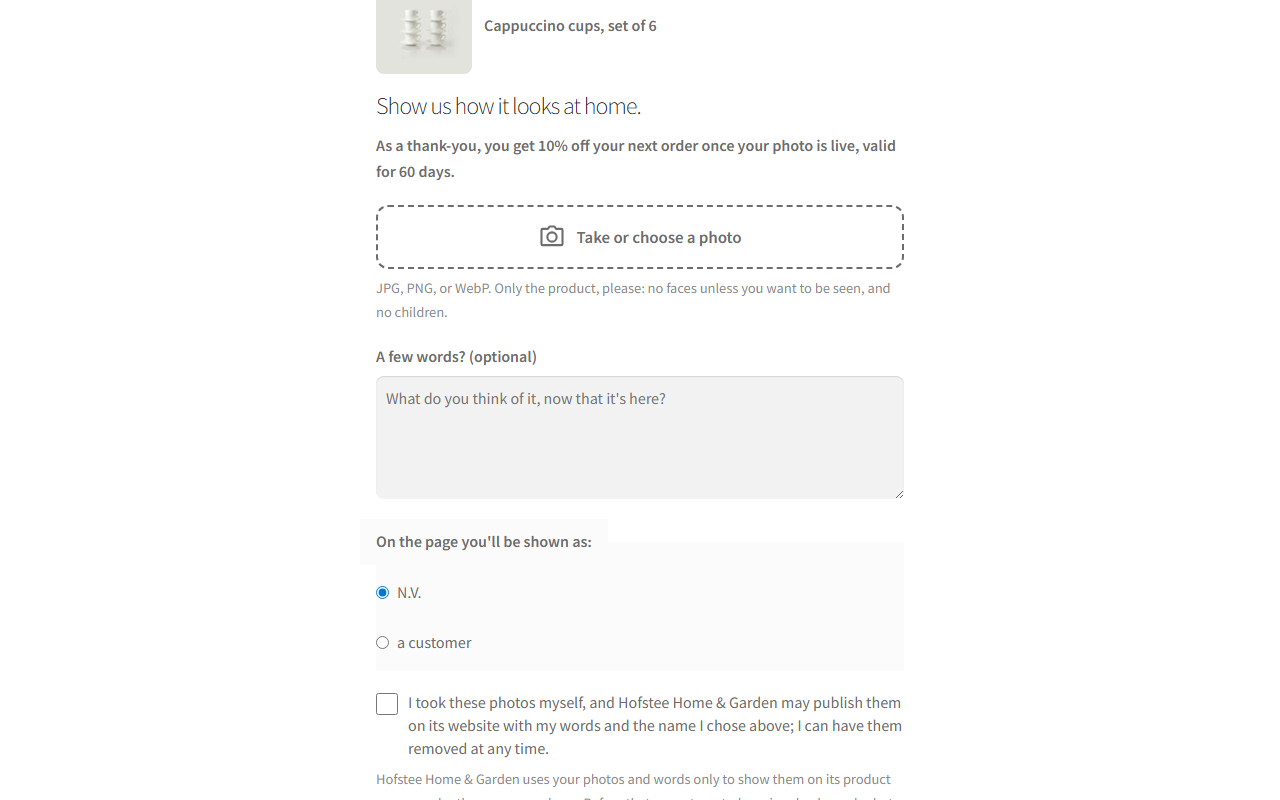
- A minute on their phone. No account, up to 3 photos, a few words if they like, one box to agree.
- A reward only when their photo is live. A refused photo earns nothing, and a reward is never taken back.
- A link to remove their photos. It is in every email after they send, for as long as the photos are live.
What your visitors get
- A section of real photos under your gallery, with the heading “From our customers”.
- A lightbox with the photo, the caption, the words, and “Verified buyer”.
- Photos from your own Media Library. Nothing loads from Optimi on your pages: no script, no style, no logo.
- Nothing on products without photos. The section only appears where a customer’s photo is live.
Measured, not promised. On 50 generated test photos, every photo of another product, every box, and every screenshot was caught.
What you get
- A setup guide in six steps. Each ends in a check mark; the last is your own test photo on your page.
- One sentence on Home that says whether Optimi AI Product Reviews works and what waits for you.
- The “Waiting for you” list, with the reason for every submission and your decision with one click.
- You decide how strict. Four choices in words, not numbers, for publishing, photos, words, and photos that may not show the product.
- Texts you can edit, and two free rewrites per submission when you want new ones.
- A weekly email with the requests, the photos, and what waits for you.
- “Try it”, your product page before and after, whenever you want to check.
Free, and the paid options
The Free plan is free, for good. The plugin shows how many submissions it includes each month. One submission is one customer’s photos and words, checked together. For a busy month you buy credits in the Optimi Portal, where every price is excl. VAT. Cancel anytime.
Where it shows
Under the gallery by default. You can choose under the description or at the end of the page. The block, the shortcode [optimi_ai_product_reviews], and the widget place it anywhere else. With [optimi_ai_product_reviews latest="12"] your newest photos show on any page.
Safe to try
- Your reviews stay yours. Optimi AI Product Reviews never writes in WordPress’s comments or WooCommerce’s reviews.
- Your gallery stays as it is. The photos go into a section of their own.
- Only new orders. Orders completed before you activate the plugin never get a request.
- Easy to remove. An uninstall deletes the plugin’s data on your website and disconnects it from Optimi.
What the plugin never does
- It never shows “powered by” or a link to Optimi on your store or in your customers’ emails.
- It never names the service that checks the photos.
- It never publishes a photo that may show a minor.
- It never gives a reward for a refused photo.
- It never stores anything on a visitor’s device: no cookie, no local storage.
- It never contacts Optimi before you choose the EU or Global. Opening that first page sends nothing.
Works with
- WooCommerce 8 and later, with either order storage: HPOS or the classic one.
- WPML and Polylang. Every email follows the language of the order.
- Page builders, through the block and the shortcode.
- Any theme. The setup guide shows the section on your own product page before you decide.
Languages
The plugin’s screens come in English, Dutch, German, Spanish, French, Portuguese, and Italian, included in the plugin. Each admin picks a language with the flag at the top right. Your customers’ emails and upload page follow the language of their order, in those seven languages. A regional variant reads its language: Belgian Dutch reads Dutch, Austrian German reads German, Brazilian Portuguese reads Portuguese. The section’s heading follows the page language. When your website has a community translation of the plugin from translate.wordpress.org for a language, WordPress uses that one instead. Captions are written in your store’s language. On a translated page the caption is left out, and the alt text names the product.
Requirements
WordPress 6.4 or later, PHP 8.1 or later, and WooCommerce 8 or later. Your store must be able to send email.
Start
Install the plugin, choose the EU or Global, and press “Start for free”. Then follow the six steps and send yourself a test.
External services
This plugin connects to Optimi AI Product Reviews, a service of Optimi (https://optimi.nl), at https://apps.optimi.nl. The check runs there. Every request carries the plugin’s name and version. Nothing is sent until you choose the EU or Global on the plugin’s first page.
- The plans: when you press “Show plans”, and when the plugin’s pages open and the plans are over 10 minutes old. Only the plugin’s version.
- The signup: when you press “Start for free”. Your email address, your website’s address, and your EU or Global choice.
Once a license key is saved, every request carries it and your website’s address.
- A submission: when a customer sends photos. The photos (at most 3, resized), which Optimi fetches from your website through a signed link that works for 48 hours, and the customer’s words. The product’s title, category, attributes, and main image, the page language, and a submission number. Never the customer’s name, email address, order number, or address.
- What comes back: a verdict per photo, the reason, and the alt text, caption, file name, and description.
- A rewrite or a report: when you ask for new texts or report a wrong verdict, the submission number and what you asked for.
- The connection check: whether the license key works, your plan, and the submissions left. When you open the plugin, at most every 10 minutes, and when you press “Check connection”.
- A question: what you typed on the Help tab, when you press “Send”.
- Disconnecting: on deactivation or when you remove the license key.
- Uninstalling: a disconnect. Nothing else is sent.
Optimi keeps the verdict for 30 days and no photo after the check. Optimi processes all of this in the EU, or with Global in the Optimi location closest to your store.
- Terms and conditions: https://portal.optimi.nl/terms
- Privacy statement: https://portal.optimi.nl/privacy
Also by Optimi
Optimi AI Search: visitors find products by what they mean.
Details



Related plugins
Plugins that also contain the tag customer-photos
UGC for WooCommerce — Customer Photos, Videos & Visual Reviews

Revoty – Sales Booster for WooCommerce


About
Plugin for that tries to help you find the WordPress plugin you are looking for.
| Please enjoy an image of Crush (this awesome turtle) and have a lovely day! |  |
We do not own any plugin listed on this site and do not work for or work with WordPress.com or it's associated companies. We simply provide a searchable list of the available WordPress plugins.