



Optogrid Eyeglasses for WooCommerce
Optogrid Eyeglasses for WooCommerce transforms your WooCommerce store into a full-featured optical shop. Add a step-by-step lens builder to any product page, capture prescription (Rx) and pupillary distance (PD) data, and integrate with the Optogrid API for digital PD measurement via photo.
The lens builder and manual Rx/PD capture are free. Learn about Optogrid measurement — photo PD measurement, Rx document upload, and operator-verified results delivered back to the order.
Key Features:
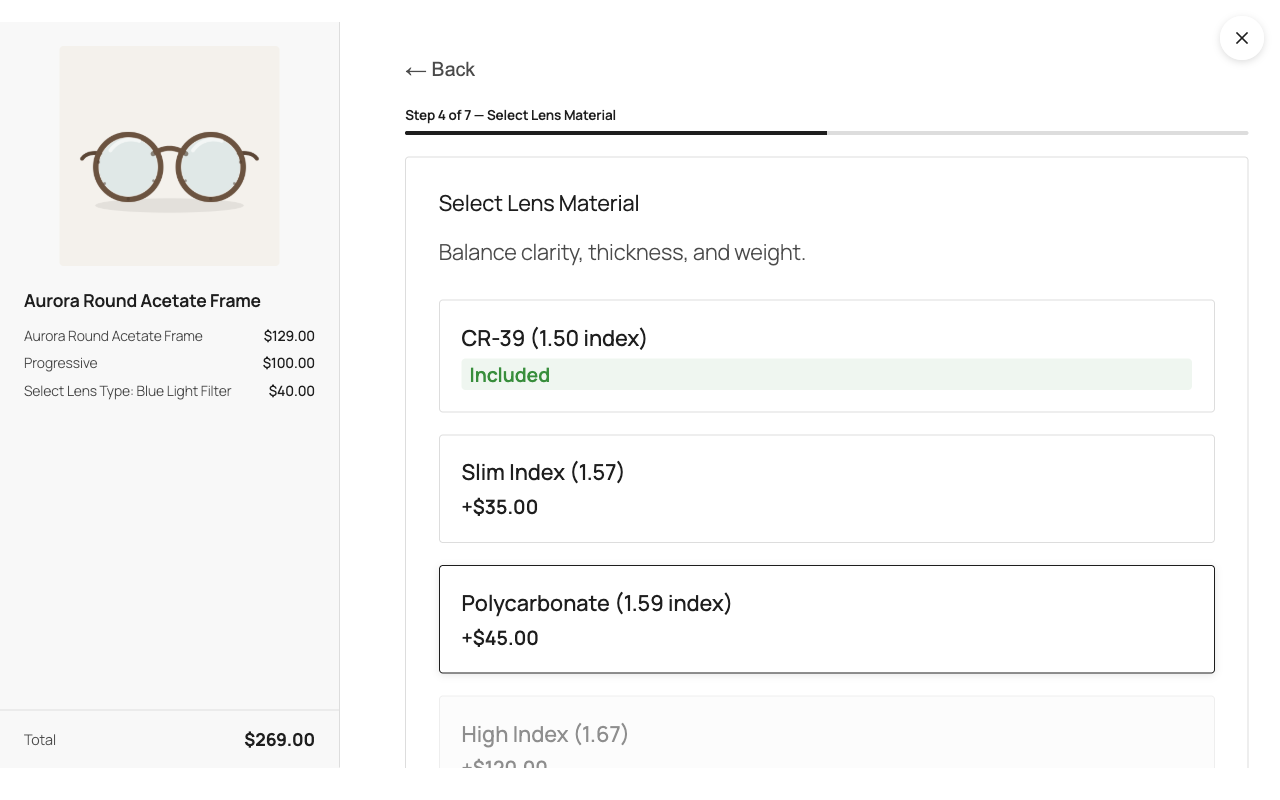
- Configurable Lens Builder — Multi-step UI for lens type, material, coatings, and tints with dynamic pricing.
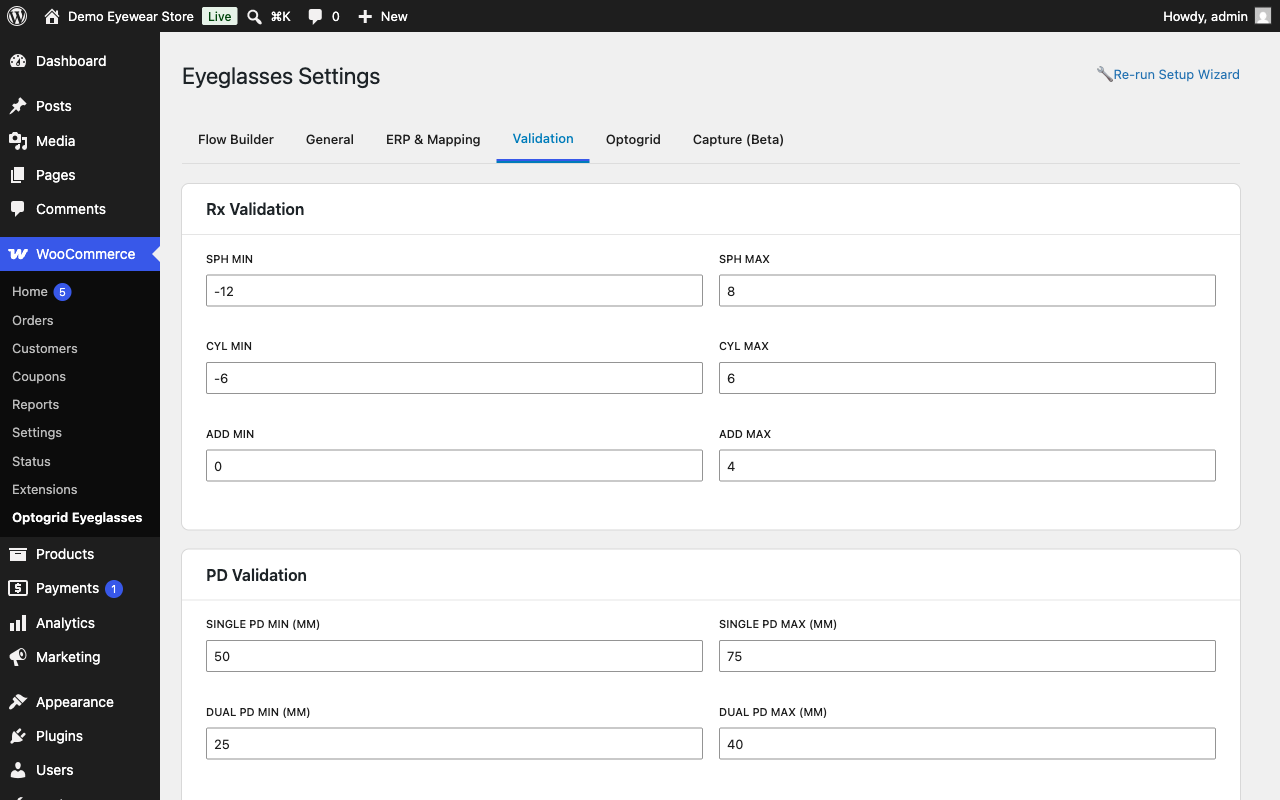
- Rx Capture — Collect prescription data via form fields, or via document upload with a connected Optogrid account.
- PD Measurement — Manual PD entry or automated measurement via Optogrid photo analysis.
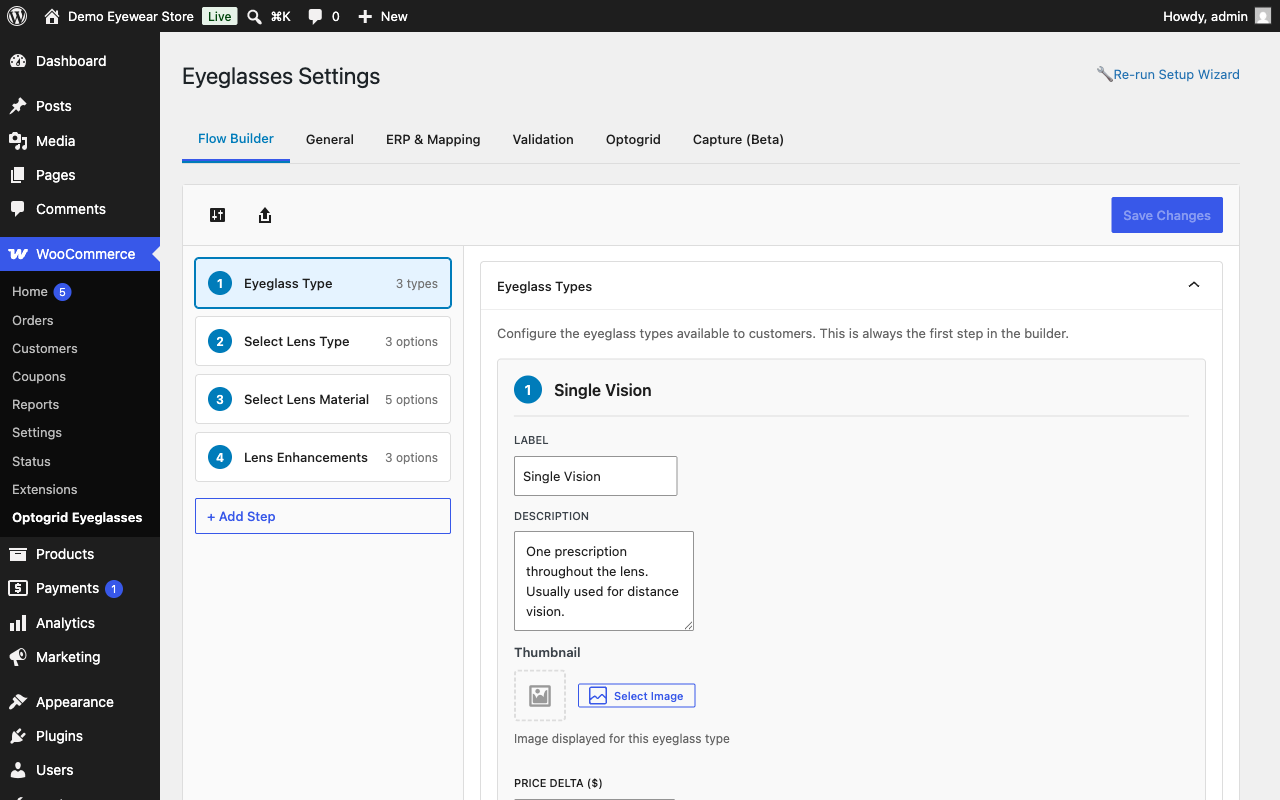
- Visual Flow Builder — Admin interface to configure lens journey steps, options, conditions, and pricing.
- Dynamic Pricing — Real-time price calculation with per-option deltas and formatted breakdowns.
- WooCommerce Integration — Works with cart, checkout, and order management. HPOS compatible.
Merchant Guide
Setup
- Activate the plugin. Until you configure your lens journey, an admin notice prompts you to run the Setup Wizard — or open it directly from WooCommerce > Optogrid Eyeglasses > Settings > Re-run Setup Wizard.
- Pick a preset or configure lens types, materials, and pricing yourself in the Flow Builder tab.
- Choose which products the lens builder appears on: all products, or specific categories/products (Settings > General).
- That’s it for the free tier — no Optogrid account is required. Manual Rx entry and manual PD entry work immediately.
- To add file uploads (prescription documents, PD photos) and photo-based PD measurement, connect an Optogrid account from the Optogrid tab (see “Free vs. paid” below).
Free vs. paid
Free, no account needed: the full lens builder (types, materials, coatings, tints, dynamic pricing), Rx capture via manual form fields, and manual PD entry. Everything a shopper enters lands on the order and in the admin order-confirmation email, ready for your lab.
Requires a connected Optogrid account: anything that involves a file. Prescription document upload and PD photo capture both store the file on Optogrid’s servers — the plugin has no local storage path for them — and photo-based PD measurement and operator-verified results are performed there. Connect your store from the Optogrid tab in Settings. Until you connect, or if your Optogrid plan does not include measurements, the upload and photo controls are not shown at all and the builder falls back to the manual fields described above — shoppers are never shown a broken or half-finished feature.
Order flow
- The shopper configures their lenses in the builder and provides a prescription (manual fields, or — once connected — a document upload and/or a PD photo).
- At checkout, the plugin persists that data to the order (
Rx/PD Capture Datameta box) and, for photo submissions, schedules a background job to link the upload to the order. - If a PD photo was submitted, the order is moved to a “Pending PD” status until Optogrid returns a measurement; other orders proceed through your normal WooCommerce statuses unaffected.
- To follow up on a measurement from wp-admin: on the WooCommerce > Orders list, “Pending PD” appears in the Status column (use the status filter above the list to see every order awaiting measurement). Open the order and the
Rx/PD Capture Databox shows the capture status and a “View in Optogrid” link that opens the uploaded photo in your Optogrid account, where the measurement is performed. - When the measurement completes, the order’s Rx/PD meta box shows the result and a “View measurement” link back to Optogrid; the order can then move to your fulfillment/lab stage as usual.
- The admin order-confirmation email also includes the full prescription and PD, so your lab has everything even without opening wp-admin.
Failure recovery
If a submitted PD photo can’t be measured (for example, the photo is blurry or no face is detected), Optogrid reports the reason back to your store as an order note explaining what went wrong. The manually-entered prescription and PD already on the order (if the shopper provided any) are unaffected and still ship with the order.
The shopper is then guided through an automated recovery flow. Your store emails the customer the reason together with a secure, private link (valid for 14 days) where they can retake and re-upload the photo — no login or new checkout required. When Optogrid measures the replacement photo, the order advances automatically, exactly as it would have on the first attempt. From the order screen you can also re-send that link (“Request new photo”) or enter the PD yourself (“Enter PD manually”) if you’d prefer to resolve it directly.
External Services
This plugin optionally connects to the Optogrid API (https://app.optogrid.com/) for digital pupillary distance (PD) measurement and prescription document storage.
When data is sent to Optogrid:
- Store registration — When a merchant registers their store with Optogrid via the plugin settings. Sends: admin email, store name, store domain, store URL, WooCommerce version, and plugin version. It also registers a webhook URL pointing back to your store (a REST endpoint on your own site) so Optogrid can deliver measurement results.
- PD photo upload — When a customer submits a photo for automated PD measurement.
- Rx document upload — When a customer uploads a prescription document.
- Upload linking — At checkout, upload tokens are exchanged for permanent Optogrid references tied to the order. This call also sends the customer’s email address, the customer’s name, and an internal (non-public) customer identifier used to match repeat customers across orders.
- PD measurement retrieval — When the plugin checks the status or result of a PD measurement.
- Ping — Periodic connectivity checks to verify the Optogrid API is reachable.
- Webhooks — Optogrid sends measurement results back to your store via webhook when PD processing completes.
What the service can send back: responses from Optogrid may carry two fields that change plugin state. (1) A replacement API address, so a connected store follows an Optogrid domain move without the merchant having to reconnect — only https:// addresses are accepted, and while one is in effect an admin notice names it and tells you how to reset it. (2) A service notice (for example a deprecation warning), which is shown as a dismissible admin notice to users with manage_woocommerce; a notice that declares a minimum plugin version this install does not meet is shown as a non-dismissible update prompt until you update. Both fields are escaped before display and neither can execute code.
Before a shopper’s face photo or prescription document is uploaded, the plugin requires the shopper to give explicit consent via a checkbox, and records that consent (with a timestamp) alongside the order.
This feature is optional. The plugin works without an Optogrid account — customers can enter PD values manually and provide prescription data via form fields, and the lens builder, pricing, cart and order integration are unaffected. The Optogrid integration is required only for the features that depend on it: Rx document upload and PD photo upload (the file is stored on Optogrid’s servers; the plugin has no local storage path for it) and the PD measurement performed on those photos.
Source Code
The full, unminified TypeScript/React source for the compiled JavaScript in /build/ is included in the plugin under /src/, together with the build configuration needed to reproduce it: package.json, webpack.config.js and tsconfig.json. Nothing is obfuscated or minified beyond the standard webpack production build.
To rebuild from the shipped files: install pnpm, then run pnpm install followed by pnpm run build in the plugin directory. This regenerates /build/ from /src/ using webpack via @wordpress/scripts.
Developers
The plugin exposes hooks for extending detection, pricing, and the lens journey, plus CSS custom properties for styling. The full reference (all 12 filters and 5 actions with signatures, and every --optowoo-* property) lives in README.md. Highlights:
optogd_is_eyeglasses_product/optogd_product_uses_builder— control whether the builder renders on a product.optogd_lens_price_breakdown— filter the price breakdown to apply merchant discounts/markups. Applied to the charged price (cart/checkout/order). Note: the product-page price preview is computed in the browser and does not reflect this PHP filter, so a change here shows in the cart but not on the live PDP preview.
Multi-currency stores are not fully supported yet. Lens price deltas are converted to the active currency for the charged price (cart/checkout/order via the optogd_convert_lens_delta filter, which integrates with WPML, WOOCS, and Aelia), but the product-page price preview is computed in the browser and always shows base-currency deltas. On a multi-currency store the preview can therefore differ from the amount charged. If you run WPML/WOOCS/Aelia currency switching, test the end-to-end price before going live.
* optogd_journey_config — override the active lens journey at runtime. It runs on every request and is never persisted: the day-long cache stores the unfiltered config, so per-request filter output is never frozen and shared.
* optogd_default_journey_config — override the shipped default journey; applies only when no config is stored (a saved config always wins).
* Saved journey configs are validated for referential integrity: unique step/option/eyeglass-type IDs, and every logic-rule target and condition reference must resolve to an existing step/option.
* Styling: the builder is scoped to .optowoo-extra-options and exposes --optowoo-* custom properties (accent, colors, spacing, borders, transition). Override them by scoping to that container.
Details
Related plugins
Plugins that also contain the tag eyeglasses
Lenses Prescription

About
Plugin for that tries to help you find the WordPress plugin you are looking for.
| Please enjoy an image of Crush (this awesome turtle) and have a lovely day! |  |
We do not own any plugin listed on this site and do not work for or work with WordPress.com or it's associated companies. We simply provide a searchable list of the available WordPress plugins.