



Opus Price Builder
Design Beautiful WooCommerce Prices with Ease: Opus Price Builder allows you to create stunning custom price layouts using a visual drag-and-drop canvas editor. Transform how your prices look across your entire WooCommerce store without writing any code.
Opus Price Builder is designed to give shop owners complete creative control over their product price displays. Whether you want elegant typography, animated sale badges, or unique price arrangements, this plugin makes it possible through an intuitive visual interface.
Plugin home page | Demo | Docs
Main Features
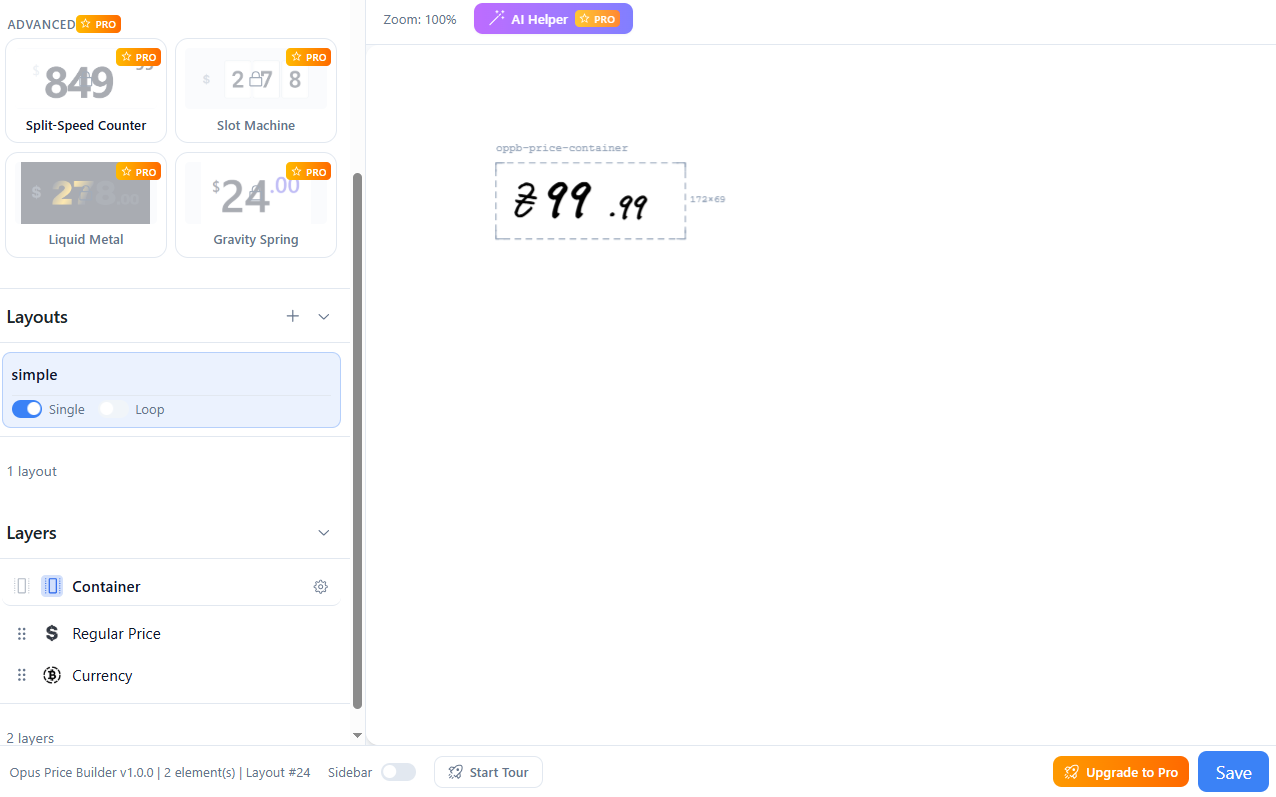
🎨 Visual Canvas Editor
- Konva.js-powered canvas for smooth 2D manipulation
- Drag & drop elements freely on the canvas
- Proportional scaling – elements maintain aspect ratio when resized
- Rotation support via corner handles
- Snap-to-guide alignment for precise positioning
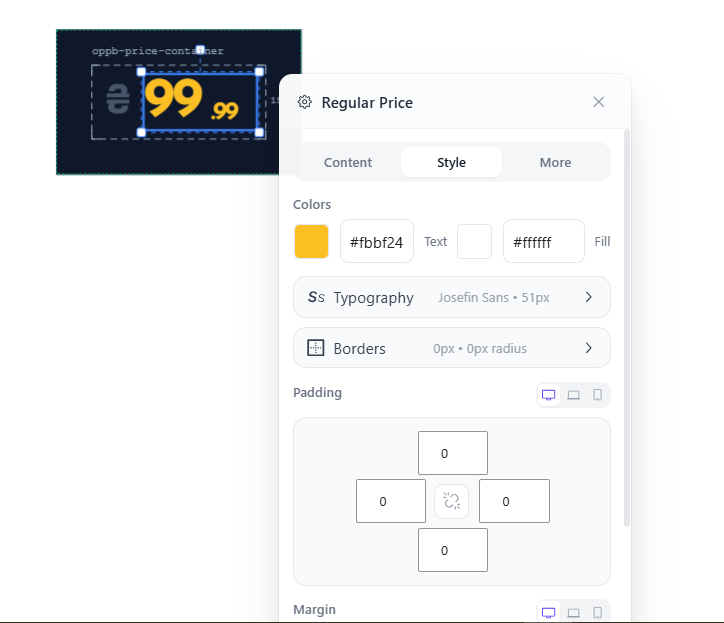
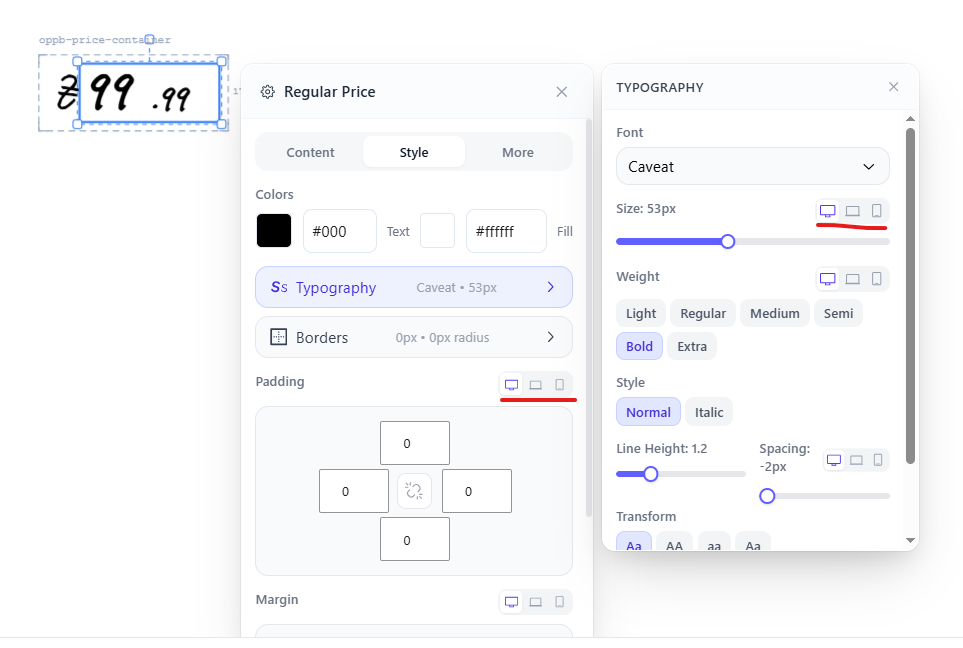
- Real-time preview of all style changes
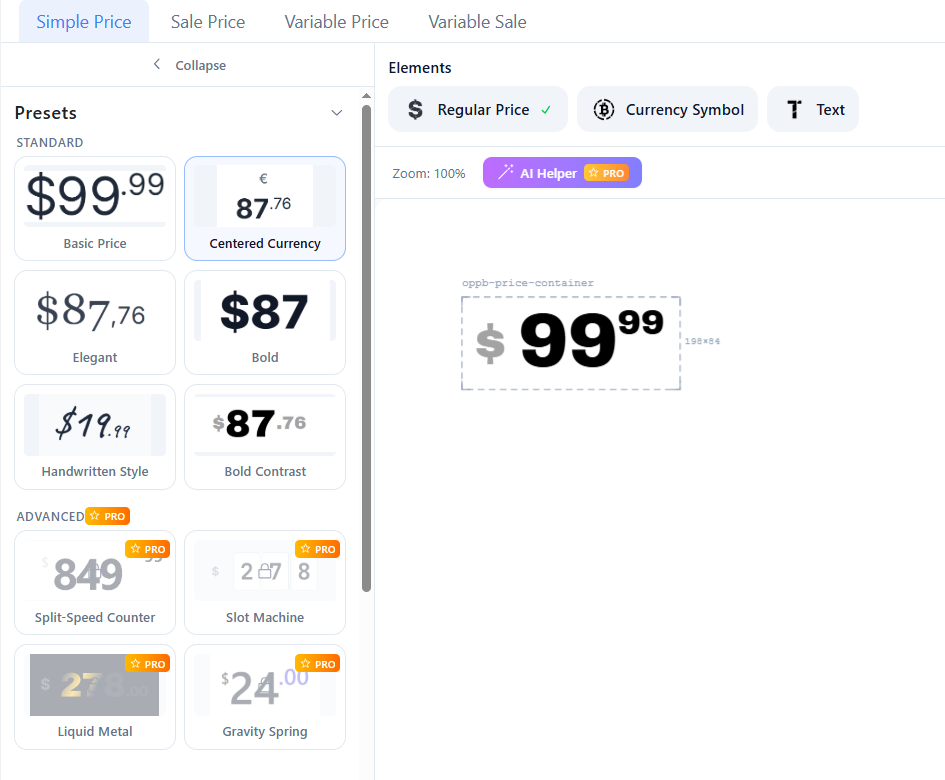
📦 6 Built-in Element Types
- Regular Price – Display the original product price
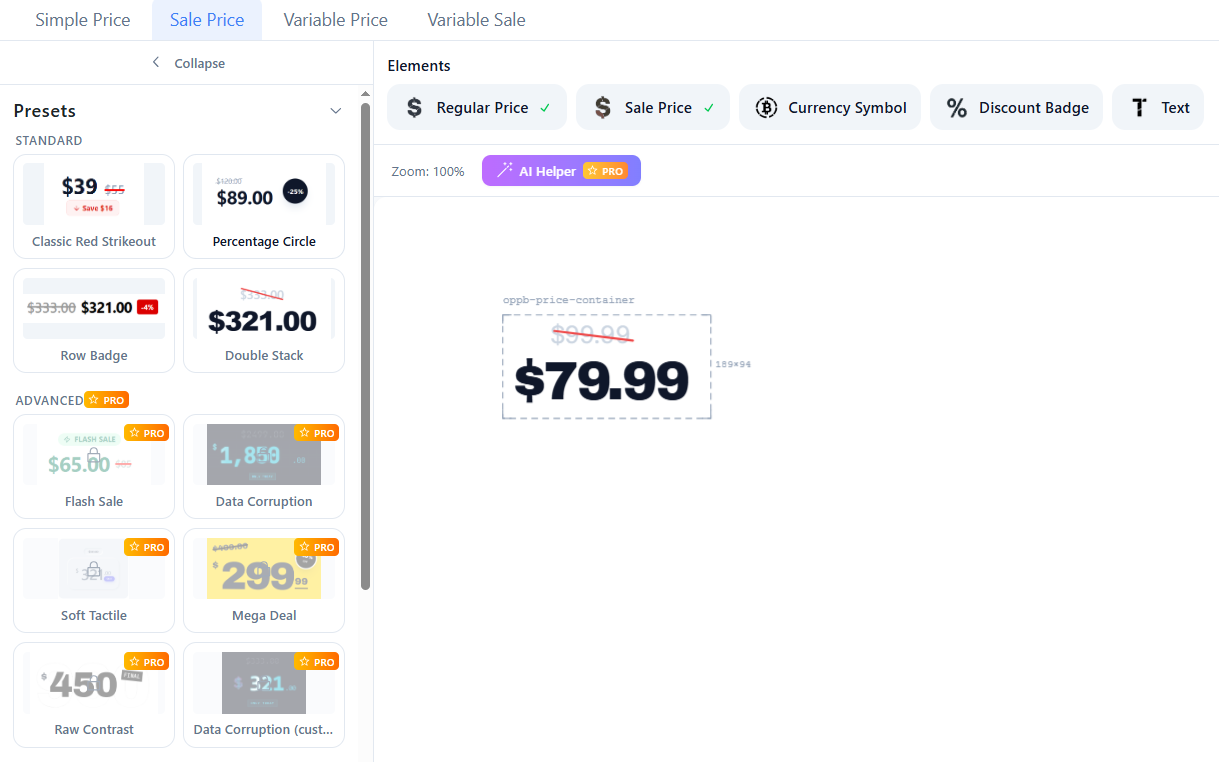
- Sale Price – Display discounted price
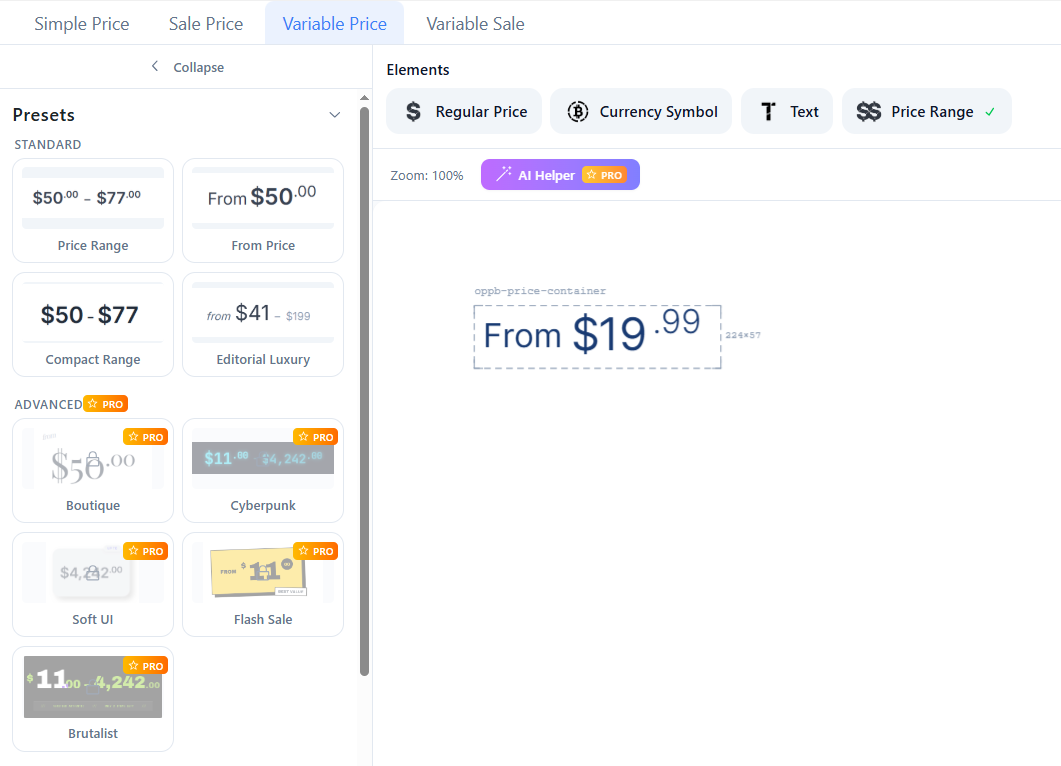
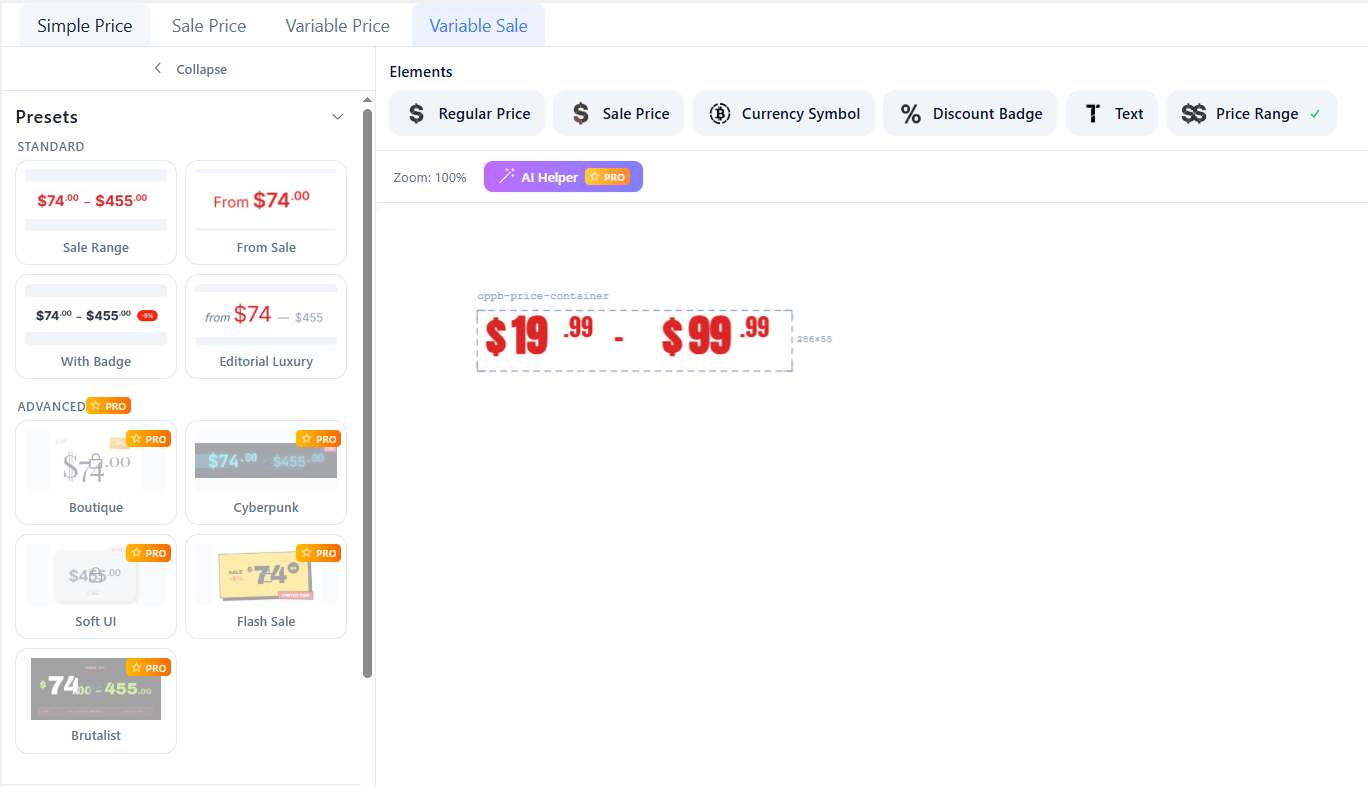
- Variable Price Range – Display min-max price range for variable products
- Currency Symbol – Standalone currency indicator
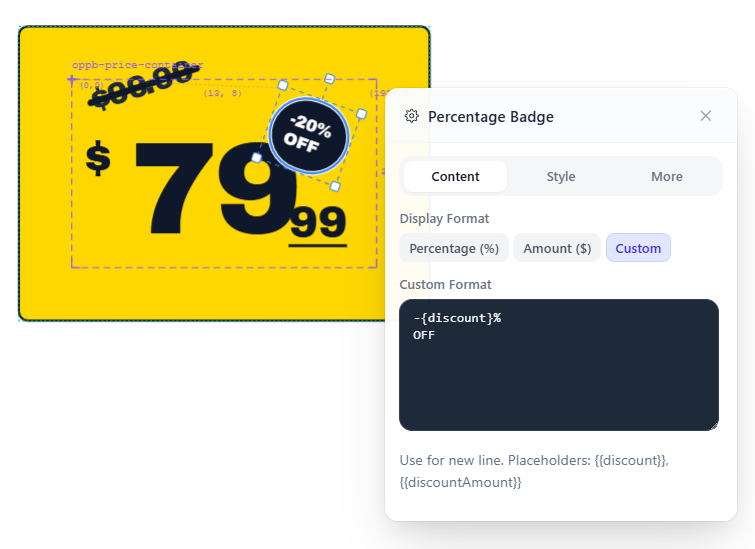
- Discount Badge – Show percentage or amount saved
- Text – Custom text with multiline support, alignment, and width modes
🎯 Four Price Scenarios
Configure different layouts for each pricing situation:
1. Simple Price – Products without variations or sales
2. Sale Price – Products currently on sale
3. Variable Simple – Variable products at regular price
4. Variable Sale – Variable products on sale
📍 Location-Based Activation
Apply layouts to specific display locations:
* Single Product – Main product page price display
* Loop – Shop, category, archive pages and related products
* Extensible via filters for cart, checkout, and custom locations
⚡ Smart Features
- Smart Layout System – Automatically generates optimal flexbox CSS from canvas positions
- Responsive Settings – Configure typography, borders, and spacing for desktop/tablet/mobile
- Google Fonts Integration – Access hundreds of Google Fonts
- Custom CSS Support – Add your own styles
- WooCommerce Price Filter Integration – Works with native WooCommerce filters
- WPML/Polylang Compatible – Full multilingual support
Premium Features
Upgrade to Opus Price Builder Pro for advanced capabilities:
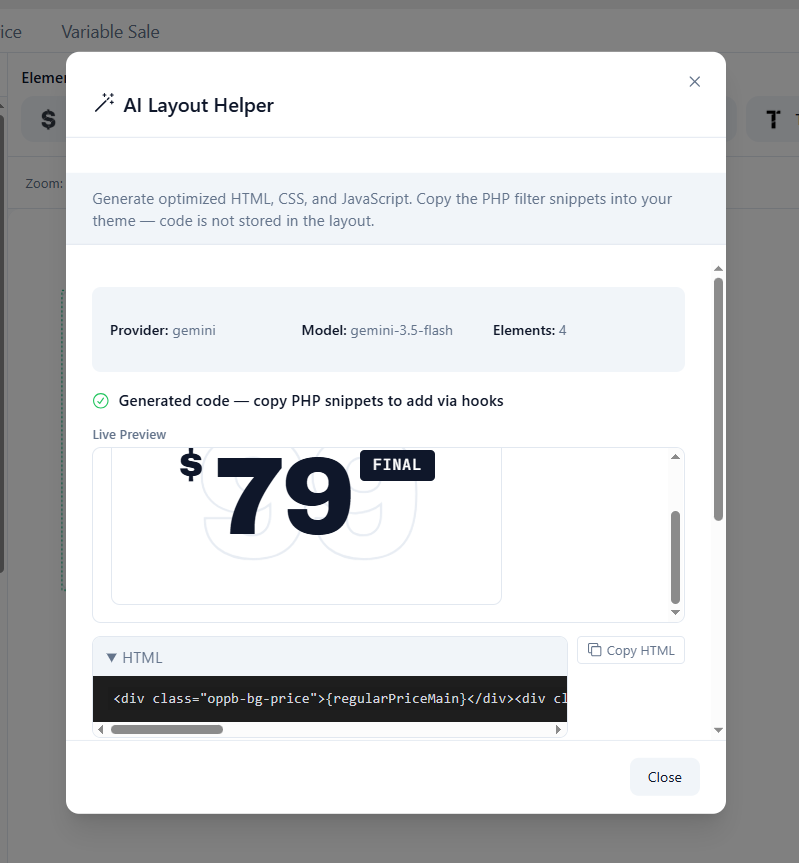
🤖 AI Layout Helper
Generate optimized HTML, CSS, and JavaScript using AI providers:
* OpenAI GPT-5/GPT-4.1
* Google Gemini 3 Pro
* Anthropic Claude Opus 4.5/Claude 4.5 Sonnet
🎭 Advanced Animated Presets
- Split-Speed Counter – Animated counter with racing decimals effect
- Slot Machine – Mechanical slot-style rolling digits
- Liquid Metal – Shimmer gradient effect with gold accent
- Gravity Spring – Elastic bounce animation with spring physics
- Data Corruption – Cyberpunk glitch and shimmer effects
- Soft Tactile – Neumorphic soft UI with counting animation
- And many more…
📈 Count Up Animation
Animated number counting for price elements using CountUp.js:
* 7 easing function options
* Configurable start value and duration
* Thousand separator support
* Animate on scroll with IntersectionObserver
* Separate decimal animation with delay
🛠️ Custom HTML Templates
Override generated HTML with fully custom templates using dynamic placeholders:
* {regularPrice} – Full regular price
* {salePrice} – Full sale price
* {currencySymbol} – Currency symbol
* {discount} – Discount percentage
* And many more placeholders for each scenario
⚡ Custom JavaScript
Add custom JavaScript for advanced interactions and post-render effects.
Free vs Pro Comparison
Free Features:
✅ Visual canvas editor with drag & drop
✅ 6 built-in element types
✅ Standard preset layouts for all scenarios
✅ Full typography and styling controls
✅ Responsive settings (desktop/tablet/mobile)
✅ Custom CSS support
✅ Google Fonts integration
✅ Location-based layout activation
✅ WooCommerce price filter integration
✅ Standard animations (fade, slide, scale, pulse, glow)
Pro Features:
⭐ AI Layout Helper with multiple AI providers
⭐ Advanced animated presets (15+ unique designs)
⭐ Count Up Animation with 7 easing functions
⭐ Custom HTML Templates with placeholders
⭐ Custom JavaScript for advanced interactions
⭐ Priority support
Third-party libraries
The admin canvas editor and settings UI are built with open-source JavaScript libraries bundled into the plugin:
- Konva / react-konva — 2D canvas editor for drag-and-drop layout design (MIT)
- React — Admin UI framework (MIT)
- Zustand — Client-side state management (MIT)
- TanStack Query — REST API data fetching in the admin (MIT)
- Radix UI — Accessible settings controls (MIT)
- @dnd-kit — Layer tree drag-and-drop (MIT)
- Tailwind CSS — Admin styling (MIT)
- Motion — UI animations in the admin (MIT)
Pro add-on only:
- CountUp.js — Animated number counting for price elements (MIT). Shipped in the separate Pro package (
pro/assets/js/countUp.min.js), not in the free WordPress.org build.
Source code for the compiled admin bundles is in the plugin’s src/ directory.
External services
This plugin may connect to third-party services. No data is sent unless the conditions described below are met. Site visitors are never asked to opt in to these connections; only site administrators configure and trigger them.
Google Fonts (fonts.googleapis.com / fonts.gstatic.com)
Used to load web fonts selected in the layout editor so prices render with the chosen typography.
When data is sent: By default, fonts are served locally from your WordPress site and visitors do not contact Google. Visitor browsers only request fonts from Google when a site administrator explicitly enables Load fonts from Google CDN in Opus Price Builder settings (this option is off by default). In the WordPress admin, the canvas editor may request fonts from Google while you design layouts. When Load fonts locally is enabled, font files are downloaded to your server via a one-time server-side request to Google Fonts.
What is sent: When CDN loading is opted in, standard HTTP request data (such as IP address, browser user agent, and the requested font family names and weights). No personal customer or order data is transmitted.
This service is provided by Google: Google Terms of Service, Google Privacy Policy, Google Fonts FAQ (privacy).
OpenAI API (api.openai.com) — Pro, optional
Used by the AI Layout Helper (Pro) to suggest custom HTML, CSS, and JavaScript for a price layout based on your canvas design.
When data is sent: Only when a site administrator has configured an OpenAI API key, selected OpenAI as the AI provider, and explicitly clicks to generate a layout in the layout editor. Nothing is sent automatically or on the storefront.
What is sent: Your OpenAI API key (in the request authorization header), the selected model name, and a prompt containing the current layout’s price scenario, canvas element positions and style settings (JSON), and container settings (JSON). No WooCommerce customer, order, or visitor data is included.
This service is provided by OpenAI: Terms of Use, Privacy Policy.
Google Gemini API (generativelanguage.googleapis.com) — Pro, optional
Used by the AI Layout Helper (Pro) for the same purpose as OpenAI above, when Google Gemini is selected as the provider.
When data is sent: Only when a site administrator has configured a Google API key, selected Gemini as the AI provider, and explicitly triggers AI layout generation in the admin. Nothing is sent automatically or on the storefront.
What is sent: Your Google API key (in the request URL), the selected model name, and a prompt containing the current layout’s price scenario, canvas element settings (JSON), and container settings (JSON). No WooCommerce customer, order, or visitor data is included.
This service is provided by Google: Gemini API Terms of Service, Google Privacy Policy.
Anthropic API (api.anthropic.com) — Pro, optional
Used by the AI Layout Helper (Pro) for the same purpose as OpenAI above, when Anthropic Claude is selected as the provider.
When data is sent: Only when a site administrator has configured an Anthropic API key, selected Anthropic as the AI provider, and explicitly triggers AI layout generation in the admin. Nothing is sent automatically or on the storefront.
What is sent: Your Anthropic API key (in the request header), the selected model name, system instructions, and a prompt containing the current layout’s price scenario, canvas element settings (JSON), and container settings (JSON). No WooCommerce customer, order, or visitor data is included.
This service is provided by Anthropic: Consumer Terms, Privacy Policy.
Details

About
Plugin for that tries to help you find the WordPress plugin you are looking for.
| Please enjoy an image of Crush (this awesome turtle) and have a lovely day! |  |
We do not own any plugin listed on this site and do not work for or work with WordPress.com or it's associated companies. We simply provide a searchable list of the available WordPress plugins.