



Orbitwrite
Orbitwrite for WordPress is the official plugin for Orbitwrite, the social media scheduling service. Write the social post for an article in the same place you wrote the article, then publish it or schedule it to X, LinkedIn, Bluesky, Mastodon, Threads, Instagram and more.
How it works
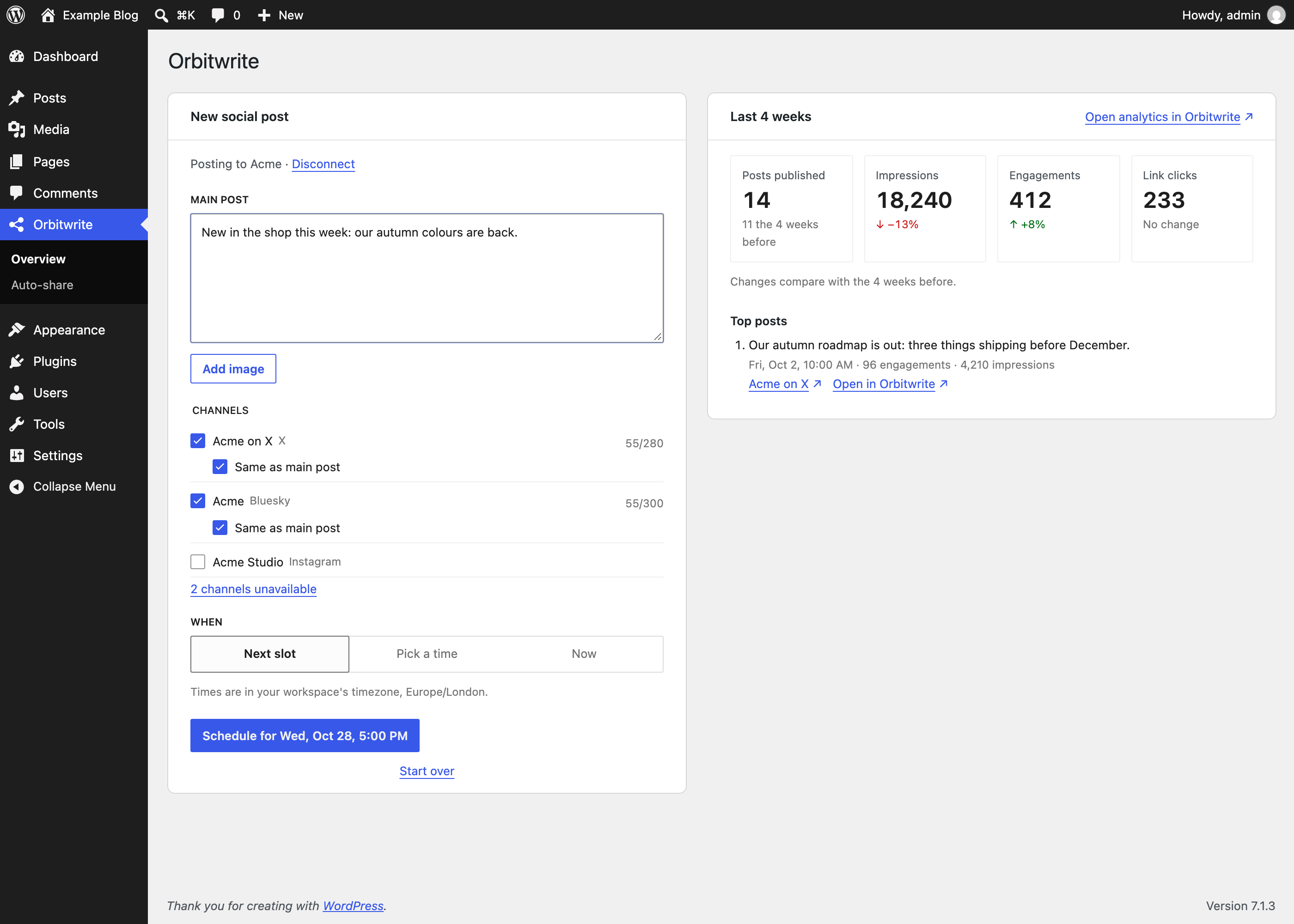
- Connect your Orbitwrite account. Each WordPress user signs in with their own account, and there are no API keys to copy.
- Open Share on Orbitwrite in the editor sidebar when you finish an article. The text is filled in with the article’s title and link, and its featured image is attached.
- Edit the post and pick your channels. Each channel shows its character count and anything its network won’t take as you type.
- Choose when it goes out: now, at your workspace’s next free posting slot, or at a date and time.
Write where you already work
Block editor: a Share on Orbitwrite sidebar next to the article.
Classic editor: a box on the edit screen, with the Classic Editor plugin.
The Orbitwrite page: a composer for posts not tied to an article.
Your unsent draft is kept if you close the sidebar or reload.
One post, or a version for each channel
Every channel uses the main post until you untick “Same as main post” for it. Then you can write different text or pick a different image for that channel alone.
Each channel shows its character count and anything its network won’t take, such as a missing image on Instagram. Images are sent at the largest size each network accepts, picked from the sizes WordPress already made.
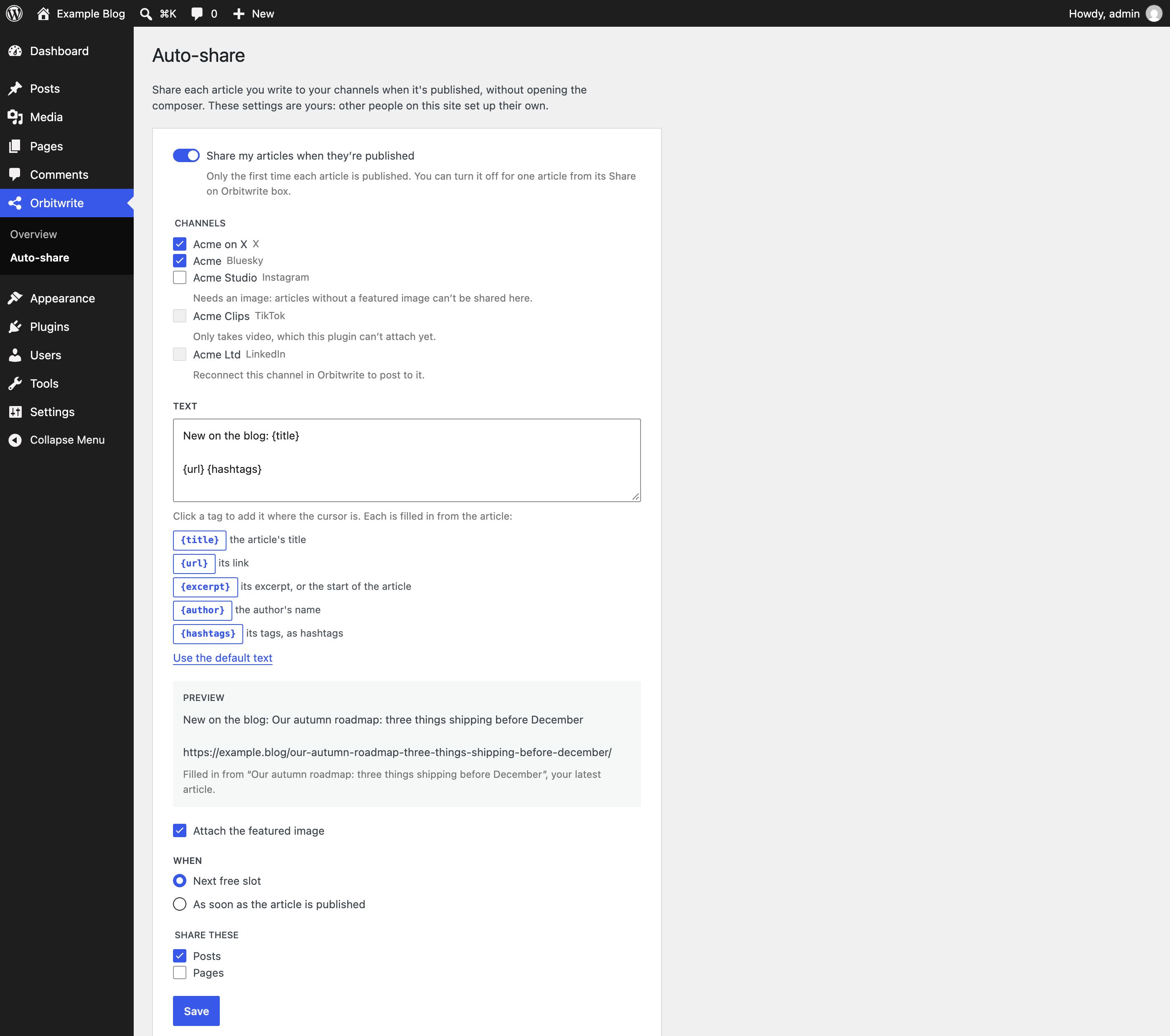
Auto-share new articles
Turn on auto-share and each article you write goes to the channels you choose the first time it’s published. The text is built from the article with these tags:
{title}the article’s title{url}its link{excerpt}its excerpt, or the start of the article{author}the author’s name{hashtags}its tags, as hashtags
Turn it off for any article from its Share on Orbitwrite box.
See what you sent and how it did
- Each article lists the posts you’ve sent for it, with their status (scheduled, waiting for approval or published) and links to the live posts. You can delete any post that’s still waiting to go out.
- Each published post shows its impressions, reactions, comments, reposts and link clicks back to your article.
- The Orbitwrite page opens with your last four weeks: posts published, impressions, engagements and link clicks against the four weeks before, and your top posts.
- A dashboard widget shows your last four weeks, and your Posts list gets a Social column and a Share link.
Bring your AI agent
The posts you send from WordPress land in your Orbitwrite workspace, and your AI agent can work in the same one. Orbitwrite’s MCP server connects to Claude, ChatGPT, Claude Code, Cursor, VS Code and anything else that speaks MCP. Your agent can draft and schedule posts, find free slots, ask for approval and answer replies in your inbox, and every post still goes through your team’s approvals and permissions.
To set it up, paste this prompt into your agent:
Fetch and execute the appropriate instructions to set me up for Orbitwrite from https://orbitwrite.com/agent-setup/prompt.md
It adds the MCP server for the agent you’re using, walks you through signing in and installs the Orbitwrite skill. In Claude or ChatGPT, add a custom connector under Settings Connectors with the URL https://mcp.orbitwrite.com/mcp and sign in. The MCP guide has the steps for every client.
What you need
You need an Orbitwrite account with at least one connected social channel. Orbitwrite plans are paid, and each starts with a 10-day free trial.
Your site needs a public address, HTTPS and pretty permalinks so Orbitwrite can reach it when you connect.
Each WordPress user connects their own Orbitwrite account, so posts are attributed to the right person and your team’s roles and approval rules in Orbitwrite still apply.
External services
This plugin connects to Orbitwrite (https://orbitwrite.com), a social media scheduling service, to publish and schedule the posts you write with it. Nothing is sent until a user connects their Orbitwrite account.
- When you connect, Orbitwrite reads this site’s public client description at
/wp-json/orbitwrite/v1/oauth-client(the site’s name, address and icon) and you sign in on orbitwrite.com. - When you open the composer, the plugin asks Orbitwrite for your workspace’s channels, posting rules, timezone and next free posting slot, and the status of posts sent from the article you’re editing.
- When you send a post, the plugin reads your channels’ current rules, then sends its text (and each channel’s own version), the channels you picked, the time, the article’s title, and the images you attached (with their alt text) to Orbitwrite.
- When you open an article or the Orbitwrite page, the plugin reads how the posts you sent did, and your workspace’s totals and top posts for the last four weeks.
- Twice a day, from WordPress’s scheduled tasks, the plugin re-reads how the posts sent from your most recent articles are doing, using the connection of whoever sent each one, so the Posts list’s Social column stays current.
- When an article is published and its author has turned on auto-share, the plugin sends the post auto-share builds (its text, the author’s chosen channels, the article’s title and, if chosen, its featured image with alt text) to Orbitwrite from WordPress’s scheduled tasks, using the author’s connection.
- When you disconnect, the plugin asks Orbitwrite to revoke its access.
Requests are made by your WordPress server, never your browser, and identify the plugin and WordPress versions in their User-Agent.
Orbitwrite’s terms of service and privacy policy.
Source code
The plugin’s JavaScript and styles are built from the source in its src folder with @wordpress/scripts. To build it yourself, run npm install and then npm run build in the plugin’s folder; package.json lists the build and its tools.
Details

Related plugins
Plugins that also contain the tag bluesky
Simple Share Buttons Adder
XPoster – Share to Bluesky and Mastodon

Simple Auto-Poster for Bluesky

Social Integration for BlueSky

Autoblue

Share on Bluesky

About
Plugin for that tries to help you find the WordPress plugin you are looking for.
| Please enjoy an image of Crush (this awesome turtle) and have a lovely day! |  |
We do not own any plugin listed on this site and do not work for or work with WordPress.com or it's associated companies. We simply provide a searchable list of the available WordPress plugins.