


Parolas – Comments with atproto
Parolas turns a conversation on Bluesky, or any other AT Protocol app, into the comment section of a WordPress post.
Publish your post and then publish its Bluesky post from the editor, with your own text and a card that links back to the entry. Or share it yourself and paste the link to that post. The replies appear under your post, threaded, with their authors and dates. Visitors reply from their own app; there is nothing to moderate in WordPress and no accounts to create.
- Publish the anchor post from the block editor, when you decide, in the site’s AT Protocol account (Bluesky or any other server).
- Or paste an
at://URI or the post URL from bsky.app, mu.social or any compatible app, with a handle or a DID. - Unlink an entry at any time, or delete its anchor post from Bluesky when it belongs to the site account.
- Works with block and classic themes.
- Replace the native comments, or show both, one after the other.
- Choose the content types where it is active (posts by default).
- Interface and dates in your site’s language.
- Scripts and styles load only on the posts that show AT Protocol comments.
The comments are displayed by the atproto-comments web component, bundled with the plugin. Its source code is available on GitHub and as the atproto-comments npm package. The source of this plugin, including its block editor panel, is on GitHub.
Parolas is an independent project by the author of the atproto-comments web component. It is not affiliated with or endorsed by AT Protocol or Bluesky.
External services
This plugin connects to AT Protocol services. The visitor’s browser loads the replies; the WordPress server only makes requests when an editor publishes or deletes an anchor post, tests the account connection or saves a link with a handle.
AppView (visitor’s browser)
The replies to the linked post are loaded from an AT Protocol AppView. By default it is the public AppView run by Bluesky Social PBC, https://public.api.bsky.app. You can change it in Settings Parolas.
- What is sent: the
at://URI of the linked post and the maximum reply depth. The request is made by the visitor’s browser, so the AppView also receives the visitor’s IP address and browser details, as with any web request. - When: every time a visitor opens a post that is linked to an AT Protocol post. Nothing is sent on other pages.
The comments show avatars served by the AppView’s image CDN (for Bluesky, cdn.bsky.app), which the visitor’s browser loads directly.
The editor’s browser also asks the same AppView for the number of replies of the linked post when an editor clicks “Delete from Bluesky”, to show it in the confirmation. It sends the at:// URI of the post, along with the editor’s IP address and browser details.
The account’s server (PDS)
If you configure an AT Protocol account in the settings, the WordPress server connects to that account’s Personal Data Server (PDS). The plugin does not hard-code any server: the PDS is the one the account’s DID document declares, which can be one of Bluesky’s servers or another provider’s, such as Eurosky.
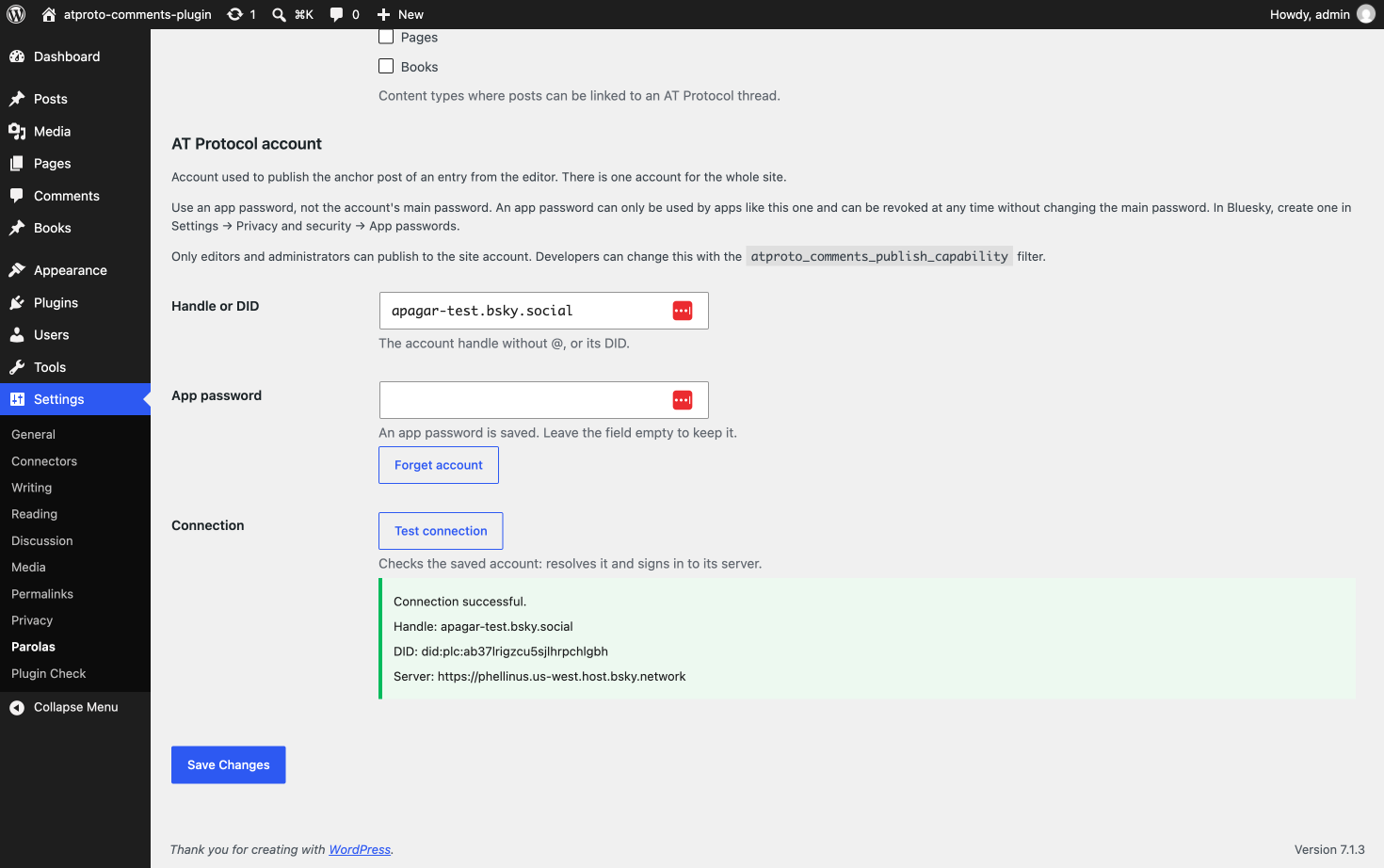
- What is sent: to sign in, the account’s DID and its app password. To publish, the post text you write, the creation date, the site language (for example
es), and a card with the entry’s permalink, title and excerpt (no excerpt for password-protected entries). If the entry has a featured image of 1 MB or less, the image file too. To delete, the post’s repository (the account’s DID) and record key; if the server’s answer is not clear, a public read of that same record confirms whether it is gone. - When: only when an editor clicks “Publish to Bluesky” or “Delete from Bluesky”, or an administrator clicks “Test connection”. Publishing, updating, trashing or deleting an entry never contacts the PDS.
Identity resolution
To find an account’s DID and PDS, the WordPress server uses the standard AT Protocol methods:
- The handle’s domain: a DNS lookup of
_atproto.<handle>and a request tohttps://<handle>/.well-known/atproto-did. Only the handle is sent. - The DID directory: for
did:plcaccounts,https://plc.directory/<did>, run by Bluesky Social PBC; fordid:webaccounts,https://<domain>/.well-known/did.json. Only the DID is sent. - When: when publishing or deleting an anchor post, testing the connection, or saving a thread link that uses a handle instead of a DID (the result is cached for 10 minutes).
Bluesky’s Terms of Service and Privacy Policy apply to the default AppView, to plc.directory and to accounts hosted on Bluesky’s servers. If you use another AppView or an account on another provider, its own terms apply.
Privacy
When a visitor chooses the app they want to reply with, the choice is stored in their browser’s localStorage under the key atproto-preferred-app, so it is remembered on their next visit. It is never sent to your site or to anyone else. The plugin sets no cookies.
The app password of the site’s AT Protocol account is stored in the WordPress database, encrypted with a key derived from your site’s security keys (AUTH_KEY and AUTH_SALT). It is never shown in the settings or sent to the browser, and it is deleted when you choose “Forget account” or uninstall the plugin. Use an app password, never the account’s main password.
Consider mentioning the AppView, the publishing of anchor posts and this localStorage entry in your site’s privacy policy.
Details


Related plugins
Plugins that also contain the tag atproto
Share on Bluesky

Neznam Atproto Share

GhostLabs Friendly Skies – Feeds & Embeds for Bluesky

ATmosphere

Wireservice


About
Plugin for that tries to help you find the WordPress plugin you are looking for.
| Please enjoy an image of Crush (this awesome turtle) and have a lovely day! |  |
We do not own any plugin listed on this site and do not work for or work with WordPress.com or it's associated companies. We simply provide a searchable list of the available WordPress plugins.