



Particle Station
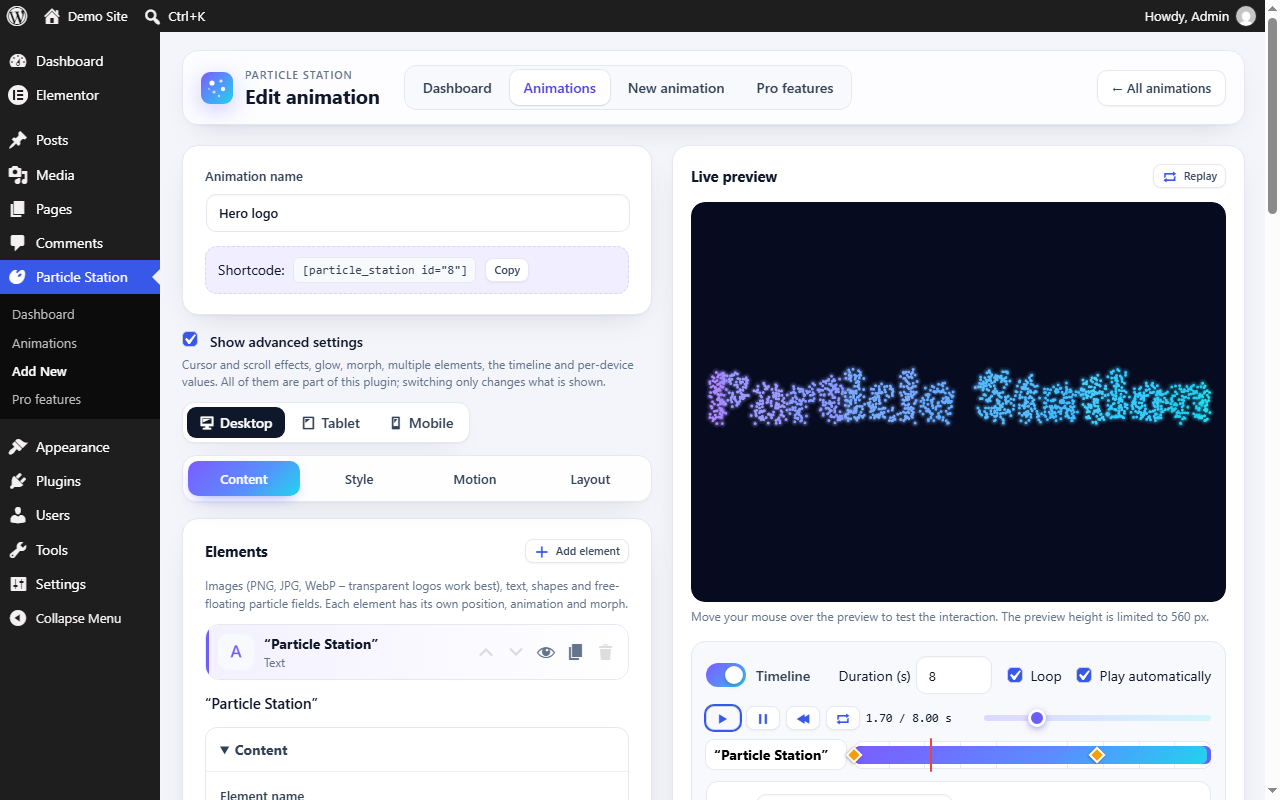
Particle Station converts a PNG, JPG or WebP image from your media library – or your own text and shapes – into a canvas particle animation that keeps the shape and colours of the source and reacts to the mouse, to touch and to scrolling. Every feature listed here is included and works without an account, licence key or external service.
Particles and colours
- Circle, square, triangle, pixel, soft glow or your own image as particles
- Original image colours, one colour, gradient (four directions) or a random mix of your colours; colour variation, intensity and opacity
- Particle size and size variation, density (low / medium / high / custom), particle limit, glow, blend modes and motion trails
Motion and interaction
- 8 presets, each with its own icon: Classic, Galaxy, Digital Pixel, Glow, Particle Explosion, Wave, Text Assembly and Particle Network
- A simple editor view with the essential settings; one switch shows all advanced settings (every one of them is free)
- Cursor and touch effects: repulsion, attraction, vortex and wave, with strength, radius and speed; explosion on click or tap with together or wave-like reassembly
- Scroll animation: start when the animation enters the screen or at a position, or assemble, disperse, morph or play the timeline while scrolling – with direction, smoothing, sensitivity, easing and “keep the end state”
Scenes, morph and timeline
- Up to 12 elements per animation: image, text, shape and particle field (with network lines and parallax layers), each with position, size, rotation, opacity, particles, entrance and exit
- Particle morph between image, text and shape, with up to 4 extra stages, five triggers, easing, loop and reverse
- Particle text with fonts, size, weight, alignment, spacing and letter-by-letter entrances
- Timeline editor with tracks, draggable keyframes for 9 properties, easing, Smooth and Step interpolation, playback and scrubbing
Layout and integration
- Gutenberg block, Elementor widget and shortcode, all powered by the same engine; background mode with content on top
- Width, max width, alignment, fixed height or aspect ratio, background colour, gradient and image
- Separate tablet and mobile values, visibility per device, fewer particles on phones and tablets, optional static image on phones
- Live preview, duplicate, quick preview, reset, JSON export and import
- Scripts load only on pages that show an animation; each animation starts only when it comes near the viewport, pauses off screen and respects “prefers-reduced-motion”; adaptive quality
- English and Hungarian (hu_HU) interface
Privacy
Particle Station does not contact external servers, does not track visitors and stores no personal data. Images and fonts are loaded from your own site.
Particle Station Pro (planned)
A separate Pro add-on, distributed outside WordPress.org, is planned with its own additional features: WebGL 3D scenes, an AI designer, more presets and a Pro collection of presets, particle shapes and colour modes. It is not available yet. The “Pro features” page and a “Pro” label in the editor describe these features for information only. The features themselves are not part of this plugin, which only contains the extension points an add-on connects to. Everything in this plugin works without restriction.
Credits
The engine (engine/ps-core.js) uses three small, openly licensed algorithms:
- Easing equations by Robert Penner, MIT License; the notation follows easings.net (GPL-3.0)
- Mulberry32 random number generator by Tommy Ettinger, CC0 1.0
- FNV-1a hash by Glenn Fowler, Landon Curt Noll and Kiem-Phong Vo, CC0 1.0
Details


Related plugins
Plugins that also contain the tag animation
Blocks Animation: CSS Animations for Gutenberg Blocks

UiCore Animate – Free Animations, Transitions, and Interactions Addon for Elementor & Gutenberg blocks

Loading Page with Loading Screen

Animations for Blocks
Ghost Kit – Page Builder Blocks, Motion Effects & Extensions

Animate on Scroll


About
Plugin for that tries to help you find the WordPress plugin you are looking for.
| Please enjoy an image of Crush (this awesome turtle) and have a lovely day! |  |
We do not own any plugin listed on this site and do not work for or work with WordPress.com or it's associated companies. We simply provide a searchable list of the available WordPress plugins.