


Smart Alt Manager
Smart Alt Manager is a comprehensive solution for managing image alt text across your entire WordPress website. It helps you improve accessibility, boost SEO, and ensure compliance with WCAG standards.
Key Features
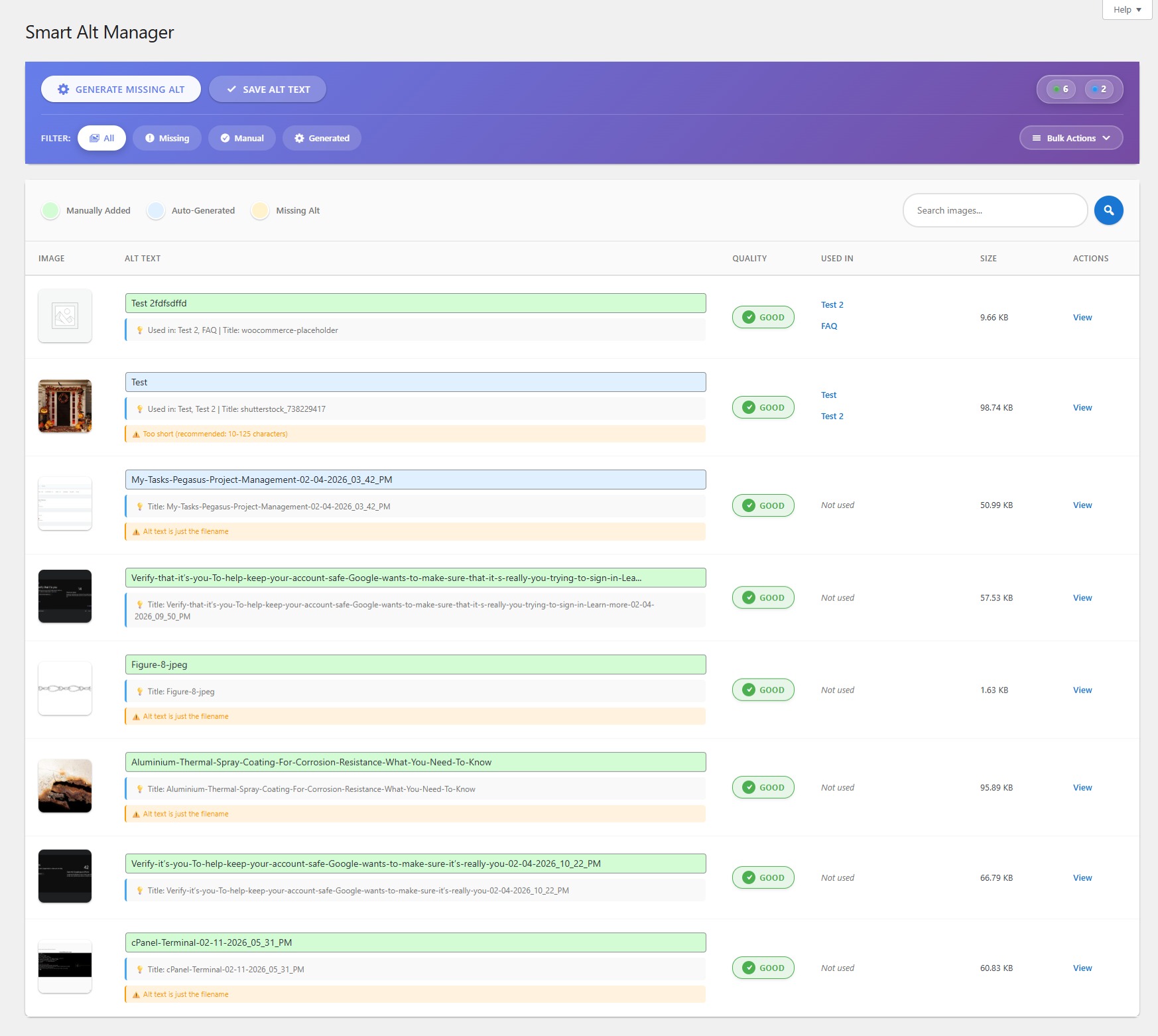
- Bulk Alt Text Management – Edit alt text for multiple images at once
- Bulk Actions – Delete auto-generated alt text or copy from titles in one click
- Smart Filters – Quick filter chips to view all, missing, manual, or generated alt text
- Quality Checker – Real-time quality scoring with visual badges (Good/Fair/Poor)
- Dashboard Widget – See alt text coverage and statistics at a glance
- Admin Bar Notifications – Get notified about missing alt text with quick access
- Smart Search – Find images by filename, title, or existing alt text
- Context-Aware Suggestions – Get intelligent suggestions based on image usage and metadata
- Auto-Generation – Automatically generate alt text from image titles, captions, and descriptions
- Visual Status Indicators – Color-coded interface shows which images need attention
- Usage Tracking – See where each image is used across your site
- Frontend Patch – Automatically adds alt text to images missing it on the frontend
- Page Builder Support – Works with Elementor, Divi, Beaver Builder, and more
- WooCommerce Integration – Patches product description images automatically
- ACF Integration – Full support for Advanced Custom Fields image fields
- Modern Material Design – Beautiful, intuitive interface with smooth animations
Why Alt Text Matters
- Accessibility: Screen readers use alt text to describe images to visually impaired users
- SEO: Search engines use alt text to understand and rank your images
- User Experience: Alt text displays when images fail to load
- Legal Compliance: Many countries require accessible websites (ADA, Section 508, WCAG)
Frontend Patch
The plugin automatically ensures all images on your website have proper alt text, even if it’s missing in the HTML:
- Scans all frontend images
- Pulls alt text from the database
- Works with WordPress core, Gutenberg, and custom HTML
- No content modification – reads only
Supported Page Builders & Platforms
- Elementor
- Divi Builder
- Beaver Builder
- WPBakery (Visual Composer)
- Avada (Fusion Builder)
- Oxygen Builder
- Revolution Slider
- Advanced Custom Fields (ACF)
- WooCommerce (Product descriptions)
Modern Material Design Interface
- Beautiful gradient header with glassmorphism effects
- Filter chips for quick access (All, Missing, Manual, Generated)
- Modern dropdown menus with smooth animations
- Quality badges with visual scoring system
- Responsive design for all devices
- Intuitive color-coded status system
- Full-width layout for maximum productivity
- Dashboard widget with statistics
- Admin bar notifications
Quality Checker
The built-in quality checker analyzes your alt text and provides:
- Quality Score – 0-100 rating for each image
- Visual Badges – Good (green), Fair (orange), Poor (red)
- Issue Detection – Identifies generic phrases, filenames, and length problems
- Inline Warnings – Shows specific issues below each input field
- Best Practice Tips – Helps you write better, more accessible alt text
Bulk Actions
Save time with powerful bulk operations:
- Delete Auto-Generated – Remove all auto-generated alt text at once
- Copy from Title – Automatically copy image titles to alt text for missing images
- Filter + Action – Combine filters with bulk actions for targeted operations
Dashboard Integration
- Dashboard Widget – View alt text coverage percentage and statistics
- Admin Bar Notification – See missing alt text count with one-click access
- Real-time Updates – Statistics update automatically when you make changes
- Quick Access – Click notifications to jump directly to filtered views
Best Practices
Writing Good Alt Text:
- Be descriptive but concise (125 characters or less)
- Describe what’s in the image, not just the subject
- Include context relevant to surrounding content
- Don’t start with “Image of” or “Picture of”
- For decorative images, use empty alt text
- Include text that appears in the image
Examples:
❌ Bad: “image123.jpg”
❌ Bad: “Picture of a dog”
✅ Good: “Golden retriever playing fetch in a park”
SEO Tips:
- Include relevant keywords naturally
- Don’t keyword stuff
- Make it useful for users first, search engines second
Accessibility Guidelines:
- Follow WCAG 2.1 Level AA standards
- Test with screen readers when possible
- Consider the image’s purpose in context
Support
For support, feature requests, or bug reports, please visit the plugin support forum.
Privacy
This plugin does not collect or transmit any user data. All processing happens locally on your WordPress installation.
Details
Related plugins
Plugins that also contain the tag accessibility
Ally – Web Accessibility & Usability

Auto Image Attributes From Filename With Bulk Updater (Add Alt Text, Image Title For Image SEO)

Accessibility by UserWay

WP Dark Mode – Improve Accessibility with AI Powered Dark Theme

AccessibleWP – Accessibility Toolbar
Alt Text AI – Automatically generate image alt text for SEO and accessibility


About
Plugin for that tries to help you find the WordPress plugin you are looking for.
| Please enjoy an image of Crush (this awesome turtle) and have a lovely day! |  |
We do not own any plugin listed on this site and do not work for or work with WordPress.com or it's associated companies. We simply provide a searchable list of the available WordPress plugins.