



Pixalink Loyalty for WooCommerce
Pixalink is a customer loyalty platform for retail and F&B businesses. This plugin connects a WooCommerce store to a Pixalink outlet so online orders count exactly like in-store purchases.
- Earn on every order. Paid orders are sent to Pixalink and the shopper earns points on the same programme as your outlets.
- Vouchers and points at checkout. Verified members redeem Pixalink vouchers and convert points into a discount in both the Cart & Checkout blocks and the classic checkout.
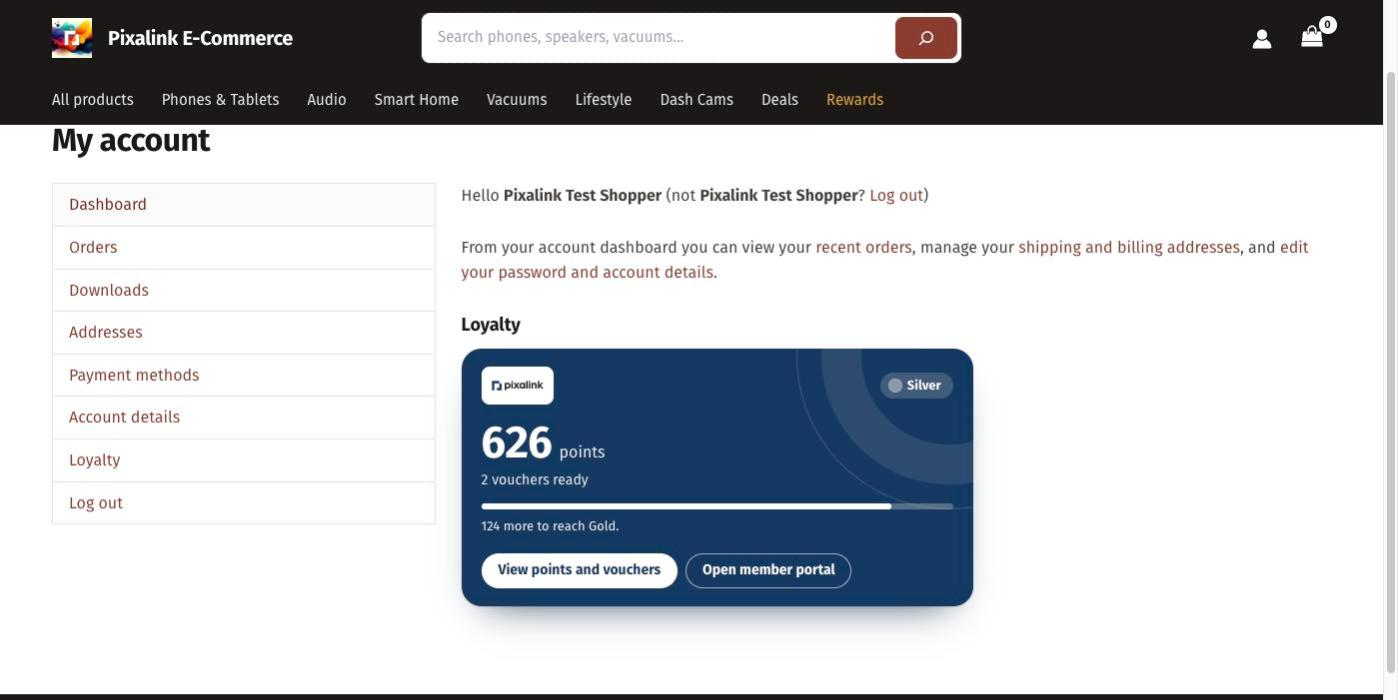
- My Account › Loyalty. Members see their balance, tier, vouchers and a QR code to scan at your outlets.
- Phone number and marketing consent. Checkout captures an international phone number and an explicit, separately recorded marketing consent.
- Reliable delivery. Order events are sent to Pixalink as soon as the shopper’s page has loaded, and also queued on your site and retried with Action Scheduler, so short outages never lose an order.
The plugin is compatible with High-Performance Order Storage and the Cart & Checkout blocks. It sends no telemetry.
A Pixalink account is required. Store owners who are not on Pixalink yet can request access from the plugin’s Connect screen.
External services
This plugin connects to the Pixalink Commerce API (https://explore.pixalink.io/api/commerce/v1), operated by Pixalink, to run the loyalty programme you configure in Pixalink. Nothing is sent until a store administrator connects the store.
What is sent, and when:
- When you connect the store: your site URL, the plugin, WordPress and WooCommerce versions, and a one-time authorisation code. You sign in on pixalink.io; your Pixalink password is never entered on your site.
- When you choose “Request access” (stores not on Pixalink yet): your store name, site URL, your name and e-mail address, the store’s country, currency, time zone, language and checkout type, the plugin, WordPress, WooCommerce and PHP versions, and your choice in the optional Pixalink marketing box, so Pixalink’s team can contact you. Nothing is sent until you click the button, and you submit the request on pixalink.io.
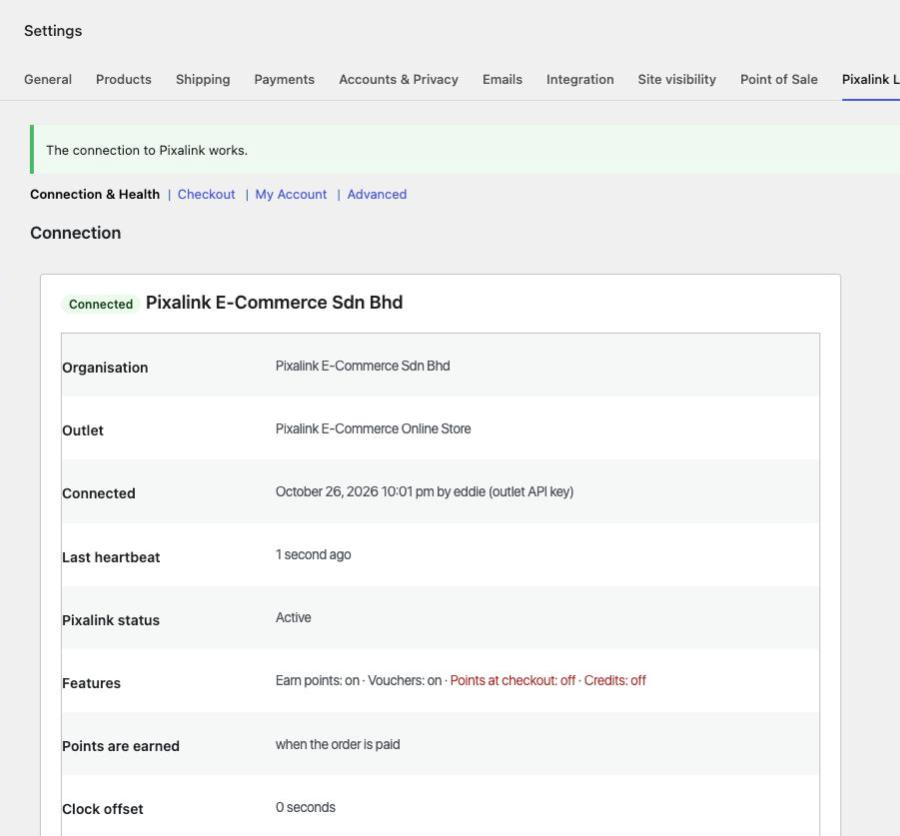
- Periodically while connected (heartbeat, every 6 hours): your site URL, plugin and WooCommerce versions, and the number of queued and failed order events. Pixalink answers with the features switched on for your store and your member portal’s name, logo, colours, address and sign-in page.
- When you disconnect: a request asking Pixalink to revoke the store’s key.
- When an order is paid for, completed, cancelled, refunded or (unpaid) deleted: the order number and key, totals, currency, line items (product name, SKU, category, quantity, price), coupons, shipping total, and the shopper’s name, e-mail address, phone number, WordPress user id (if logged in) and marketing-consent choice with its time and the hash of the consent text shown.
- When an administrator sends a test ping from the settings: an empty test event.
- When a shopper verifies their phone number (My Account › Loyalty): the phone number to look the member up; if Pixalink has no member with it, the shopper’s WordPress user id, name, e-mail address, phone number and country, and their recorded marketing choice, to create one. Pixalink then sends a one-time code by WhatsApp or SMS, and the plugin sends the code the shopper types.
- When a member arrives from the Pixalink member portal (the
pixalink_ssolink): the single-use sign-in ticket in the link and, if they are logged in to a customer account, their WordPress user id (never the id of a staff account: editors, shop managers and administrators are never linked to a member). Pixalink answers with the member’s id, phone number, name and e-mail address, which the plugin uses to sign the member in or create their customer account. - When a verified member clicks a portal button: their Pixalink customer id, WordPress user id and the page to open; Pixalink answers with a one-time sign-in link, which the browser is sent to at once.
- When a shopper presses Sign in with the member portal: the browser goes to the Pixalink portal with the store page to return to and a random check value; Pixalink sends back a one-time sign-in ticket. The store then redeems that ticket with the check value as described for the
pixalink_ssolink above. - When a verified member views My Account › Loyalty, the My Account dashboard or the loyalty shortcodes: their Pixalink customer id, to show points, credits, tier, vouchers, memberships, recent activity and the member QR code (drawn in the browser; no image service is used).
- When a shopper changes their loyalty phone number or marketing choice (checkout, registration, Account details) or links their account: a customer update with their WordPress user id, Pixalink customer id, phone number and country, e-mail address, name and marketing choice with its time, where it was given and the hash of the wording shown.
- When a verified member opens checkout or changes the rewards they use: their Pixalink customer id and the cart contents needed to price vouchers, points and credits (product names, SKUs, categories, quantities and prices, store discounts, shipping and tax totals).
- When a member places an order using vouchers, points or credits: the order key, the cart contents and the rewards to hold for the order; when payment fails or an unpaid order is abandoned, a request to release them.
Pixalink also calls the store: POST /wp-json/pixalink-loyalty/v1/webhook receives signed notifications (a member’s details or balance changed, a voucher was issued) so cached balances refresh and a withdrawn marketing consent is recorded. Requests are verified with the same key and rejected unless correctly signed and recent.
Every request is signed with a key derived from your outlet API key. Pixalink processes this data as your service provider under its terms.
- Pixalink Terms and Conditions: https://pixalink.io/terms
- Pixalink Privacy Policy: https://pixalink.io/privacy-policy
The member QR code is drawn with qrcode-generator by Kazuhiko Arase (MIT License, see assets/js/THIRD-PARTY-LICENSES.txt), bundled in the plugin.
Self-hosted builds downloaded from the plugin’s GitHub releases (not the WordPress.org version) also check GitHub (https://api.github.com, repository Pixalink-MY/pixalink-woocommerce-plugin) for plugin updates about twice a day, and download an update from GitHub when one is installed. Each check is a standard WordPress HTTP request, which carries the site URL in its User-Agent. GitHub Privacy Statement: https://docs.github.com/site-policy/privacy-policies/github-general-privacy-statement
Details


Related plugins
Plugins that also contain the tag loyalty
Giveaways and Contests by RafflePress – Get More Website Traffic, Email Subscribers, and Social Followers

Points Management System For Gamification, Ranks, Badges, and Loyalty Rewards Program – myCred

Points and Rewards for WooCommerce – Create Loyalty Programs, Reward Customer Purchases, User Badges, Gamification

Loyalty Points Rewards and Referral for WooCommerce – WPLoyalty

Gratisfaction- Loyalty, Rewards , Referral, Birthday and Giveaway Program
Easy Loyalty Points and Rewards for WooCommerce


About
Plugin for that tries to help you find the WordPress plugin you are looking for.
| Please enjoy an image of Crush (this awesome turtle) and have a lovely day! |  |
We do not own any plugin listed on this site and do not work for or work with WordPress.com or it's associated companies. We simply provide a searchable list of the available WordPress plugins.