


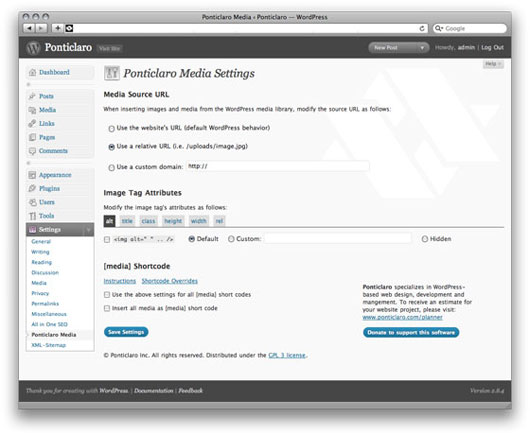
Ponticlaro Media Settings
Keep your media insert code consistent site-wide.
- Customize image and media HTML code site-wide
- Use the [media] shortcode to display images from the gallery at particular sizes
- Remove overbearing WordPress auto-code like class=””
- Force WordPress to insert relative URLs to make testing on a dev server easier
Shortcode Documentation
Use the [media] shortcode to easily display images from the gallery. Here are some example uses:
Display 3 images from the gallery. The order is determined in the WordPress media gallery:
[media] [media] [media]
Display an image with id 123:
[media id=”123″]
Display a thumbnail, medium, or large sized image:
[media size=”small”]
[media size=”medium”]
[media size=”large”]
Display a clickable image. The click through URL will default to the WordPress “view page” for that image.
[media link=true]
Display a clickable image, linking to an arbitrary URL:
[media link=true url=”http://www.your-custom.url”]
Examples for setting custom class, title, width, or height attributes. These can be used to customzie the attributes on the generated HTML image tag
[media class=”custom-class” title=”title text” width=”100″ height=”100″]
Details
Related plugins
Plugins that also contain the tag images
Autoptimize

Recent Posts Widget With Thumbnails

Lightbox & Modal Popup WordPress Plugin – FooBox

Responsive Lightbox & Gallery
Modern Image Formats

Media Cleaner: Clean your WordPress!


About
Plugin for that tries to help you find the WordPress plugin you are looking for.
| Please enjoy an image of Crush (this awesome turtle) and have a lovely day! |  |
We do not own any plugin listed on this site and do not work for or work with WordPress.com or it's associated companies. We simply provide a searchable list of the available WordPress plugins.