


Back

Post/Page Import Export – Migrate Content with Custom Fields & Taxonomies
Details
View on WordPress
Back
📦 Post/Page Import & Export makes it easy to migrate content between WordPress sites — no database dumps, no complex migration tools.
With a single click, export any post or page as a lightweight JSON file that includes everything: content, custom fields, taxonomies, featured images, and ACF data. Then upload that file on another WordPress site to instantly recreate the content.
Just click, download, upload, done.
✨ Key Features
- 📤 One-Click Export — Export any post or page as a JSON file directly from the list view
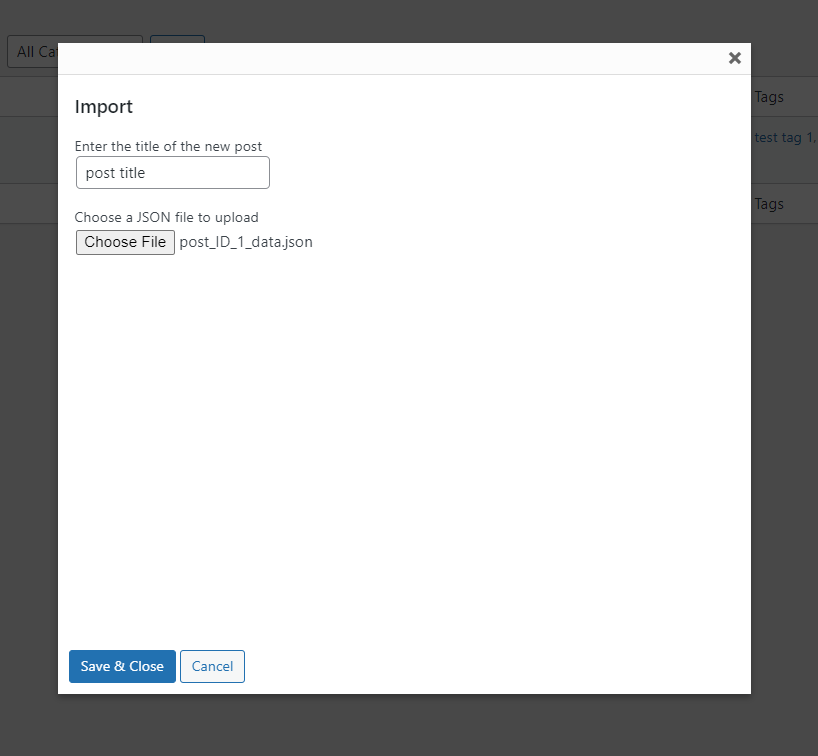
- 📥 Quick Import — Import JSON files via a simple popup modal
- 🖼️ Featured Image Transfer — Automatically downloads and re-attaches featured images on the destination site
- 🏷️ Taxonomy Preservation — Categories, tags, and custom taxonomies are fully preserved
- 📝 Custom Fields / PostMeta — All custom field data is carried over during migration
- 🔧 ACF Support — Advanced Custom Fields including nested repeaters up to 5 levels deep
- 🖼️ Inline Image Handling — Images embedded in post content are downloaded and URLs are updated automatically
- 📄 Custom Post Types — Works with any registered post type, not just posts and pages
- 🏗️ Page Builder Friendly — Compatible with Elementor, WPBakery, Beaver Builder, and more
- 🔒 Secure — Only administrators can export content
💡 Use Cases
- 🌐 Cross-Site Content Migration — Move posts or pages from a staging site to production without database migration
- 📋 Content Duplication — Clone a post or page within the same site with all its metadata intact
- 🏗️ Staging to Production — Build pages on staging and deploy to the live site via JSON export/import
- 🔄 Multi-Site Content Sharing — Share content across a multisite network or between independent installs
- 📦 Content Backup — Export critical posts as JSON backups before making major changes
- 👨💻 Developer Handoff — Share pre-built pages with clients or team members as portable JSON files
- 🛒 WooCommerce Product Migration — Move product pages with custom fields between stores
- 📰 Editorial Workflow — Export drafted content for offline review and re-import after approval
- 🎨 Template Distribution — Create a page with ACF fields and page builder layouts, distribute as JSON
- 🧪 A/B Testing — Duplicate pages quickly to test different content versions while preserving all metadata
- 🏫 Demo Content Setup — Set up demo content on fresh WordPress installations for training or presentations
- 🔀 Theme Migration — Export key pages and re-import them when switching themes to preserve structured content
📋 What Gets Exported
- ✅ Post title, content, and excerpt
- ✅ Post status and post type
- ✅ Featured image (auto-downloaded on import)
- ✅ All custom fields / postmeta
- ✅ Categories, tags, and custom taxonomies
- ✅ ACF fields (including nested repeaters and image fields)
- ✅ Inline images in content (auto-downloaded and URLs updated)
🤝 Works Great With These Popular Plugins
- 🔧 Advanced Custom Fields (ACF) — Full support for ACF fields including nested repeaters and image fields
- 🏗️ Elementor — All layout data stored in postmeta is preserved during export/import
- 🏗️ WPBakery Page Builder — Shortcode-based layouts in post content transfer seamlessly
- 🦫 Beaver Builder — Page builder data in custom fields is carried over
- 🛒 WooCommerce — Migrate product pages with all custom fields and taxonomies
- 📝 Yoast SEO — SEO metadata (title, description, focus keyword) is exported and imported
- 📝 Rank Math — All SEO metadata stored in custom fields is preserved
- 🖼️ Meta Box — Custom fields created with Meta Box are included in the export
- 🔁 WPML — Export translated content individually and import on multilingual sites
- 🗂️ Custom Post Type UI — Works with any custom post type registered by CPT UI
Details
Plugin code:
postpage-import-export-with-custom-fields-taxonomies
Plugin version:
2.1.0
Author:
Outdated:
No
WP version:
4.0.0 or higher
PHP version:
7.4 or higher
Test up to WP version:
6.9.1
Total installations:
200
Last updated:
2026-02-12
Rating:
Times rated:
2
clone-pages
content-migration
copy-posts
export-posts
import-posts



Related plugins
Plugins that also contain the tag clone-pages
Clone Posts


About
Plugin for that tries to help you find the WordPress plugin you are looking for.
| Please enjoy an image of Crush (this awesome turtle) and have a lovely day! |  |
We do not own any plugin listed on this site and do not work for or work with WordPress.com or it's associated companies. We simply provide a searchable list of the available WordPress plugins.