



PressedMail – Email Client, Inbox & Webmail
PressedMail is an email client for WordPress that brings inbox management directly into your WordPress admin dashboard.
Source code and build instructions
The human-readable source and build instructions are public:
- Source repository: https://github.com/CurbSoftware/pressedmail
- This release, tagged: https://github.com/CurbSoftware/pressedmail/tree/v1.0.25
- Build instructions: https://github.com/CurbSoftware/pressedmail/blob/v1.0.25/BUILD.md
The repository holds the TypeScript, React, CSS, package manifests, lockfile, and build configuration that produce assets/admin/dist/, and nothing else. It is generated from the module list the free build itself reports, so it contains the source of this package and no code from any other product.
This build is a one-person email client. It connects one mailbox through standard IMAP and SMTP and gives you a practical inbox for reading, composing, replying, forwarding, organizing, and securing daily email work without leaving WordPress. The mailbox belongs to whoever connects it, and that person is who can open PressedMail.
Nothing here is keyed or time limited, and nothing waits for a payment. One mailbox is the shape of this plugin rather than a lock on a larger one. There is no licence check, counter, or disabled control.
Email inside WordPress
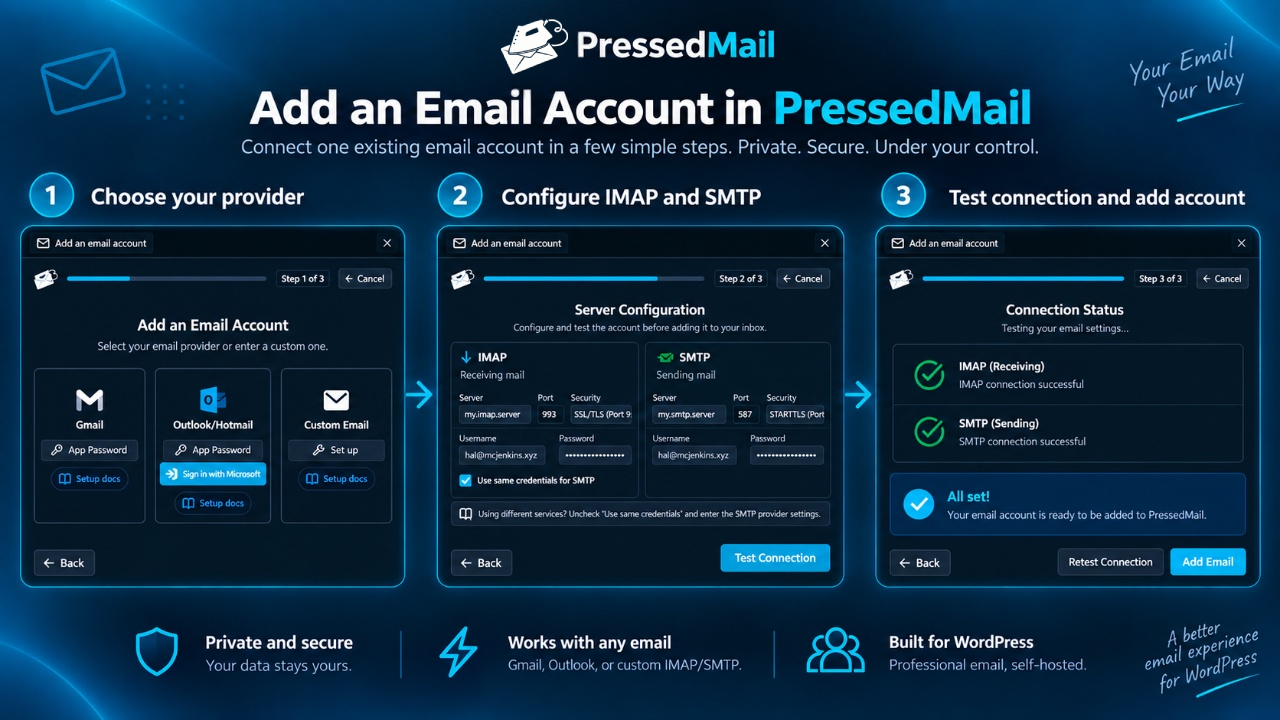
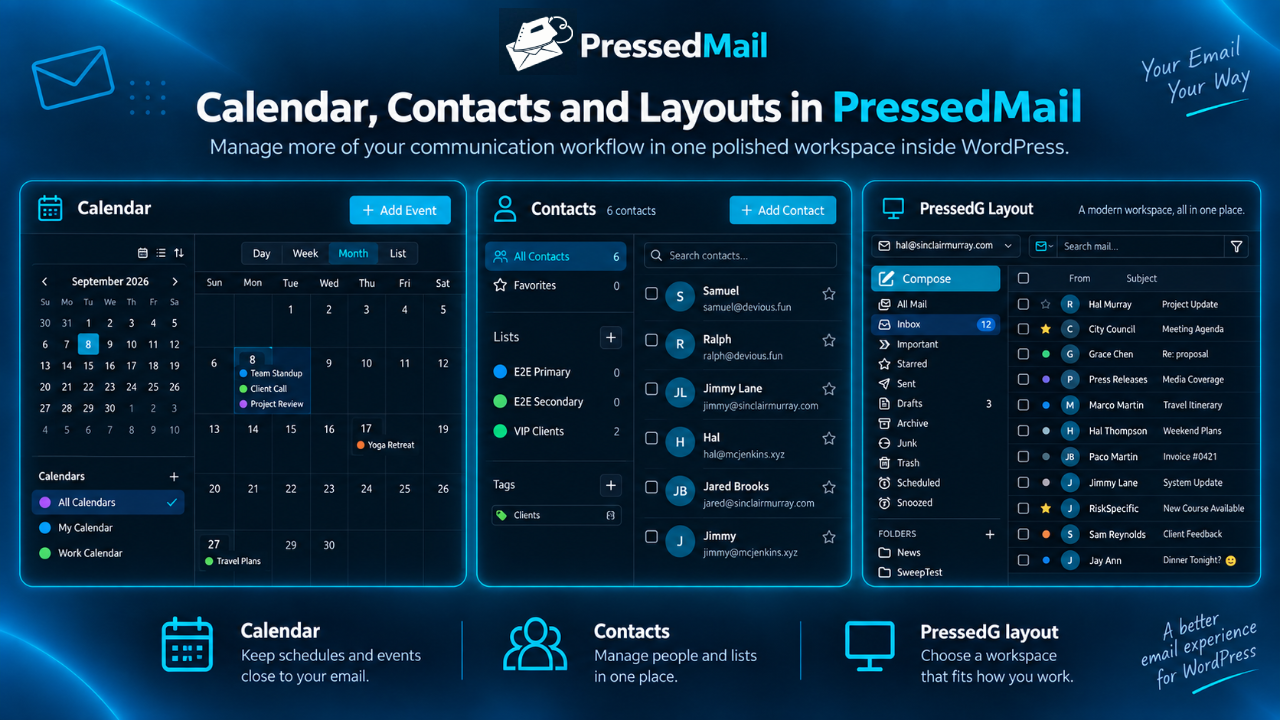
PressedMail adds a dedicated email workspace to your WordPress admin area. You can connect compatible IMAP and SMTP mailboxes, view messages, compose new email, reply to conversations, forward messages, and manage email from the same dashboard where you manage your website.
IMAP and SMTP support
PressedMail works with email providers that support compatible IMAP and SMTP access, including many hosted email providers, cPanel mailboxes, custom domains, and business email accounts.
Compatible services commonly include Gmail and Google Workspace using app passwords, Outlook and Microsoft 365 using Microsoft sign-in or app passwords, Zoho Mail, Fastmail, cPanel-hosted email, Roundcube, and custom mail servers. Availability depends on each provider’s current IMAP, SMTP, authentication, and app-password requirements.
Some providers require app passwords, OAuth, bridge software, or provider-specific security settings before third-party email clients can connect.
SMTP for WordPress system email
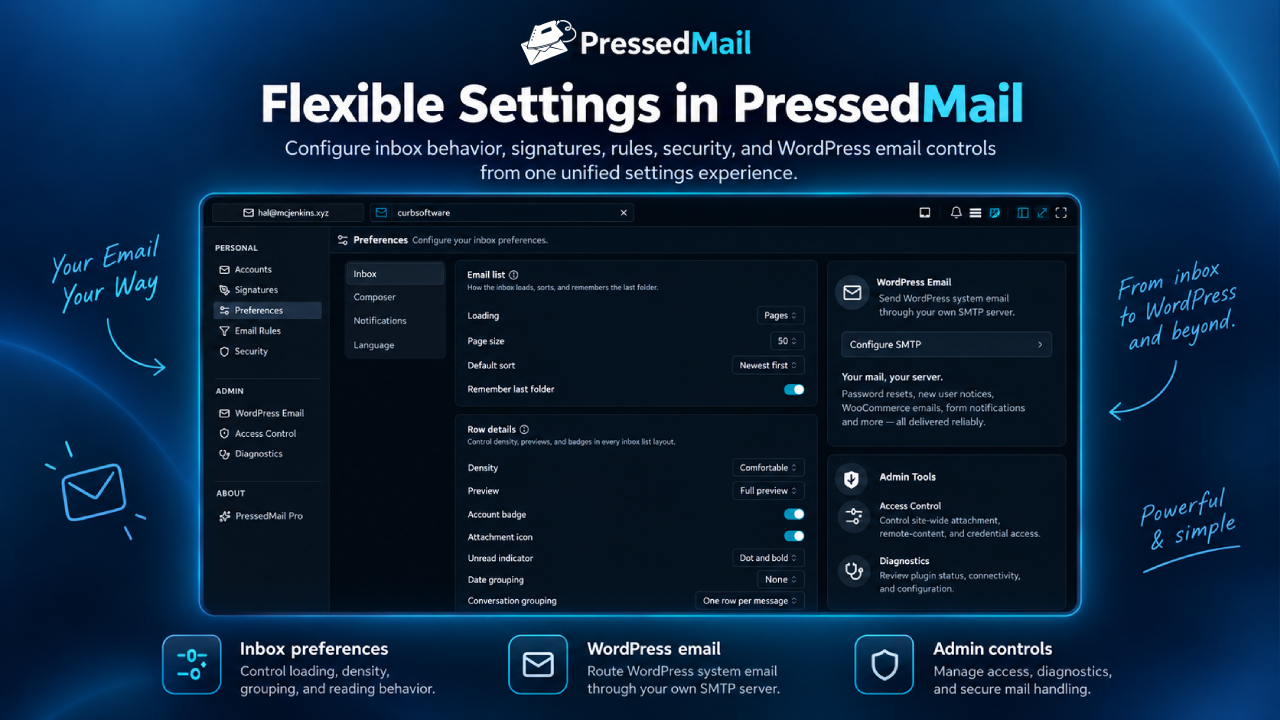
Separately from your inboxes, PressedMail can send WordPress’s own email through an SMTP server you configure. That covers password resets, new user notifications, comment notifications, WooCommerce order email, contact form notifications, and anything else a plugin or theme sends with wp_mail().
The default PHP mailer is unreliable on many hosts and is a common cause of WordPress email that never arrives. Configure a mail server under Settings, send a test message, and review the delivery log to confirm what was sent and what failed.
The delivery log records only metadata: the date, the first recipient and how many recipients there were, the subject, the sender, which mail server was used, and whether the message succeeded. Message content, headers, and attachments are never recorded. Entries are deleted automatically after the retention period you choose, logging can be turned off entirely, and the log can be cleared at any time.
What the free plugin includes
Free features include:
- One connected email account using standard IMAP and SMTP
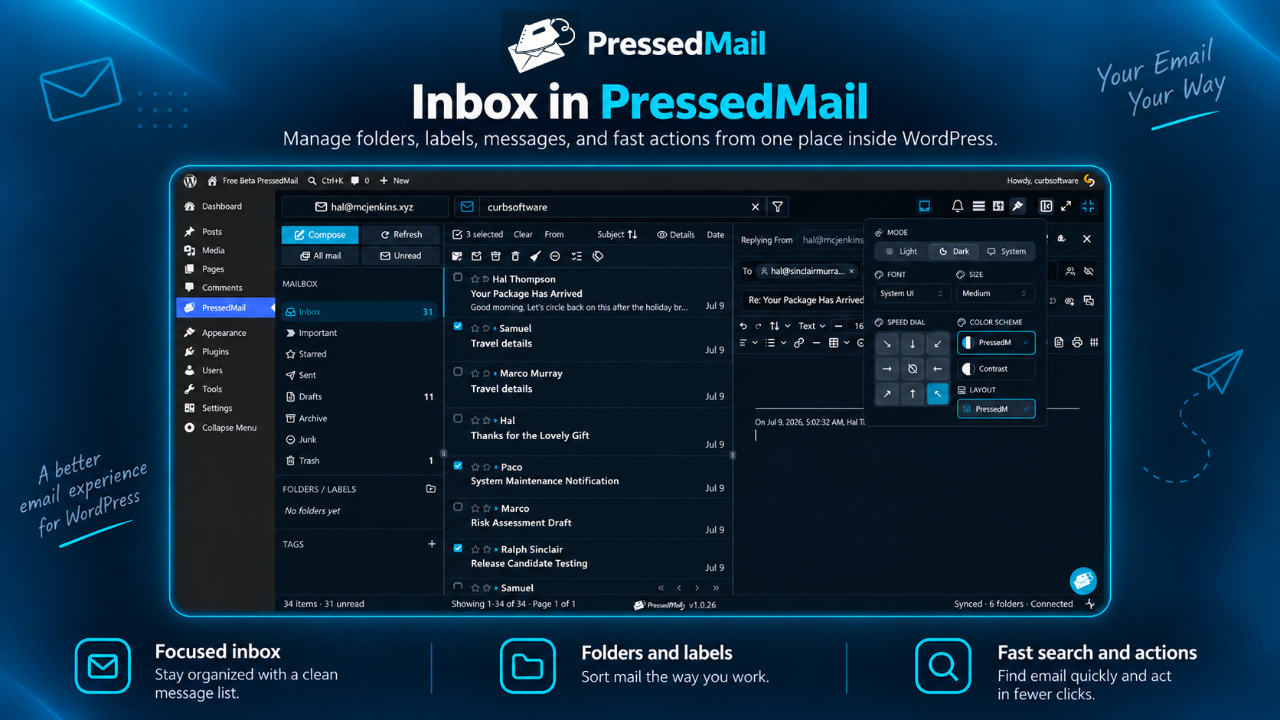
- Dashboard inbox for reading and managing email
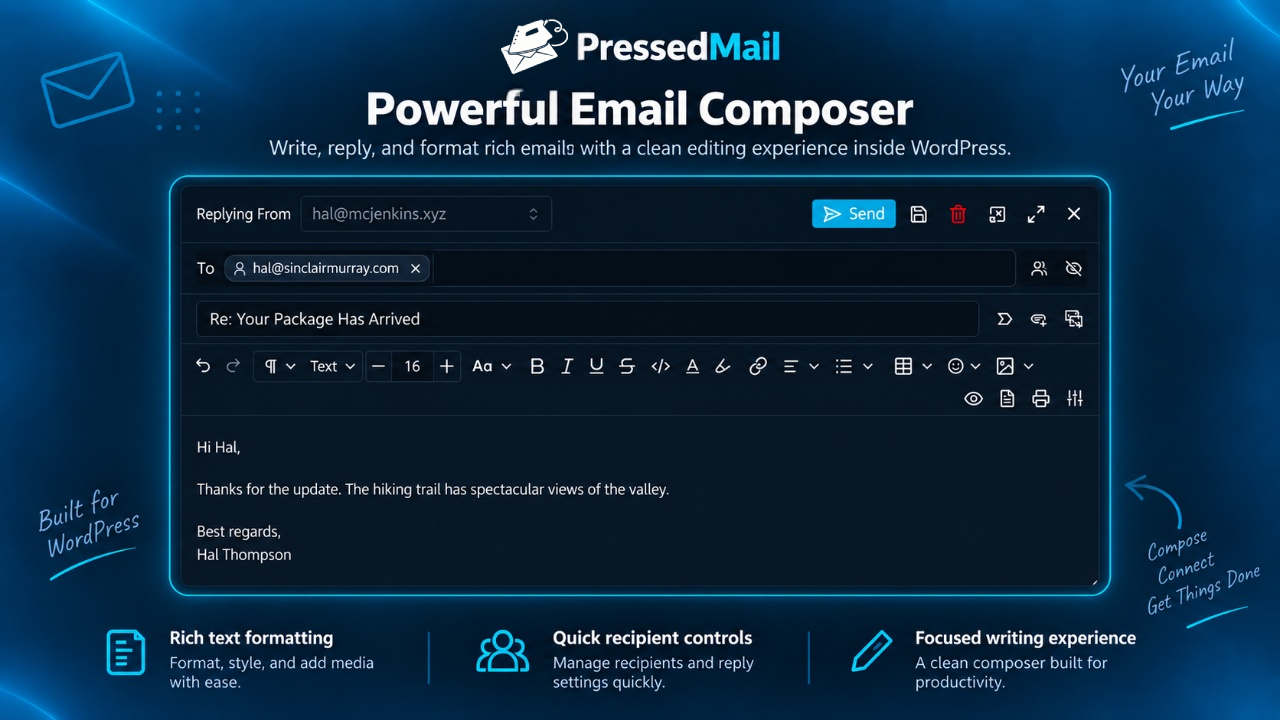
- Message composer for new messages, replies, reply-all, and forwards
- CC and BCC fields
- Conversation view for threaded replies
- One signature for outgoing messages
- Unlimited tags for organizing email
- IMAP folder browsing and sync for folders exposed by your mail server
- Search and filtering inside connected email folders
- Dark mode and light mode
- Sender impersonation protection
- Sandboxed email rendering with remote content blocked by default
- WordPress capability-based access for authorized users
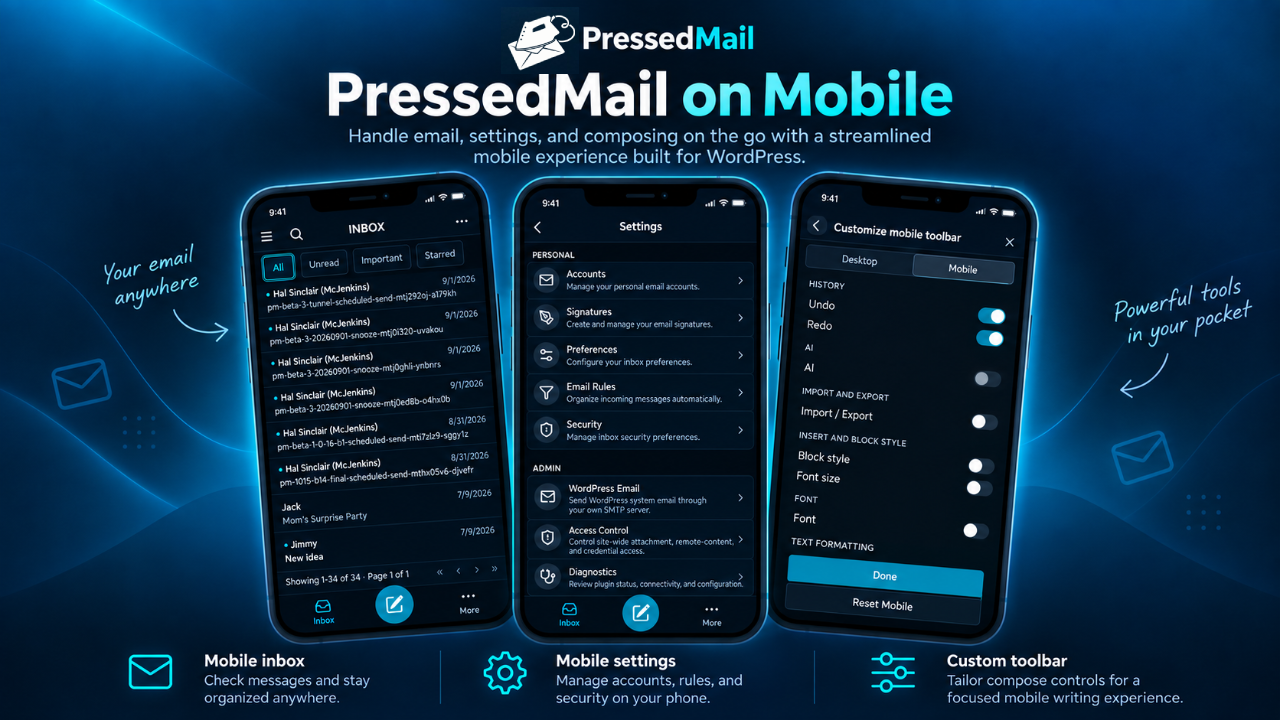
- Responsive WordPress admin layout for tablet and phone sized screens
- Basic keyboard navigation
- SMTP for WordPress system email, so password resets, new user notices, WooCommerce order mail, and form notifications send through your own mail server instead of the default PHP mailer
- Delivery log recording the date, recipient, subject, mail server, and result of each system email, with a retention period you choose
- WordPress.org updates through the standard plugin update channel
Security-focused email handling
Email can contain untrusted content. PressedMail is built with security-conscious handling for message display and account access.
Security-focused features include:
- Sandboxed email rendering
- Remote content blocked by default
- Sender impersonation protection
- WordPress capability-based access for authorized users
- Email account settings managed inside WordPress
Privacy and data flow
This WordPress.org build has no telemetry, no license checks, no custom update checks, and no CurbSoftware analytics. It receives updates only through WordPress.org. Mail-server, Microsoft sign-in, remote-image, and local-storage data flows are disclosed under External services below.
Optional companion plugin
A separately distributed GPL-compatible PressedMail Pro plugin provides additional workflows. Its code is not included in this WordPress.org package, and this plugin does not contain controls that wait for payment or a key. Learn more at https://pressedmail.com/pricing
Privacy and External Services
PressedMail contacts only the services described below, and only when a site owner configures an account or an authorized user requests the related function.
IMAP server
After an email account is configured, PressedMail contacts its IMAP server whenever an authorized user lists folders, synchronizes, searches, reads, moves, flags, or deletes email. The server receives its hostname and port connection, security settings, mailbox username or email address, authentication credential or OAuth access token, and the requested IMAP commands. It returns folders, message identifiers, senders, recipients, dates, subjects, headers, bodies, attachments, flags, labels, and synchronization state needed for the requested mailbox operation. The configured provider’s terms and privacy policy apply.
SMTP server
PressedMail contacts the configured SMTP server when an authorized user sends a message or when WordPress sends system email through the configured server. The server receives its hostname and port connection, security settings, mailbox username or email address, authentication credential or OAuth access token, and the message sender, recipients, subject, headers, body, and attachments. The configured provider’s terms and privacy policy apply.
Optional PressedMail Microsoft OAuth relay
When an authorized user selects Microsoft sign-in, PressedMail uses the Microsoft identity service and the PressedMail Microsoft OAuth relay at https://pressedmail.com. Password-based and app-password connections do not contact this relay.
- Start: https://pressedmail.com/oauth/microsoft/start receives the site URL, WordPress admin callback URL, and a cryptographic nonce when the user starts Microsoft sign-in.
- Redeem: https://pressedmail.com/oauth/microsoft/redeem receives the one-time transfer code, site URL, and the same nonce immediately after Microsoft redirects the user back.
- Refresh: https://pressedmail.com/oauth/microsoft/refresh receives the refresh token, site URL, and a fresh nonce when PressedMail needs a replacement access token shortly before expiry.
The relay returns the Microsoft mailbox identity, OAuth access and refresh tokens, granted scope, and expiry information to the requesting WordPress site. The relay does not receive message bodies, attachments, or mailbox contents. Microsoft receives the sign-in and mailbox-authorization information required by its identity and mail services.
PressedMail Terms of Service: https://pressedmail.com/terms-of-service
PressedMail Privacy Policy: https://pressedmail.com/privacy
Microsoft Services Agreement: https://www.microsoft.com/servicesagreement
Microsoft Privacy Statement: https://privacy.microsoft.com/privacystatement
Remote images
Remote images are blocked by default. If an authorized user chooses to display them, the browser requests each image directly from the remote image host. That host receives the requested image URL and the viewer’s IP address and user agent, and may receive ordinary browser request headers or cookies under the host’s own terms and privacy policy. Loading a sender-controlled image can reveal that the message was viewed.
WordPress.org distribution and local privacy
This WordPress.org build has no telemetry, no license checks, no custom update checks, and no CurbSoftware analytics. It receives updates only through WordPress.org. Installing or activating it does not send email content or email metadata to CurbSoftware or to an AI service.
PressedMail stores account settings, encrypted credentials or OAuth tokens, and synchronized mailbox data in the site’s WordPress database or filesystem as needed for enabled local features. The site owner controls hosting, user access, backups, retention, account removal, personal-data requests, and uninstall cleanup.
Third-Party Assets
PressedMail bundles the OpenDyslexic font for its optional dyslexia-friendly reading mode. OpenDyslexic is licensed under the SIL Open Font License 1.1; the full license text ships alongside the font files in the plugin (assets fonts directory, OFL.txt).
Open Source Libraries
The PressedMail admin interface is a compiled React application. The public Free build uses the WordPress Core registered React, ReactDOM, and JSX runtime and does not bundle copies of those libraries. It is built on the following additional open source libraries, each distributed under a GPL-compatible license (MIT, BSD, Apache-2.0, ISC, or MPL-2.0). The complete, unminified source and build instructions are available in the public repository linked under Development.
- Plate.js – the rich-text editor framework that powers the message composer (MIT)
- Slate – the underlying rich-text editing engine used by Plate.js (MIT)
- Vite – the build tool that compiles the admin interface (MIT)
- Tailwind CSS – the styling framework (MIT)
- Radix UI and React Aria – accessible interface primitives (MIT and Apache-2.0)
- DOMPurify – the HTML sanitizer used for secure message rendering (Apache-2.0 or MPL-2.0)
- KaTeX – math notation rendering (MIT)
- date-fns – date and time utilities (MIT)
- Zod – schema validation (MIT)
Development
The admin interface is a React application built with the Plate.js rich-text
editor framework and compiled with Vite; the plugin ships the compiled output in
assets/admin/dist/. The complete, unminified source and build instructions are
public:
- Source: https://github.com/CurbSoftware/pressedmail/tree/v1.0.25
- Build steps: https://github.com/CurbSoftware/pressedmail/blob/v1.0.25/BUILD.md
Build with Node.js 20+ and pnpm 11: pnpm install && pnpm build at the source repository root.
Details
Related plugins
Plugins that also contain the tag email
MC4WP: Mailchimp for WordPress

Post SMTP – Complete Email Deliverability and SMTP Solution with Email Logs, Alerts, Backup SMTP & Mobile App

WP Mail Logging

Creative Mail – Easier WordPress & WooCommerce Email Marketing

Mailchimp for WooCommerce

SureMail – SMTP and Email Logs Plugin with Amazon SES, Postmark, and Other Providers

About
Plugin for that tries to help you find the WordPress plugin you are looking for.
| Please enjoy an image of Crush (this awesome turtle) and have a lovely day! |  |
We do not own any plugin listed on this site and do not work for or work with WordPress.com or it's associated companies. We simply provide a searchable list of the available WordPress plugins.