



Presswell Content Extractor
Presswell Content Extractor gives AI agents and crawlers a clean Markdown copy of your posts and pages, plus an llms.txt index that lists them. Content is converted on your server, cached, and kept in step with your SEO and caching plugins.
Features
- Serve any post or page as Markdown by adding
.mdto its address - Publish an
llms.txtindex of your content - Serve Markdown to agents that ask for it, on the regular post address
- Include SEO titles, descriptions, canonical URLs, robots rules, and social details in YAML frontmatter
- Leave out posts your SEO plugin marks noindex
- Convert with the built-in converter or Cloudflare’s toMarkdown API
- Clear cached Markdown when your page cache is purged
- Review activity in a private debug log
- Follow Presswell Site Structure’s page tree, menu labels, featured posts, and breadcrumbs
Markdown Endpoints
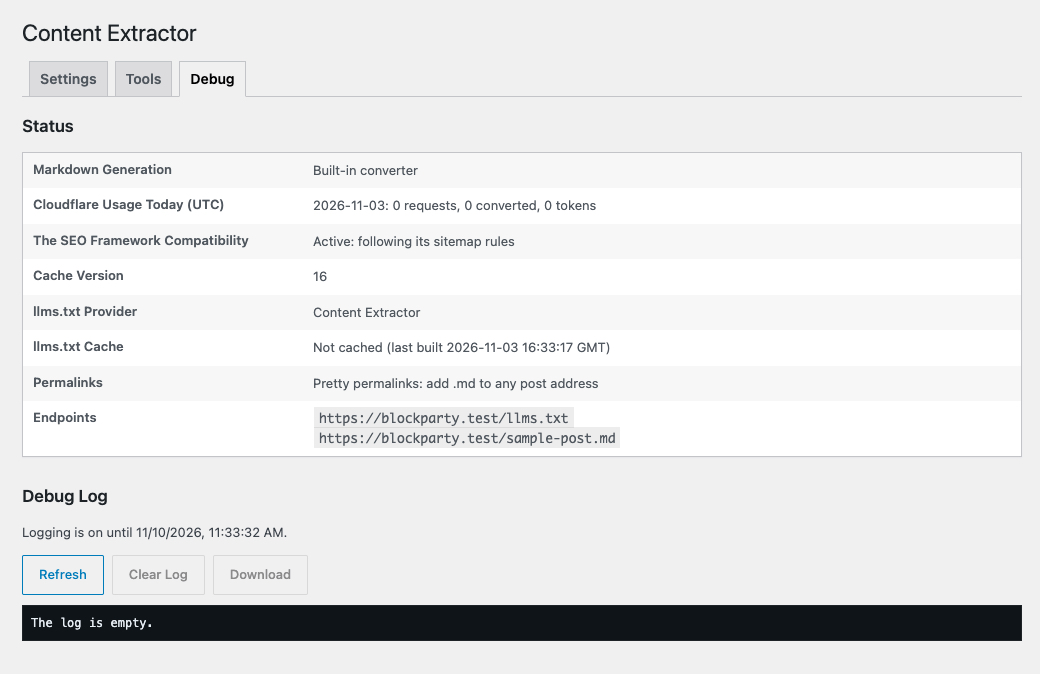
Add .md to any permalink, such as example.com/hello-world.md, to get the post as Markdown. Each document starts with YAML frontmatter: title, publish and modified dates, permalink, excerpt, the post’s categories, tags, and other terms under taxonomies, and an seo object with the SEO title, description, canonical URL, robots rules, and Open Graph and Twitter details. With Presswell Site Structure, a breadcrumbs trail is added. Your front page is at /index.md, and View Markdown appears in the post list.
llms.txt
/llms.txt lists your published content, most recently updated first and grouped by post type, with links to each post's Markdown. A static front page is listed once, as Home.
With Presswell Site Structure, pages follow the page tree: in tree order, nested under their parents, with menu labels. Flat post types with “Use order on site” follow their tree order too. When its Featured Posts feature is on, a Featured section lists featured posts in their featured order.
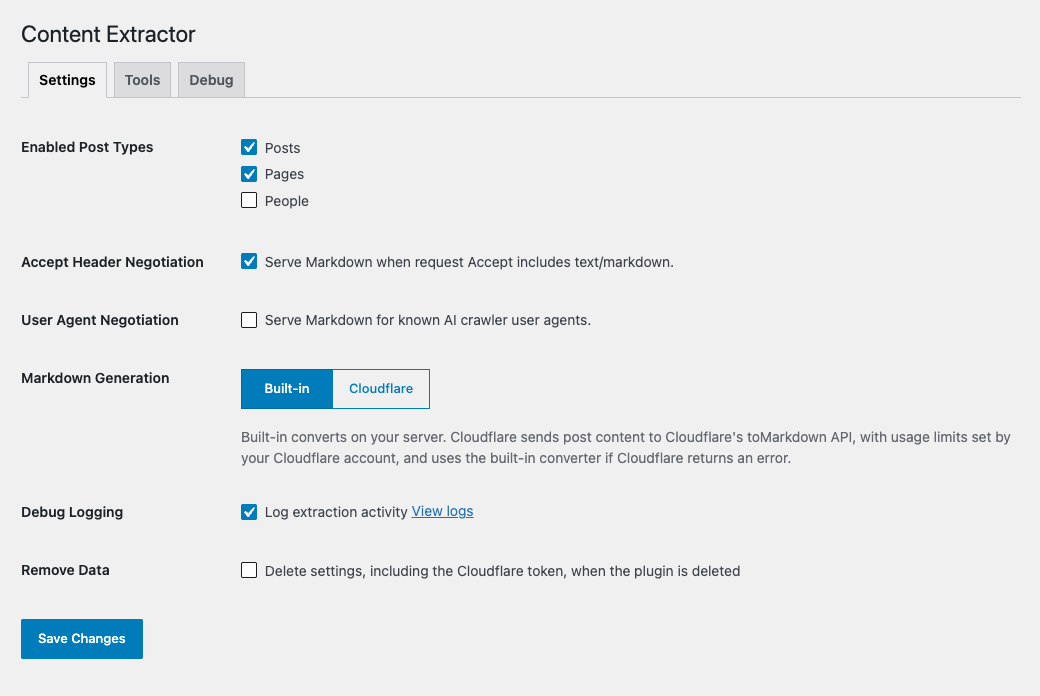
Yoast SEO, Rank Math, and All in One SEO can publish their own llms.txt. While one of them does, Content Extractor serves none, so the two never clash. The settings page shows which plugin provides it and offers to switch to Content Extractor’s.
Content Negotiation
Requests that prefer text/markdown in their Accept header receive Markdown from the regular post address. You can also turn on User Agent Negotiation to send Markdown to known AI crawlers, such as GPTBot, ClaudeBot, and PerplexityBot; it’s off by default, since those crawlers don’t ask for Markdown and people visiting the same address see HTML. Every post also advertises its Markdown address with a <link rel="alternate"> tag and a Link header.
SEO and Caching Plugins
Titles, descriptions, canonical URLs, robots rules, and social details come from Yoast SEO, Rank Math, All in One SEO, SEOPress, Slim SEO, or The SEO Framework: the values each prints in the page’s head, whether set on the post or generated from its templates and post type and site defaults. Posts they mark noindex are left out.
Markdown is cached until the post changes, and cleared when you purge WP Rocket, W3 Total Cache, LiteSpeed Cache, WP Fastest Cache, Cache Enabler, WP-Optimize, Breeze, or Nginx Helper. Browsers, CDNs, and page caches may keep a .md or llms.txt response for up to an hour. Markdown sent from a post’s regular address is never stored, since it shares that address with your HTML.
Converter
HTML is converted by the plugin’s own converter, which uses PHP’s DOM extension and ships no third-party code. You can use Cloudflare’s toMarkdown API instead, with your own account; if Cloudflare returns an error, the built-in converter is used.
Documentation
Public APIs
pwce_get_markdown_for_post( $post_id )
- $post_id (int) (required) – ID of the post
Returns the post’s Markdown document, including frontmatter: the same document its .md address serves. Returns an empty string when the post isn’t published as Markdown (not published, password-protected, of a post type that isn’t enabled, or noindex).
Example:
$markdown = pwce_get_markdown_for_post( get_the_ID() );
pwce_get_settings()
Returns the plugin’s settings.
Example:
$settings = pwce_get_settings();
Filters
pwce_frontmatter_data
Filters the frontmatter for a post before it is written as YAML.
Arguments:
- $data (array) – Frontmatter values.
- $post (WP_Post) – The post.
Example:
add_filter( 'pwce_frontmatter_data', function( $data, $post ) {
  $data['author'] = get_the_author_meta( 'display_name', $post->post_author );
  return $data;
}, 10, 2 );
pwce_markdown_content
Filters the finished Markdown document.
Arguments:
- $document (string) – Markdown document.
- $post (WP_Post) – The post.
- $frontmatter (array) – Frontmatter values.
pwce_llms_entries
Filters the entries listed in llms.txt.
Arguments:
- $entries (array) – Entries, each with
post_id,url,title,post_type, andlastmod. - $post_types (array) – Post types listed.
Example:
add_filter( 'pwce_llms_entries', function( $entries ) {
  $entries[] = array(
    'url'       => home_url( '/docs.md' ),
    'title'     => 'Documentation',
    'post_type' => 'page',
  );
  return $entries;
} );
More filters
- pwce_supported_post_types – Post types published as Markdown.
- pwce_cache_ttl – Seconds a Markdown document is cached (default one week).
- pwce_http_cache_max_age – Seconds browsers and page caches may keep a
.mdor llms.txt response (default one hour; 0 stops them storing it). - pwce_fallback_rendered_html – HTML to convert when a post’s content renders empty, such as with some page builders.
- pwce_agent_user_agents – User agent fragments that receive Markdown when user agent negotiation is on.
- pwce_allow_home_markdown_negotiation – Allow negotiation on the front page (default false, to keep caches of
/safe). - pwce_redirect_archive_markdown_to_llms – Whether
/index.mdredirects to llms.txt when the front page lists posts. - pwce_archive_markdown_redirect_url – Where that redirect goes.
- pwce_llms_post_types – Post types listed in llms.txt.
- pwce_llms_max_entries – Most entries listed in llms.txt (default 1000, most recently updated first).
- pwce_llms_cache_ttl – Seconds llms.txt is cached (default one week).
- pwce_serve_llms_txt – Whether Content Extractor serves llms.txt.
- pwce_llms_txt_conflicts – Other llms.txt sources found.
- pwce_exclude_noindex_posts – Whether noindex posts are left out (default true).
- pwce_is_post_available – Whether a post is published as Markdown, after the built-in checks: its
.mdaddress, negotiation, alternate link, llms.txt entries, andpwce_get_markdown_for_post(). Return false to hide a post; return true only with care, since its content is then served to anyone. - pwce_seo_adapters – SEO plugin adapters, in order of precedence.
- pwce_seo_normalized_data – SEO data merged from the active SEO plugins:
source,title,description,canonical_url,robots,social, andproviders. Everything exceptprovidersfills the frontmatter’sseoobject. - pwce_cache_purge_hooks – Hooks that clear all Markdown when a page cache is purged.
- pwce_default_settings – Default settings.
- pwce_filter_settings – Settings from the settings page, before they are saved.
- pwce_debug_log_filename – Filename of the private debug log.
- pwce_debug_log_max_bytes – Size at which the debug log rotates (default 5 MB).
- pwce_llms_use_site_structure_tree – Whether a post type’s llms.txt section follows its Presswell Site Structure tree (default true).
- pwce_llms_featured_section – Whether llms.txt lists Presswell Site Structure’s featured posts (default true).
- pwce_frontmatter_breadcrumbs – Whether the frontmatter includes the Presswell Site Structure breadcrumb trail (default true).
Actions
pwce_before_markdown_render
Fires before a post’s Markdown is built.
Arguments:
- $post_id (int) – Post ID.
pwce_after_markdown_cache
Fires after a post’s Markdown is built and cached.
Arguments:
- $post_id (int) – Post ID.
- $cache_key (string) – Cache key.
- $document (string) – Markdown document.
Privacy
Presswell Content Extractor publishes Markdown copies of content that is already public on your site. Private, draft, scheduled, password-protected, and noindex posts are never included.
By default all conversion happens on your server and no data is sent to external services. See External services below for the optional Cloudflare converter.
External services
This plugin can send post content to Cloudflare to convert it to Markdown. It only does this when you choose Cloudflare under Markdown Generation in the settings and enter your own Cloudflare account ID and API token.
When enabled, each time a post’s Markdown is generated (the first request after the post changes, or after caches are cleared), the plugin sends the post’s rendered HTML and your site’s hostname to the Cloudflare Workers AI toMarkdown API (api.cloudflare.com), authenticated with your API token.
- Service: Cloudflare Workers AI, provided by Cloudflare, Inc.
- Terms of service: https://www.cloudflare.com/terms/
- Privacy policy: https://www.cloudflare.com/privacypolicy/
Details

Related plugins
Plugins that also contain the tag ai
SEOPress – On-site SEO & Analytics

AI Engine – The Chatbot, AI Framework & MCP for WordPress

GetGenie – AI Content Writer with Keyword Research & SEO Tracking Tools

SEO Plugin by Squirrly SEO

Website LLMs.txt

Smartsupp – live chat, AI shopping assistant and chatbots


About
Plugin for that tries to help you find the WordPress plugin you are looking for.
| Please enjoy an image of Crush (this awesome turtle) and have a lovely day! |  |
We do not own any plugin listed on this site and do not work for or work with WordPress.com or it's associated companies. We simply provide a searchable list of the available WordPress plugins.