

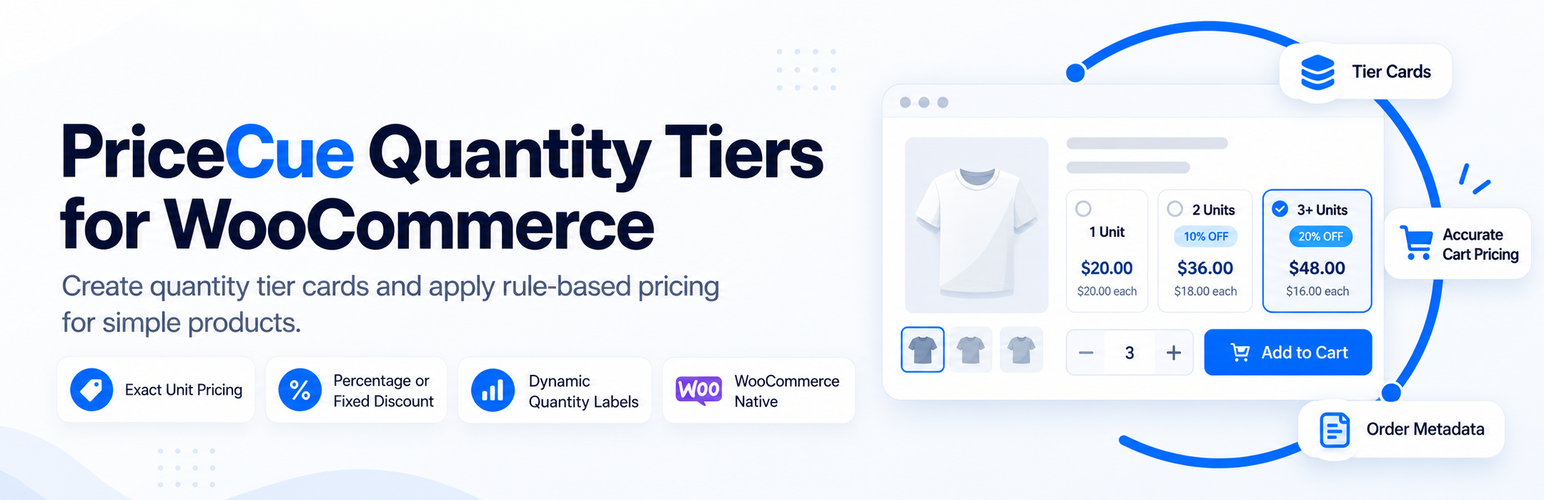

PriceCue Quantity Tiers for WooCommerce
PriceCue Quantity Tiers for WooCommerce helps stores create simple quantity-tier pricing for WooCommerce simple products.
Use PriceCue to show quantity offer cards on the product page, keep the native WooCommerce quantity field as the source of truth, and apply the correct per-unit price in the cart and checkout.
Example:
- Quantity 1: $39.99 each
- Quantity 2: $34.99 each
- Quantity 3 or more: $29.99 each
PriceCue uses real WooCommerce cart quantities. If a shopper changes the quantity manually, the plugin resolves the highest qualifying threshold and applies that tier price. The final tier remains active above its threshold, so a 3+ tier can also price quantities such as 4, 5, or 8.
Key features
- Quantity-tier offer cards for simple WooCommerce products.
- Exact unit price, percentage discount, or fixed amount off per unit.
- Server-side price resolution from the real WooCommerce quantity.
- Native WooCommerce quantity field remains authoritative.
- Quantity card and WooCommerce quantity input stay synchronized.
- Final-tier helper text for quantities above the last threshold.
- Customer-facing cart, checkout, and order label based on the actual quantity.
- Hidden audit metadata for order records.
- Price ceiling protection: PriceCue will not raise the current WooCommerce product price.
- Supports rules with zero assigned products, so merchants can prepare rules before assigning products.
- WooCommerce HPOS compatibility.
- No analytics, telemetry, remote API calls, gifts, bundles, or upsells.
Important v1 scope
PriceCue 1.x is intentionally focused on whole-unit simple products.
The plugin does not support variable products, product bundles, buy-one-get-one offers, free gifts, companion products, cross-sells, or analytics.
Do not use another dynamic pricing or quantity pricing plugin on the same PriceCue-enabled products.
Pricing behavior
Quantity thresholds are minimum quantities.
For example, if the thresholds are 1, 3, and 5:
- Quantity 1 and 2 use the threshold-1 price.
- Quantity 3 and 4 use the threshold-3 price.
- Quantity 5 and above use the threshold-5 price.
The browser never controls the final price. PHP resolves the applicable tier from the real WooCommerce cart quantity.
PriceCue will never raise the current WooCommerce catalog or sale price. If a configured tier price is higher than the product’s current WooCommerce price, the customer pays the lower WooCommerce price.
Order metadata
PriceCue saves the configured visible metadata label and value to WooCommerce order items. It also stores machine-managed audit metadata such as rule ID, tier threshold, effective quantity, applied unit price, pricing mode, and plugin version.
The audit fields remain stored for traceability but are hidden from WooCommerce’s normal order-item meta display.
Details
Related plugins
Plugins that also contain the tag bulk-pricing
Price Update: Bulk Pricing Editor for WooCommerce

Wholesale Dynamic Pricing Buttons

CB Quantity Breaks for WooCommerce

HookSpark Dynamic Pricing & Discounts for WooCommerce

PricePress – Advanced Dynamic Pricing for WooCommerce

Bulk Products Pricing

About
Plugin for that tries to help you find the WordPress plugin you are looking for.
| Please enjoy an image of Crush (this awesome turtle) and have a lovely day! |  |
We do not own any plugin listed on this site and do not work for or work with WordPress.com or it's associated companies. We simply provide a searchable list of the available WordPress plugins.