

This plugin is outdated and might not be supported anymore
Back
Qty Increment Buttons for WooCommerce
Details
View on WordPress
Back
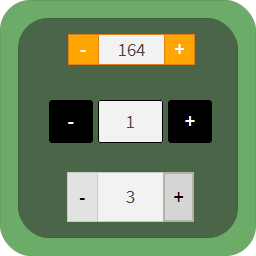
Adds professionally looking “-” and “+” quantity increment buttons around product quantity field on WooCommerce pages. Removes default increment arrows inside this field. Easy customization through plugin settings.
Features
- Adds “-” and “+” quantity buttons around product quantity field.
- Removes default increment arrows inside the quantity input field, which are built-in by browsers.
- Works on product, cart, checkout, shop, category or optionally all pages.
- Quantity field with increment buttons can be added to shop page, category page or both.
- Should look great on most of the themes out of the box. Extensively tested on Storefront theme.
- Fully responsive design.
- Plugin settings allow to customize buttons.
- Generated with PHP – visible immediately on page load.
- Buttons are not displayed for items sold individually.
- Compatible with Quick View plugins.
- For automatic cart and mini-cart update after changing the quantity on the cart page, you can use my other free plugin Ajax Cart AutoUpdate for WooCommerce.
Details
Plugin code:
qty-increment-buttons-for-woocommerce
Plugin version:
2.7.5
Author:
Outdated:
Yes
WP version:
4.6 or higher
PHP version:
5.4 or higher
Test up to WP version:
5.5.15
Total installations:
10,000
Last updated:
2020-08-21
Rating:
Times rated:
319
buttons
increment
qty
quantity
woocommerce


Related plugins
Plugins that also contain the tag buttons
WP Edit

WP Shortcode by MyThemeShop

Sticky Side Buttons

Easy Media Download

Superb Social Media Share Buttons and Follow Buttons

Lead Call Buttons


About
Plugin for that tries to help you find the WordPress plugin you are looking for.
| Please enjoy an image of Crush (this awesome turtle) and have a lovely day! |  |
We do not own any plugin listed on this site and do not work for or work with WordPress.com or it's associated companies. We simply provide a searchable list of the available WordPress plugins.