

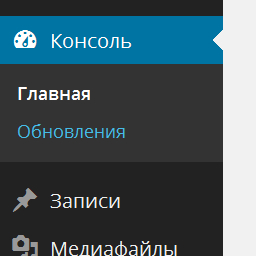
Restore Admin Menu (ru_RU)
Up to 3.3.x, Russian WordPress packages had some CSS fixes to make room for translated strings in the admin menu and other UI elements.
In 3.4 and 3.5, those fixes were merged into core (see #19603 and #20975). However, obsolete language files are not deleted during an automatic update (see #20974). Unfortunately, this causes the admin menu to disappear when directly updating from 3.1.x or an older version to the latest releases from ru.wordpress.org.
The list of obsolete files:
wp-content/languages/ru_RU.php
wp-content/languages/ru_RU.css
wp-content/languages/ru_RU-ie.css
wp-content/languages/ms-ru_RU.css
The best option is just to remove them manually via FTP. If for some reason you can’t do that, you can try this plugin, which restores the admin menu by unhooking ru_accomodate_markup() function and attempts to remove the obsolete files.
After installing and activating the plugin, try deactivating it. If you still see the admin menu, you can safely remove the plugin, its job is done. If you can’t see the admin menu, activate the plugin again.
Details

Related plugins
Plugins that also contain the tag admin
Redux Framework

Loginizer

LightStart – Maintenance Mode, Coming Soon and Landing Page Builder

Admin Menu Editor

White Label CMS

InfiniteWP Client


About
Plugin for that tries to help you find the WordPress plugin you are looking for.
| Please enjoy an image of Crush (this awesome turtle) and have a lovely day! |  |
We do not own any plugin listed on this site and do not work for or work with WordPress.com or it's associated companies. We simply provide a searchable list of the available WordPress plugins.