

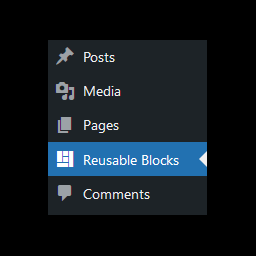
Reusable Blocks Admin Menu Option
You can access the Manage Reusable Blocks page from within the Gutenberg block editor by using the option in the Reusable section of the add block dialog. However, especially when building a new site, I have found this to be quite a lot of clicks just to make a quick change.
This is a simple plugin that adds an entry into the admin menu for quicker direct access to the page.
How To Use
To use the plugin, simply install and activate it. This will add a new ‘Reusable Blocks’ option to the WordPress admin menu.
Clicking on this option will take you to the reusable blocks page.
Details
Related plugins
Plugins that also contain the tag admin-menu
Admin Menu Search
My Wp Brand – Hide menu & Hide Plugin
Wider Admin Menu
Easy Hide Admin Menu Items
Hide Admin Menu Items

Pending Indicator


About
Plugin for that tries to help you find the WordPress plugin you are looking for.
| Please enjoy an image of Crush (this awesome turtle) and have a lovely day! |  |
We do not own any plugin listed on this site and do not work for or work with WordPress.com or it's associated companies. We simply provide a searchable list of the available WordPress plugins.