


Rexivue Lens Prescription for WooCommerce
Rexivue Lens Prescription adds a prescription table to WooCommerce product pages, built for contact lenses and similar optical products.
Rexivue is an independent plugin. It is not affiliated with, or endorsed by, WooCommerce or Automattic.
For each product you choose:
- Which eyes to ask about: left (OS), right (OD) or both.
- Which powers to ask for: SPH, CYL and/or AXIS, each with its own list of allowed values.
- Whether customers may attach a prescription image or PDF.
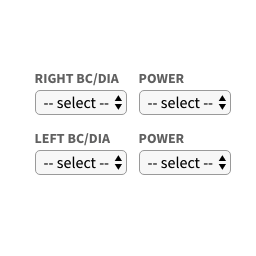
On the product page the customer picks values and the number of boxes for each eye. The cart quantity becomes the total number of boxes (left + right), and WooCommerce charges its normal product (or variation) price for each box. The prescription is shown in the cart, mini-cart, checkout and order, and is saved on the order line item.
Features
- Per-product configuration in a “Prescription” tab of the product data box (simple and variable products).
- SPH / CYL / AXIS dropdowns per eye, with admin-defined value lists.
- AXIS is only enabled when a non-zero CYL is selected (positive or negative).
- Number of boxes per eye (1–10 by default); cart quantity = total boxes.
- Live “total for selected boxes” using the store’s currency format; variation prices update automatically.
- Optional prescription upload (JPG, PNG, GIF, WebP or PDF), stored privately.
- Works with the classic cart/checkout and the Cart and Checkout blocks.
- Compatible with High-Performance Order Storage (HPOS).
- “Order again” re-uses the original prescription when it is still valid.
- Works with themes that add to cart over AJAX on the product page.
- Translation-ready.
How pricing works
The plugin never sets or reads a price from the browser. The line quantity is set on the server from the validated number of boxes, and WooCommerce multiplies its own product price by that quantity, so taxes, coupons and currency plugins behave as normal.
Security
- Every submitted value is checked on the server against the product’s configured options. Anything else is rejected with an error message.
- Box counts must be whole numbers from 1 to the maximum.
- The quantity is locked to the number of boxes in the classic cart, the Cart block and the Store API, and re-checked before checkout.
- Variation IDs must belong to the product being added.
- Admin saves are protected by a nonce and the
edit_productcapability. - Uploaded prescriptions are checked for real file type and size, stored under random names in
wp-content/uploads/rexivue-prescriptions/, and can only be downloaded by users with theedit_shop_orderscapability through a nonce-protected link on the order screen.
Configuration
Product > Product data > Prescription
- Left eye (OS) / Right eye (OD): show the prescription table and ask for values for that eye. At least one eye must be enabled for the table to appear.
- SPH / CYL / AXIS: tick to ask for the value, then list the allowed options separated by
|, in display order. Example:-0.50|-0.75|-1.00|0.00|+0.50. A field that is ticked but has no options is not shown. - Prescription upload: let customers attach an image or PDF.
WooCommerce > Settings > Products > Prescription fields
- Maximum upload size (MB): default 5 MB, never more than the server allows.
- Delete data on uninstall: see “Uninstall” below.
Hooks
Filters
rexivue_product_config( array $config, WC_Product $product ): the normalised configuration of a product.rexivue_max_boxes( int $max = 10, WC_Product $product ): maximum boxes per eye.rexivue_is_field_required( bool $required = false, string $field, string $eye, array $clean, array $config, WC_Product|null $product ): make SPH/CYL/AXIS mandatory.rexivue_validation_errors( WP_Error $errors, array $prescription, array $config, WC_Product|null $product ): add store-specific validation rules.rexivue_upload_mimes( array $mimes ): accepted upload types (images and PDF by default).rexivue_pending_upload_lifetime( int $seconds = 604800 ): how long an upload that never reached an order is kept.rexivue_add_to_cart_selectors( string[] $selectors ): add-to-cart buttons the script handles.rexivue_buy_now_selectors( string[] $selectors ): separate Buy Now buttons.rexivue_native_submit( bool $native = true ): submit the product form natively (bypasses theme AJAX add-to-cart).
Actions
rexivue_loaded( Rexivue\LensPrescription\Plugin $plugin ): after the plugin has registered its hooks. Components are available through$plugin->get( 'cart' ),get( 'order' ),get( 'frontend' ),get( 'uploads' )andget( 'admin' ).rexivue_cleanup_pending_uploads: daily cron event that removes abandoned uploads.
Shortcodes
None.
Data stored
Everything the plugin stores uses the rexivue prefix.
Product meta:
_rexivue_left_eye,_rexivue_right_eye:yeswhen the eye is enabled._rexivue_sph_enabled,_rexivue_cyl_enabled,_rexivue_axis_enabled:yeswhen the field is enabled._rexivue_sph_values,_rexivue_cyl_values,_rexivue_axis_values: allowed options separated by|._rexivue_upload_enabled:yeswhen uploads are enabled.
Order line item meta:
- Visible (shown with translated labels):
rexivue_left_sph,rexivue_left_cyl,rexivue_left_axis,rexivue_left_boxes, the same four forright, andrexivue_prescription_file(original file name). - Hidden:
_rexivue_prescription(structured copy),_rexivue_prescription_file(stored file name),_rexivue_prescription_file_name(original file name).
Options: rexivue_db_version, rexivue_max_upload_mb, rexivue_delete_data_on_uninstall.
Cart item data: rexivue_prescription (array with prescription, file and uid).
Files: wp-content/uploads/rexivue-prescriptions/pending/ (in carts) and /orders/ (attached to orders).
Uninstall
Deactivating the plugin never deletes data.
When the plugin is deleted it always removes its scheduled event and data-version option. If Delete data on uninstall is enabled it also removes its settings, the prescription meta on products and variations, and uploads that never became part of an order.
Orders, order item meta and prescription files attached to orders are never deleted, because they are business records. Remove them manually if your data-retention policy requires it.
Details


Related plugins
Plugins that also contain the tag contact-lenses
Lenses Prescription

About
Plugin for that tries to help you find the WordPress plugin you are looking for.
| Please enjoy an image of Crush (this awesome turtle) and have a lovely day! |  |
We do not own any plugin listed on this site and do not work for or work with WordPress.com or it's associated companies. We simply provide a searchable list of the available WordPress plugins.