



RockHeron
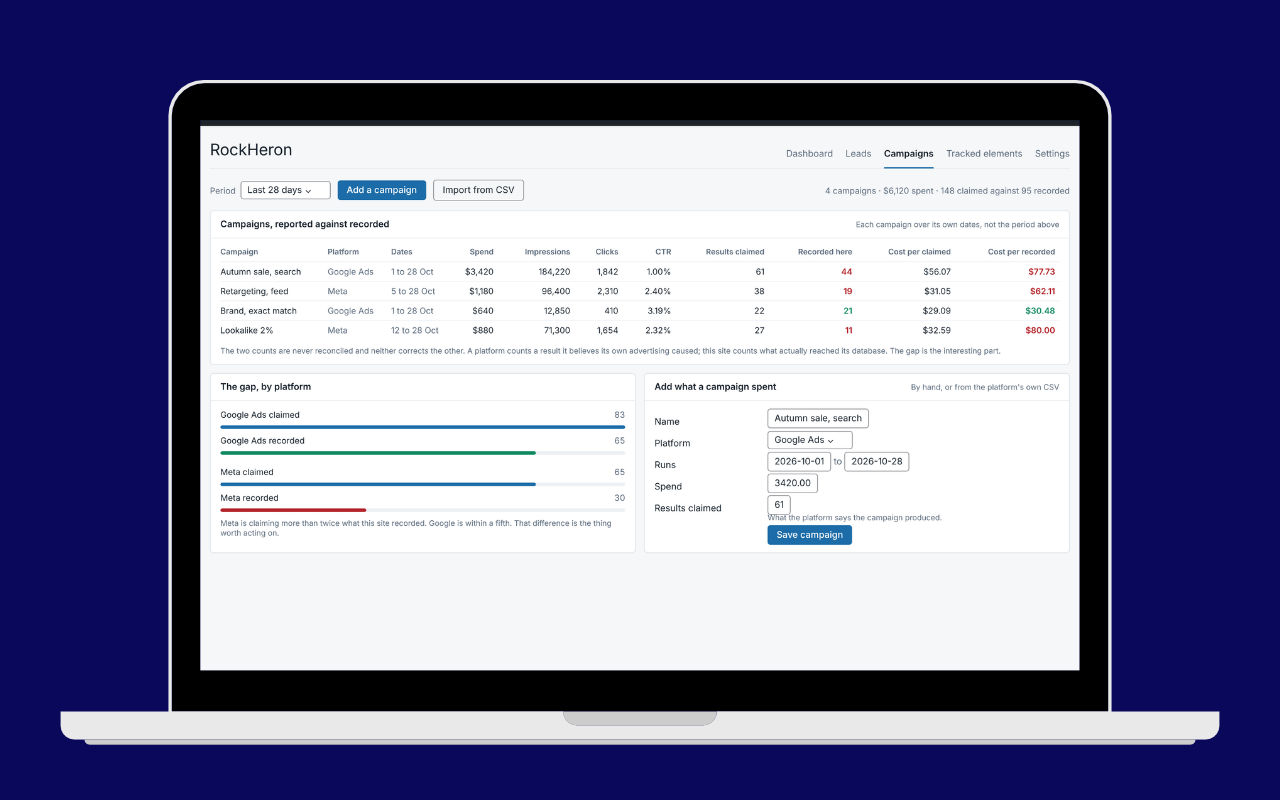
Your ad platform counts its own results. RockHeron counts them on your site and
puts the two numbers next to each other.
It records which campaign introduced every form submission and every WooCommerce
order, in your own database on your own hosting, then shows what the platform
claimed beside what your site actually recorded, so you can see the gap rather
than take a dashboard’s word for it.
Lead source attribution
- First touch attribution: the campaign that introduced a visitor is remembered for thirty days, and the first one keeps the credit
- Source, medium, campaign, term and content, plus which parameter identified them
- Six form plugins: Contact Form 7, WPForms, Gravity Forms, Elementor Forms, Fluent Forms and WooCommerce
- WooCommerce orders, read from WooCommerce’s own order attribution rather than collected twice
- A leads table of every submission with the campaign behind it, broken down by source, medium and campaign
What else it records on your site
- Visits, visitors and page views, with the previous period next to every number
- Goals: calls, emails, WhatsApp clicks, form sends, add to cart, or any element you name
- Clicks on any element you name by CSS selector, site wide or on chosen pages
- Elements seen on screen, video plays, scroll depth, outbound clicks, downloads, site searches
- Where visits come from: search, AI assistants, social, referral, campaigns, direct
- Devices, browsers, operating systems, countries, landing pages, top pages
- A live count of visitors in the last thirty minutes
Google data next to it
- Google Site Kit is used automatically when installed, so you do not connect Google twice
- Without it, connect Analytics 4 directly using your own Google Cloud OAuth client
- Search Console clicks, impressions, CTR and average position when Site Kit is present
- Import past months from Google Analytics so the dashboard is not empty on day one
- Import sixteen months of Search Console history, by button with Site Kit or from the export file without
- Export any period as CSV or PDF, with the caveats carried into the file
Privacy
- No analytics cookies, and no IP address is ever stored
- The one cookie it does set is first party and holds campaign details only: no name, no email address, no telephone number, nothing typed into your form, no advertising click identifier
- Visitors are counted with a one way hash that changes daily
- Do Not Track and Global Privacy Control are respected
- Works with CookiePile, the WP Consent API, or any consent cookie you name
- Raw events are cleared on your own retention schedule while daily totals keep the history
Languages
Fully translated into Hebrew, with a right to left layout. The translation is
delivered by WordPress.org as a language pack rather than bundled in this zip,
which is why languages/ holds only the POT file: a bundled catalog would
shadow the pack and stop you receiving corrections. Any other language can be
added from that POT file, or contributed at
https://translate.wordpress.org/projects/wp-plugins/rockheron/
External services
RockHeron contacts nothing on its own. Every connection below happens only
because you connected an account or switched a setting on.
Google OAuth, Analytics 4 and Google Ads (optional, off until you connect them)
If you choose to connect Google directly, with your own Google Cloud OAuth
client, the plugin talks to Google from your server to read your own reports:
accounts.google.com– where your browser goes to approve the connection. Nothing is sent there by the plugin; you sign in to Google yourself.oauth2.googleapis.com– exchanges the approval for an access token and refreshes it later. Sends your own OAuth client ID, client secret and the token.analyticsdata.googleapis.comandanalyticsadmin.googleapis.com– reads your Analytics 4 reports and property list. Sends the access token, the property ID and the date range and dimensions being requested.googleads.googleapis.com– reads campaign spend and clicks, and only when you have entered a Google Ads customer ID and a Google approved developer token. Sends the access token, the developer token and the customer ID.
These four read your figures in. Nothing recorded about your visitors or your
leads goes out through them: no visit, no lead, no form entry, no email
address, no name, no IP address. That covers these four connections only, not
the Google tag below, which does send visitor data to Google.
With Google Site Kit, RockHeron reads through Site Kit on your own site and
makes no connection of its own.
Google tag (optional, off by default, and it does send visitor data to Google)
This runs in your visitors’ browsers, not on your server, and it is the
ordinary Google tag. Switch on “Inject the Google tag”, enter a measurement ID,
and every page your visitors load fetches
https://www.googletagmanager.com/gtag/js and reports to Google on their
behalf.
Google receives what the Google tag always receives: the page and its title,
the referring page, the visitor’s IP address, their device, browser, operating
system and screen size, their approximate location from that IP address, and
whatever Google’s own cookies on that browser already identify. RockHeron does
not choose or limit any of it. It places the tag and Google does the rest.
Because of that:
- It is off by default and nothing is requested from Google until you turn it on.
- It is skipped entirely when Site Kit or another plugin is already tagging the same property, so nobody is double counted.
- It is not loaded until the visitor has allowed it. Consent and Do Not Track are evaluated in the visitor’s own browser, so a cached page cannot serve one visitor’s answer to the next. With a consent mode set, no request reaches Google before that visitor consents, and if they consent later on the same page the tag loads then.
- Turning it on is a decision about your visitors’ data, not just your own reporting, and your privacy policy should say so.
These are Google services, governed by the Google Privacy Policy
(https://policies.google.com/privacy), the Google APIs Terms of Service
(https://developers.google.com/terms) and, for Analytics data, the Google
Analytics terms
(https://marketingplatform.google.com/about/analytics/terms/us/).
Nothing else
RockHeron contacts no service of ours, phones no home, and loads no script or
stylesheet from a CDN. Everything it ships runs from your own server, including
the bundled charting library below.
Third party credits
Chart.js 4.6.1, MIT licensed, bundled at assets/vendor/chartjs/. The
dashboard and report charts are drawn with it. Its license is in
assets/vendor/chartjs/LICENSE.md and the source is at
https://github.com/chartjs/Chart.js/tree/v4.6.1
Nothing else is bundled.
Details




Related plugins
Plugins that also contain the tag attribution
Molongui Post Contributors: Multi-Role Contributor Attribution

ThoughtMetric for WooCommerce

TrueROAS AI Ad Attribution

PressForward

Simple Attribution
Async Image Credits – Lightweight automatic image credits


About
Plugin for that tries to help you find the WordPress plugin you are looking for.
| Please enjoy an image of Crush (this awesome turtle) and have a lovely day! |  |
We do not own any plugin listed on this site and do not work for or work with WordPress.com or it's associated companies. We simply provide a searchable list of the available WordPress plugins.