

Rotbane – Broken Link Checker
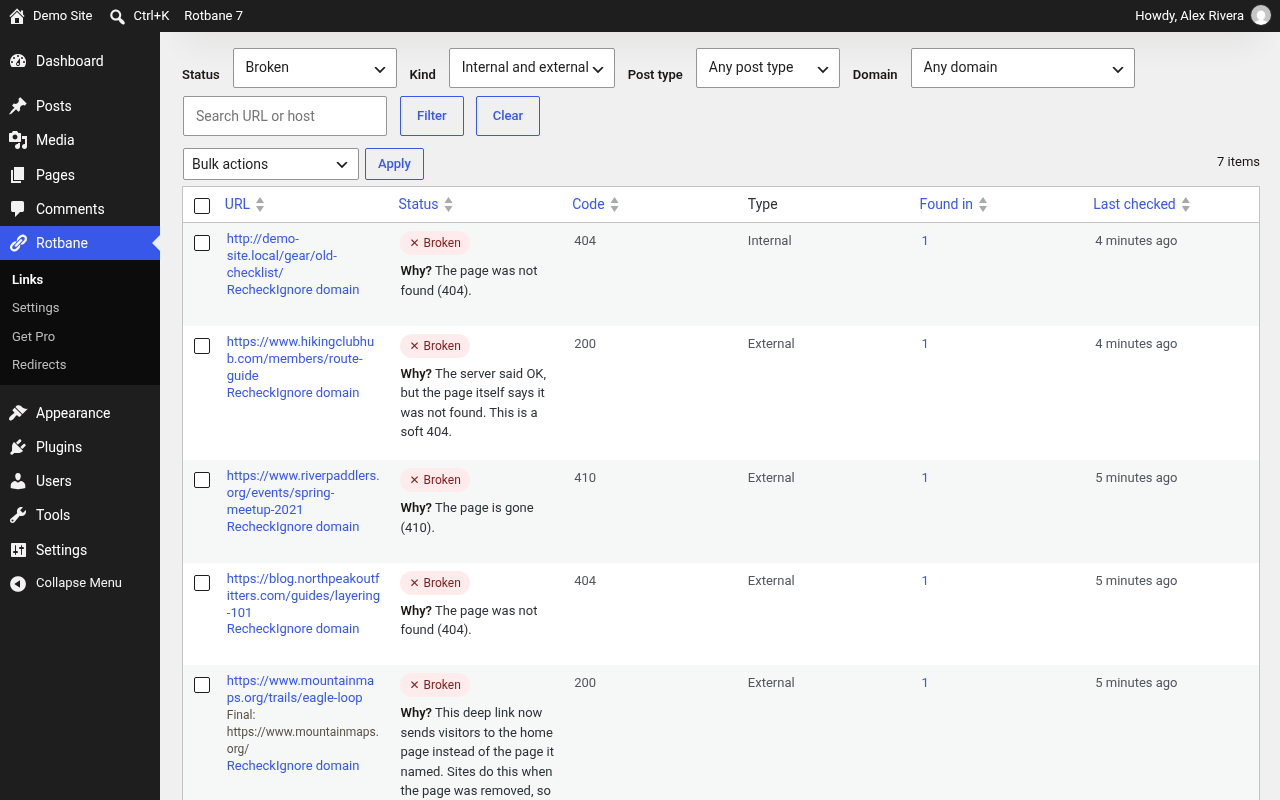
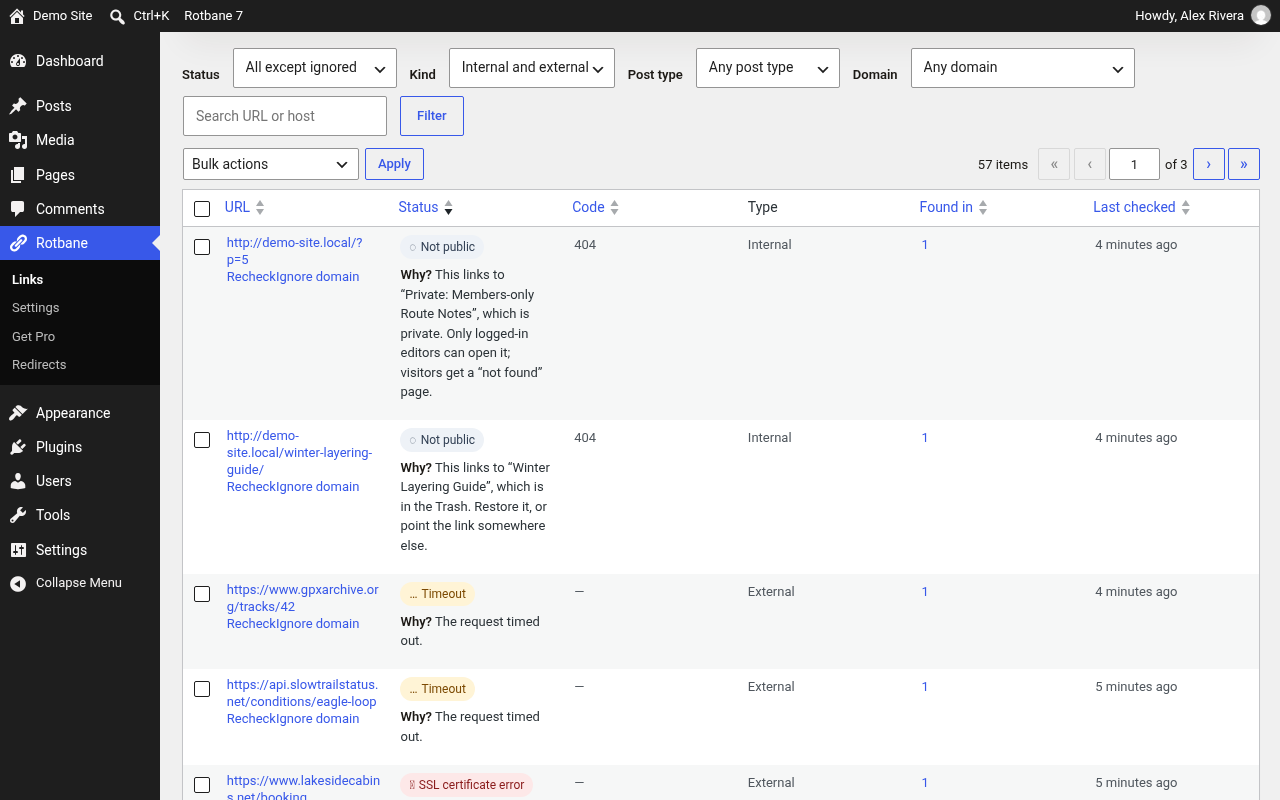
Rotbane is a free broken link checker for WordPress. It scans the links and images in your posts, pages, menus, widgets, and comments, reports broken links, 404 errors, soft 404s, redirects, and missing anchors with a plain-language reason, and lets you fix them without opening every post.
No account, no credit card, no link limits, checks run on your own site. Every check runs from your WordPress server, so there is nothing to sign up for and no cap on how many links it checks.
The scan runs in small, paced batches through WP-Cron, resumes if it is interrupted, and keeps the results in Rotbane’s own database tables. Nothing is added to your public pages: no front-end scripts or styles.
It tells broken links apart from links a host merely refused to check. Amazon, LinkedIn, X, Medium, SSRN, and doi.org have built-in rules so a robot check or an expected DOI redirect is not reported as a dead link. A page that returns HTTP 200 but says “page not found” is reported as a soft 404, with a plain-language reason on every result.
By default Rotbane does not change the front end. Redirects, slug watching, and URL edits happen only when you ask for them. URL edits replace the quoted address, so surrounding attributes stay intact.
Nothing in the free plugin phones home. The only outbound requests are the link checks you start, including an oEmbed lookup when a YouTube or Vimeo URL needs to be confirmed, and the optional webhook alert you configure yourself.
What it checks
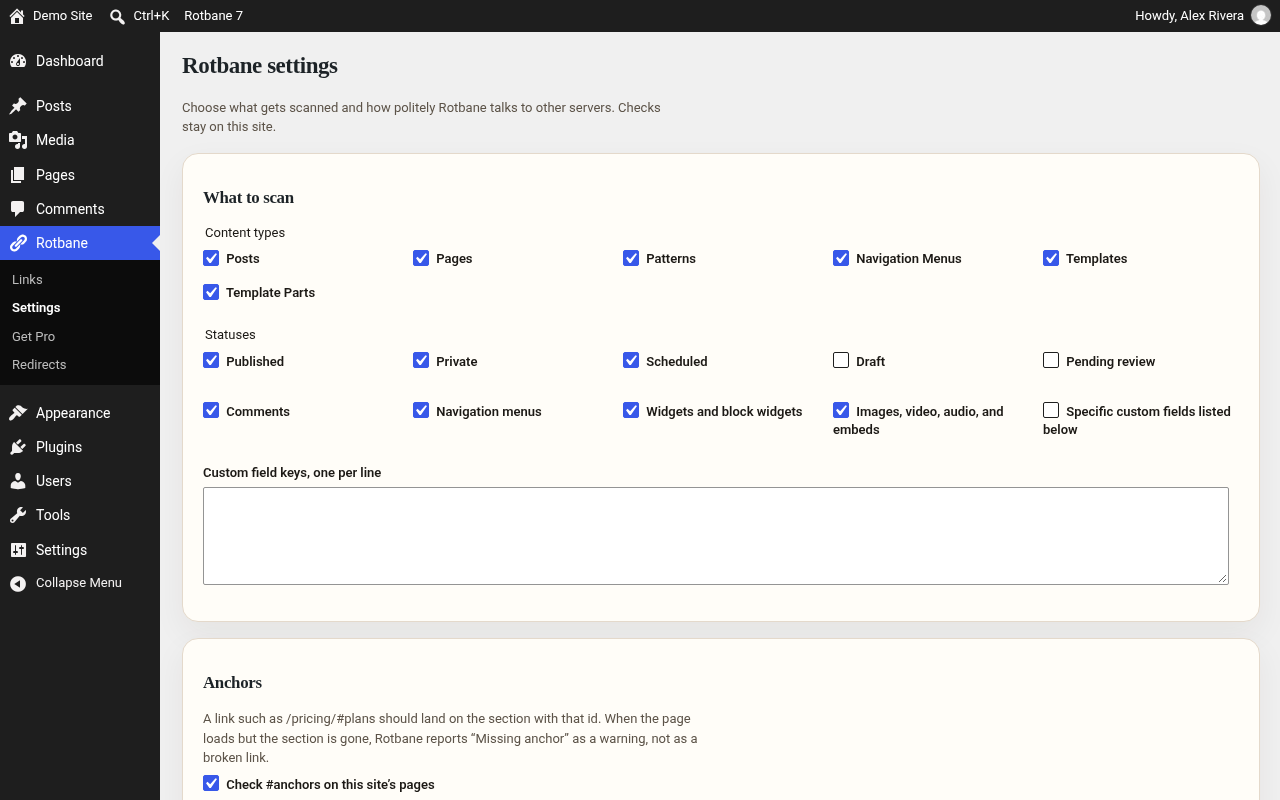
- Posts, pages, custom post types, comments, menus, widgets, excerpts, and block templates
- Optional allow-listed custom fields
- Internal and external links, images, and video embeds
- Mixed content (HTTP on an HTTPS site)
- Soft 404s and redirect chains: “not found” text in more than 30 languages, pages that use the site’s 404 template, deep links that land on a home page, and your own phrases
- SSL certificate problems (expired, self-signed, wrong name, untrusted), reported as their own status
- Links to your own posts that visitors cannot open yet: drafts, pending, scheduled, private, or trashed posts. These are rechecked automatically when the post is published or restored
- Missing anchors: a link such as
/pricing/#planswhose page loads but no longer has aplanssection
What you can do with a result
- Read why Rotbane chose that status
- Ignore a domain in one click
- Update a URL everywhere it appears, or point it at the final redirect
- Unlink, mark as not broken, or recheck
- Create a same-site 301 for a broken internal path
- Export a CSV
Email, when you turn it on, reports links that break after the first completed scan. It does not mail the whole backlog.
An optional webhook alert works the same way: when it is on, Rotbane posts a short JSON message to the https:// address you enter, only for problems that are new since the last alert. It works with Slack and Discord incoming webhooks, Zapier, Make, and n8n. Private, local, and cloud metadata addresses are refused.
Redirects for 404 pages
- Create a same-site 301 redirect for a broken internal path from the link’s page, in bulk, or on the Redirects screen.
- A redirect runs only when WordPress would otherwise show a 404, so real pages are never overridden. Loops, off-site targets, and core paths such as /wp-admin are refused.
- Optional slug watcher: when you change the slug of a published post or page, Rotbane saves a 301 from the old address.
- Each redirect counts its hits.
Light on your server
- Three links at a time by default, a delay between requests to the same domain, and a timeout you can set.
- Links to your own posts are resolved from the database where possible, without an HTTP request.
- A failure is rechecked before it is reported, so a slow answer is not called broken.
- Slow host mode for small shared hosting plans. Settings are stored without autoload.
WP-CLI and the Abilities API
wp rotbane scan,wp rotbane status,wp rotbane list --status=broken,wp rotbane show <id>,wp rotbane recheck --status=broken, andwp rotbane export.- On WordPress versions with the Abilities API, Rotbane registers read-only abilities (summary, list links, get one link) and a recheck ability for AI assistants and automation tools. Each checks the same Rotbane permissions as the admin screens. Nothing is registered on older WordPress versions.
Documentation and guides: rotbane.forgestacks.net/docs
Rotbane Pro is a separate plugin for agencies: scheduled white-label reports, an agency hub, Search Console, per-client alert channels, repurposed-domain detection, site migration checks, and an affiliate link audit. The free plugin does not require it, and nothing in the free plugin is locked.
Missing anchors
A link with a #fragment should land on the element with that id (or an <a name>). When the page loads but that element is not there, Rotbane shows Missing anchor: a warning, not a broken link, with the reason on the result.
- Your own pages are checked from the stored content first, then from the published page itself, which is requested once through the same safe HTTP path as every other check and remembered for ten minutes.
- Anchors on other websites are not checked unless you turn that on in Settings Anchors. Then the check for such a link is one GET request instead of HEAD, and Rotbane reads up to 1 MB of the page.
#top, empty#,#!and#/app routes, text fragments (#:~:text=), and#name=valuefragments are skipped. Ids are matched exactly, so#Plansand#plansare different, as in browsers.
External services
Rotbane does not send data to any service of its own. A link check requests the checked URL from the host in that URL. The request carries a User-Agent header, by default Rotbane/<version> (+<your site address>), which you can change in Settings. The host also sees your server’s IP address.
Two links are checked through a third-party oEmbed endpoint instead of the page itself. A removed or private video still returns a normal-looking page, and the oEmbed endpoint tells Rotbane whether the video is really there.
YouTube oEmbed (Google)
- What it is used for: confirming that a linked or embedded YouTube video still exists.
- What is sent: the video URL, rebuilt from its id as
https://www.youtube.com/watch?v=<id>, tohttps://www.youtube.com/oembed, along with the User-Agent described above. - When: only while a scan or recheck is checking a YouTube link (youtube.com, youtu.be, youtube-nocookie.com, m.youtube.com, or music.youtube.com) found in your content. Nothing is sent if your content has no YouTube links.
- Terms of Service: https://www.youtube.com/t/terms
- Privacy Policy: https://policies.google.com/privacy
Vimeo oEmbed
- What it is used for: confirming that a linked or embedded Vimeo video still exists.
- What is sent: the video URL, rebuilt from its id as
https://vimeo.com/<id>, tohttps://vimeo.com/api/oembed.json, along with the User-Agent described above. - When: only while a scan or recheck is checking a Vimeo link found in your content. Nothing is sent if your content has no Vimeo links.
- Terms of Service: https://vimeo.com/terms
- Privacy Policy: https://vimeo.com/privacy
Your webhook (optional)
- What it is used for: telling you about new broken links in a chat or automation tool you choose.
- What is sent: a JSON message with your site name and address, the new problem URLs, their status, HTTP code, reason, and a link to the Rotbane screen.
- Where: only to the https:// address you enter in Settings Webhook alert. Rotbane has no webhook service of its own; the terms and privacy policy are those of the service you choose (for example Slack, Discord, Zapier, Make, or n8n).
- When: only when the setting is on, after a scan confirms problems that are new since the last alert, or when you press “Send a test message”. It is off by default.
Apart from these two oEmbed lookups and your own webhook, Rotbane only requests the URLs it is checking (plus any redirects they lead to). To confirm a #anchor on one of your own pages, it may also request that page from your own site. It has no analytics, telemetry, or license calls, and it loads no remote scripts, fonts, or images in the admin.
Details


Related plugins
Plugins that also contain the tag 404
Redirection

404 to 301 – Redirect, Log and Notify 404 Errors

Smart Custom 404 Error Page

Redirection

WP 404 Auto Redirect to Similar Post

Link Juice Keeper

About
Plugin for that tries to help you find the WordPress plugin you are looking for.
| Please enjoy an image of Crush (this awesome turtle) and have a lovely day! |  |
We do not own any plugin listed on this site and do not work for or work with WordPress.com or it's associated companies. We simply provide a searchable list of the available WordPress plugins.