

Back

SecurePilot Accessibility Scanner
Details
View on WordPress
Back
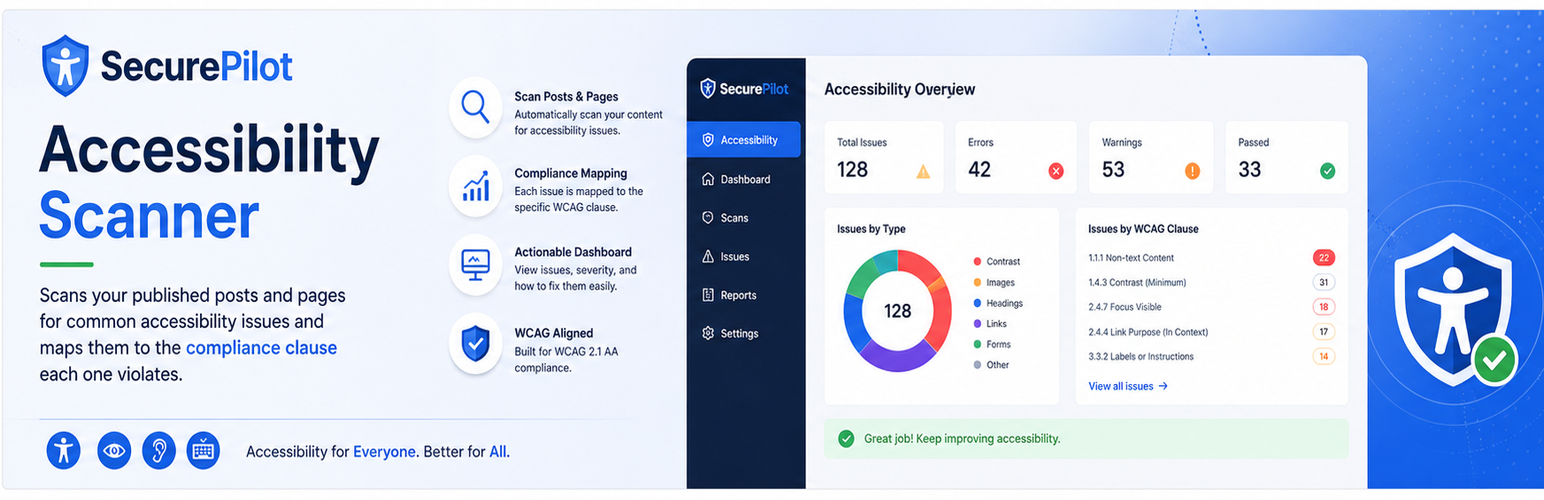
SecurePilot Accessibility Scanner scans your published posts and pages for common accessibility issues and reports them on a dashboard, mapped to the specific compliance clause each one violates.
What it detects
- Missing or non-descriptive image alt text
- Empty or generic link text (“click here”, “read more”)
- Missing form field labels
- Insufficient color contrast on inline-styled text (below a configurable ratio, default 4.5:1)
- Heading hierarchy breaks (skipped levels, missing or duplicate h1)
- Missing focus indicators (heuristic — flagged for manual keyboard-navigation review)
- Missing video captions
How it works
- A daily (or weekly) scheduled scan fetches each published page’s live, rendered HTML and checks it against the rules above.
- Each issue is mapped to the relevant WCAG 2.1, ADA, Section 508, and EAA clause, with a plain-language remediation hint.
- Issues are tracked per page. Re-scanning automatically resolves issues that were fixed, while dashboard “Dismiss” records an explicit, sticky override (e.g. an accepted risk) that survives future scans.
- Export a full remediation plan as PDF, or the raw issue data as JSON, at any time.
Standards mapped
- WCAG 2.1 (A / AA)
- ADA (Title II/III effective communication)
- Section 508
- EAA (European Accessibility Act)
Details
Plugin code:
securepilot-accessibility-scanner
Plugin version:
0.1.0
Author:
Outdated:
No
WP version:
6.0 or higher
PHP version:
7.4 or higher
Test up to WP version:
7.0.2
Total installations:
0
Last updated:
2026-08-01
Rating:
Times rated:
0
accessibility
ada
eaa
section-508
wcag

Related plugins
Plugins that also contain the tag accessibility
Ally – Web Accessibility & Usability
Auto Image Attributes From Filename With Bulk Updater (Add Alt Text, Image Title For Image SEO)

Accessibility by UserWay

WP Dark Mode – Improve Accessibility with AI Powered Dark Theme

AccessibleWP – Accessibility Toolbar
Alt Text AI – Automatically generate image alt text for SEO and accessibility


About
Plugin for that tries to help you find the WordPress plugin you are looking for.
| Please enjoy an image of Crush (this awesome turtle) and have a lovely day! |  |
We do not own any plugin listed on this site and do not work for or work with WordPress.com or it's associated companies. We simply provide a searchable list of the available WordPress plugins.