



Selectika AI Commerce
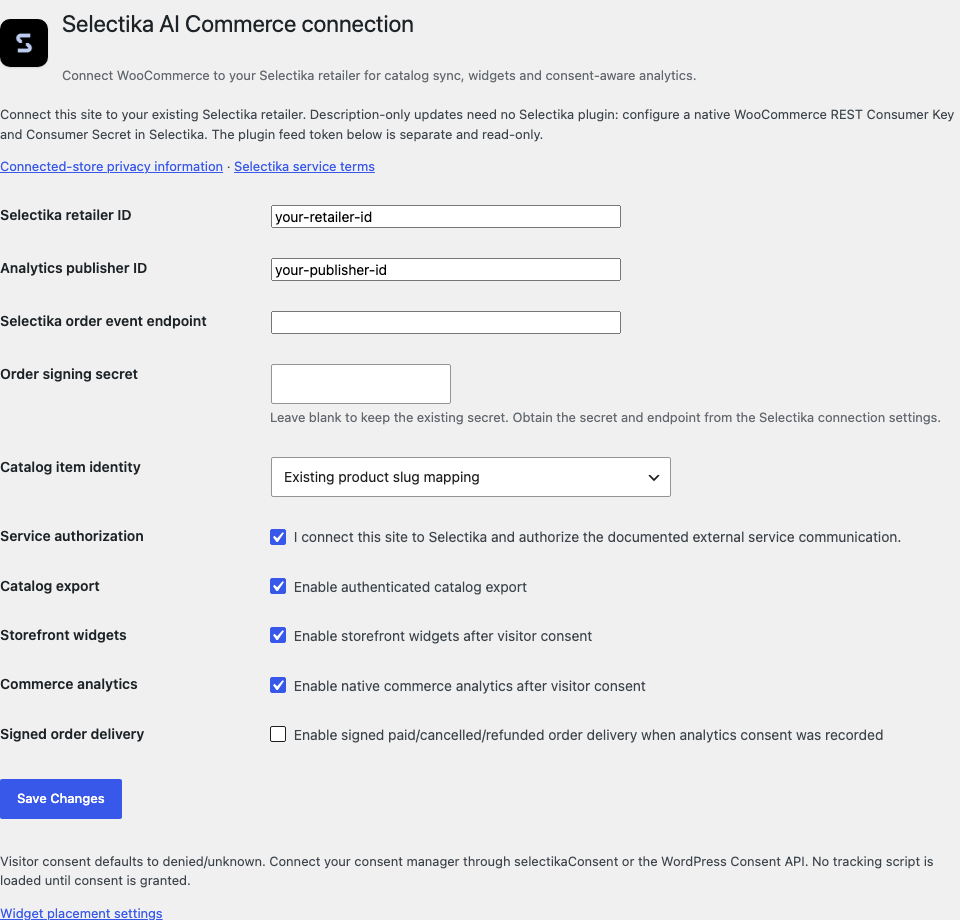
Selectika AI Commerce connects a WordPress or WooCommerce store to your Selectika retailer account. Use it to publish complete product catalogs, place AI recommendation widgets on the storefront, and measure consented commerce activity — without sending customer contact details or payment data to Selectika.
A Selectika account and retailer configuration are required for external features. Every new connection capability starts disabled until you opt in. Product enrichment, AI recommendations and search run in Selectika services outside WordPress.
What merchants get
- Authenticated, read-only product feeds for simple and variable WooCommerce products.
- Complete paginated catalog generations; failed builds preserve the previous completed generation.
[selectika]shortcode, Selectika Carousel Gutenberg block and Elementor widget.- Product, cart and checkout placement, including WooCommerce Cart and Checkout blocks.
- Consent-aware page, product, cart, checkout and purchase analytics.
- Optional signed server delivery for WooCommerce payment-complete, cancellation and refund events, with durable retries.
- Separate native WooCommerce REST connection for AI description approval and writeback through the Selectika dashboard.
WordPress without WooCommerce supports widgets only. Multisite commerce connections are disabled. Bundles, subscriptions, grouped/external products, multilingual, multicurrency and fractional-quantity extensions are not certified by this release. Unsupported catalog product types fail the generation visibly instead of silently dropping products. Recognized WPML/Polylang, currency-switcher and dynamic-pricing integrations disable commerce capabilities and report the unsupported scope in connection diagnostics. Storefront widget placement remains available on ordinary single-site WordPress.
External services
This plugin uses Selectika, https://selectika.com/, to provide product recommendations, search, enrichment and commerce measurement. The following communication is optional and controlled by the connection switches and visitor consent:
- After visitor consent, the browser loads the Selectika widget loader and optional pixel from https://scripts.selectika.com/. The service necessarily receives normal network information such as the requesting IP address and browser headers. Widgets load components from https://statics.selectika.com/, retrieve retailer settings from https://retailers.selectika.com/, and request enabled recommendations/search features through https://ask.selectika.com/, https://search.selectika.com/ and https://srv.selectika.com/; their requests include retailer ID, product identity, selected action and relevant storefront context.
- When analytics is enabled and visitor consent is granted, native events include page/product/cart/checkout activity, product and variation identifiers, price, quantity, currency and an event ID. The existing Selectika pixel sends these events to https://data.selectika.com/v1/pixel/track and manages its own visitor/session identifiers. Plugin events do not include checkout addresses, payment details or customer names/emails. Pending native cart events are stored separately from the WooCommerce cart, keyed by a one-way session HMAC and connection generation; they expire after one hour and are pruned by native activity or scheduled cleanup.
- When catalog export is enabled, Selectika fetches the authenticated feed from this store. The feed contains published product descriptions, identifiers, variants, categories, attributes, images, prices, availability and links. No customer or order data is included in this feed.
- If server order delivery is enabled, consent recorded during checkout allows a signed order event to https://retailers.selectika.com/. Payloads contain the store/retailer identity, order/refund identifier, time, currency, totals and product lines. They exclude customer contact information, addresses and payment data. Failed deliveries remain in this site’s private database and retry. Delivered event bodies are removed after 90 days; deduplication markers remain until uninstall.
- Native AI description updates use WooCommerce’s own REST API. Selectika stores the credentials and applies the content approved in the Selectika dashboard. Drafts and the approval workflow are hosted by Selectika.
Service privacy information: https://selectika.com/privacy-policy/#connected-stores
Service terms: https://selectika.com/privacy-policy/#service-terms
Consent integration
No external widget or tracking script is loaded until consent is granted. Connect your consent manager by calling window.selectikaConsent(true) or window.selectikaConsent(false), or dispatch a selectika:consent event with detail { analytics: true/false }. Consent is stored in the first-party session cookie selectika_analytics_consent and is bound to the active connection generation. Reconnecting a different retailer requires fresh consent. When WordPress Consent API is present, the plugin uses the marketing category only when a consent manager has explicitly declared optin/optout behavior. An unconfigured Consent API does not imply consent.
Withdrawing consent clears queued events and reloads the current page to unload already-executed service scripts. Cart contents are retained by WooCommerce. Server order events use the consent recorded on the order at checkout. When server order delivery is enabled, browser purchase commands from both the plugin and shared widgets are suppressed. Native WooCommerce owns add/remove cart conversions; widget attribution is retained under the separate selectika_widget_cart_attribution event instead of duplicating the conversion.
Retailer AI shopping (staging opt-in)
The AI shopping bridge is separate from existing catalog credentials. Configure server-only
SELECTIKA_AGENT_RETAILER, SELECTIKA_AGENT_MCP_ORIGIN and SELECTIKA_AGENT_TOKEN in wp-config.php.
The token must be an explicit commerce credential scoped to this retailer with cart:handoff.
GET /selectika/commerce/review only shows confirmation; POST requires a Woo session nonce, consumes
one ticket and validates native stock/price before adding to the current cart. No payment is taken.
Price/tax settings and variant IDs must pass staging verification before handoffInstalled is enabled.
For WordPress with or without WooCommerce, SELECTIKA_AGENT_DISCOVERY_ENABLED=true enables the
virtual robots.txt link. After verifying real 404 responses, set SELECTIKA_AGENT_VERIFIED_MISSING_DOCUMENTS
to an array drawn from agents.md, llms.txt, llms-full.txt. Only those missing routes are served, late in
template_redirect, as verified plain text from the configured retailer endpoint. Existing physical files
remain the web server’s responsibility and must be updated through the managed installation plan.
Disable these constants to roll back virtual routes; restore physical files only after checking hashes.
Details


Related plugins
Plugins that also contain the tag ai
SEOPress – On-site SEO & Analytics

AI Engine – The Chatbot, AI Framework & MCP for WordPress

GetGenie – AI Content Writer with Keyword Research & SEO Tracking Tools

SEO Plugin by Squirrly SEO

Website LLMs.txt

Smartsupp – live chat, AI shopping assistant and chatbots


About
Plugin for that tries to help you find the WordPress plugin you are looking for.
| Please enjoy an image of Crush (this awesome turtle) and have a lovely day! |  |
We do not own any plugin listed on this site and do not work for or work with WordPress.com or it's associated companies. We simply provide a searchable list of the available WordPress plugins.