


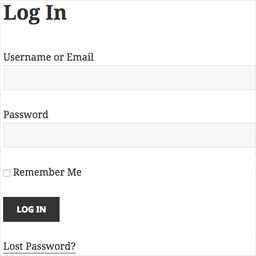
Sewn In Template Log In
Creates a log in page at /login/ and manages password recovery and user notification feedback for the log in process. Everything gets managed within your page.php template or page-login.php template in order to fit into the theme better.
By default, this plugin creates a virtual page, but if you add a page with slug ‘login’, the plugin will begin to use that.
Add a redirect for logged in users
Controls where logged in users go when they login or when they visit the ‘/login/’ page. You can either return the post_id of the post/page to send them to, or the slug of the post/page to send them to.
// Redirect using post id
add_filter( 'sewn/login/logged_in_redirect', 'custom_sewn_logged_in_redirect_id' );
function custom_sewn_logged_in_redirect_id()
{
    return 4;
}


// Redirect using post slug
add_filter( 'sewn/login/logged_in_redirect', 'custom_sewn_logged_in_redirect_slug' );
function custom_sewn_logged_in_redirect_slug()
{
    return 'post-slug';
}
Sewn In Notification Box Support
If you install the Sewn In Notification Box, this plugin will start using that. This is handy to keep all of your notifications in a centralized location.
Details


Related plugins
Plugins that also contain the tag log-in
TWST Login Block
Personalize Login

Get Login Plugin

PersonDoc for WooCommerce

My Custom Login

WebPoint Login


About
Plugin for that tries to help you find the WordPress plugin you are looking for.
| Please enjoy an image of Crush (this awesome turtle) and have a lovely day! |  |
We do not own any plugin listed on this site and do not work for or work with WordPress.com or it's associated companies. We simply provide a searchable list of the available WordPress plugins.