


Silverlight Bing Maps
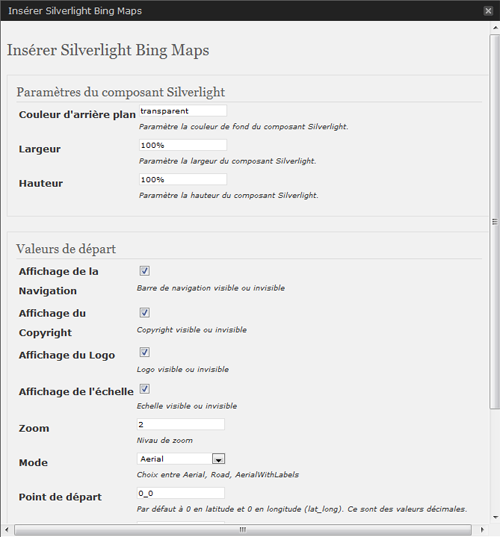
This BingMap plugin allows a smooth integration of an interactive map in your WordPress site. The administration section will offer you some parameters to customize the presentation.
Just write use the adminpanel or write a tag like :
[sl-bingmaps background=”transparent” width=”100%” height=”300″ NavigationVisibility=”1″ CopyrightVisibility=”1″ LogoVisibility=”1″ ScaleVisibility=”1″ ZoomLevel=”5″ Mode=”Aerial” StartLocation=”48.8756271_2.3493838″ Pushpin=”48.8756271_2.3493838″ Culture=”fr_FR”]
The plugin offers the following features:
* Width and Height customization - percent value are possible
   //width=400 or 100%
* Display navigation menu or not
   //NavigationVisibility="1"
* Display copyright in the map or not
   //CopyrightVisibility="1"
* Display the Bing logo or not
   //LogoVisibility="1"
* Display Scale indication
   //ScaleVisibility="1"
* Set the zoom level
   //ZoomLevel="5"
* Set the display mode
   //Mode="Aerial" //Aerialwithlabels //road
* Set camera center
   //StartLocation="48.8756271_2.3493838"
* Set point of interest
   //Pushpin="48.8756271_2.3493838"
* Set Culture
   //Culture="fr_FR"
Arbitrary section
A brief Markdown Example
<?php code(); // goes in backticks ?>
Details


Related plugins
Plugins that also contain the tag bing
AI Powered Marketing

CrawlWP SEO – Instant Search Engine Indexing & SEO Performance Monitor

Leaflet Maps Marker (Google Maps, OpenStreetMap, Bing Maps)

ReCrawler

VS Meta Description

多合一搜索自动推送管理插件-支持Baidu/Google/Bing/IndexNow/Yandex/头条


About
Plugin for that tries to help you find the WordPress plugin you are looking for.
| Please enjoy an image of Crush (this awesome turtle) and have a lovely day! |  |
We do not own any plugin listed on this site and do not work for or work with WordPress.com or it's associated companies. We simply provide a searchable list of the available WordPress plugins.