


Smackcoders MailPilot
MailPilot fixes the most common reason your WordPress site email goes missing: the default PHP mail() function, which most hosts either throttle, block outright, or simply never deliver. MailPilot replaces it with a proper SMTP connection or a dedicated transactional email API, then gives you a Dashboard, an Email Log, and a Test Email tool so you never have to guess whether your site’s password resets, order confirmations, or contact form notifications actually went out.
Every feature in the free version is fully functional with no trial period, usage limit, or license key. MailPilot Pro exists as a separate, optional upgrade (sold on our website) for teams that need failover, smart routing, analytics, and other advanced capabilities, covered further down.
What Can MailPilot Do?
- Replace unreliable PHP
mail()with a real SMTP connection or a transactional email API - Walk you through first-run setup with a guided, five-step wizard
- Show 7-day send health, failure counts, and your active mailer on one Dashboard
- Log every email your site sends, with configurable retention, filtering, manual purge, and GDPR delete
- Send a test email or validate your mailer connection without sending anything
- Force a consistent From name and From email across every plugin and theme
Dashboard
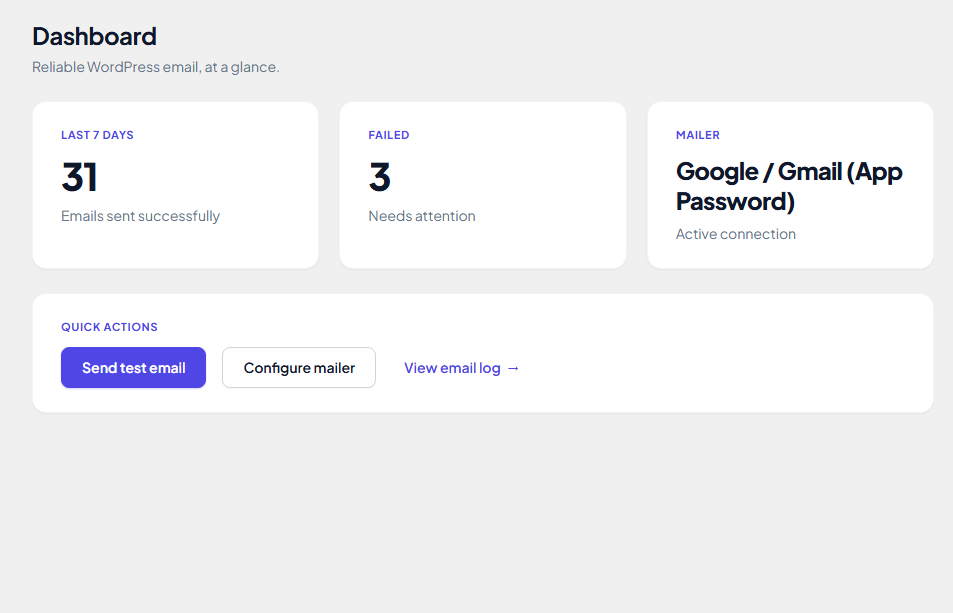
The Dashboard is the first screen MailPilot opens to, built around one question, is outgoing mail actually working right now. It shows how many emails sent successfully in the last 7 days, how many failed, and which mailer is currently active, then backs all three with Quick Actions for sending a test email, jumping to Providers / Mailer, or opening the full Email Log. If nothing has been logged yet, the Dashboard says so plainly instead of showing empty numbers.
Setup Wizard
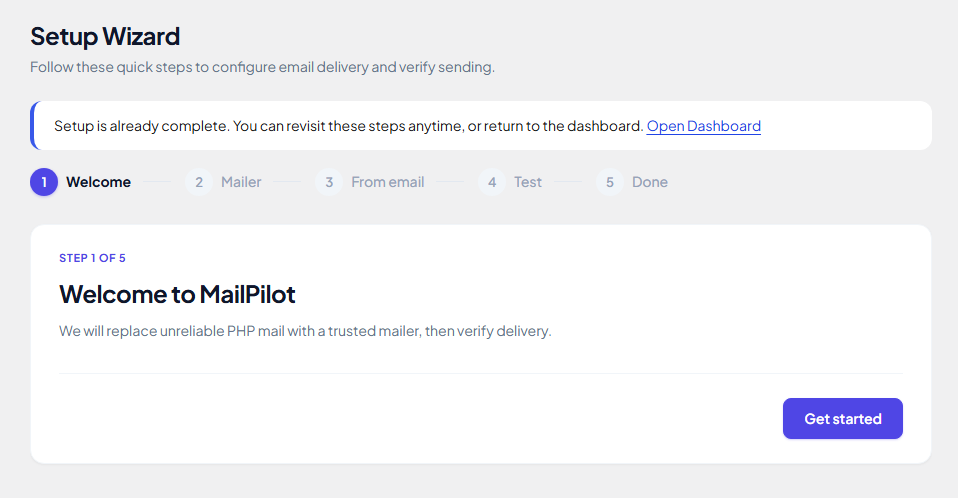
New installs land in a short, five-step Setup Wizard, Welcome, Mailer, From email, Test, and Done. It walks you through choosing a mailer, entering the From address your site should send as, and optionally firing off a first test email before you ever touch a settings page directly. Once setup is marked complete, the wizard stays available to revisit at any time, it simply stops interrupting your Dashboard with a setup reminder.
Providers / Mailer
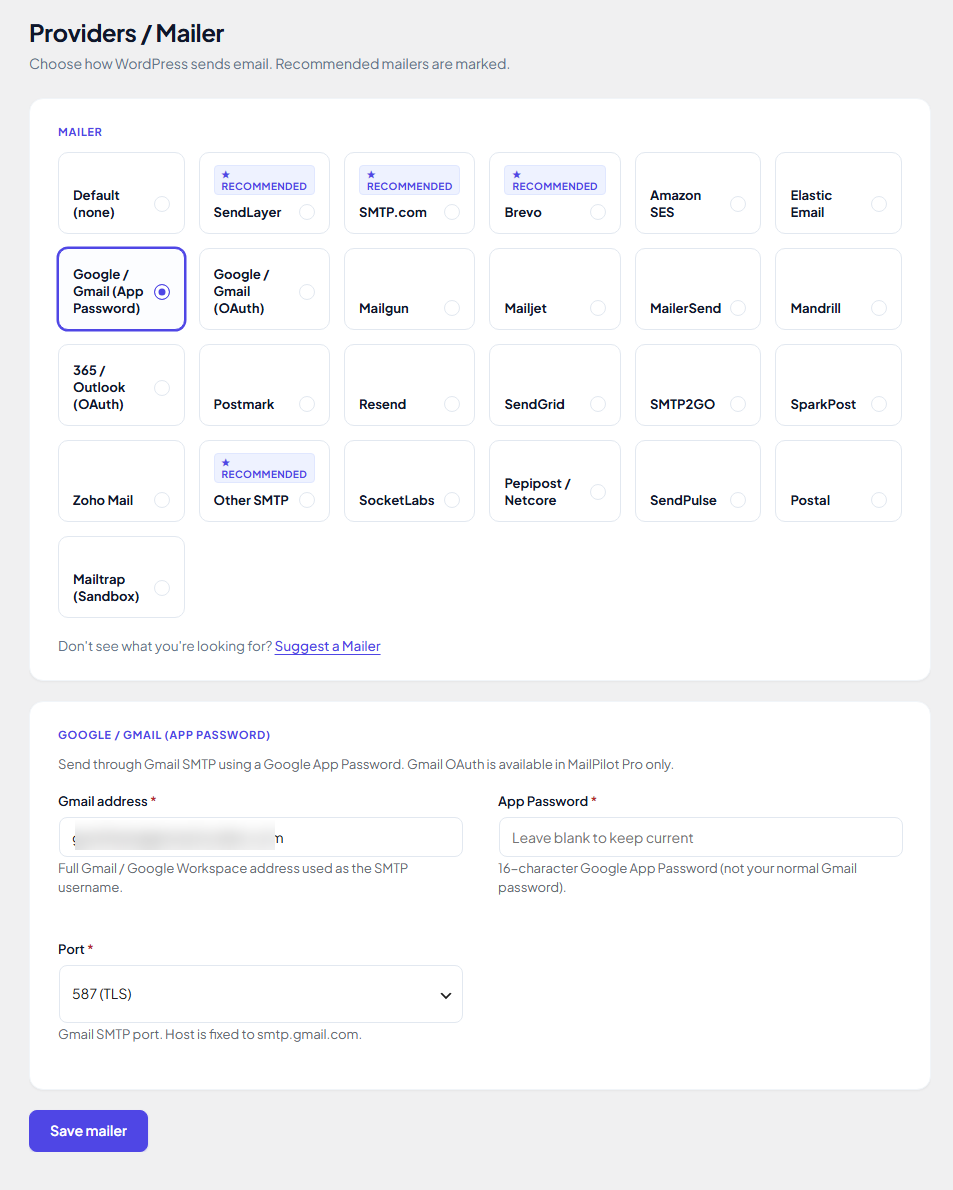
Connect WordPress to the mailer of your choice from one screen. MailPilot supports Generic SMTP plus a wide set of free API mailers, with several marked as recommended for most sites:
- Generic SMTP
- SendLayer
- Brevo
- SMTP.com
- Mailgun
- SendGrid
- Postmark
- SparkPost
- Gmail via App Password
- Elastic Email
- Mailjet
- MailerSend
- SMTP2GO
- Resend
Pick a mailer, fill in its specific credentials, such as an app password and port for Gmail, and save, MailPilot handles the rest of the SMTP or API handshake.
Email Log
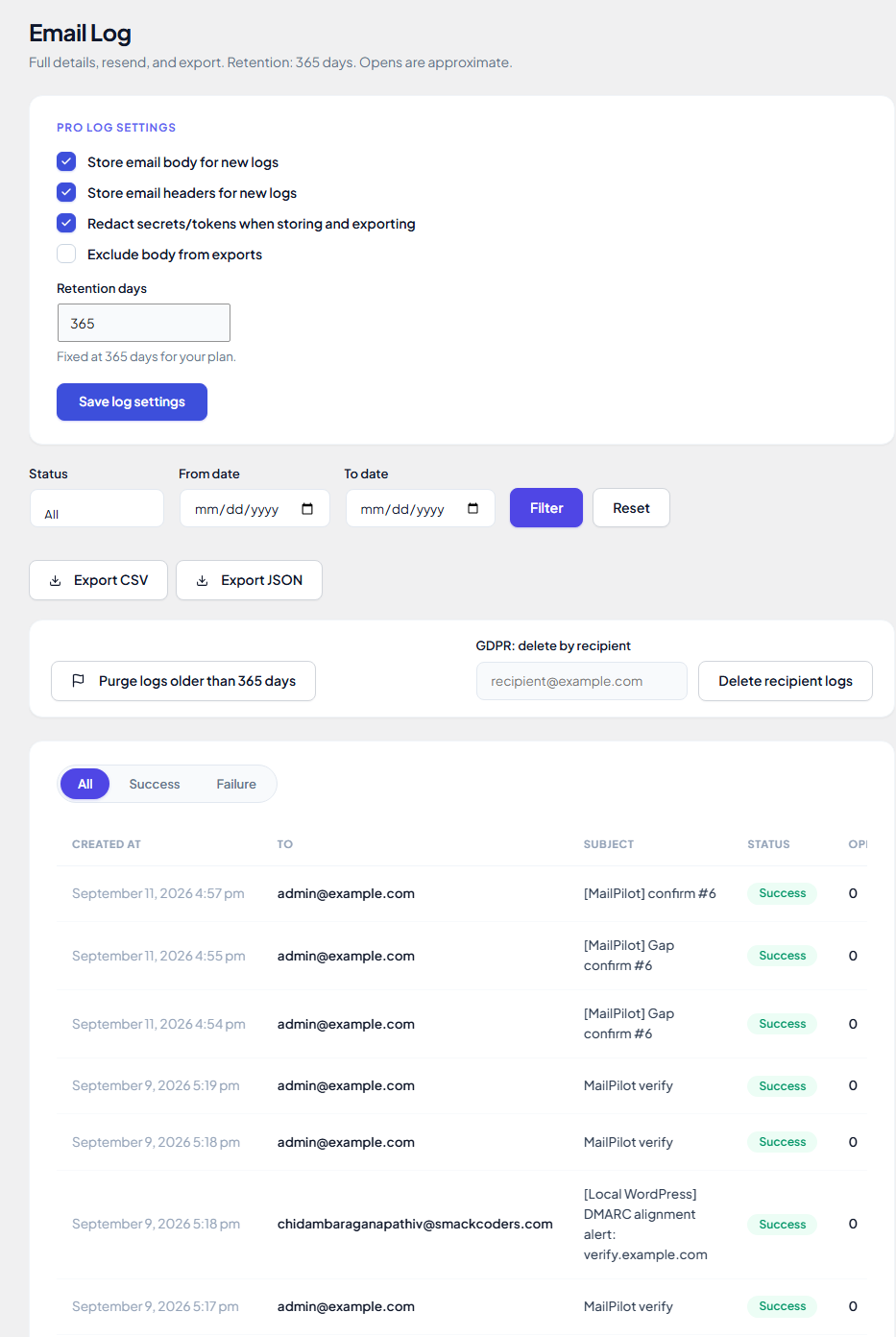
Every email MailPilot sends is recorded in the Email Log, with the recipient, subject, timestamp, and success or failure status, filterable by status and date range. It provides email logging with configurable retention, manual purge, and a GDPR-style delete-by-recipient tool for removing a specific person’s logged emails on request.
Test Email
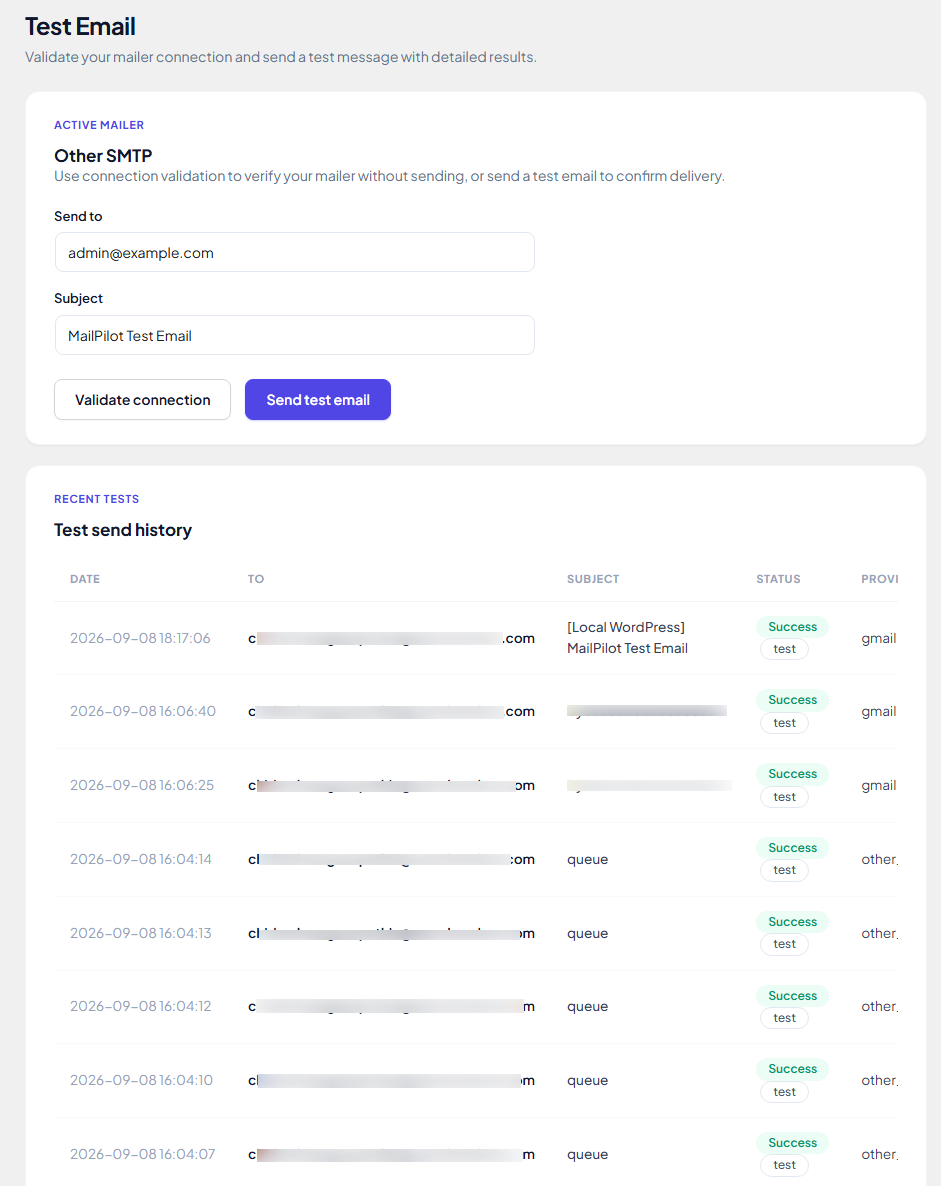
Before trusting a new mailer with real traffic, use the Test Email screen to either validate the connection without sending anything, or send an actual test message to an address of your choice with a custom subject. A Test Send History table underneath keeps a running record of exactly which tests you’ve sent, when, and whether each one succeeded.
Settings
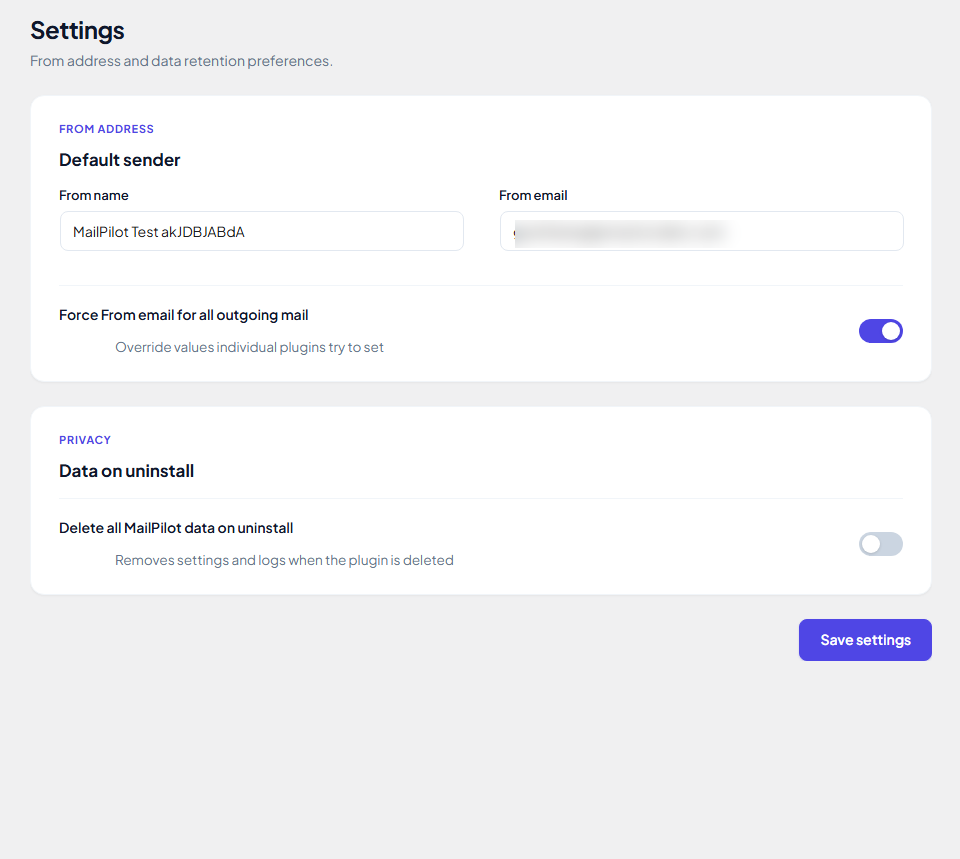
Set the From name and From email WordPress should use for every outgoing message, configure email logging preferences, and optionally enable Force From email for all outgoing mail so individual plugins and themes can’t quietly override it with their own value. A separate Privacy option, Delete all MailPilot data on uninstall, controls whether MailPilot deletes its own settings and logs automatically when the plugin is uninstalled.
Free vs Pro
MailPilot’s free version is permanently free, it is not a limited trial of MailPilot Pro. The six capabilities above, Dashboard, Setup Wizard, a full set of SMTP and API mailers, Email Log, Test Email, and Settings, are everything most single-site WordPress installs need to send mail reliably.
MailPilot Pro is a separate, optional upgrade for sites and agencies that need deeper delivery control, reporting, and automation on top of the free foundation:
- Automatic Failover, switching to a backup mailer once your primary mailer crosses a failure threshold
- Smart Routing, sending each email through the first mailer that matches your own rules
- Async Queue, holding sends with automatic retry, throttling, and dead-letter handling for messages that still fail
- Failure Alerts, notifying you by Email, Slack, Teams, Discord, or a custom Webhook the moment a send fails
- Analytics, charting sent, failed, opens, and clicks over time, with CSV export
- Open & Click Tracking, an invisible open pixel plus link click tracking
- WooCommerce Integration, mapping a specific mailer to each WooCommerce email type with its own notification controls
- Multisite Network Mailer, one network-wide mailer configuration with per-site overrides
- White Label, rebranding MailPilot’s own admin screens under your name
- DMARC Insights, surfacing DMARC alignment data for your sending domain
- Reputation Tools, tracking sender reputation signals over time
- Additional Pro Mailers, Amazon SES, Microsoft 365 OAuth, Gmail OAuth, Mandrill, and Zoho Mail
None of this is required to use MailPilot well, it is there for sites that have outgrown a single mailer and need advanced routing or analytics.
Privacy
MailPilot stores the following in your WordPress database:
- Email Log entries: recipient, sender name and email, subject, timestamp, send status, provider message ID, error message (if any), headers (which may include CC/BCC addresses), and attachment file names. MailPilot does not store message bodies or attachment contents.
- Test Send History: recipient, subject, time, and result of each test email.
- Mailer settings and credentials (API keys, SMTP passwords), stored in the wp_options table. Credentials are stored unencrypted, as with most WordPress plugin settings, so only trusted administrators should have database access.
Logs are deleted automatically after the retention period you choose (default 7 days), or kept until you delete them. You can purge all logs, or delete all entries for one recipient, from the Email Log screen.
MailPilot does not send any data to Smackcoders. Email content is sent only to the mail provider or SMTP server you configure (see External services).
If you enable “Delete all MailPilot data on uninstall”, all settings and logs are removed when the plugin is deleted.
External services
MailPilot sends your site’s email through the third-party provider you choose. It connects only to the single provider you set as your active mailer, and only when:
1. WordPress sends an email,
2. you send a test email, or
3. you click “Validate connection” (this sends only your credentials, no message).
With each request MailPilot sends your API key or SMTP credentials for authentication. When sending email, it also sends the recipient(s), sender name and email, subject, message body, headers, and attachments.
Below are the external services supported by MailPilot:
-
SendLayer
- Service: Cloud-based transactional email delivery API (https://console.sendlayer.com/api/v1).
- Data sent: Recipient email address, sender name and email, subject, message body (HTML and plain text), attachments, and headers sent upon email dispatch or connection testing.
- Terms of Service: https://sendlayer.com/terms-of-service/
- Privacy Policy: https://sendlayer.com/privacy-policy/
-
SMTP.com
- Service: Transactional email delivery and sender reputation API (https://api.smtp.com/v4).
- Data sent: Sender email, recipient email, subject line, message body, headers, and attachments sent during email sending or channel validation.
- Terms of Service: https://www.smtp.com/policies/terms-of-service/
- Privacy Policy: https://www.smtp.com/policies/privacy-policy/
-
Brevo (formerly Sendinblue)
- Service: Transactional email delivery API (https://api.brevo.com/v3).
- Data sent: Recipient, sender name/email, subject, email body, headers, and attachments sent upon email delivery or connection validation.
- Terms of Service: https://www.brevo.com/legal/termsofuse/
- Privacy Policy: https://www.brevo.com/legal/privacypolicy/
-
SendGrid (Twilio)
- Service: Transactional email delivery API (https://api.sendgrid.com/v3).
- Data sent: Recipient email address, sender email, subject, email content, headers, and attachments sent upon email dispatch.
- Terms of Service: https://www.twilio.com/en-us/legal/tos
- Privacy Policy: https://www.twilio.com/en-us/legal/privacy
-
Mailgun
- Service: Transactional email delivery API (https://api.mailgun.net or https://api.eu.mailgun.net).
- Data sent: Recipient email address, sender email address, subject, message body, headers, and attachments sent upon email dispatch.
- Terms of Service: https://www.mailgun.com/legal/terms/
- Privacy Policy: https://www.mailgun.com/legal/privacy-policy/
-
Postmark
- Service: Transactional email delivery API (https://api.postmarkapp.com).
- Data sent: Recipient, sender, subject line, HTML/text body, headers, and attachments sent upon email dispatch or connection testing.
- Terms of Service: https://postmarkapp.com/terms-of-service
- Privacy Policy: https://postmarkapp.com/privacy-policy
-
SparkPost
- Service: Cloud email delivery API (https://api.sparkpost.com/api/v1 or https://api.eu.sparkpost.com/api/v1).
- Data sent: Recipient address, sender address, subject, email body, headers, and attachments sent during email transmission.
- Terms of Service: https://www.sparkpost.com/policies/terms/
- Privacy Policy: https://www.sparkpost.com/policies/privacy/
-
Elastic Email
- Service: Email delivery API (https://api.elasticemail.com/v4).
- Data sent: Recipient email address, sender email address, subject, email body, attachments, and headers sent during email dispatch.
- Terms of Service: https://elasticemail.com/resources/usage-policies/terms-of-use
- Privacy Policy: https://elasticemail.com/resources/usage-policies/privacy-policy
-
Mailjet
- Service: Transactional email delivery API (https://api.mailjet.com/v3.1).
- Data sent: Recipient email address, sender email address, subject, email content, attachments, and headers sent during email transmission.
- Terms of Service: https://www.mailjet.com/legal/terms-and-conditions/
- Privacy Policy: https://www.mailjet.com/legal/privacy-policy/
-
MailerSend
- Service: Transactional email delivery API (https://api.mailersend.com/v1).
- Data sent: Recipient email, sender name/email, subject, body, attachments, and headers sent during email transmission.
- Terms of Service: https://www.mailersend.com/legal/terms-of-service
- Privacy Policy: https://www.mailersend.com/legal/privacy-policy
-
SMTP2GO
- Service: Outbound email delivery API (https://api.smtp2go.com/v3).
- Data sent: Recipient, sender, subject, email body, attachments, and headers sent during email dispatch or connection validation.
- Terms of Service: https://www.smtp2go.com/terms/
- Privacy Policy: https://www.smtp2go.com/privacy/
-
Resend
- Service: Modern email delivery API (https://api.resend.com/emails).
- Data sent: Recipient, sender, subject line, email body, attachments, and headers sent during email dispatch.
- Terms of Service: https://resend.com/legal/terms-of-service
- Privacy Policy: https://resend.com/legal/privacy-policy
-
Google / Gmail (App Password)
- Service: Google SMTP relay service (smtp.gmail.com).
- Data sent: Outbound email messages are transmitted via secure SMTP through Google servers using your Gmail address and application password.
- Terms of Service: https://policies.google.com/terms
- Privacy Policy: https://policies.google.com/privacy
-
Other / Custom SMTP
- Service: Any custom third-party or hosting SMTP server configured by the administrator.
- Data sent: Outbound email messages are routed directly to the host specified in your SMTP settings.
Your use is governed by the terms and privacy policy of your SMTP host.
Documentation and Support
Details
Related plugins
Plugins that also contain the tag email
MC4WP: Mailchimp for WordPress

Post SMTP – Complete Email Deliverability and SMTP Solution with Email Logs, Alerts, Backup SMTP & Mobile App

WP Mail Logging

Creative Mail – Easier WordPress & WooCommerce Email Marketing

Mailchimp for WooCommerce

SureMail – SMTP and Email Logs Plugin with Amazon SES, Postmark, and Other Providers


About
Plugin for that tries to help you find the WordPress plugin you are looking for.
| Please enjoy an image of Crush (this awesome turtle) and have a lovely day! |  |
We do not own any plugin listed on this site and do not work for or work with WordPress.com or it's associated companies. We simply provide a searchable list of the available WordPress plugins.