


Smart Contact Card
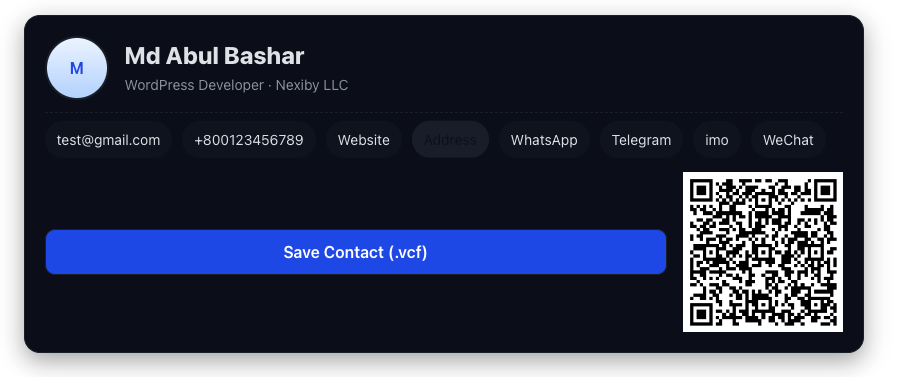
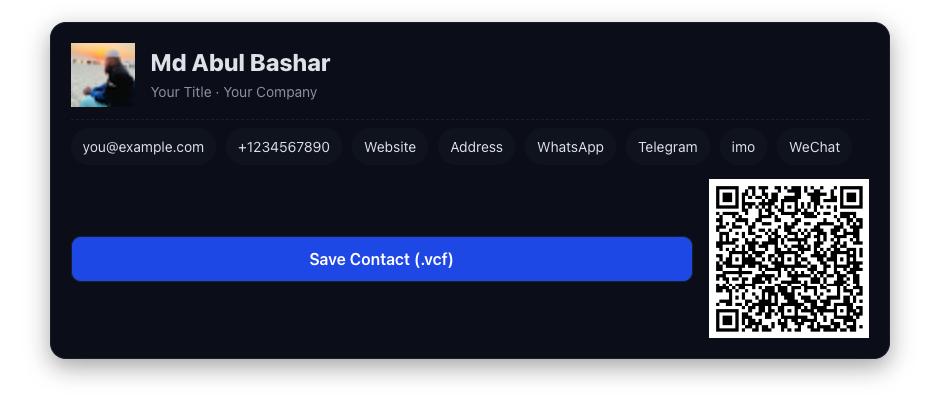
Smart Contact Card allows you to create professional, shareable contact cards on your WordPress site. Display contact information beautifully with QR codes and downloadable vCard files.
Features:
- 📇 Professional contact card display
- 📱 QR code generation for easy sharing
- 💾 Downloadable vCard (.vcf) files
- 🎨 Multiple design options (default and minimal)
- 🔧 Easy implementation via shortcode
- 🎛️ Elementor widget support
- 📞 Support for multiple contact methods (Phone, Email, WhatsApp, Telegram, IMO, Skype, WeChat)
- 🌐 Schema.org markup for better SEO
- 📱 Fully responsive design
How to Use
Shortcode Usage:
Add a contact card anywhere using the shortcode:
[smartcc_contact name="John Doe" title="CEO" org="Company Name" phone="+1234567890" email="john@example.com" website="https://example.com"]
Available Shortcode Parameters:
- Identity: name, title, org, avatar
- Contacts: phone, email, website, address
- Messaging Apps: whatsapp, telegram, imo, skype, wechat
- Display: button, design (default/minimal_qr)
- QR Options: qr_for (vcard/whatsapp/telegram/imo/skype/wechat/url), qr_url, qr_text
Elementor Widget Usage:
- Edit your page with Elementor.
- Search for “Smart Contact Card” in the widget panel.
- Drag the widget into your layout.
- Fill in the contact details and customize the design using the widget controls.
Design Options:
design="default"(full card with all details)design="minimal_qr"(minimal card with avatar, name, phone, email, and custom QR)
QR Code Options:
You can customize what the QR code encodes:
* vCard (default) – Complete contact information
* WhatsApp – Direct WhatsApp chat link
* Telegram – Telegram profile link
* IMO – IMO messaging link
* Skype – Skype profile link
* WeChat – WeChat contact link
* URL – Custom URL or website
Developer Friendly:
The plugin uses modern PHP practices with PSR-4 autoloading and is built with extensibility in mind. Developers can easily customize and extend functionality.
Third-Party Services
This plugin uses QuickChart.io (https://quickchart.io) for QR code generation. When a QR code is displayed, the contact information is sent to QuickChart.io to generate the QR code image. By using this plugin, you acknowledge:
- QuickChart.io Terms of Service: https://quickchart.io/documentation/
- QuickChart.io Privacy: https://quickchart.io/privacy/
No data is stored on external servers, and QR codes are generated on-the-fly when pages are viewed.
Details
Related plugins
Plugins that also contain the tag business-card
ECard – Digital Visiting Card

Digital Visiting/Business Card

Business Card Template
QR Code Multi Purpose


About
Plugin for that tries to help you find the WordPress plugin you are looking for.
| Please enjoy an image of Crush (this awesome turtle) and have a lovely day! |  |
We do not own any plugin listed on this site and do not work for or work with WordPress.com or it's associated companies. We simply provide a searchable list of the available WordPress plugins.