


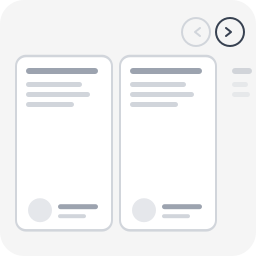
Snap Carousel — Block Style
This plugin adds 4 block styles to the WordPress Group block (core/group):
- Carousel (3 items) — displays 3 visible items
- Carousel (1 item) — full-width slideshow mode
- Carousel (2 items) — displays 2 visible items
- Carousel (4 items) — displays 4 visible items
Features
- 100% CSS scroll-snap for scrolling
- Prev/next navigation buttons
- Keyboard navigation (Arrow keys, Home, End)
- Full ARIA attributes (role=”region”, aria-roledescription, aria-live)
- Peek effect: partial visibility of the next item, signaling scrollable content
- Responsive (auto tablet/mobile adaptation)
- Respects
prefers-reduced-motion - Works with any child block (images, columns, groups, WooCommerce…)
- ~2 KB CSS + ~2 KB JS, zero dependency
- Fully internationalized (i18n ready, French translation included)
- Easy to customize via CSS custom properties or overrides
Accessibility (WCAG 2.2 AA)
role="region"+aria-roledescription="carousel"on the containerrole="group"+aria-roledescription="slide"on each itemaria-label="X of Y"for position contexttabindex="0"for keyboard focusaria-live="polite"to announce changes- Buttons with
aria-labelandaria-controls - Touch targets 44×44px minimum
- Visible focus indicator
Usage
- In the editor, create a Group block
- Set the group layout to Row
- Add child blocks (images, groups, columns…)
- In the sidebar panel Styles choose Carousel (3 items) (or another variant)
- Publish
Navigation buttons and accessibility attributes are automatically injected on the front-end.
Customization
The carousel is designed to work out of the box, but you can easily override styles in your theme’s style.css or via the WordPress Customizer > Additional CSS.
Disable the peek effect
By default, items are slightly narrower than the visible area so the next item “peeks” in — signaling there is more content to scroll. To disable this and show full-width items:
/* Disable peek — 3 items variant */
.is-style-snap-carousel > * {
    flex-basis: calc(33.333% - 1rem) !important;
}

/* Disable peek — 1 item variant */
.is-style-snap-carousel-single > * {
    flex-basis: 100% !important;
}

/* Disable peek — 2 items variant */
.is-style-snap-carousel-duo > * {
    flex-basis: calc(50% - 0.75rem) !important;
}

/* Disable peek — 4 items variant */
.is-style-snap-carousel-quad > * {
    flex-basis: calc(25% - 1.125rem) !important;
}
Customize navigation arrows
/* Arrow color and background */
.snap-carousel-prev,
.snap-carousel-next {
    background: #0073aa;
    color: #ffffff;
    border-color: #0073aa;
}

/* Arrow hover state */
.snap-carousel-prev:hover,
.snap-carousel-next:hover {
    background: #005177;
    color: #ffffff;
}

/* Arrow size (default: 44px — WCAG minimum touch target) */
.snap-carousel-prev,
.snap-carousel-next {
    width: 48px;
    height: 48px;
}

/* Square arrows instead of round */
.snap-carousel-prev,
.snap-carousel-next {
    border-radius: 8px;
}
Customize spacing
/* Gap between items */
[class*="is-style-snap-carousel"] {
    gap: 2rem;
}

/* Space above carousel (room for navigation) */
.snap-carousel-wrapper {
    padding-top: 4rem;
}
Customize focus indicator
/* Custom focus color for keyboard navigation */
[class*="is-style-snap-carousel"]:focus-visible {
    outline-color: #ff6600;
    outline-width: 3px;
}

.snap-carousel-prev:focus-visible,
.snap-carousel-next:focus-visible {
    outline-color: #ff6600;
}
Use with WordPress theme.json design tokens
The carousel already uses --wp--preset--color--base, --wp--preset--color--contrast and --wp--preset--color--primary tokens. You can override these per-block in theme.json or via CSS:
/* Example: dark themed carousel */
.snap-carousel-wrapper {
    --wp--preset--color--base: #1a1a2e;
    --wp--preset--color--contrast: #e0e0e0;
    --wp--preset--color--primary: #e94560;
}<h3>Technical Notes</h3>
– CSS overrides flex-wrap: nowrap on the Row container to force horizontal scrolling
– Items use a slightly reduced flex-basis to create a peek effect (next item partially visible)
– Navigation buttons are positioned absolute at the top right (adjust top value for your theme)
– JS uses a 150ms debounce on scroll for button state updates and 300ms for screen reader announcements
– Compatible with WooCommerce blocks (products, etc.)
About
Snap Carousel is built and maintained by WeAre[WP], a french WordPress agency specializing in accessible, high-performance websites for businesses of all sizes.
Need help with your WordPress project? Get in touch.
Details


Related plugins
Plugins that also contain the tag accessible
Equalize Digital Accessibility Checker – Audit Your Website for WCAG, ADA, and Section 508 Accessibility Errors

Button visually impaired
Accessibility Tools & Alt Text Finder

SlickNav Mobile Menu
Accessibility by AllAccessible

Fix Alt Text


About
Plugin for that tries to help you find the WordPress plugin you are looking for.
| Please enjoy an image of Crush (this awesome turtle) and have a lovely day! |  |
We do not own any plugin listed on this site and do not work for or work with WordPress.com or it's associated companies. We simply provide a searchable list of the available WordPress plugins.