


Back

SnapAura Menu Manager
Details
View on WordPress
Back
SnapAura Menu Manager gives you granular control over when and where your menu items appear. Perfect for creating dynamic navigation that adapts to your visitors’ context.
Features:
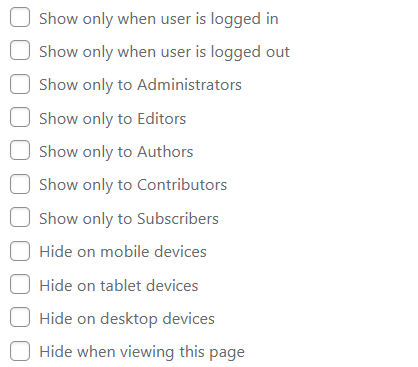
- Login State Control – Show menu items only to logged-in or logged-out users
- User Role Visibility – Show menu items only to specific user roles (Administrator, Editor, Author, Contributor, Subscriber)
- Device-Based Hiding – Hide items on mobile, tablet, or desktop devices
- Current Page Hiding – Automatically hide menu items when viewing that page
- Works with Any Theme – Compatible with all WordPress themes
- No Configuration Required – Simple checkboxes in the menu editor
Use Cases:
- Show “Login” only to logged-out users and “Dashboard” only to logged-in users
- Show “Edit Posts” only to Editors and Administrators
- Show “Submit Article” only to Authors and Contributors
- Hide contact links on mobile to save space
- Create different navigation experiences for different devices
- Remove redundant navigation when already on a page
How It Works:
- Go to Appearance > Menus
- Expand any menu item
- Check the visibility options you want
- Save your menu
No complicated settings or configuration files. Just simple checkboxes that do exactly what they say.
Details
Plugin code:
snapaura-menu-manager
Plugin version:
1.1.0
Author:
Outdated:
No
WP version:
5.0 or higher
PHP version:
7.4 or higher
Test up to WP version:
6.9.1
Total installations:
0
Last updated:
2026-02-13
Rating:
Times rated:
0
login
menu
mobile
responsive
visibility
Related plugins
Plugins that also contain the tag login
WPS Hide Login

Security Optimizer – The All-In-One Protection Plugin

Loginizer

Limit Login Attempts

LoginPress | wp-login Custom Login Page Customizer

WPS Limit Login


About
Plugin for that tries to help you find the WordPress plugin you are looking for.
| Please enjoy an image of Crush (this awesome turtle) and have a lovely day! |  |
We do not own any plugin listed on this site and do not work for or work with WordPress.com or it's associated companies. We simply provide a searchable list of the available WordPress plugins.