

Speedlyst – Web Speed Analytics
Measure mobile PageSpeed Insights and Core Web Vitals (LCP, INP, and CLS), check WordPress admin speed, follow history and trends, and export an AI-ready report from one administration screen. Cache plugins optimize; Speedlyst measures — both your website and your wp-admin. Review mobile performance, prioritized improvement opportunities, and local WordPress diagnostics.
This plugin is an independent project. It is not affiliated with, endorsed by, or sponsored by Google LLC. PageSpeed Insights, Core Web Vitals, and Lighthouse are products or projects of Google LLC, referenced here only to describe what this plugin measures and which public API it uses.
Google PageSpeed Insights measurements
Click Measure site speed in the WordPress administration to run a speed test from Google’s perspective. The plugin does not run the first PageSpeed Insights measurement until you request it.
Results include:
- Mobile Lighthouse performance score
- Largest Contentful Paint (LCP) from laboratory and field data
- Cumulative Layout Shift (CLS) from field data
- Interaction to Next Paint (INP) from field data
- Laboratory data from the current mobile test
- Real-user Chrome UX Report (CrUX) field data when Google has enough data for the measured URL or origin
- Improvement opportunities sorted by estimated time or data savings, with a recommended action
You can request up to 10 PageSpeed Insights measurements per site per day. The limit resets at midnight.
No Google API key, account, registration, or service connection needs to be configured.
Local WordPress diagnostics
Local diagnostics help investigate a slow admin by examining the WordPress and server environment independently of the PageSpeed Insights measurement limit.
The plugin checks:
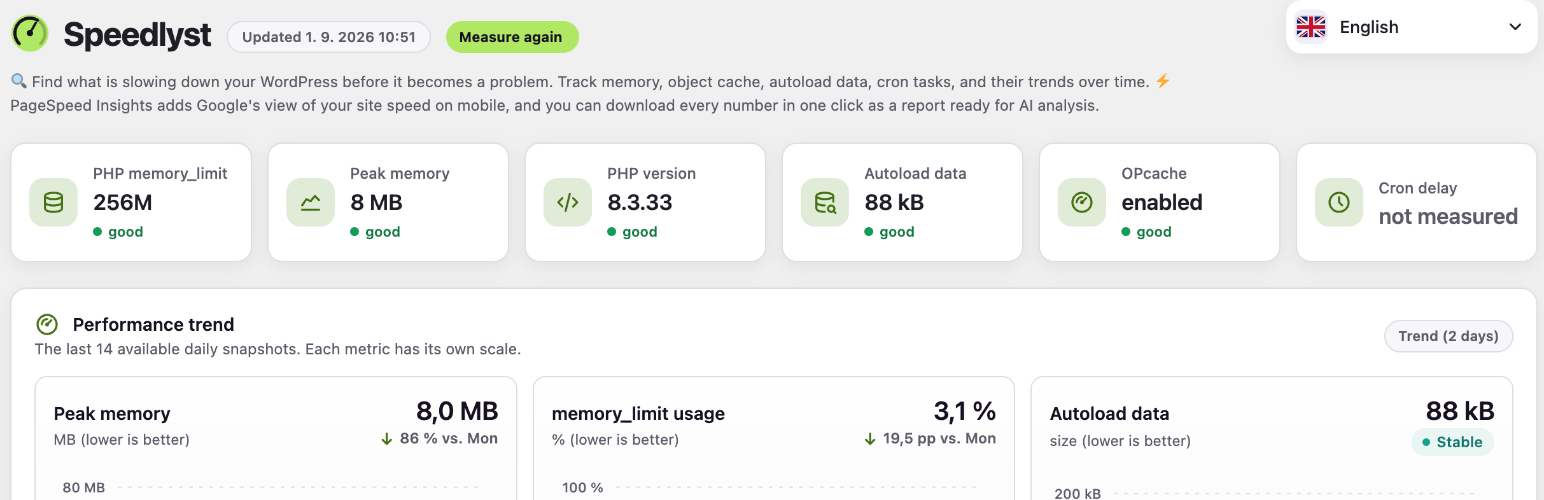
- PHP version and end-of-life status
- PHP
memory_limitand measured peak memory usage - Persistent object cache status, drop-in, and detected backend
- OPcache status
- Autoloaded options count and total size
- The largest autoloaded options by name
- Overdue WP-Cron tasks and the age of the oldest delay
- Generation time, database query count, and peak memory for the last measured admin request
- WP_DEBUG status
- Number of active plugins
- Active theme
Values that the hosting environment cannot report are shown as not measured instead of being treated as zero.
Recommendations are generated from the available local measurements and assigned a priority, providing concrete clues about possible WordPress admin speed issues.
History and performance trends
Speedlyst stores daily snapshots locally so you can review history and performance trends over time.
- Dashboard charts cover the latest 14 days
- Local history can be retained for up to 90 days
- Key metrics include 7-day trend sparklines
- Missing measurements remain gaps instead of being displayed as unchanged values
- Recommendations appear alongside the relevant local history
AI report export
The AI-ready report export combines the available diagnostic information into one downloadable file:
- All current local measurements
- The latest PageSpeed Insights result
- Reference values for each report section
- A ready-made question for an AI assistant
The file is created inside your WordPress installation and downloaded directly to you. It is not uploaded to the plugin author’s measurement service or automatically sent to an AI provider.
You can paste the file into a chat with an AI assistant. For a more thorough analysis, use the assistant’s most capable available model rather than a model optimized primarily for speed.
The exported report follows the effective plugin language.
Privacy and external services
Local diagnostics, recommendations, history, and report generation run inside WordPress. PageSpeed Insights measurement requires an external request, which is made only after you click Measure site speed.
Measurement service operated by the plugin author
When you request a measurement, the plugin contacts the measurement service operated by the plugin author. The service receives:
- The public home URL being measured
- A one-time random verification value, valid for five minutes
- The installed plugin version
The service reads the one-time value from a public REST route on the measured site to verify that the request belongs to that site. It then sends the public home URL to the Google PageSpeed Insights API and returns the measurement result to the plugin.
The service does not receive page content, posts, WordPress user data, or visitor data from the plugin. It stores only the domain of the measured site and the time of the request, for two days, to enforce the daily limit and protect the service from abuse. Verification codes expire after five minutes. Measurement results are not stored by the service.
Service operator: Petr Kučera, PPC ONE, Czech Republic. Contact: info@ppcone.cz.
Terms of service: https://webspeedinsights.com/terms/
Privacy policy: https://webspeedinsights.com/privacy/
Google PageSpeed Insights API
The measurement service sends the public home URL to the Google PageSpeed Insights API when you request a measurement. Google loads and analyzes that public page to produce mobile results.
Google receives the public URL being measured. It may return laboratory results and real-user field data when field data is available for the URL or origin.
Terms of service: https://developers.google.com/speed/docs/insights/v5/about
Google privacy policy: https://policies.google.com/privacy
Data kept in WordPress
PageSpeed Insights results, local diagnostic results, history, recommendations, and report data are stored locally in WordPress. The plugin does not use cookies and does not collect visitor data.
Languages
Speedlyst supports 21 languages: the English source language plus 20 translations.
Supported locales include English, German, Spanish for Spain and Mexico, Portuguese for Brazil and Portugal, French, Italian, Japanese, Dutch, Polish, Russian, Indonesian, Turkish, Ukrainian, Czech, Romanian, Hungarian, Simplified Chinese, Traditional Chinese, and Korean.
The per-user language switcher prefers a WordPress.org language pack when available and falls back to the bundled translation. System mode follows the current WordPress user locale.
External services
This plugin connects to two external services. Both are contacted only after you click the measurement button; no request is made on activation or in the background.
1. Speedlyst measurement service (operated by the plugin author)
This service performs the PageSpeed Insights call on your behalf, so that no Google API key is required from you.
Sent on each measurement you request: the public home page address of your site, a one-time random verification code valid for five minutes, and the plugin version. The service reads that one-time code from a public route on your site to confirm the request belongs to your site.
Stored by the service: the domain of the measured site and the time of the request, kept for two days to enforce the daily limit of 10 measurements per site and to protect the service from abuse. Verification codes are deleted when they expire. Measurement results, page content, posts, WordPress user data, and visitor data are not stored.
Operator: Petr Kucera, PPC ONE, Czech Republic (info@ppcone.cz).
Terms of service: https://webspeedinsights.com/terms/
Privacy policy: https://webspeedinsights.com/privacy/
2. Google PageSpeed Insights API
The measurement service passes the public address of the measured page to the Google PageSpeed Insights API, which loads that public page and returns the performance analysis shown in the plugin.
Sent: the public URL being measured. Google may return laboratory results and, where available, real-user field data for that URL or origin.
Terms of service: https://policies.google.com/terms
Privacy policy: https://policies.google.com/privacy
Why is my WordPress admin so slow?
A slow WordPress admin can be related to memory limits or usage, database activity, large autoloaded options, overdue cron tasks, object-cache configuration, PHP or OPcache status, active plugins, or the current theme.
Speedlyst measures the generation time, database query count, and peak memory usage of the last measured admin request. It also checks autoload data, cron delays, and other local diagnostics, then provides prioritized recommendations and concrete clues about possible causes.
How do I measure Core Web Vitals without an API key?
Click Measure site speed in Speedlyst. The plugin author’s measurement service makes the Google PageSpeed Insights API request, so you do not need to configure an API key, create an account, register, or connect the plugin to another service.
The results can include a mobile Lighthouse performance score, laboratory LCP, and real-user LCP, INP, and CLS field data when Google has enough data for the measured URL or origin.
What is a good LCP / INP / CLS score?
Google’s Core Web Vitals thresholds classify LCP of 2.5 seconds or less as good, more than 2.5 seconds through 4 seconds as needing improvement, and more than 4 seconds as poor.
INP of 200 milliseconds or less is good, more than 200 through 500 milliseconds needs improvement, and more than 500 milliseconds is poor.
CLS of 0.1 or less is good, more than 0.1 through 0.25 needs improvement, and more than 0.25 is poor.
Does this plugin slow down my site?
PageSpeed Insights measurements run only when you request them. The daily local snapshot is lightweight, and the plugin does not load anything on the public frontend.
Why are my numbers different from the PageSpeed Insights website?
The Lighthouse laboratory score comes from an individual test on Google’s infrastructure. Test conditions can vary between runs, so the score and individual laboratory metrics may also vary. Stored history can help distinguish a longer-term trend from a single result.
Why is real-user Core Web Vitals data missing?
Field data comes from the Chrome UX Report and is available only when Google has enough real-user data for the measured URL or origin. The plugin can still show laboratory results when field data is unavailable.
What happens to my data when I uninstall?
Local plugin data remains in the WordPress database after the plugin is uninstalled.
To remove it, delete options whose names begin with marketing_console_, for example by using WP-CLI. On multisite, remove those options separately for each site as needed.
What if my site is behind a login or firewall?
The measurement service must be able to read the temporary verification value from a public REST route, and Google must be able to load the public page being measured.
Password protection, a security plugin, a hosting firewall, blocked external IP addresses, or similar access restrictions can prevent verification or measurement. The measurement panel shows the address that must be reachable and the status code returned by the site when verification fails.
Does the plugin send data automatically?
Local diagnostics, recommendations, history, and report generation remain inside WordPress. The external PageSpeed Insights request is made only when you click Measure site speed. The first measurement therefore does not run until you request it.
What data is sent when I run a speed test?
The plugin sends the public home URL, a one-time verification value, and the installed plugin version to the measurement service operated by the plugin author.
The service verifies the request and sends the public home URL to the Google PageSpeed Insights API. The plugin does not send page content, posts, WordPress user data, or visitor data to the measurement service.
How many PageSpeed Insights tests can I run each day?
You can request up to 10 measurements per site per day. The allowance resets at midnight.
The limit protects the author’s measurement service from abuse. Local WordPress diagnostics do not use this allowance.
Where does the AI report go?
The plugin creates one file containing the local measurements, latest PageSpeed Insights result, reference values for each section, and a ready-made question for an AI assistant.
The file is generated inside WordPress and downloaded directly to you. The plugin does not send it to the measurement service or an AI provider. You decide whether and where to paste or upload it.
Does the plugin use cookies or collect visitor data?
No. The plugin does not use cookies and does not collect data about site visitors.
Why does a diagnostic say “not measured”?
The hosting environment did not make that value available. Some hosts restrict which server values a plugin can read. The plugin reports the value as unavailable instead of substituting an incorrect zero.
Does Speedlyst work on WordPress multisite?
Yes. Data is stored separately for each site and remains in the database after uninstall.
Details


Related plugins
Plugins that also contain the tag admin
Redux Framework

Loginizer

LightStart – Maintenance Mode, Coming Soon and Landing Page Builder

Admin Menu Editor

White Label CMS

InfiniteWP Client


About
Plugin for that tries to help you find the WordPress plugin you are looking for.
| Please enjoy an image of Crush (this awesome turtle) and have a lovely day! |  |
We do not own any plugin listed on this site and do not work for or work with WordPress.com or it's associated companies. We simply provide a searchable list of the available WordPress plugins.