


This plugin is outdated and might not be supported anymore
Back
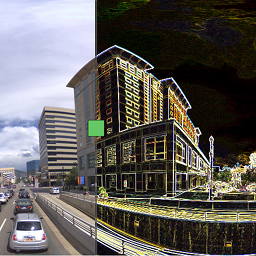
Sravnitel
Details
View on WordPress
Back
Sravnitel is a WordPress plugin by Elphel Inc. based on a jQuery plugin jquery.sravnitel.js.
Features
- Compare 2+ images
- Zoom and pan
- Initial zoom and offset
- Touch events: click, drag, pinch to zoom
Tips
- Click on the view area to quickly switch between left and right image
- Click on the zoom info in the top right to zoom-to-fit the view area
- To place several instances of the plugin assign unique ids: [sravnitel id=’test1′ …], [sravnitel id=’test2′ …]
Working demo
Quick examples
- Fit image into the view window, w/o titles:
[sravnitel images=”ID0,ID1,ID2″ width=640 height=480] - Fit image into the view window, with titles and toggle button:
[sravnitel images=”ID0,ID1,ID2″ width=640 height=480 showtitles=true showtoggle=true] - Also fit image, with titles:
[sravnitel images=”ID0,ID1,ID2″ width=640 height=480 showtitles=true zoom=0] - Zoom 30%, with titles, x=0 and y=0 in the center of the view window:
[sravnitel images=’ID0,ID1,ID2′ width=640 height=480 showtitles=true zoom=0.3 center_x=0 center_y=0]
Shortcode Parameters
- id – int – 0 – wrapper’s <div> element id
- images – str – ” – (required) list of images ids (attachment_id), comma separated
- width – int – 530 – view window width px
- height – int – 300 – view window height px
- showtitles – bool – false – show/hide titles
- showtoggle – bool – false – show/hide button – switch between left and right image
- index_l – int – 0 – init, left image – is the index of the images array, starting from 0
- index_r – int – 1 – init, right image – is the index of the images array, starting from 0
- zoom – float – 0 – init, zoom, 0 – fit to view window, 1.0 – 100%
- center_x – int – 0 – init, x coordinate of the original image to be placed in the center of the view window
- center_y – int – 0 – init, y coordinate of the original image to be placed in the center of the view window
Details
Plugin code:
sravnitel
Plugin version:
1.3
Author:
Outdated:
Yes
WP version:
4.5.5 or higher
PHP version:
or higher
Test up to WP version:
4.7.29
Total installations:
10
Last updated:
2017-02-27
Rating:
Times rated:
1
before-after-slider
images
page
posts
visual-composer


Related plugins
Plugins that also contain the tag before-after-slider
Ultimate Before After Image Slider & Gallery – BEAF

Twenty20 Image Before-After

Before After Image Comparison Slider for Elementor

Before After Image Comparison Slider for WPBakery Page Builder

Image Before After Addon for Elementor – WPTD

Before After Image Comparison Slider


About
Plugin for that tries to help you find the WordPress plugin you are looking for.
| Please enjoy an image of Crush (this awesome turtle) and have a lovely day! |  |
We do not own any plugin listed on this site and do not work for or work with WordPress.com or it's associated companies. We simply provide a searchable list of the available WordPress plugins.