



Statsdot Analytics
Statsdot is simple web analytics that works without cookies and without storing personal data. This plugin adds the Statsdot script to your site, so you can see on one screen:
- Visitors and pageviews, compared with the previous period, and visitors right now
- Where visitors come from: search engines, social networks, other sites and UTM campaigns
- Top, entry and exit pages
- Countries, devices, browsers and operating systems
- Outbound link clicks and file downloads, counted automatically
- Goals and conversion rates
- With WooCommerce: “Add to cart” and “Purchase” events, ready to use as goals
- Optional AI crawler tracking: which AI crawlers (GPTBot, ClaudeBot, PerplexityBot…) read your pages
The script weighs under 2 KB, loads deferred and sets no cookies. Visitors are counted with a hash that changes every day, so nobody can be followed from one day to the next and the IP address is never stored. That is why Statsdot is designed to run without a cookie banner. Whether your site needs a banner also depends on everything else it loads.
The dashboard is available in English, Spanish, German, French, Italian and Portuguese.
How it works
- Install and activate this plugin. Activating it loads nothing yet.
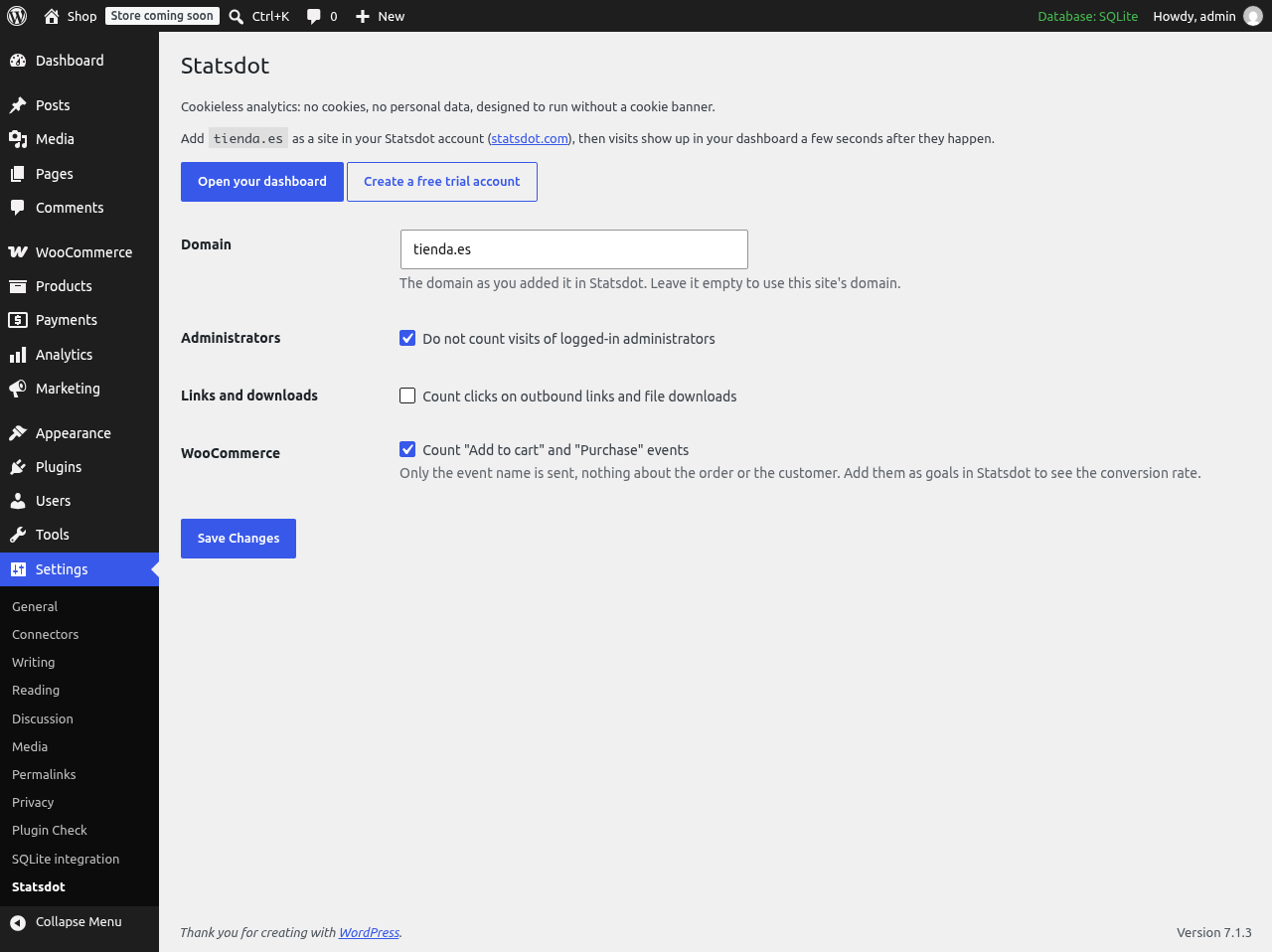
- In Settings > Statsdot, click “Connect your Statsdot account” (or “Create a free trial account”: 30 days free, no card needed). Statsdot opens in a small window where you log in or sign up and choose the site, or add this one. Connecting turns on tracking.
- Visits show up in your Statsdot dashboard a few seconds later.
Tracking stays off until you turn it on. Logged-in administrators are not counted by default, and nothing is loaded in the WordPress admin.
External services
This plugin relies on Statsdot, a third-party analytics service run by the plugin author, to measure the visits of your site.
- Nothing is sent and no script is loaded until an administrator connects the plugin or turns on “Measure visits with Statsdot” in Settings > Statsdot. It is off after activation.
- Connecting: when an administrator clicks “Connect your Statsdot account” or “Create a free trial account”, the browser opens
https://statsdot.com/connect/wordpresswith this site’s domain, the address of the plugin’s settings page and a random one-time code. Statsdot sends back the domain and the id of the chosen site. Logging in and signing up happen on statsdot.com; the plugin never sees the password. - Once it is on, on every page of your site seen by a visitor (not in the admin, and not for logged-in administrators unless you change the setting), the browser loads the script
https://statsdot.com/js/script.js. - The script sends to
https://statsdot.com/api/collect, for each page view: the page address (Statsdot keeps the path only, without query string, and removes order numbers such as/checkout/order-received/1234/), the referring page address (Statsdot keeps only its domain), the UTM campaign tags of the landing page and the screen width (to tell mobile, tablet or desktop). For events it also sends the event name and an optional label: clicks on outbound links and file downloads are sent with the link or file address without query string, unless you turn them off in the settings. - With every request the browser sends its IP address and user agent. The Statsdot server uses them only in memory to compute a visitor code that changes every day and to recognise bots, and derives the browser and operating system names from the user agent, which it stores. It does not store the IP address or the user agent. The country comes from the request.
- With WooCommerce, the events “Add to cart” and “Purchase” (with the order total and currency, optional) are sent with no other order or customer data.
- AI crawler tracking (optional, only when you paste a bot key in the settings): when a request comes from a known crawler (its user agent matches the Statsdot crawler directory), your server sends to
https://statsdot.com/api/botsthe crawler’s user agent, the requested address and the HTTP status code. Nothing is sent for human visitors. - No cookies are set and nothing is stored on the visitor’s device.
Terms of service: https://statsdot.com/terms
Privacy policy: https://statsdot.com/privacy
Details

Related plugins
Plugins that also contain the tag analytics
Site Kit by Google – Analytics, Search Console, AdSense, Speed

MonsterInsights – Google Analytics Dashboard for WordPress (Website Stats Made Easy)

WP Statistics – Simple, privacy-friendly Google Analytics alternative

GA Google Analytics – Connect Google Analytics to WordPress

Head, Footer and Post Injections

ExactMetrics – Google Analytics Dashboard for WordPress (Website Stats Plugin)


About
Plugin for that tries to help you find the WordPress plugin you are looking for.
| Please enjoy an image of Crush (this awesome turtle) and have a lovely day! |  |
We do not own any plugin listed on this site and do not work for or work with WordPress.com or it's associated companies. We simply provide a searchable list of the available WordPress plugins.