



TackQuote for WooCommerce
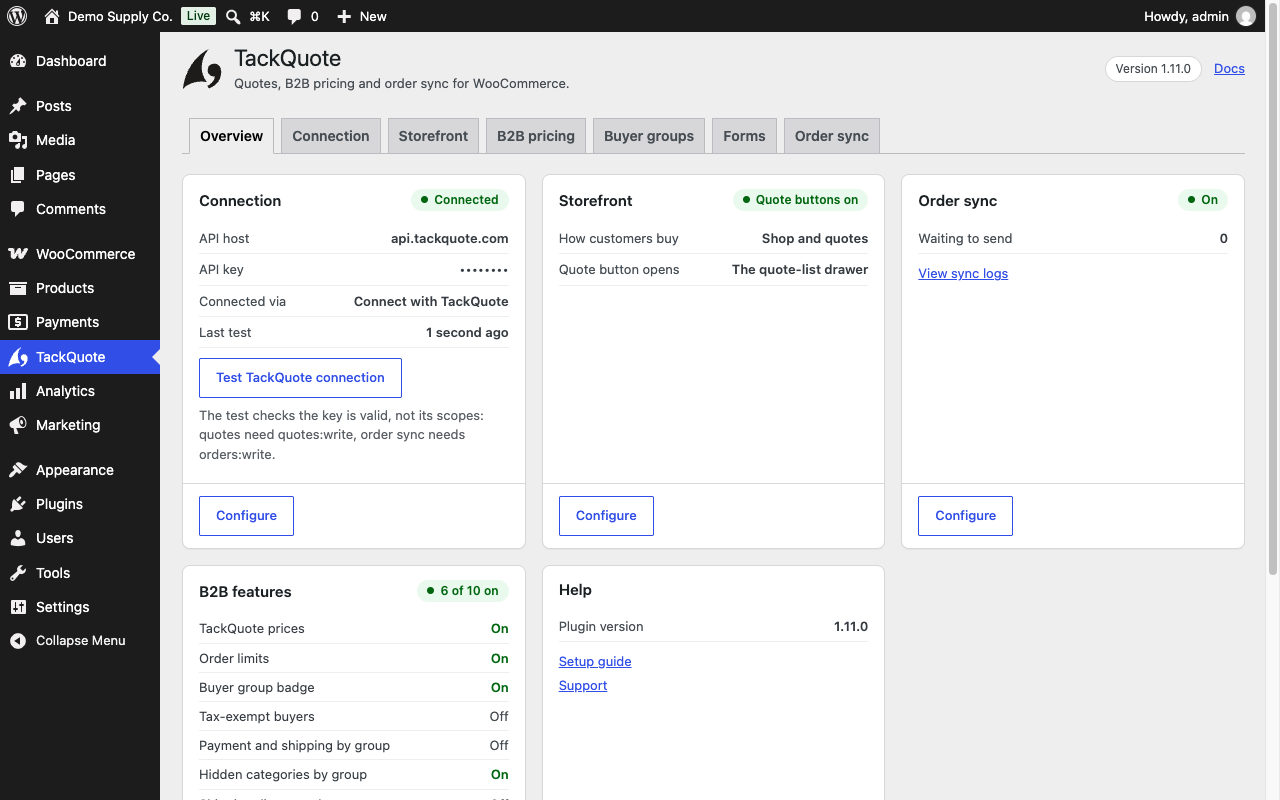
TackQuote for WooCommerce adds request-a-quote buttons to your products, so B2B and wholesale shoppers can ask for a price instead of checking out — and optionally syncs orders one-way to your TackQuote account.
Learn more about the WooCommerce integration · Create a free TackQuote account
What you get
- Add to Quote and Request a Quote buttons on product pages. Show either, both, or neither.
- A floating quote list with Checkout as Quote — several products, one request. It is separate from the WooCommerce cart, so stock and checkout are untouched.
- Quote only (B2B catalogue) mode — switch Add to Cart off across the whole store and take quotes instead. Your products, categories and search keep working; only checkout goes away. Apply it to everyone, to signed-out visitors only, or to chosen roles.
- Optional one-way order sync to TackQuote — off by default, and queued through Action Scheduler so it never runs inside checkout.
- Works with WooCommerce High-Performance Order Storage (HPOS).
Setup is one field: paste your TackQuote API key. You can create an account here.
What it does not do
- It does not replace WooCommerce checkout or act as a full CPQ workspace.
- Order sync is outbound only — it does not import quotes as orders, sync your catalogue, or touch inventory.
- Failed syncs are logged (WooCommerce Status Logs, source
tackquote) and never block checkout.
Source code is developed in the open at github.com/ackm04/tack-ecommerce-extensions.
External services
This plugin connects to the TackQuote API, a third-party B2B quoting service operated by
TackQuote, to send quote requests that shoppers submit on your store and — only if you
switch it on — to send data about orders placed in your store.
The service is required for the plugin to work. Without a TackQuote account and API key the
plugin cannot create quotes, and its storefront buttons do nothing. Nothing is sent anywhere
until you enter an API key.
All requests go to the API base URL set under TackQuote TackQuote API URL, which is
https://api.tackquote.com/v1 unless your TackQuote support contact gave you a different
one. Every request carries your TackQuote API key so the service can identify your account.
-
Connection test —
GET /integrations/woocommerce/ping, falling back toGET /health.
Sent when an administrator clicks “Test TackQuote connection” on the plugin settings screen.
Sends your API key only: no store, order or customer data. -
Quote form field policy —
GET /integrations/woocommerce/registration-config.
Sent when a storefront page showing a quote button is viewed and the cached policy has
expired (cached for 15 minutes). Sends your API key only: no store, order or customer data. -
Quote request —
POST /integrations/woocommerce/quote-requests.
Sent when a shopper submits the quote form on your storefront. Sends what that shopper typed
into the form, plus the products being quoted: email address, first and last name, phone
number if given, company name and any company details the seller’s registration policy
requires (legal name, tax/VAT ID, registration number, website, address, city, state, postal
code, country, company phone, industry, employee count), the free-text note if written, and
for each requested product its name, SKU, quantity, unit price excluding tax and WooCommerce
product ID, together with the store’s currency code. -
Order sync —
POST /integrations/woocommerce/order-sync. Off by default.
Sent when an order is created and each time its status changes, but only if the merchant has
switched on “Sync orders to TackQuote”. Sends the whole order: the customer’s billing and
shipping addresses, email address and phone numbers, WooCommerce customer ID, their order
note, the order ID, number and status, currency and totals, coupon codes, timestamps, the
payment method ID and title, the payment gateway’s transaction ID, and every line item with
its name, SKU, product and variation IDs, quantities, totals, taxes and item meta. No card
numbers, no card details and no gateway credentials are ever sent. The Privacy section
below lists every field individually.
This plugin sends data to no other external service.
The TackQuote service is provided by TackQuote. By using this plugin you agree to their
terms. Please review them before entering an API key:
- Terms of Service: https://tackquote.com/terms
- Privacy Policy: https://tackquote.com/privacy
Privacy
This plugin sends data to TackQuote, a third-party service, over HTTPS. It sends nothing anywhere else, and it never sends payment card data.
Where data is sent
To the TackQuote API base URL configured under TackQuote TackQuote API URL — https://api.tackquote.com/v1 unless your TackQuote support contact gave you another one. Endpoints used:
GET /integrations/woocommerce/ping(andGET /health) — connection test. Sends no store or customer data.GET /integrations/woocommerce/registration-config— fetches which fields the quote form should ask for. Sends no store or customer data.POST /integrations/woocommerce/quote-requests— a shopper’s quote request.POST /integrations/woocommerce/order-sync— order sync. Only when the merchant has switched order sync on. It is off by default.
What a quote request sends
Sent when a shopper submits the quote form, using only what they typed into it:
- Email address
- First name, last name
- Phone number (if provided)
- Company name, and any company fields the seller’s registration policy requires (for example legal name, tax/VAT ID, registration number, address, city, state, postal code, country, company phone, industry, employee count)
- The free-text note, if written (capped at 2,000 characters)
- The requested products: name, SKU, quantity, unit price excluding tax, and the WooCommerce product ID
- The store’s currency code
What order sync sends (off by default)
Sent for each order when it is created and when its status changes, if the merchant
has enabled Sync orders to TackQuote. This is the whole order, because a quote
that becomes an order is only useful to the seller if it carries who is buying and
where it is going. Read this list before switching order sync on.
The customer’s identity and addresses
- Billing address in full: first name, last name, company, street (both lines), city, state or county, postal code, country, email address and phone number
- Shipping address in full: the same fields, including shipping phone where WooCommerce holds one
- The WooCommerce customer ID, or
0for a guest order - The customer’s order note, as they wrote it
The order
- WooCommerce order ID, order number and status
- Currency, item subtotal, discount total, shipping total, tax total and order total
- Coupon codes applied
- A purchase-order number, only if your store fills the
tack_quotes_order_po_numberfilter — WooCommerce core has no purchase-order field, so nothing is sent unless you wire one up - Created, last-modified, paid and completed timestamps
- An idempotency key, so a repeated delivery of the same order state can be discarded
Payment
- Payment method ID and its display title (for example
stripe/ “Credit Card”) - The gateway transaction ID, where the gateway recorded one
- Whether the order still needs payment, and when it was paid
No card numbers, no card details, and no gateway credentials are ever sent. The
transaction ID is a reference the gateway issued, not an instrument.
Line items
- Product name, SKU, WooCommerce product ID and variation ID
- Quantity, line subtotal, line total and line tax
- Item meta — the variation attributes and any custom item fields your store records on a line (for example “Size: Large”, “Colour: Blue”). If your checkout writes customer-supplied text onto a line item, it is included here
- Shipping lines: method title and cost. Fee lines: name and amount
If you are a merchant in the EU, UK or another jurisdiction with a transfer regime
Order sync sends personal data about your customers to TackQuote, which makes
TackQuote a processor acting on your instructions. That is why it ships switched
off and why enabling it is a deliberate act rather than a default. Before you
enable it, satisfy yourself that you have a lawful basis and, where required, a data
processing agreement in place with TackQuote. Your own privacy policy should name
TackQuote as a recipient; the plugin adds suggested wording to
Settings Privacy for you to review and adapt.
What is stored on your own site
- Plugin settings, as WordPress options: the TackQuote API key, API URL, button labels, and the feature toggles.
tack_quotes_registration_config— a transient caching the quote-form field policy for 15 minutes.tack_qr_*— short-lived transients counting quote requests per visitor for rate limiting. They hold a salted hash of the visitor’s IP address, never the address itself, and expire after 5 minutes._tack_quotes_sync_key— order meta recording which order state was last accepted by TackQuote, so the same state is not sent twice.
Deleting the plugin removes every option above and the tack_quotes_registration_config transient, on every site of a multisite network. The tack_qr_* rate-limit counters are left to expire on their own (they last five minutes and are keyed on a hash, so there is no name to delete). The _tack_quotes_sync_key order meta is deliberately left in place: orders are financial records and an uninstall routine should not rewrite every one of them.
Suggested privacy policy text
The plugin adds suggested wording to Settings Privacy Policy guide in WordPress, listing the same fields. Edit it to match how your store actually uses the plugin.
Details




Related plugins
Plugins that also contain the tag b2b
B2BKing — Ultimate WooCommerce B2B and Wholesale Solution — Dynamic Pricing, Wholesale Order Form & More

Lead Forensics

CatalogX – Catalog Mode, Enquiry & Quotes for WooCommerce

WholesaleX – B2B & Wholesale Plugin for WooCommerce with Wholesale Prices

WC Call For Price

Wholesale & Tiered Pricing for WooCommerce


About
Plugin for that tries to help you find the WordPress plugin you are looking for.
| Please enjoy an image of Crush (this awesome turtle) and have a lovely day! |  |
We do not own any plugin listed on this site and do not work for or work with WordPress.com or it's associated companies. We simply provide a searchable list of the available WordPress plugins.